


KnobMan, the VSTGUI AnimationKnob bitmap generator
-
- KVRAF
- 6241 posts since 26 Sep, 2003 from right here, as you can see ...
no, only windows ... dual boot systems are your friend ...
regards,
brok landers
BIGTONEsounddesign
gear is as good as the innovation behind it-the man
brok landers
BIGTONEsounddesign
gear is as good as the innovation behind it-the man
-
- KVRer
- 2 posts since 23 Jan, 2009
brok landers wrote:no, only windows ... dual boot systems are your friend ...
it's crazy because i did the old google search and found SO MANY for windows.... i'm surprised no one has made one for mac....
it scares me to put windows on my live machine...... last windows computer i had died in the middle of a set....
-
- KVRer
- 2 posts since 28 Nov, 2006
this is the greatest tool for designing ui elements... and free... thank you very much!
some feature requests / suggestions:
1. layers order - it will be more logical to reverse their order (top layer on top of list - it's standard way in graphic applications)
2. adding/duplicating layers - it should create layer above, not under current selected layer.
3. there was nice feature of adding preview bitmap into .knob file in some older version of program, now it is not anymore (but maybe i'm just making something wrong)
thank you again, keep the great work!
some feature requests / suggestions:
1. layers order - it will be more logical to reverse their order (top layer on top of list - it's standard way in graphic applications)
2. adding/duplicating layers - it should create layer above, not under current selected layer.
3. there was nice feature of adding preview bitmap into .knob file in some older version of program, now it is not anymore (but maybe i'm just making something wrong)
thank you again, keep the great work!
-
- KVRAF
- 6241 posts since 26 Sep, 2003 from right here, as you can see ...
g200kg,
i have a feature request for knobman that bothers me since the bezier shape is there:
i'd like to do a circle knob, where i can puch out a portion, so that portion
shows the background or any shape that is below it (think of a num value circle, of which only that number is visible, where the puched out portion of the rotating knob is positioned).
in order for the punch-out to have it's own designed shape,
i can't do this via masking on a circle primitive ...
and with the bezier circle there's the problem, that, as soon as one adds
the dot's to where they need to be (to do the punch out), the circle isn't perfect anymore, no matter how fine the grid is ... it's a hassle to do that in the bezier editor ...
so here's my idea:
can you maybe add the same primitive selection to the masking, too?
so that whatever primitive is selected/edited in the mask, this punches out
exactly that shape of the primitive that is set up in the regular main primitive selection? that way one could use the bezier primitive in the masking section, and edit the shape that should be punching out the shape
from the main primitive ... i hope you get what i mean ...
something along those lines ...
here's a 10sec sketch of what i mean, it's far from perfect, but should illustrate what i mean:

please get back to me on this, as this would open up a whole new dimension for different knobs that could be done in knobman ...
thanks in advance!
i have a feature request for knobman that bothers me since the bezier shape is there:
i'd like to do a circle knob, where i can puch out a portion, so that portion
shows the background or any shape that is below it (think of a num value circle, of which only that number is visible, where the puched out portion of the rotating knob is positioned).
in order for the punch-out to have it's own designed shape,
i can't do this via masking on a circle primitive ...
and with the bezier circle there's the problem, that, as soon as one adds
the dot's to where they need to be (to do the punch out), the circle isn't perfect anymore, no matter how fine the grid is ... it's a hassle to do that in the bezier editor ...
so here's my idea:
can you maybe add the same primitive selection to the masking, too?
so that whatever primitive is selected/edited in the mask, this punches out
exactly that shape of the primitive that is set up in the regular main primitive selection? that way one could use the bezier primitive in the masking section, and edit the shape that should be punching out the shape
from the main primitive ... i hope you get what i mean ...
something along those lines ...
here's a 10sec sketch of what i mean, it's far from perfect, but should illustrate what i mean:
please get back to me on this, as this would open up a whole new dimension for different knobs that could be done in knobman ...
thanks in advance!
regards,
brok landers
BIGTONEsounddesign
gear is as good as the innovation behind it-the man
brok landers
BIGTONEsounddesign
gear is as good as the innovation behind it-the man
-
- KVRist
- Topic Starter
- 485 posts since 22 May, 2004 from Yokohama, Japan
1. I had dithering about this for a while. but keeping current order because this is natural if tree-viewed layers (like SkinMan) are added in the future.xbarbie wrote: 1. layers order - it will be more logical to reverse their order (top layer on top of list - it's standard way in graphic applications)
2. adding/duplicating layers - it should create layer above, not under current selected layer.
3. there was nice feature of adding preview bitmap into .knob file in some older version of program, now it is not anymore (but maybe i'm just making something wrong)
2. You are right. I think so

3. Does the preview bitmap cause some trouble? the preview bitmap is used when import to SkinMan.
yes, I understand your request.brok landers wrote: so here's my idea:
can you maybe add the same primitive selection to the masking, too?
so that whatever primitive is selected/edited in the mask, this punches out
exactly that shape of the primitive that is set up in the regular main primitive selection? that way one could use the bezier primitive in the masking section, and edit the shape that should be punching out the shape
from the main primitive ... i hope you get what i mean ...
something along those lines ...
on another front, I am thinking about possiblity
to use same rendering engine for KnobMan and SkinMan.
Current, these two apps use similer but different rendering method.
In my long-range goal, these discrepancies are resolved
-
- KVRAF
- 6241 posts since 26 Sep, 2003 from right here, as you can see ...
well, the dream would be to actually join skinman and knobman so that wa finally have only one app to deal with the whole knob and gui stuff ... would be the most intuitive thing ...g200kg wrote:yes, I understand your request.brok landers wrote: so here's my idea:
can you maybe add the same primitive selection to the masking, too?
so that whatever primitive is selected/edited in the mask, this punches out
exactly that shape of the primitive that is set up in the regular main primitive selection? that way one could use the bezier primitive in the masking section, and edit the shape that should be punching out the shape
from the main primitive ... i hope you get what i mean ...
something along those lines ...
on another front, I am thinking about possiblity
to use same rendering engine for KnobMan and SkinMan.
Current, these two apps use similer but different rendering method.
In my long-range goal, these discrepancies are resolved
regards,
brok landers
BIGTONEsounddesign
gear is as good as the innovation behind it-the man
brok landers
BIGTONEsounddesign
gear is as good as the innovation behind it-the man
-
- KVRian
- 774 posts since 1 Oct, 2006
g200kg would it be possible to add guilds to the layer RotCenter X&Y, perhaps so they can be toggled on or off. Its is often very difficult to pin point it location. with having a guild line that cuts right through on the X/Y per layer it would be help greatly with rotations that are not centered.
made a quick example of what I'm thinking...

made a quick example of what I'm thinking...
GUI designers a resource list of artists: http://sukaudio.blogspot.com/
-
- KVRAF
- 6241 posts since 26 Sep, 2003 from right here, as you can see ...
g200kg,
here's a feature request which i assume would solve a lot of workarounds:
a big problem when doing knobs is, that, if you really want to make them look good, you have to do them in a bigger size, and after it's completeley done, you have to downsize the actual images. that's not only timeconsuming, but also stops from really being creative, as you always have to esthimate if what you do big sized, is actually working when down-converted to the size you actually need the knob to be ...
so here's my idea:
up to now, we can zoom in and out the "test" area. that does not rescale all settings from the knob, but actually resamples the whole image, just as if you would rescale the knob after you did it in bigger size.
now, why not, instead of having given zoom steps as they are now, being able to actually zoom to the exact size you'd need the knob to be in the end? that way we could always check, even edit the knob in the size it's actually got to be in the end ...
and:
why not beeing able to render in the actual zoom-size?
so, the procedere would be like this:
1. set the (big) size you want to create (and edit) the knob, in the preferences
2. do the knob, and while doing the knob, you check via the zoom (which now is editable to the desired size, just like in the preferences), if the knob "works" in the size it's got to be scaled down to in the end
3. when the knob is finished, render the png strip via file > "render knob in testwindow zoom size"
and a feature request:
how about making the "test" window-fraction transparent (switchable with a button)? that way we can open knobman and overlay it on skinman, being able to see what the knob looks like on the gui of skinman, without actually having to load the knob into skinman ... i know, i could render an image in skinman and use that as background in knobman, but that way it would be even easier and supporting the workflow tremendeously ...
here's a screenshot for a better understanding of what i mean with all above written:
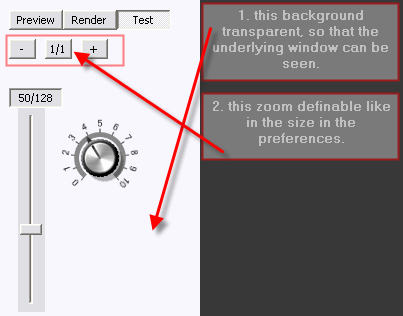
lemme know what you think, g200kg ...
here's a feature request which i assume would solve a lot of workarounds:
a big problem when doing knobs is, that, if you really want to make them look good, you have to do them in a bigger size, and after it's completeley done, you have to downsize the actual images. that's not only timeconsuming, but also stops from really being creative, as you always have to esthimate if what you do big sized, is actually working when down-converted to the size you actually need the knob to be ...
so here's my idea:
up to now, we can zoom in and out the "test" area. that does not rescale all settings from the knob, but actually resamples the whole image, just as if you would rescale the knob after you did it in bigger size.
now, why not, instead of having given zoom steps as they are now, being able to actually zoom to the exact size you'd need the knob to be in the end? that way we could always check, even edit the knob in the size it's actually got to be in the end ...
and:
why not beeing able to render in the actual zoom-size?
so, the procedere would be like this:
1. set the (big) size you want to create (and edit) the knob, in the preferences
2. do the knob, and while doing the knob, you check via the zoom (which now is editable to the desired size, just like in the preferences), if the knob "works" in the size it's got to be scaled down to in the end
3. when the knob is finished, render the png strip via file > "render knob in testwindow zoom size"
and a feature request:
how about making the "test" window-fraction transparent (switchable with a button)? that way we can open knobman and overlay it on skinman, being able to see what the knob looks like on the gui of skinman, without actually having to load the knob into skinman ... i know, i could render an image in skinman and use that as background in knobman, but that way it would be even easier and supporting the workflow tremendeously ...
here's a screenshot for a better understanding of what i mean with all above written:
lemme know what you think, g200kg ...
regards,
brok landers
BIGTONEsounddesign
gear is as good as the innovation behind it-the man
brok landers
BIGTONEsounddesign
gear is as good as the innovation behind it-the man
-
- KVRian
- 774 posts since 1 Oct, 2006
Wish list for added fetures:
Fill opacity()% 0-100 while alpha(%) controls the overall transparency of the layer with FX. One of the main tricks in Photoshop is to retain the layer FX reduce the fill opacity to 0%.
Operations function from Skinman included in Knobman.
Change the layer control tree style to that of Skinman so that layer can be file into a group folder.
Allow for the color picker, layer control tree, primitives, and effects menu to stand free as they do in Skinman.
XY guide line per layer to reflect rotation center visable in the preview section
Control over gradient color
Control over the contour curve for FX like contrast, shadowing, edge height, specular; drop off for its linear transition
Save color picker swatches for re-use
Allow for more then one animation mask to be active per layer
Unlimited points allow for the animation curve, also more 4 animation curves is a bit limited at time 8-10 would be better
For non symmetric canvas sizes and option that will force the primitive shape to a symmetric aspect when selected. This would make the first loading of the primitive easier to edit.
Angle degree option for the spherical effect. Control over its gradient color.
Color selection for inside shadow
Gradient option for primitives fill color, with various styles the standard linear, radial,
Angle, reflective, diamond would be great.
qick export option to save an active layer as a .png (single layer or image strip) and reload to a new layer automatically from saved location.
Fill opacity()% 0-100 while alpha(%) controls the overall transparency of the layer with FX. One of the main tricks in Photoshop is to retain the layer FX reduce the fill opacity to 0%.
Operations function from Skinman included in Knobman.
Change the layer control tree style to that of Skinman so that layer can be file into a group folder.
Allow for the color picker, layer control tree, primitives, and effects menu to stand free as they do in Skinman.
XY guide line per layer to reflect rotation center visable in the preview section
Control over gradient color
Control over the contour curve for FX like contrast, shadowing, edge height, specular; drop off for its linear transition
Save color picker swatches for re-use
Allow for more then one animation mask to be active per layer
Unlimited points allow for the animation curve, also more 4 animation curves is a bit limited at time 8-10 would be better
For non symmetric canvas sizes and option that will force the primitive shape to a symmetric aspect when selected. This would make the first loading of the primitive easier to edit.
Angle degree option for the spherical effect. Control over its gradient color.
Color selection for inside shadow
Gradient option for primitives fill color, with various styles the standard linear, radial,
Angle, reflective, diamond would be great.
qick export option to save an active layer as a .png (single layer or image strip) and reload to a new layer automatically from saved location.
GUI designers a resource list of artists: http://sukaudio.blogspot.com/
-
- KVRAF
- 6241 posts since 26 Sep, 2003 from right here, as you can see ...
i'm bumping this now, as i know you're all good, g200kg ...
please lemme know what you say to my last two posts:
http://www.kvraudio.com/forum/viewtopic ... 15#3629415
and
http://www.kvraudio.com/forum/viewtopic ... 74#3660974
please lemme know what you say to my last two posts:
http://www.kvraudio.com/forum/viewtopic ... 15#3629415
and
http://www.kvraudio.com/forum/viewtopic ... 74#3660974
regards,
brok landers
BIGTONEsounddesign
gear is as good as the innovation behind it-the man
brok landers
BIGTONEsounddesign
gear is as good as the innovation behind it-the man
-

- KVRAF
- 3770 posts since 5 Mar, 2004 from Gold Coast Australia
Hi
I have a problem.
I am making a MIDI Note number slider (knob) that shows every note name from C-2 to G8 using the Text Primitive
Interestingly the resulting knob in pre-view and render chops of at G3. I see that the Text Box chops off characters ofter this point. Is there a solution to getting my whole list in?
Thanks
I have a problem.
I am making a MIDI Note number slider (knob) that shows every note name from C-2 to G8 using the Text Primitive
Interestingly the resulting knob in pre-view and render chops of at G3. I see that the Text Box chops off characters ofter this point. Is there a solution to getting my whole list in?
Code: Select all
C-2,C#-2,D-2,D#-2,E-2,F-2,F#-2,G-2,G#-2,A-2,A#-2,B-2,C-1,C#-1,D-1,D#-1,E1,F-1,F#-1,G1,G#-1,A1,A#-1,B1,C0,C#0,D0,D#0,E0,F0,F#0,G0,G#0,A0,A#0,B0,C1,C#1,D1,D#1,E2,F1,F#1,G2,G#1,A2,A#1,B1,C2,C#2,D2,D#2,E2,F2,F#2,G2,G#2,A2,A#2,B2,C3,C#3,D3,D#3,E3,F3,F#3,G3,G#3,A3,A#3,B3,C4,C#4,D4,D#4,E4,F4,F#4,G4,G#4,A4,A#4,B4,C5,C#5,D5,D#5,E5,F5,F#5,G5,G#5,A5,A#5,B5,C6,C#6,D6,D#6,E6,F6,F#6,G6,G#6,A6,A#6,B6,C7,C#7,D5,D#7,E7,F7,F#7,G7,G#7,A7,A#7,B7,C8,C#8,D8,D#8,E8,F8,F#8,G8Benedict Roff-Marsh
http://www.benedictroffmarsh.com
http://www.benedictroffmarsh.com
-

- KVRian
- 745 posts since 5 Jul, 2005 from Southern California
I'm just thinking that in order for the text to be legible that the knob is going to be huge.
Wouldn't 2 knobs (one for octave and the other for note) be more practical?
Probably would take up less space on the GUI as well.
Edit:
I misread you text.
Work around might still involve having a separate control for the octave.
...Steven
Wouldn't 2 knobs (one for octave and the other for note) be more practical?
Probably would take up less space on the GUI as well.
Edit:
I misread you text.
Work around might still involve having a separate control for the octave.
...Steven
 Cakewalk/Sonar Plugin Management Tools
-
- KVRAF
- 3770 posts since 5 Mar, 2004 from Gold Coast Australia
Yes the knob only shows one note at a time but seeing as MIDI offers 128 notes I need a longer input string.
The 'octave + semi' knobs is a workaround but will be poor usability so I hope to avoid it if at all possible.
The 'octave + semi' knobs is a workaround but will be poor usability so I hope to avoid it if at all possible.
Benedict Roff-Marsh
http://www.benedictroffmarsh.com
http://www.benedictroffmarsh.com
-
very angry mobster very angry mobster https://www.kvraudio.com/forum/memberlist.php?mode=viewprofile&u=11047
- KVRian
- 611 posts since 15 Dec, 2003 from Melbourne, Australia
Can you render the knob in 2 or more runs and stitch together the strips in photoshop or something else?
-
- KVRist
- 186 posts since 16 May, 2004 from Norway
You can get tobybear's stitchstudio here http://tobybear.phreque.com/files/gfxutils.zip to stitch images together..
