Subtractive Synthesis and Routing (Flow Chart)?

How to do this, that and the other. Share, learn, teach. How did X do that? How can I sound like Y?
RELATED
PRODUCTS

Post

I know there is probably a lot of wood in here, however shuffled in tons of tiny bits. I have to admit, if it comes down to synthesis, I just mess around and hope I can get the best out of it, or simply revert to presets - since it's simple and quicker.

However recently I'm like "duh, throw out all your samples, create your own sound effects (which fit better to what you need), program your own basses, make your own leads", etc, etc, etc.


Thing is... I know jack about it.
Wait, not exactly true... I know what an OSC is, what the VCA (Amplifier), what the VCF (filter) and EG (Envelope Generator... uhm... LFO?) is. At least the basics.

What I don't know however: the routing.

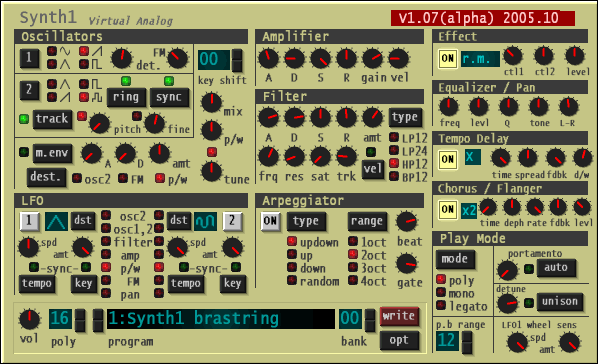
Yes, you read right, I don't know how the routing works of a synth like: Synth1, Elek7ro, V-Station (IMO three pretty simple subtractive synths).


Is there some sort of flow chart of how all these modules work together?
Like... which module goes into which module, what module controls that, etc?


That'd definitely help understanding. ;)


On a sidenote:
Yes, I read the manuals, but I must be blind to find a flowchart or something.
[ Mix Challenge ] | [ Studio Page / Twitter ] | [ KVRmarks (see: metering tools) ]

Post

How to route them all when every synth is different?! :shrug:

Post

i don't know how to answer this. The best way to learn is to use a modular synth, do some tutorials. Generally its pretty clear on the synth what controls what. Surge is a good synth to learn about signal flow on, or synthedit. Try to find some synthedit source files for synths you already know and look at how the components control each other.
Do not lick the fablanky

Post

Personally I'd just love to have a manual where that routing is written in there like a flow chart. But it's not for Synth1, and I didn't see one for V-Station either.


I wasted hours on the net to find something, read on tutorials, I know some relation between the modules, but it just didn't make "click" yet.
[ Mix Challenge ] | [ Studio Page / Twitter ] | [ KVRmarks (see: metering tools) ]

Post

Have you red the V station manual?? It has a synthesis tutorial explaining the basics, plus a very simple signal flow on page 10.
You can replace the env with lfo's and vice versa, or even put both at the same time on a module.

Any sound you hear, or you imagine is made of three elements (page 7 of the manual). Tone, Timbre and Volume.
Basically the routing si quite simple, the sound is generated on a osc (giving ti it's tonality, whether you play a c note, d, e f or whatever, then sent to a filter for adjusting the timbre (high or low) , and then to an emp env for shaping the volume through time(raising slowly or fast attack etc ....
Add a bunch of lfo's and env, step sequencers, mod env etc between each and every module and you'll have complex patches ...

But basically, no matter if it's FM, PM, Subtractive or additive the process is the same, you'll need these three elements to make a sound, just some of the elements will differ in some way, e.g in fm synthesis, the tone is done by modulating the osc freq with another one's.
The only synth I was surprised that has a timbre section (instead of a filter section) is FM8.

Post

Guess I must dig up the V-Station manual again.

Thanks for the quick coverage.
[ Mix Challenge ] | [ Studio Page / Twitter ] | [ KVRmarks (see: metering tools) ]

Post

For subtractives, like dsp said, the basic path pretty much always goes like this:

Code: Select all

tone generation --> filter --> amplifier --> out
It's very common to have two dedicated envelope generators modulating the filter and the amp:

Code: Select all

VCO --> VCF --> VCA --> out
         |       |
        EG1     EG2
Synth1 and Elek7ro are quite similar. If I'm not mistaken, both look something like this:

Code: Select all

         LFO1   LFO2
          |      |
  ++------+------|---------+-------+
  ||++-----------+-----------+-------+
  ||||                     | |     | |
+------+ --> +-------+     | |     | |
| tone | --> | mixer | --> VCF --> VCA --> out 
+------+ --> +-------+      |       |
   |||                      |       |
   EG3                     EG1     EG2
Note: this is missing a lot of stuff. I'm just putting the basic components.
The first two EGs have fixed outputs while the third and the two LFOs are demultiplexed to one of many possible destinations.

Post

Wait, I thought Synth1 only has one EG, no? Fortunately that synth has free routable LFO's. It's not that simple to understand with every synth to be honest.
[ Mix Challenge ] | [ Studio Page / Twitter ] | [ KVRmarks (see: metering tools) ]

Post

No it has two, one for the amp, and one for the filter (adsr knobs). Or am I missing something here?

Actually it has 3 as there's a modulation env which is a simplified A&D version, assignable to pitch or PWM or FM ..

Image

Post

So just to understand this:
- The Amp has it's own ADSR courves (aka Env Gen), so does the Filter
- The two OSCs can be mixed together and additionally be modulated with FM synthesis, the OSC2 or P/W (pulse wave?) while having an own attack/decay
- The LFO's in Synth1 are pretty much selfexplaining, I can route them freely
- the buttons "tempo" relate to "sync to host tempo" and key relate to "retrigger on key-press", no?

Everything else, comes after the synth, like:
- Arpeggiator
- EQ
- Effect (additional ring modulation or compression, the tempo delay, chorus/flanger, etc
- Play-Mode)

And do I see it right, Synth1's LFO1 can be additionally triggered with the modwheel of your keyboard?
[ Mix Challenge ] | [ Studio Page / Twitter ] | [ KVRmarks (see: metering tools) ]

Post

Compyfox wrote:- The two OSCs can be mixed together and additionally be modulated with FM synthesis, the OSC2 or P/W (pulse wave?) while having an own attack/decay
FM: amount in which OSC2 frequency modulates OSC1
ring: OSC1 ring modulates OSC2
sync: OSC2 hard syncs to OSC1
m.env: activates the A/D envelope
With this envelope you can modulate OSC2's pitch, the amount of FM or the pulse width of both oscillators.
Compyfox wrote:- the buttons "tempo" relate to "sync to host tempo" and key relate to "retrigger on key-press", no?
Yep.
Compyfox wrote:Everything else, comes after the synth, like:
- Arpeggiator
- EQ
- Effect (additional ring modulation or compression, the tempo delay, chorus/flanger, etc
- Play-Mode)
I think of the arpeggiator and the play-mode as placed before everything else, as they control how voices are managed and control the oscillators.
Compyfox wrote:And do I see it right, Synth1's LFO1 can be additionally triggered with the modwheel of your keyboard?
You can use the wheel to control its speed or amount of modulation to apply.

Post

allright, this is a start. Then what's the track button for? Or the Vel button at the filter?


I just took a peek into the "Hands on Synthesis" DVD btw, but my head still doesn't wrap around a standard synth, since this DVD focused on modular synths. Then again, Synth1 and V-Station are fairly simple in terms of synths (at least IMO), so it's a good starting point for learning, no?
[ Mix Challenge ] | [ Studio Page / Twitter ] | [ KVRmarks (see: metering tools) ]

Post

Compyfox wrote:allright, this is a start. Then what's the track button for? Or the Vel button at the filter?
The track button (somtimes also called keytrack or key if the GUI is overwhelmed)controls how much the filter is modulated by the played key (the more a note is high in pitch, the more high frequencies it delivers, so it's a way to make the filter react to the key played and then readjusts the frequency in relation (so it makes a more natural sound).

The velocity is to make the envelope react differently, faster or slower depending on the force you push the keys on the keyboard.

To add to gsoto explanation, I'd say that when using FM, you'll be able to hear only one osc, the one which is modulated (called the carrier) because the modulating osc (modulator) is only here for modulation and not for sound generating (kind of like a LFO). It's been years since I used synth1 but it should be like this :)

How to make a noise seems to be a quite often mentioned book here. Maybe it's worth having a look at it (never put much time into it myself).

Otherwise, Rob Papen should be releasing a synthesis dvd but I think the release is not for tomorrow

Post

VEL - Velocity - turn it on if you want your playing keyboard - pressing keys softer or harder to define the shape-value of a cutoff filter ...

Post

Try this...

http://www.hollowsun.com/Analog_Synthesis_Tutorial.pdf (right click the link to actually download the PDF)

It's a little sumfin wot I writ for Alesis - back-to-basics analogue/subtractive synth tutorial.

Cheers,


Steve

Post Reply

Return to “Production Techniques”