

Hello,
Is there a free VST I could use to place sounds in space?

3D placement plugin
-

- KVRAF
- 1908 posts since 7 Jan, 2004 from Earth
-

- Rad Grandad
- 38041 posts since 6 Sep, 2003 from Downeast Maine
check out the developer challenge forum, I believe 07...midiworks came up with a tool to position a drum but If I recall correctly it can be used on anything. I can't remember the name of the plug though. FWIW, samplitude has the feature for every track, it's called 2 channel surround sound and is awesome.Totolitoto wrote:Hello,
Is there a free VST I could use to place sounds in space?
edit: it's called Drum Mic Positioner by Sound Spectral and is from the 06 challenge but I have yet to find a link to the plugin
here it is
http://www.kvraudio.com/developer_chall ... tioner.rar
The highest form of knowledge is empathy, for it requires us to suspend our egos and live in another's world. It requires profound, purpose‐larger‐than‐the‐self kind of understanding.
-
- KVRian
- 619 posts since 13 Aug, 2005
You could try Ambia here. Not sure if it would meet your needs but the price point is right 
-
- KVRAF
- 11839 posts since 23 Nov, 2004 from west of east
You mean 5.1 space?Totolitoto wrote:Hello,
Is there a free VST I could use to place sounds in space?
We escape the trap of our own subjectivity by
perceiving neither black nor white but shades of grey
perceiving neither black nor white but shades of grey
-
- KVRAF
- 2285 posts since 20 Dec, 2002 from The Benighted States of Trumpistan
-
- KVRAF
- Topic Starter
- 1908 posts since 7 Jan, 2004 from Earth
No, no.. just a vst fakind 3d placementeduardo_b wrote:You mean 5.1 space?Totolitoto wrote:Hello,
Is there a free VST I could use to place sounds in space?
Am I clear?

-
- KVRAF
- Topic Starter
- 1908 posts since 7 Jan, 2004 from Earth
Yes that's the way I'm doing things, but I'm lazy and I'm trying to find a plugin that would do the job for mekobal wrote:you could use the pan and volume sliders ,also eq could help ,the closer a sound the more bright it is in real (roll of some top end to enhance the illusion of distance)

Actually I remember having tried one in the past, but can't find it anymore
It may be the HRTF 3D but the page is down
-
- KVRian
- 593 posts since 14 Apr, 2005
Sorry, these are not freeware. Thought I should mention them anyway.
Mreverb has a nice positioning feature. Its 30EUR though. http://www.meldaproduction.com/mreverb/
KickHaas 129EUR
http://www.kvraudio.com/news/11618.html
/Johnny
Mreverb has a nice positioning feature. Its 30EUR though. http://www.meldaproduction.com/mreverb/
KickHaas 129EUR
http://www.kvraudio.com/news/11618.html
/Johnny
-
- KVRist
- 314 posts since 12 Dec, 2006
Not freeware but interesting nonetheless: http://wavearts.com/products/plugins/panorama/
-
- KVRAF
- 7028 posts since 28 Apr, 2004 from france
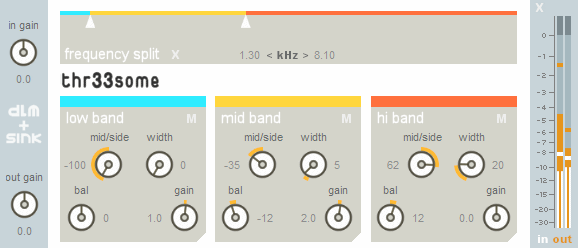
I got interesting results by playing with the plugin we made with DeLaMancha, Thr33some. Try adjusting the M/S settings.
-
- KVRAF
- 11839 posts since 23 Nov, 2004 from west of east
It loads for me. Just tried it, and it was working yesterday as well.Totolitoto wrote:Yes that's the way I'm doing things, but I'm lazy and I'm trying to find a plugin that would do the job for mekobal wrote:you could use the pan and volume sliders ,also eq could help ,the closer a sound the more bright it is in real (roll of some top end to enhance the illusion of distance)
Actually I remember having tried one in the past, but can't find it anymore
It may be the HRTF 3D but the page is down
We escape the trap of our own subjectivity by
perceiving neither black nor white but shades of grey
perceiving neither black nor white but shades of grey
-
- Rad Grandad
- 38041 posts since 6 Sep, 2003 from Downeast Maine
also use a little reverb with pre delaykobal wrote:you could use the pan and volume sliders ,also eq could help ,the closer a sound the more bright it is in real (roll of some top end to enhance the illusion of distance)
The highest form of knowledge is empathy, for it requires us to suspend our egos and live in another's world. It requires profound, purpose‐larger‐than‐the‐self kind of understanding.
-

- KVRian
- 763 posts since 12 Jun, 2009
http://www.mediafire.com/?hkiwmmhmozm
How's this for 3-D? I know it sounds boomy, but I was going only for placement in a room
How's this for 3-D? I know it sounds boomy, but I was going only for placement in a room