SKINMAN, the new strike by g200kg (early early alpha)

DSP, Plugin and Host development discussion.
Post Reply New Topic
RELATED
PRODUCTS

Post

Hlis93 wrote:I don't think SKinman is far away from being able to do skins like that. Its getting darn close to being a though choice between this or psd, still need psd's layer effects but for changing an arrangment around or adding a knob nothing really beats working with Skinman.
oh, no, that's by far not what i was implying ...the opposite is true:
if i was only allowed to post the skin i did for a company, it's all exclusiveley done with knob/skinman. there's just some small sicknesses in those programs which would be nice to be covered, but you can do full fledged skind with _only_ knob/skinman ... i just love g200kg, he's so deep willing into realizing what users would wish for ... up to now, if he was able to, he instantly implemented _everything_ i was wishing for, sensationally ... let's give skinman and knobman a bit more time to evolve, and both of them will rule the world in their class ...
regards,
brok landers
BIGTONEsounddesign
gear is as good as the innovation behind it-the man

Post

After the update, loading is much faster. But now I think skinman has problems with the textures. Several times I had the problem now that texture disappears (turns black) when I change the alpha or light of a primitive - I have to reselect the texture again to bring it back. Also the texture "jumps/moves" when selecting/changing drop shadow.
Another thing that I saw before already: when I change the look of a knob in knobman and save the .knob file, then deleting the knob image in skinman and using "insert - image" to open the new version, it shpws the old one in skinman, not the new saved one ("Refresh knobs" doesn't work at all).
ImageImage

Post

brok landers wrote:
Hlis93 wrote:I don't think SKinman is far away from being able to do skins like that. Its getting darn close to being a though choice between this or psd, still need psd's layer effects but for changing an arrangment around or adding a knob nothing really beats working with Skinman.
oh, no, that's by far not what i was implying ...the opposite is true:
if i was only allowed to post the skin i did for a company, it's all exclusiveley done with knob/skinman. there's just some small sicknesses in those programs which would be nice to be covered, but you can do full fledged skind with _only_ knob/skinman ... i just love g200kg, he's so deep willing into realizing what users would wish for ... up to now, if he was able to, he instantly implemented _everything_ i was wishing for, sensationally ... let's give skinman and knobman a bit more time to evolve, and both of them will rule the world in their class ...
Are you making a pass at me? :hihi:
At ease.
WOK wrote:After the update, loading is much faster. But now I think skinman has problems with the textures. Several times I had the problem now that texture disappears (turns black) when I change the alpha or light of a primitive - I have to reselect the texture again to bring it back. Also the texture "jumps/moves" when selecting/changing drop shadow.
now, the texture analyzing is occured when you touch the texture related parameters instead of startup-time. because im now implementing more efficient analyzing, probably this problem will be improved in next release :)
WOK wrote:Another thing that I saw before already: when I change the look of a knob in knobman and save the .knob file, then deleting the knob image in skinman and using "insert - image" to open the new version, it shpws the old one in skinman, not the new saved one ("Refresh knobs" doesn't work at all).
im now a little regretting about 'Create New Knob' button. it seems confusing.

Existing knob-file import:
Most simple way to import a existing knob-file is just drag to SkinMan from explorer.
or use 'Insert Image' button.
once imported, you can do further edit by Rclick-'Edit Image/Knob' menu. after edit, simply 'Save' by KnobMan without filename change. and Rclick-'Refresh Image/Knobs' by SkinMan is needed. because this editting is just for this SkinMan instance, original file doesnt be destroyed.

Create New Knob for this Skin:
use 'Create New Knob' button (the default.knob file is used as a templete). After edit, simply 'Save' by KnobMan without filename changing. also R-click-'Refresh Image/Knobs' is needed for reflect the result of editting.

Post

g200kg Saving the knob like that doesn't work for me, I actually have to go in and save it as the last temp file in the skinman folder, and even then, the knob isn't the right size, i have to resize it. And the tree and properties windows do not stay on top ?

~Rob.

Post

robrokken wrote:g200kg Saving the knob like that doesn't work for me, I actually have to go in and save it as the last temp file in the skinman folder, and even then, the knob isn't the right size, i have to resize it. And the tree and properties windows do not stay on top ?

~Rob.
hmm...,

at first, please try the 'ToolsAlwaysOnFront' option in the 'File'-'Setup' dialog for window staying.

and next, imported Knob size is finally resized by SkinMan. [1:1] button on SkinMan properties will help you if you change knob size by KnobMan.

could you tell me which is the problem step?
1. knob-file import by drag&drop existing knob-file to SkinMan
'Image[(filename.knob)]' object is created on SkinMan

2. launch KnobMan by "Rclick-Edit Image/Knob"
opened file is 'xxxxxxxxx__temp_folder_path_filename.knob'

3. Save after edit by KnobMan.
still not reflected yet on SkinMan

4. SkinMan display is refreshed by 'Rclick Refresh Images/Knob'
[1:1] button press is needed if you change size by KnobMan

Post

Number 2, but now i see what is happening, and maybe there could be another "save" function inside of knobman? But is greyed out if skinman isnt open?

1. insert new knob, knobman pops up.
2. go to my knob folder and open an existing knob
3. Now If i hit save in knobman, its going to save that in my existing knob folder, NOT THE temp folder for skinman!!

Maybe there can be an option, so we dont have to go back and save it under the temp folder and select the last file.

Save to Temp

Or a file browser thats always open that you can select your knob file folder and drag/drop

BTW: I tried to drag a knobman file onto the skinman, and it didnt do anything :(

Option.

~Rob

Post

robrokken wrote:Number 2, but now i see what is happening, and maybe there could be another "save" function inside of knobman? But is greyed out if skinman isnt open?

1. insert new knob, knobman pops up.
2. go to my knob folder and open an existing knob
3. Now If i hit save in knobman, its going to save that in my existing knob folder, NOT THE temp folder for skinman!!

Maybe there can be an option, so we dont have to go back and save it under the temp folder and select the last file.

Save to Temp

Or a file browser thats always open that you can select your knob file folder and drag/drop

BTW: I tried to drag a knobman file onto the skinman, and it didnt do anything :(

Option.

~Rob
may be something are misunderstood? :?
open another file with KnobMan that launched by 'Insert New Knob' is unexpected operation. KnobMan doesnt have another "Save" function, that will just only edit the newly opened file. if you need to import existing knob-file, you should use 'Insert Image' button instead of 'Create New Knob'.
doesn't that work?

about Drag&Drop, other format images(ex. bmp/png... ) can't D&D in the same way? (means just D&D from windows explorer to SkinMan's canvas).

Post

Is it possible to get all the windows "tree" and the others to all lock together? Looks like thats how it is in the demo videos in ur site, right now i have 2 windows that are just floating around, cant figure out how to lock them all together.

~Rob.

Post

g200kg,
how's the development of skinman/knobman going on? i am a bit worried that the development slowley but sureley stalls, which would be the greatest shame ever, imo ... there's a lot of room for improovement in both apps ...
iirc you had the idea to melt skinman and knobman into one app, which would be the bomb, if you ask me ...

please let us know!
regards,
brok landers
BIGTONEsounddesign
gear is as good as the innovation behind it-the man

Post

don't worry. I'm here :wink:
Just I hooked on my own plugin.

Post

ahh, great to hear that! but don't work so much on your plugins, that keeps you away from knobnan/skinman!!! :x (just kidding ;) )


so what about the development state of knobman and skinman?

here's 2 feature requests for skinman:

1. could you make the emboss depths fine steps, like the width?
often the embossing depths are too heavy with even only value 1, so i'd like to be able to adjust the depths with 0.01 steps, too, just like the emboss width.

2. could you maybe implement individual embossing widths for border and fill?


and a bug report (it has been reported a few times, but the problem still exists):
in some cases the textures are vanishing, when tweaking whatever parameter on that certain shape. i (if i realize it fast enough) have to re-select the texture before closing/saving the project, otherwise, after reloading, the texture is gone and i can't remember which texture i actually used.

cool you're still there! :)
regards,
brok landers
BIGTONEsounddesign
gear is as good as the innovation behind it-the man

Post

Hi,
SkinMan 0.995 release

http://www.g200kg.com/en/software/skinman.html
* Fix crush when move primitives in some cases
* Support decimal places for 'Emboss depth' parameter :hihi:
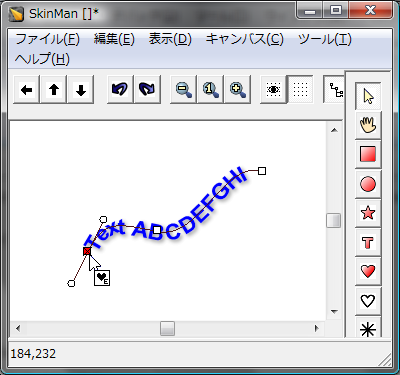
* Text-path function (incompleted).

Text-path function is not finished but decide to release for a meantime, because the crushing bug is fixed.

I dont recommend to use text-path in current version but can do like bellow.
Image

AND
Ive started somewhat bigger reconstruction, that will takes a litte more.

Post

holy crap g200kg! you're damned fast! thank you so much for the update, will try the next days and report back. :)
regards,
brok landers
BIGTONEsounddesign
gear is as good as the innovation behind it-the man

Post

Hi g200kg,

I have a crash sometimes when using the mouse wheel to change values especially position in larger files I find though if I move the object with a mouse click or enter the value with keyboard first it wont crash with mouse wheel.

I also have a feature request:

In large projects it takes a long time for me to change the color of many primatives. what I suggest is a kind of color pallete, so 1 special palette color could be changed and it would affect all primatives using that special palette color. I dont use that many colors anyway and having to go to ever priative that needs changing takes quite a while.

Thanks again for this great software.

Post

hello,
Dunks wrote:In large projects it takes a long time for me to change the color of many primatives. what I suggest is a kind of color pallete, so 1 special palette color could be changed and it would affect all primatives using that special palette color. I dont use that many colors anyway and having to go to ever priative that needs changing takes quite a while.
though it is not a perfect answer, it may help you...
1) Edit colors of a primitive
2) Copy the primitive
3) Select multiple primitives that you want CopyTo
4) Right click -> 'PasteColor'

please try,

Post Reply

Return to “DSP and Plugin Development”