
Can't figure out program settings for sub-sessions

Locked New Topic
RELATED
PRODUCTS

Post

I'm having difficulty either comprehending, or properly implementing program selection in my sub-sessions. I haven't exactly identified what causes the issue yet. It's late at night and that's not helping either.

Here's one example.

VST: Guitar Rig 4

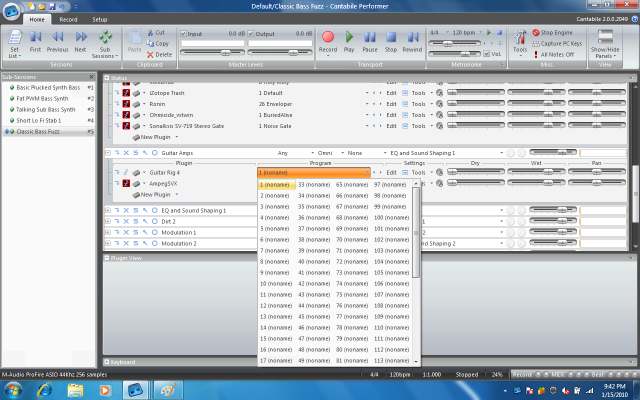
You cannot simply arrow through programs/presets in Cantabile's interface. Nothing visible happens, it stays on 1 (noname). Click the program list, and there's 127 programs there all as (noname).
Image

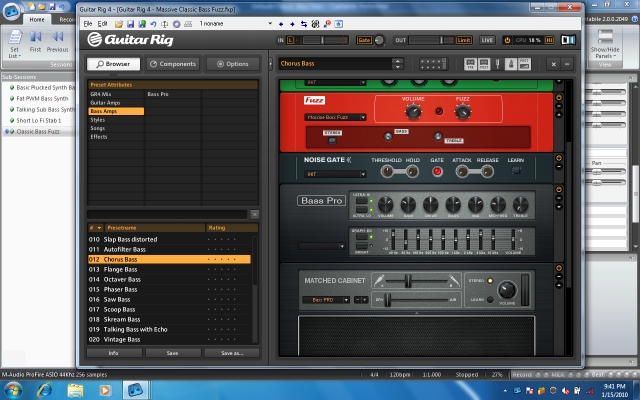
Open Guitar Rig, create something you like within the VST, then click Save Program, and save a named program. It saves it. You can change Guitar Rig, then re-open that saved program, it re-loads the saved settings. So far so good there.
Image

I then save a sub-session using Guitar Rig after I've manually opened the program (Massive Classic Bass Fuzz.FXP) as seen in the previous screenshot.

However, if I change any of the settings in Guitar Rig such as opening a factory preset. Then re-open my saved sub-session, Guitar Rig does NOT launch using the saved program I specified.

Note the program list always looks as seen in the first screenshot above.

I cannot figure out how to get Cantabile to open Guitar Rig with that saved program file.

I have a different VST FrettedSynth's SafFron (audio tracking synth I use to generate oscilators) that does support named programs. However, when saving programs (FXP) manually, it saves them, I can open and use them, but similarly when saving sub-sessions it seems to have issues. As best I can tell the saved programs are tied to the program name seen within SafFron itself. For example, preset/program 1 is called 1 Pulser. However, I manually saved a FXP named Bass Saw.FXP and now that seems associated with 1 Pulser.

It's all fairly confusing to me.

Everything seems to work great for VST that natively support standard program selection. And all sub-sessions work super great if I use the factory programs. The issue comes when it's time for me to create my own programs/settings and somehow save them to be able to have Cantabile recall them.

I can grab more screenshots as necessary as I'm sure I'm not using the correct words/terms to accurately describe what I'm talking about.[/img]

Post

I agree that sometimes it is confusing what to do... but that's usually the plugin's patch orgaisation.

If you already have saved and retrieved vst presets succesfully, then check out if you can find additional patches at the and of the selectors list, in brackets, something like: [mypatch] If yes, try to select this before saving the subsession.

If a plugin presents just one entry in Cantabile's patch selector (usually plugins with their own internal patch browsers) you need to store/recall the total vst bank. To get this you have to activate "subsession behavior" - "entire bank" for that plugin in Cantabile.

Other than that the vst patches in a bank should show up in Cantabile's patch selector if they are really stored in the plugin's bank, otherwise there is something missing in that bank - maybe you have to store the entire bank for this plugin to get the selection working.
Best regards, TiUser
...and keep on jamming...

Post

I still can't figure this out.

Program selection works perfectly for me as long as long as the VST has a pre-supplied list of patch/programs you can toggle through using the Cantabile interface. But I rarely use those in the long term.

Sometimes program selection works even when the VST has a built-in program manager like FabFilter Volcano 2 (great filter).

Other times I simply cannot figure out how to get Cantabile to load a different program per-subesssion against the same VST in the same slot. I've tried with both program and bank checked in the subsession behaviour for the VST.

Here's one anyone can try themselves.

* Download ReaGate VST, it's free here: http://www.reaper.fm/reaplugs/
* Note when you open it in Cantbile there's absolutely no presets/programs pre-supplied
* Note there's on a single 1 (noname) in the preset/program
* Open subsession A
* Open ReaGate
* Set it's threshold to min
* Click File \ Save Program As and save as ReaGate-A
* Save subession
* Open subsession B
* Open ReaGate
* Set it's threshold to max (no audio will pass)
* Click File \ Save Program As and save as ReaGate-B
* Save subession
* Now open subsession A and it will use ReaGate-B instead of ReaGate-A

It always uses whatever the last program used period, regardless of the subsession.

I'm sure there's something stupidly obvious I'm missing.

Related, I sent an email for support on the 17th and have yet to hear any reply. It's been over 3 business days. Doesn't give me warm fuzzies.

Post

gastric wrote:I still can't figure this out.
Program selection works perfectly for me as long as long as the VST has a pre-supplied list of patch/programs you can toggle through using the Cantabile interface. But I rarely use those in the long term.
This is the intended way in Cantabile. You can add any patches to the list via the "Program Organiser" - "Shared Bank". These shared patches appear in brackets: [SharedPatchName]

In this case do not use "load entire bank" as it is usually unnecessary and inefficient.

gastric wrote:Sometimes program selection works even when the VST has a built-in program manager like FabFilter Volcano 2 (great filter).
I have such plugins too - there "load entire bank" does usually the trick. Usually these are plugins that just present a single entry in the Cantabile list.

gastric wrote:Other times I simply cannot figure out how to get Cantabile to load a different program per-subesssion against the same VST in the same slot. I've tried with both program and bank checked in the subsession behaviour for the VST.

Here's one anyone can try themselves.

* Download ReaGate VST, it's free here: http://www.reaper.fm/reaplugs/
* Note when you open it in Cantbile there's absolutely no presets/programs pre-supplied
* Note there's on a single 1 (noname) in the preset/program
* Open subsession A
* Open ReaGate
* Set it's threshold to min
* Click File \ Save Program As and save as ReaGate-A
* Save subession
* Open subsession B
* Open ReaGate
* Set it's threshold to max (no audio will pass)
* Click File \ Save Program As and save as ReaGate-B
* Save subession
* Now open subsession A and it will use ReaGate-B instead of ReaGate-A

It always uses whatever the last program used period, regardless of the subsession.

I'm sure there's something stupidly obvious I'm missing.
Maybe this plugin is unable to reload entire banks. You can never be sure with freebies...

Last Chance is to set a trigger on subsession load and send a program change to the rack... but that's somewhat odd...
gastric wrote: Related, I sent an email for support on the 17th and have yet to hear any reply. It's been over 3 business days. Doesn't give me warm fuzzies.
Ok, that's not great... I recommend to resend the request, sometimes mail get's lost or accidentally deleted...
Best regards, TiUser
...and keep on jamming...

Post

I believe I've found a viable workaround to those plugs that don't appear to support any type of bank/program saves such as ReaGate.

I simply load multiple instances of the plugin, then modify each instance to specific parameters, rename each instance so I can visually identify the differences, then disable subession program/bank behaviour entirely.

However, this further muddies up the session VST list as I now have duplicates of VST instead of a single line item that loads programs correctly.

I still haven't entirely figured out Guitar Rig 4, however I most likely won't be using that program so it's not important right now. But I'm assuming it highlights a potential issue with similar VST and I'll have to revist in the future.

The lack of timely developer support is certainly concerning though. Basically we have a single user (and I thank you) supporting the product entirely. In contrast the Bidule forum is comparatively very active.

Post

FYI - after 8 calendar days I finally received a reply from Brad.
I've had a closer look at this.

1. The "entire bank" sub-session option does seem to work for Guitar Rig however I discovered a bug where with some plugins (GR4 included) the sub-session state would get dropped by Cantabile and not restored. I've made a fix for this which is included in build 2050, available now - http://www.cantabilesoftware.com/download. Please let me know if this still doesn't work for you.

2. You can also cause GR4 to load a preset load by send MIDI program changes. By setting a trigger to send a program change to the rack holding GR4 on sub-session load you should be able to switch presets. If you have a lot of sub-session with lots of different presets this will get tedious however as you need to setup a separate trigger for each - but it's an option none the less. Also I noticed that GR is a bit different in its handling of program numbers - you'll need to add 1 to the trigger you configure in Cantabile. Also if you select a preset tag filter in GR4 this renumbers all of GRs presets so watch out for that.

I hope this helps, please get back to me if you still can't get it to work.

Brad
At the time I write this I haven't had the chance to test the build yet to see if it makes any difference for me.

I have been trying Plogue Bidule heavily and since it's not sharing a common pool (racks) of VST it seems to natively not have any issues with saving/loading presets/settings/etc. from one song to the next since you have unique and totall separate instances of the VST. At least that's what it looks like it's doing.

I'm not bashing or promoting one product over the other. Each seems to have its pros and cons. But specifically for managing VST settings/programs Bidule seems to be superior which has been my issue using Cantabile thus far.

Post

gastric wrote:FYI - after 8 calendar days I finally received a reply from Brad.

,,,

At the time I write this I haven't had the chance to test the build yet to see if it makes any difference for me.

I have been trying Plogue Bidule heavily and since it's not sharing a common pool (racks) of VST it seems to natively not have any issues with saving/loading presets/settings/etc. from one song to the next since you have unique and totall separate instances of the VST. At least that's what it looks like it's doing.

I'm not bashing or promoting one product over the other. Each seems to have its pros and cons. But specifically for managing VST settings/programs Bidule seems to be superior which has been my issue using Cantabile thus far.
I am not very familiar with Bidule but it seems to be something different - a free modular approach with more audio and midi options than hosting VST's.

A "pool of VST's"...? The point with subsessions is to change sounds as fast as possible. But you can also create different sessions which will load slower - not sure how long it takes to load the next "Bidule patch"...

If Bidule is what suits your purposes better go for it! I am really not offensive here and I appreciate people finding and using what suits their imaginations best - and not what I or others prefer.

In my case I have some VST's with it's own patch browsers and Cantabile is the only host I know that can load also *.fxb (banks) on the fly to work around this problem.

Referring to Brads answer - I am not happy with the current treatment of program changes for use with the vst racks instead of fxp or fxb - but that's another story... :D
Best regards, TiUser
...and keep on jamming...

Post

My comment with the "pool of VST" is that you have to literally have every VST you will ever use in any subsessions listed in the racks. If you're running a few softsynths and some verb that's probably not a big issue. But when I first started I had a handful of every possible VST effect listed there and was very confusing and cumbersome to exapand/collapse racks trying to figure out what VST happened to be enabled in the subsession.

In contrast, if I have 100 VST installed (exaggerating for my purpose here) and only use 4 in a song I'd only have 4 enabled in the subession. In Bidule I'd literally only have 4 VST in the signal chain for the song (group).

As far as loading banks on the fly... If you need to load banks on the fly in a live setting during a song I'm not sure how you'd do that in Bidule as I haven't tried, but there's probably a way as it you can manually load banks and programs, so there's surely a way to automate that. But if you simply need a bank available in Song 1 and a different bank in Song 2 (what I was trying to do with Guitar Rig 4), that's handled automatically since the VST isn't "shared" beteween songs/groups/subessions. I just load GR4 with whatever settings/programs/banks I want in one song, a different in a different song, they never intermingle and thus never get screwed up. I can load additional banks in the first song, it doesn't ever affect the other songs.

I'm not saying one is better than the other. Only that Bidule worked instantly for me. I've yet to have loading a bank/program in one song screw up the settings in a different one, which happened to me all the time in Cantabile. I'm assuming due to the fact the VST are "shared" in the pool seen in the racks and that Cantabile wasn't saving/loading/whatever correctly.

I'm a noob at all of this so I really don't know. I just know it wasn't working. :) And maybe it is with the new build, I'll try it in the next few days to find out.

Not promoting Bidule here but here's a screenshot of the main layout. Each "song" is a separate signal chain with whatever VST is in it. Processing is bypassed like in Cantabile for songs that aren't in use to keep the load down. I can bop through the songs with my MIDI foot controller like in Cantabile and they switch automatically without any apparent lag/delay just like in Cantabile.

There's also another product called Brainspawn Forte that some people use, seems generally similar to Cantabile and Bidule in regards to what I'm trying to do.


Image
Last edited by gastric on Wed Jan 27, 2010 9:46 pm, edited 1 time in total.

Post

You can also just use the VST's in Cantabile you need and save that in individual sessions (not subsessions). You can then use the setlist feature to load any session file. It's just that new plugins have to be loaded with the new session and the audio engine stops for this time.

I am curious - how does bidule manage session changes?

I am not so familiar with forte too but as far as I know you need to preload all wanted VST's there too to have instant changes.

Even if you have preloaded all necessary plugins there are still glitch hazards possible during patch changes in plugins as many plugins do not handle that too great...
Best regards, TiUser
...and keep on jamming...

Post

TiUser wrote:You can also just use the VST's in Cantabile you need and save that in individual sessions (not subsessions). You can then use the setlist feature to load any session file. It's just that new plugins have to be loaded with the new session and the audio engine stops for this time.
I probably read that blurb about the audio engine stopping and then never considered full session loading again as I didn't recall you could do that. I thought everything was sub-session based.
TiUser wrote:I am curious - how does bidule manage session changes?
I'm not aware of the under-the-hood workings. But I believe it's all similar to Cantabile's operations.

There are no session/subsessions per se, so part of it is a terminology issue. Instead you have the palette like I've illustrated above. You have the ability to "group" items in the palette to condense them down to a single item in the view. This keeps the view uncluttered, and lets items in the "group" share certain settings and controls such as bypass/processing. Which is what I've done for each "song" in the illustration above.

I've mapped the Audio Switch to the "Mode" of each group (song) so it automatically "mutes" (suspends in Cantabile) the group, thus all items within the group. Similarly, Bidule provids a "Bypass" which works the same as in Cantabile. So they're doing the same thing as far as I know, just using different words.

Obviously I'm not an expert user with either product. Bidule is by far more complicated due to it's appearance and the fact you have to manually build everything yourself. So getting ramped up is slower than in Cantabile. It's also missing some of the nice-to-have features of Cantabile, specifically the clock/metronome in the toolbar which I enjoyed. There's no mentronome at all in Bidule, though I'm sure you could use a VST for that. And the clock/sync is loaded in a separate window. Functional, just not as pretty and always-present like in Cantabile.

Post

It looks like you're seriously exploring both programs. I would appreciate to read more about your personal experiences with both. I like open discussion!

Maybe it's really one important point how programs present their features.

I agree in a way that Cantabile's views on it's inside start to get chaotic easy, especially with subsessions. Maybe this can be improved by additional views some time. There are more of these hidden things hard to master, like the audio master bus or the midi filter path... you need to know where to click and pick stuff and it's hard to keep track on an overview...

I've had a very short view on Bidule's web site and have to say it's really different - modular and offers by far a deeper level as you can design your own midi and audio flow. It's a bit like comparing a Minimoog to a Moog Modular... ;)
Best regards, TiUser
...and keep on jamming...

Locked

Return to “Topten Software”