
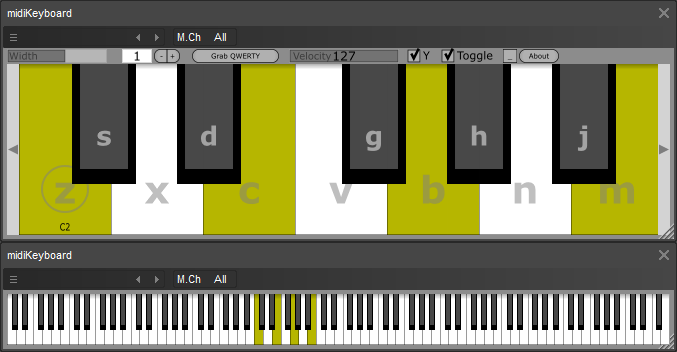
midiKeyboard update

Official support for: thepiz.org
Post Reply New Topic
RELATED
PRODUCTS

Post

Image

Added:
- Letters on GUI when playing with qwerty keyboard
- "Toggle" option: Notes are toggle switches instead of momentary; applies to mouse clicks, midi input, and qwerty input
- Can load default settings from "midiKeyboard.fxb" (or "Whatever_you_rename_the_plugin_file_to.fxb")
- Qwerty octave and visible keyboard range are now saved with plugin state

Download:
http://thepiz.org/pizmidi/midiKeyboard.zip

Note: Windows only until I get a non-broken Mac
Last edited by insertpizhere on Sat Nov 20, 2010 8:01 pm, edited 1 time in total.
wrongtastic, baby
tucson's number one gothic rock band since 1995

Post

Cool, I'll give it a play, been doing drums here in my living room instead of where my midi drumkit is.

That Program Change plug is real handy, time saving for my Behringer floorboard. I don't want it to do program change, only on/off cc stuff.
The only site for experimental amp sim freeware & MIDI FX: http://runbeerrun.blogspot.com
https://m.youtube.com/channel/UCprNcvVH6aPTehLv8J5xokA -Youtube jams

Post

this thing seriously rocks. Can I recommend a slight change to GUI? The periwinkle rounded buttons don't really mesh at all.

Post

i was just thinking about that. i don't like the shiny buttons or the colors but was too lazy to change them from the default, but i'd like to get away from that "obvious Juce GUI" look for all my plugins...

maybe this is a little better:

Image

http://thepiz.org/pizmidi/midiKeyboard.zip
wrongtastic, baby
tucson's number one gothic rock band since 1995

Post

I like it. I would say go with that :wink:

If its possible I would also like to see a right click option for "hide panel" so you can have a pure view of just the keys.

Post

good idea.

done, uploaded, download here:
http://thepiz.org/pizmidi/midiKeyboard.zip
wrongtastic, baby
tucson's number one gothic rock band since 1995

Post

I like the clean look but I can't get any right click menu actions because right clicking on all available parts of the interface result in stuck key events.

Since left click and right click on the arrows do the same thing maybe you could designate one of those clicks to a menu.

Post

well, there is no menu... you alt-click the keys to switch views. i didn't mean for it to be hidden by default, so that's changed now... i made a few other small changes and also made shift-click grab keyboard focus. download again, same link.
wrongtastic, baby
tucson's number one gothic rock band since 1995

Post

really good changes! It may be a good idea to include a .txt introduction/instruction with the zip for newcomers.

Post

the idea is that it should have enough information on the GUI from tooltips and the "About" box for anyone to figure it out... i never remember to update text files and/or include them in the zip. i did update my website though.
wrongtastic, baby
tucson's number one gothic rock band since 1995

Post

request: grab qwerty status is not saved with the preset/project for now.
please make it possible

Post

fixed, now the right-click version of Grab QWERTY is saved:
http://thepiz.org/pizmidi/midiKeyboard.zip
wrongtastic, baby
tucson's number one gothic rock band since 1995

Post

possible feature: learn midi trigger note
and learn qwerty key trigger for each note of midikeyboard

so the plug can be used as a remapper

another minor issue: possibility to save the toggle status of the presets (or of the first preset) with the project(host project), and possibility to resend toggle status at startup

Post Reply

Return to “Insert Piz Here”