


Sonicprojects OP-X Pro II is out
-
- KVRian
- 781 posts since 25 May, 2006
btw, a video for the matrix bank is available here
-
- KVRian
- 781 posts since 25 May, 2006
Another nice example of the modulation possibilities - an arpeggio with synced panning modulation:Peter999 wrote:Here's something alike (just edited the "Vapour Train Noise" patch a bit):GruvSyco wrote:Can OPX do something like the Start Engines patch from the OB8 like on this page
http://www.synthmania.com/ob-8.htm
It has no practical use, just curious how in depth it can get. I love the demo btw, except I think the dropouts are WAY too frequent.
Audioclip:
Listen: OP-X PRO-II Start Engines
Patch (fxp):
Download patch (zipped)
Just play with the "LFO Rate" knob to increase/decrease speed (which you too could automate using vst automation)
If you're interested what the potential of OP-X PRO-II for experimental and weird sound is then check the "PROII_Effects" and "PROII_Matrix" bank; with FM / RigMod / Cross Modulation / Sync / FilterenvMod / FilterSelfResonance / MorphableFilter there are a lot of features for experimantal sounds, much much more than in an OB-8, more like Matrix in fact. Some examples:
Listen: OP-X PRO-II - Baby Scream
Listen: OP-X PRO-II - Long Wave receiver
Listen: OP-X PRO-II - XPander Landing Jet
----
Listen: OP-X PRO-II - Synced Reverse Pulsearp
---
-
- KVRer
- 9 posts since 31 Aug, 2007
Hi
I just brought this plugin yesterday and am very pleased with it, especially the "Famous" bank which has some songs I play in the band.
Does anyone know if it's possible to change the default bank that loads up initially. It only seems to save the current preset in the vst host.
Cheers
Ben
I just brought this plugin yesterday and am very pleased with it, especially the "Famous" bank which has some songs I play in the band.
Does anyone know if it's possible to change the default bank that loads up initially. It only seems to save the current preset in the vst host.
Cheers
Ben
-

- KVRAF
- 5913 posts since 17 Aug, 2004 from Berlin, Germany


-
- KVRian
- 781 posts since 25 May, 2006
depends on the host; most sequencers (cubase, protools etc.) save a complete bank chunk with the session, simpler ones sometimes often don't (like e.g. savihost)bencrossman wrote:Hi
I just brought this plugin yesterday and am very pleased with it, especially the "Famous" bank which has some songs I play in the band.
Does anyone know if it's possible to change the default bank that loads up initially. It only seems to save the current preset in the vst host.
Cheers
Ben


-
- KVRAF
- 1724 posts since 10 Feb, 2008 from Berlin, Germany
I had problems with it too.victrix wrote:The 2496 (and IIRC other M-Audio cards) are very problematic on many Windows 7/64-bit systems, just check the M-Audio forums.
But I solved it by disabling the energymanagement for the CPU in Windows7.
The minimum speed of it should be set on 100%. Since then, my DPC latency is good and I got no crackles with the 2496 anymore.
Go to:
"Systemsteuerung\Alle Systemsteuerungselemente\Energieoptionen\Energiesparplaneinstellungen bearbeiten"
--> "Energiesparplaneinstellungen ändern"
--> "Erweiterte Energieeinstellungen ändern"
--> "Prozessorenenergieverwaltung"
Und dann den minimalen Leistungszustand des Prozessors auf 100% stellen.
Hope it helps. For me it went from unusable to flawless.
Oh, and sorry for OT.

-
- KVRAF
- 1724 posts since 10 Feb, 2008 from Berlin, Germany
It totally doesn't matter, how it's coded (wasn't there even a Reaktor Ensemble of it once) .. it matters how it sounds.
And for the sound, the OPX is one of the very very best (like top-5) VSTi-synths out there, if you're heading for vintage-analog-like-sound.
And for the sound, the OPX is one of the very very best (like top-5) VSTi-synths out there, if you're heading for vintage-analog-like-sound.
-
- KVRAF
- 1940 posts since 16 Aug, 2004 from Vienna, Austria
Ahem. That's configurable in SAVIHost. Menu item "File / Autosave PlugIn Bank".Peter999 wrote:depends on the host; most sequencers (cubase, protools etc.) save a complete bank chunk with the session, simpler ones sometimes often don't (like e.g. savihost)
"Until you spread your wings, you'll have no idea how far you can walk." 
-
- KVRAF
- 5515 posts since 6 May, 2002
Qality should be rewarded. OP-X actually delivers the sound of the hardware Oberheim it claims to model very accurately. There may be 3 or 4 other VSTInstruments that have manged to pull that off. As long as I'm not affected by any excessive RAM or CPU consumption, it isn't my concern how the thing was coded.Nokenoku wrote:It totally doesn't matter, how it's coded (wasn't there even a Reaktor Ensemble of it once) .. it matters how it sounds.
And for the sound, the OPX is one of the very very best (like top-5) VSTi-synths out there, if you're heading for vintage-analog-like-sound.
Intel Core2 Quad CPU + 4 GIG RAM
-
- KVRian
- 781 posts since 25 May, 2006
great! didn't knowarakula wrote:Ahem. That's configurable in SAVIHost. Menu item "File / Autosave PlugIn Bank".Peter999 wrote:depends on the host; most sequencers (cubase, protools etc.) save a complete bank chunk with the session, simpler ones sometimes often don't (like e.g. savihost)
 savihost actually is my favourite small host, works perfectly with OP-X PRO-II in all systems, even in Windows 7 64bit
 SaviHost and OP-X PRO-II can build a great and trusty live-setup, since there's no unnecessary overhead, and OP-X PRO-II has the effects already in it, plus some further cool live features like relative or fetched CC response (to eliminate value jumps using controllers) and dual engine effects processing for effects finishing after preset change
using midi-program changes or the inc/dec buttons furthermore activates the "patch change smoother" that eliminates possible patch change artefacts by fading out the old patch, releasing all notes, and fading in the new one, all within the fraction of a second
-
- KVRian
- 781 posts since 25 May, 2006
Here again are some of the somewhat hidden features including relative & fetched CC processing:
Effects Unit

In the "edit" mode you can access a bunch of handy quick presets by clicking on the small down arrow between the effect parameter trimpots for delay and reverb. By clicking on those presets you can check out various settings on the fly without the need of adjusting parameters manually.
Patch Browser

There are two choices to launch the preset list: temporary or fixed. Using the left side "down arrow" the list will disappear again after having chosen a preset. Using the one on the right the list will be "locked" until you close it again, which is convenient for browsing around in the presets without having to launch the list again and again.
Dual Engine Processing

Clicking on the "PP" button will make dual engine effects processing active, which alteratingly allocates two identical engines to each preset on preset change. This allows for uncut effects finishing of the previous preset while the new one immediatly can be used with its own settings.
Arpeggiator
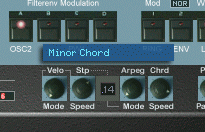 Rotate the "Arpeg Mode" knob to access 32 different modes including all standard up/down/up&down, input and pitch order, plus step sequencer, chord hold, preset chords, note record and double mode, all modes morphable in realtime. Some of them:

Arpeggio hold and sequencer start/stop can be applied by the damper pedal for hands free operation. For this depress and release the pedal within less than half a second.
Some examples:
Chord hold:
Rotate the "Arpeg Mode" knob until "Manual Chord", set "ARP On" to orange (one click), play and hold a chord, and click a second time on "ARP On" (now red). Now you can play the chord with single notes
Record:
Rotate the "Arpeg Mode" knob until "Record", set "ARP On" to orange (one click), and play in a short (max 8 notes) sequence, note by note (steps). Now either click a second time on "ARP ON" - or - more handy - quickly depress and release the damper pedal, which will start playback of the sequence, which can be edited on the fly by playing further notes. Another damper pedal action will again stop playback.
Preset Chords:
Rotate the "Arpeg Mode" knob until "Preset Chord" and set "ARP On" to orange. Now rotate the "Chrd/Speed" knob beneath which will show a choice of several preset chords that can be played with single notes
Double Mode:
Rotate the "Arpeg Mode" knob until "Double" and set "ARP On" to orange (one click). Now one note will activate 2 voices at the same time, which results in a fat and lively sound. To make it even more fat increase the "Spread" knob. A second click on "ARP ON" will arpeggiate double mode (use the speed knob on the left then).
Relative and fetched MIDI CC response (Switchable)

This feature makes parameter value jumps using non-endless rotary controllers obsolete by dedicated processing of the cc stream. There are two choices: Relative and fetched. Relative: Value changes are only added or subtracted. Fetched: A GUI control only starts to move when its value is overridden.
Continuous Two-Stage Parameter Control

Something that already could be done using VST automation now can be done directly on the GUI. Some of the most important two-stage button parameters like oscillator and noise levels and all tuning buttons now optionally can be regulated continuously by clicking into the text label and dragging the mouse vertically. Small popping up number displays will show the current value.
Bend Modes

By clicking und the number and dragging the mouse vertically you can access 32 different bend modes, which include assymetric modes like 1 semitone up /2 semitones down, modulation mapped to cutoff, or e.g. 3 different bend intervals using the mod-wheel as bender - as example check the queen "break free solo" patch
Extended Separate Voice Design
Voices now can be completely deactivated with the voice mute buttons which detaches them from the allocation engine, and so notes are only still allocated within the active voices. This allows for custom polyhony settings including any voice of choice. All tuning buttons now too allow for continuous control as described above.
Hidden LFO Features
Consult the manual to learn how to access "Sampled Vibrato" (inspired by OB-8 ), LFO delay and note triggering with free starting phase adjust.
Check it out! Would be a real pity if you discovered all of this only after one or two years
---
Effects Unit
In the "edit" mode you can access a bunch of handy quick presets by clicking on the small down arrow between the effect parameter trimpots for delay and reverb. By clicking on those presets you can check out various settings on the fly without the need of adjusting parameters manually.
Patch Browser
There are two choices to launch the preset list: temporary or fixed. Using the left side "down arrow" the list will disappear again after having chosen a preset. Using the one on the right the list will be "locked" until you close it again, which is convenient for browsing around in the presets without having to launch the list again and again.
Dual Engine Processing
Clicking on the "PP" button will make dual engine effects processing active, which alteratingly allocates two identical engines to each preset on preset change. This allows for uncut effects finishing of the previous preset while the new one immediatly can be used with its own settings.
Arpeggiator
Rotate the "Arpeg Mode" knob to access 32 different modes including all standard up/down/up&down, input and pitch order, plus step sequencer, chord hold, preset chords, note record and double mode, all modes morphable in realtime. Some of them:Arpeggio hold and sequencer start/stop can be applied by the damper pedal for hands free operation. For this depress and release the pedal within less than half a second.
Some examples:
Chord hold:
Rotate the "Arpeg Mode" knob until "Manual Chord", set "ARP On" to orange (one click), play and hold a chord, and click a second time on "ARP On" (now red). Now you can play the chord with single notes
Record:
Rotate the "Arpeg Mode" knob until "Record", set "ARP On" to orange (one click), and play in a short (max 8 notes) sequence, note by note (steps). Now either click a second time on "ARP ON" - or - more handy - quickly depress and release the damper pedal, which will start playback of the sequence, which can be edited on the fly by playing further notes. Another damper pedal action will again stop playback.
Preset Chords:
Rotate the "Arpeg Mode" knob until "Preset Chord" and set "ARP On" to orange. Now rotate the "Chrd/Speed" knob beneath which will show a choice of several preset chords that can be played with single notes
Double Mode:
Rotate the "Arpeg Mode" knob until "Double" and set "ARP On" to orange (one click). Now one note will activate 2 voices at the same time, which results in a fat and lively sound. To make it even more fat increase the "Spread" knob. A second click on "ARP ON" will arpeggiate double mode (use the speed knob on the left then).
Relative and fetched MIDI CC response (Switchable)
This feature makes parameter value jumps using non-endless rotary controllers obsolete by dedicated processing of the cc stream. There are two choices: Relative and fetched. Relative: Value changes are only added or subtracted. Fetched: A GUI control only starts to move when its value is overridden.
Continuous Two-Stage Parameter Control
Something that already could be done using VST automation now can be done directly on the GUI. Some of the most important two-stage button parameters like oscillator and noise levels and all tuning buttons now optionally can be regulated continuously by clicking into the text label and dragging the mouse vertically. Small popping up number displays will show the current value.
Bend Modes
By clicking und the number and dragging the mouse vertically you can access 32 different bend modes, which include assymetric modes like 1 semitone up /2 semitones down, modulation mapped to cutoff, or e.g. 3 different bend intervals using the mod-wheel as bender - as example check the queen "break free solo" patch
Extended Separate Voice Design
Voices now can be completely deactivated with the voice mute buttons which detaches them from the allocation engine, and so notes are only still allocated within the active voices. This allows for custom polyhony settings including any voice of choice. All tuning buttons now too allow for continuous control as described above.
Hidden LFO Features
Consult the manual to learn how to access "Sampled Vibrato" (inspired by OB-8 ), LFO delay and note triggering with free starting phase adjust.
Check it out! Would be a real pity if you discovered all of this only after one or two years
---
-
- KVRAF
- 4279 posts since 14 Nov, 2008 from UK
Thanks for giving this info, I thought it was a bug when the preset browser wouldn't close(I almost reported it), maybe change the arrows to words of some sort in an update...Peter999 wrote: Patch Browser
There are two choices to launch the preset list: temporary or fixed. Using the left side "down arrow" the list will disappear again after having chosen a preset. Using the one on the right the list will be "locked" until you close it again, which is convenient for browsing around in the presets without having to launch the list again and again.
