


Classic ZynAddSubFX VST download
-

- KVRian
- Topic Starter
- 1055 posts since 3 Jul, 2006
well, that was sort of the point of all this work
-

- KVRAF
- 3922 posts since 15 Dec, 2009
You did really well. Been pushing it for hours now and no fuss whatsoever. Finally Zyn can be used fully. 
-
- KVRer
- 10 posts since 23 Apr, 2010 from Cincinnati, Ohio
Hello!
I tried this new version tonight on Windows 7 Reaper, both 64 bit and 32 bit. I installed it into c:\Program Files(x86). I got various crashes of Reaer.host32.exe and Reaper itself when trying to close a project, I couldn't seem to get an instrument to load, and the config file was never written.
Any ideas?
It will be great to get this working, as it's truly an amazing synth.
Thanks for your work on it,
Later,
Hartley
I tried this new version tonight on Windows 7 Reaper, both 64 bit and 32 bit. I installed it into c:\Program Files(x86). I got various crashes of Reaer.host32.exe and Reaper itself when trying to close a project, I couldn't seem to get an instrument to load, and the config file was never written.
Any ideas?
It will be great to get this working, as it's truly an amazing synth.
Thanks for your work on it,
Later,
Hartley
-
- KVRAF
- 2831 posts since 11 Jun, 2003
In Fl STudio 9.1, the multiple output isn't set up correctly in Zynadd.
With all my other multi channel VSTi's, when I assign them to Mixer channel 1 in Fl Studio and click "Auto map outputs" in the fruity wrapper, then all Midi channels 1 through 16 outputs are assigned to mixer channel 1 through 16.
With the latest beta version of Zynadd, If I route the plugin to mixer channel 1 in Fl Studio and click "Auto map outputs" in Fl Studio then all 16 outputs are routed, but from mixer channel 2 to 17 (instead of 1 through 16).
Also, I don't know if this is on purpose, but whenever I have "Turbo mode" or "Multi channel" checked, then the LED db meter in Zynadd no longer displays values.
Edit Everytime I close Fl Studio (If I have the latest beta of Zynadd in it), I get a pop up saying "Fl Studio engine launcher has stopped working". This did not used to happen with the non multi out version
With all my other multi channel VSTi's, when I assign them to Mixer channel 1 in Fl Studio and click "Auto map outputs" in the fruity wrapper, then all Midi channels 1 through 16 outputs are assigned to mixer channel 1 through 16.
With the latest beta version of Zynadd, If I route the plugin to mixer channel 1 in Fl Studio and click "Auto map outputs" in Fl Studio then all 16 outputs are routed, but from mixer channel 2 to 17 (instead of 1 through 16).
Also, I don't know if this is on purpose, but whenever I have "Turbo mode" or "Multi channel" checked, then the LED db meter in Zynadd no longer displays values.
Edit Everytime I close Fl Studio (If I have the latest beta of Zynadd in it), I get a pop up saying "Fl Studio engine launcher has stopped working". This did not used to happen with the non multi out version
Last edited by pheeleep on Sun Mar 13, 2011 8:17 am, edited 2 times in total.
Play it by ear
-
- KVRAF
- 3922 posts since 15 Dec, 2009
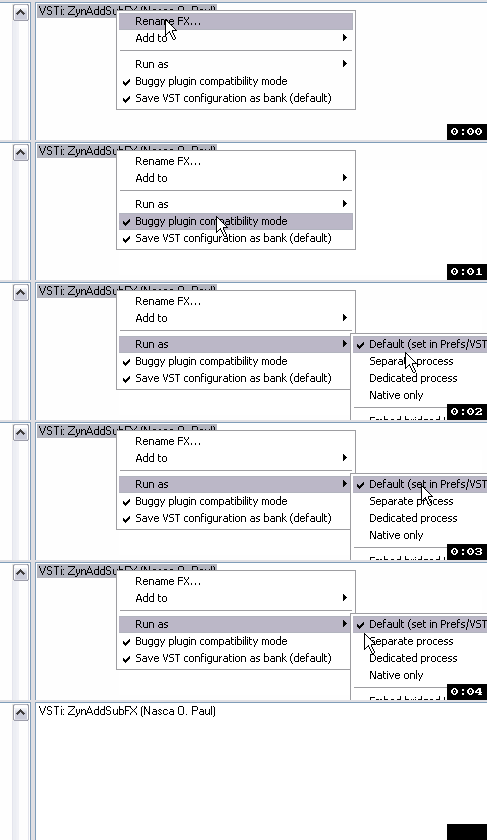
Don't run it via the Reaper host (dedicated or separate process), just load it like normal VSTs. Right-click when loading to set like this: (I'm not even using buggy mode now)Hartley Mays wrote:I got various crashes of Reaer.host32.exe
@pheeleep: I believe the LEDs are off on purpose to save resources as there's anyway metering on the DAW tracks.
-

- KVRAF
- 10175 posts since 16 Dec, 2002
I still find that with Live it makes the interface act wierd ie I have to double click everything to get focus back on Live and to get the mouse action to work eg menu, button
-
- KVRian
- Topic Starter
- 1055 posts since 3 Jul, 2006
Does Zyn tell you everytime you load it that it did not find the cfg file?Hartley Mays wrote:I tried this new version tonight on Windows 7 Reaper, both 64 bit and 32 bit. I installed it into c:\Program Files(x86). I got various crashes of Reaer.host32.exe and Reaper itself when trying to close a project, I couldn't seem to get an instrument to load, and the config file was never written.
Any ideas?
Oh wait... it is hardcoded to work in
C:\Program Files and not Program Files(x86)
I have to think how to make this work. The problem is that it is difficult to know at runtime where to look for the cfg, so the best I could come up with is to use a common path: C:\Program Files\ZynAddSubFX. But I guess on x64 that is reserved for 64 bit apps. In theory I could modify the hardcoded path to smth else. Any Ideas? Maybe simply C:\ZynAddSubFX
I don't like to mess with the registry. I also can't determine at run time the path where the dll is. If somebody knows how to do this (in coding) pls share.
Output 1 is always reserved in Zyn for the internally mixed output. When multiple outputs is active, Output1 is disabled. You must use outputs 2-17. Do you see this as a problem?pheeleep wrote:With the latest beta version of Zynadd, If I route the plugin to mixer channel 1 in Fl Studio and click "Auto map outputs" in Fl Studio then all 16 outputs are routed, but from mixer channel 2 to 17 (instead of 1 through 16).
This is exactly as V'ger suggested. It it on purpose and saves up precious CPU time. Besides, when you have multiple outputs, the LED db meter doesn't know which output to display, so it's simply off.pheeleep wrote:Also, I don't know if this is on purpose, but whenever I have "Turbo mode" or "Multi channel" checked, then the LED db meter in Zynadd no longer displays values.
Does this crash FL Studio? (meaning you cannot start another project, or does it hang?) If not, ignore it. If it does crash FL Studio you have some options:pheeleep wrote:Edit Everytime I close Fl Studio (If I have the latest beta of Zynadd in it), I get a pop up saying "Fl Studio engine launcher has stopped working". This did not used to happen with the non multi out version
1. In settings, activate 'dump notes'
2. Deactivate 'Turbo'
Does this help?
Does it make the interface act weird when Zyn's interface is also on? Then this is 'normal', and I can't solve it now, because FLTK is loaded, and its events loop interferes with the host's loop.VariKusBrainZ wrote:I still find that with Live it makes the interface act wierd ie I have to double click everything to get focus back on Live and to get the mouse action to work eg menu, button
Does it still make the interface act weird when Zyn's interface is unloaded? (after you close the dummy window)? Closing the dummy window is now supposed to unload FLTK, so that it doesn't mess up the host anymore.
Last edited by jackoo on Sun Mar 13, 2011 3:51 pm, edited 2 times in total.
== VDX == One Man can make a difference!
My music is on https://soundcloud.com/vdxi | Info | More Info
My music is on https://soundcloud.com/vdxi | Info | More Info
-
- KVRian
- Topic Starter
- 1055 posts since 3 Jul, 2006
Question for Win7/x64 ppl:
Does windows allow applications to write on C: ? Or is this disabled on matters of 'security'?
Does windows allow applications to write in C:\Program Files? here i suppose the answer is 'no'.
I'll probably post another dll with the hardcoded path changed from
C:\Program Files\ZynAddSubFX
to
C:\ZynAddSubFX
in order to avoid with differentiating Program Files vs Program Files(x86)
LE: Here it is:
[<<Removed because it is outdated. Please use 450beta>>]
x64 Users:
Please use the link above. It's the same as 448beta, except the default path is now C:\ZynAddSubFX
Please copy the banks folder there. And check that the cfg file is correctly written into that folder (it shouldn't matter where the dll is, just the banks folder and the cfg file should be there!)
@Hartley Mays: Please let me know if this fixed your problem.
LE2: You have to create the C:\ZynAddSubFX folder manually And don't forget to update the buffer size!
LE3:
@Hartley Mays: If you wish to run Zyn in a separate process, in Reaper, as V'ger suggested in the beginning, please also activate 'dump notes' in settings, and do not use the turbo mode. It will do memory management like before the update. And if it is used in a separate process, it will not interfere with the GUI.
But I would recommend to use it in the same process as all other VSTs now, with default settings ('dump notes' off). I'm keen to know which works best for you.
LE4:
For default usage: ('dump notes' deactivated)
One thing I would like to kindly ask: Before you say it crashes the host when unloading a project, also please try to close the project after all the instances have their GUIs closed. See if that helps.
Question for UnderwaterSunlight: You kept mentioning that Zyn would make loud noises particulary when changing presets, in ableton live. Do you still notice this behavior with the new version?
Does windows allow applications to write on C: ? Or is this disabled on matters of 'security'?
Does windows allow applications to write in C:\Program Files? here i suppose the answer is 'no'.
I'll probably post another dll with the hardcoded path changed from
C:\Program Files\ZynAddSubFX
to
C:\ZynAddSubFX
in order to avoid with differentiating Program Files vs Program Files(x86)
LE: Here it is:
[<<Removed because it is outdated. Please use 450beta>>]
x64 Users:
Please use the link above. It's the same as 448beta, except the default path is now C:\ZynAddSubFX
Please copy the banks folder there. And check that the cfg file is correctly written into that folder (it shouldn't matter where the dll is, just the banks folder and the cfg file should be there!)
@Hartley Mays: Please let me know if this fixed your problem.
LE2: You have to create the C:\ZynAddSubFX folder manually
And don't forget to update the buffer size!LE3:
@Hartley Mays: If you wish to run Zyn in a separate process, in Reaper, as V'ger suggested in the beginning, please also activate 'dump notes' in settings, and do not use the turbo mode. It will do memory management like before the update. And if it is used in a separate process, it will not interfere with the GUI.
But I would recommend to use it in the same process as all other VSTs now, with default settings ('dump notes' off). I'm keen to know which works best for you.
LE4:
For default usage: ('dump notes' deactivated)
One thing I would like to kindly ask: Before you say it crashes the host when unloading a project, also please try to close the project after all the instances have their GUIs closed.
See if that helps.Question for UnderwaterSunlight: You kept mentioning that Zyn would make loud noises particulary when changing presets, in ableton live. Do you still notice this behavior with the new version?
Last edited by jackoo on Tue Mar 15, 2011 8:39 pm, edited 3 times in total.
== VDX == One Man can make a difference!
My music is on https://soundcloud.com/vdxi | Info | More Info
My music is on https://soundcloud.com/vdxi | Info | More Info

-
- KVRer
- 10 posts since 23 Apr, 2010 from Cincinnati, Ohio
Jackoo,
The new version running from C:\ZynAddSubFX seems to work fine after install and some quick initial testing on Windows 7 64 bit. I have a config file now.
I'll work with it more this afternoon and let you know if I hit anything else.
V'ger,
It was already running with the default option in Reaper, so that didn't relate to the problems.
Thanks to both of you for the advice, and for the quick turnaround on the new x64 version.
Later,
Hartley
The new version running from C:\ZynAddSubFX seems to work fine after install and some quick initial testing on Windows 7 64 bit. I have a config file now.
I'll work with it more this afternoon and let you know if I hit anything else.
V'ger,
It was already running with the default option in Reaper, so that didn't relate to the problems.
Thanks to both of you for the advice, and for the quick turnaround on the new x64 version.
Later,
Hartley
-
- KVRAF
- 3922 posts since 15 Dec, 2009
Reaper_host32.exe is the wrapper application that runs when vsts are started as 'separate' or 'dedicated', so don't know why that would enter into it if all vsts were started normally, but anyway good that it's working now.Hartley Mays wrote:It was already running with the default option in Reaper, so that didn't relate to the problems.
-
- KVRist
- 44 posts since 5 Mar, 2011 from Gavere, Belgium
Zyn still crashes on my windows 7 (32bit) - laptop whenever I click 'file--> open parameter' command. I tried it in reaper and minihost both with the same result. Sometimes it doesn't and i can load a file. It is not the loading of the files that make the UI crash, but merely clicking the open parameters command. (once i get the browser to open without crashing i can load any file).
I tried using another driver (direct sound instead of asio4all driver) but same result.
So now I installed reaper and latest zyn version on my old XP desktop and guess what...I can loads xmz files one after another without any problem
Then I installed same on win 7 pro (32bit) laptop from my work and there clicking the open parameter command makes the UI crash again
(crash = browser window pops up for a fraction of a second and then is gone, after which Zyn Ui doesn't respond to anything anymore. + Whenever I load zyn as separate process the crash only affects the one track, when loaded as default it crashes all Zyn instances that are loaded)
So could it be that there is still an issue with loading xmz and win 7 (32b)?
About the cfg file, it is there and works but strangely enough I cannot see it in the folder using MS explorer but when I look for it using the instrument browser (selecting all files*) then I can see it... Anyway it works so thats the most important.
Greetings
I tried using another driver (direct sound instead of asio4all driver) but same result.
So now I installed reaper and latest zyn version on my old XP desktop and guess what...I can loads xmz files one after another without any problem
Then I installed same on win 7 pro (32bit) laptop from my work and there clicking the open parameter command makes the UI crash again
(crash = browser window pops up for a fraction of a second and then is gone, after which Zyn Ui doesn't respond to anything anymore. + Whenever I load zyn as separate process the crash only affects the one track, when loaded as default it crashes all Zyn instances that are loaded)
So could it be that there is still an issue with loading xmz and win 7 (32b)?
About the cfg file, it is there and works but strangely enough I cannot see it in the folder using MS explorer but when I look for it using the instrument browser (selecting all files*) then I can see it... Anyway it works so thats the most important.
Greetings
-
- KVRian
- Topic Starter
- 1055 posts since 3 Jul, 2006
IbiM wrote:So could it be that there is still an issue with loading xmz and win 7 (32b)?
This is quite the strangest thing I can imagine. I don't have win7 (still using my XP box, so I can't test)
Anyway, this is strictly related to FLTK, and the FLTK open file browser (which is quite independent of zyn's code). To solve the problem in XP I had to manually tweak the FLTK lib. What I mean is don't try different drivers and such because the problem is not from there.
Just as an idea, because you said you can't see the cfg file. It seems win7 doesn't let the average user/application to modify Program Files.
Could you please also try the version hardcoded in C:\ZynAddSubFX? (called x64, even though it's not 64 bit). Manually make the folder, copy the banks there. You should also see that the cfg is created THERE. Does the problem persist with that too?
If it does I don't have a clue on how to solve it now. Will think about it.
LE: important question: if you ever get to actually show the open file browser (in win7), when the browser window is active, can you click back on zyn's interface and open other zyn windows, or are they locked by the browser window?
== VDX == One Man can make a difference!
My music is on https://soundcloud.com/vdxi | Info | More Info
My music is on https://soundcloud.com/vdxi | Info | More Info
-
- KVRian
- Topic Starter
- 1055 posts since 3 Jul, 2006
@IbiM: Does this solve your problem on win7?
ZynAddSubFx VST v2.4.1.450beta
ver. 2.4.1.450beta VST VDX version
- The default hardcoded path will remain C:\ZynAddSubFX
Sorry for all the other people who have their banks in Program Files. If you wish to upgrade, you must move the banks to C:\ZynAddSubFX
- Fixed crashing GUI on multiple open xmz dialogs *really* this time
(Tweaked on FLTK some more....Or so I hope... I can't test on win7. But theoretically now it should work there also)
- Changing presets should be now more 'quiet' (Increased fade-out behavior when shutting up)
- This version should work on both 32-bit and 64-bit systems
- Included folderol's latest bank collection
===
VDX
ZynAddSubFx VST v2.4.1.450beta
ver. 2.4.1.450beta VST VDX version
- The default hardcoded path will remain C:\ZynAddSubFX
Sorry for all the other people who have their banks in Program Files. If you wish to upgrade, you must move the banks to C:\ZynAddSubFX
- Fixed crashing GUI on multiple open xmz dialogs *really* this time
(Tweaked on FLTK some more....Or so I hope... I can't test on win7. But theoretically now it should work there also)
- Changing presets should be now more 'quiet' (Increased fade-out behavior when shutting up)
- This version should work on both 32-bit and 64-bit systems
- Included folderol's latest bank collection
===
VDX
== VDX == One Man can make a difference!
My music is on https://soundcloud.com/vdxi | Info | More Info
My music is on https://soundcloud.com/vdxi | Info | More Info