Automation with handles or bezier curves?

Audio Plugin Hosts and other audio software applications discussion
RELATED
PRODUCTS

Post

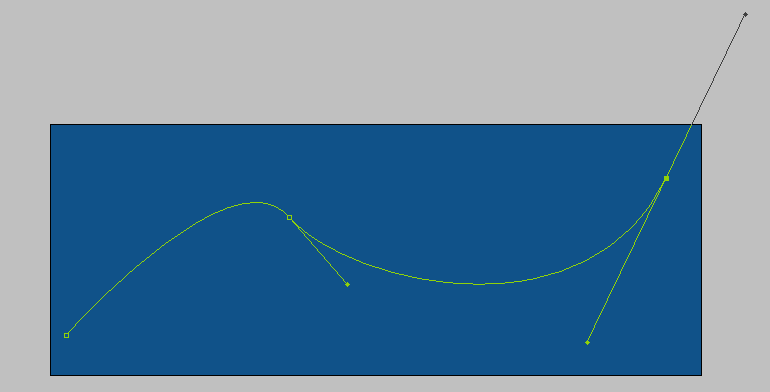
Does anybody know of any DAW using bezier curve type automation? or automation point handles for drawing more graceful automation curves? This is missing on all the DAWs I have (inc pro tools and FL studio).

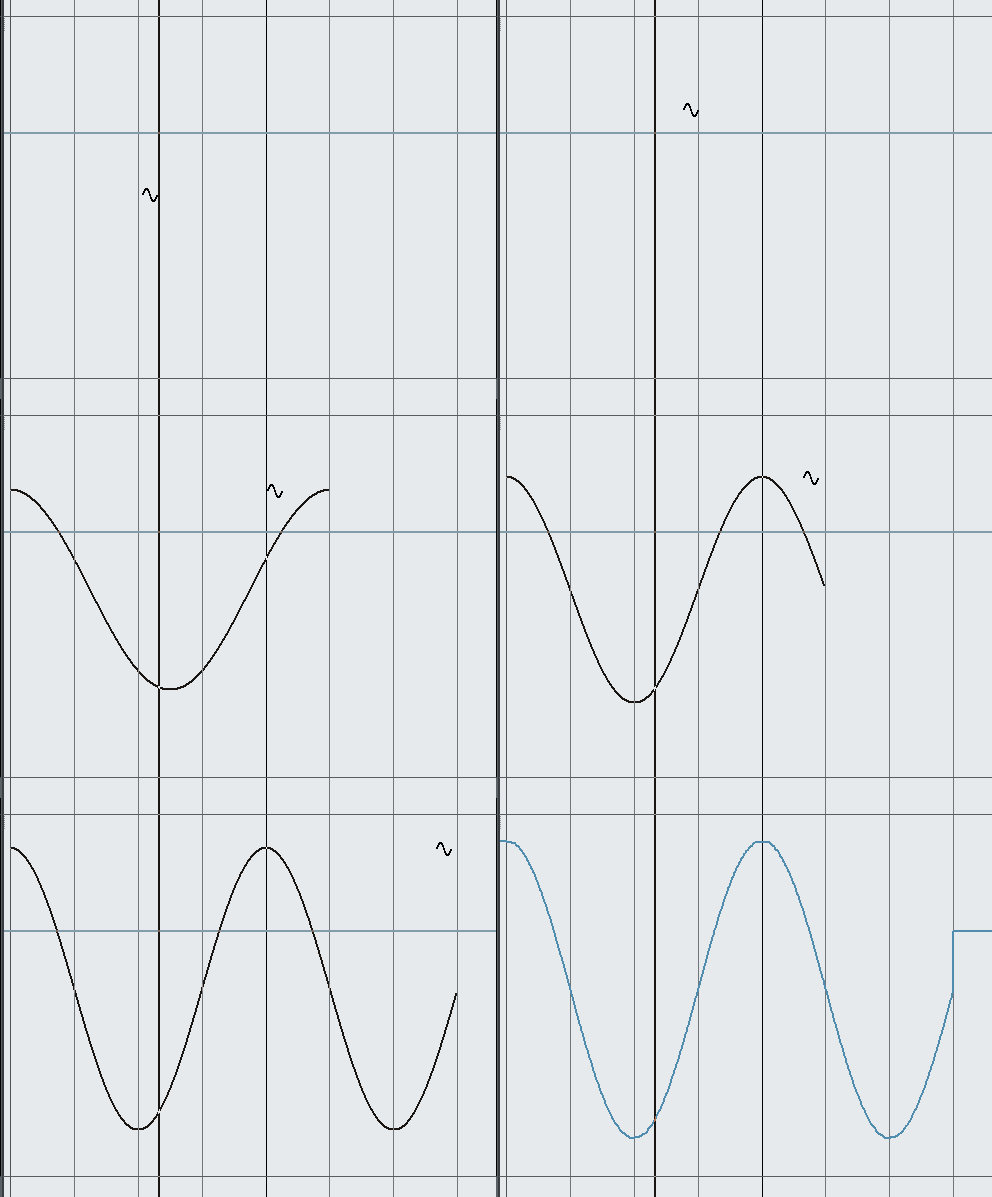
You would be surprised at how difficult it is to draw even an accurate sine wave shape without bezier handles.

Ive searched the forum briefly but not much turned up.
Image

Post

Podium draws automation exactly like that.

Reaper also uses beziers but you manipulate can the slope directly without needing handles

don't know why more hosts don't draw automation this way instead of having to mess around with lots of lines and nodes to edit a smooth curve

Pretty sure FL Studio has something similar though too

Post

Coda. wrote:Does anybody know of any DAW using bezier curve type automation? or automation point handles for drawing more graceful automation curves? This is missing on all the DAWs I have (inc pro tools and FL studio).

You would be surprised at how difficult it is to draw even an accurate sine wave shape without bezier handles.
The DAW devs know what bezier curves are. IMO the reason you don't see them a lot is that they don't reflect the actual automation being performed, which at best is at the sample level. The curves would just be approximations of the actual automation. Which would cause just as much pissing and moaning as the current endless parade of "why no bezier curve automation" threads.
If you have to ask, you can't afford the answer

Post

DELETED

Post

Who on earth could tell the difference in a mix between a nicely hand-drawn curve or one with some sort of bezier tool?
Seriously
My other host is Bruce Forsyth

Post

shallow wrote:
yeah it is pretty amazing that devs don't use the best (most accurate / flexible / fastest) curve drawing method for drawing curves.

re accurate representation - firstly for audio paramaters like pan and volume bezier is as accurate a representation as any. For quanitzed parameters beziers can be used for drawing then the representation quantized if required. I'd be interested to see where accuracy is a problem for audio compared to, say, graphics. In the end WYSIWYG applies as far as the user is concerned and defined at every point (sample accurate) as far as the programmer is concerned.
Also, if one is interested in accuracy - hand drawn envelopes are normally a pretty terrible approximation of a smooth curve
re Reaper - the Bezier implementation is a little strange, you can't pull a line 'up' for instance, so making a sine wave is difficult, but it's is better than nothing and fine for fade in / fade out to a set point
Geez, you guys simply don't get it ...

Here is Cubase, which people bitch about non-bezier constantly. However, it does curves (including sine) easily and correctly. It does it at the ADJUSTABLE level of detail required.

Example 1, very low point data kept. Would not be a good tracker for the sine wave, but may be good for certain event tracks. LOW overhead for tracking the automation points.
Image

Example 2, very high point data kept. Great Sine tracking, terrible performance. You can adjust the amount of point data to your hearts content. AND it is close to sample accurate. I say close, because there are scenarios where it is not (like certain MIDI configurations etc..)
Image


So, what does bezier give you that this doesn't?
If you have to ask, you can't afford the answer

Post

DELETED

Post

shallow wrote:"So, what does bezier give you that this doesn't?"

arbitrary curves of any complexity
that accomplishes what in terms of implementing a curve to sample accuracy?

Where is the curve I can't create with the tool?
If you have to ask, you can't afford the answer

Post

basically you guys are arguing for a feature that gives you nothing but eye candy. At the detriment of showing you what the automation actually does and with a decrease in performance. The fact that the DAW devs avoid bezier aught to tell you something.
If you have to ask, you can't afford the answer

Post

Thanks guys.

I'm attempting to bring some art in to my audio work, logos and graphics etc embedded in to my releases so they will be viewable in a spectral display.

My first attempt was a graffiti type piece with only limited success. The piece was simply four letters A.M.A.P.

Three sine waves were automated in FL Studio to create the piece. I found it very fiddly compared to working with traditional graphic tools, but some of the results were nice. The sine waves were run in to a delay to create the depth and the appearance of some harmonic overtones gave the letters a nice background.

But here is my problem, I tried Photosounder and a few other image to sound converter but there's something I just dont like about the FFT sound they rely on, its always very metallic and revery. Whereas using pure audio synths etc in a DAW is much more pleasant sounding, but limited by how well the automation works.


http://imageshack.us/f/534/capture00000.png

http://imageshack.us/f/543/amapyellowandblue.png

Id appreciate any other suggestions.
Last edited by Coda. on Fri Jan 20, 2012 11:14 pm, edited 1 time in total.

Post

spaceman wrote:Who on earth could tell the difference in a mix between a nicely hand-drawn curve or one with some sort of bezier tool?
Seriously
no one. Plus if they would learn the f'n tools, they would realize that what they want to do is already there.

So lets say you draw that pretty "arbitrary curve" now how do you intend to map that curve to the sample map? Where do you set the curve points? You either ...
a) hand enter the points so that your arbitrary curve doesn't get reshaped too much (although it will because you are reducing automation points.

b) let the system reduce the automation points for you which will again change the shape

c) keep an automation point at every sample and swamping your CPU for no benefit to what actually is happening via automation.


OR

You use the spline based tools to F'n draw your stuff because it fits the medium you are working in.
If you have to ask, you can't afford the answer

Post

Coda. wrote:Thanks guys.

Id appreciate any other suggestions.
Biggest suggestion ... quit using an audio editor as a graphics tool.

Or at least realize that it isn't a program for drawing pictures. It is for editing audio data. The tools are designed for that purpose. Instead of just trashing the intelligence of the devs as if they have never heard of bezier curves before. I guarantee, any of these guys who can figure out the Fourier transforms for filters has a pretty good idea about curve data.
If you have to ask, you can't afford the answer

Post

DELETED

Post

FWIW, I don't mean these posts to come out angry sounding. This subject is one of those repeat to infinity threads. I give it two weeks tops before the next one. The best part is when the whiners have no idea that there are even curve drawing tools in their DAW. They just use the stupid pencil because that's the default drawing tool.
If you have to ask, you can't afford the answer

Post

DELETED

Post Reply

Return to “Hosts & Applications (Sequencers, DAWs, Audio Editors, etc.)”