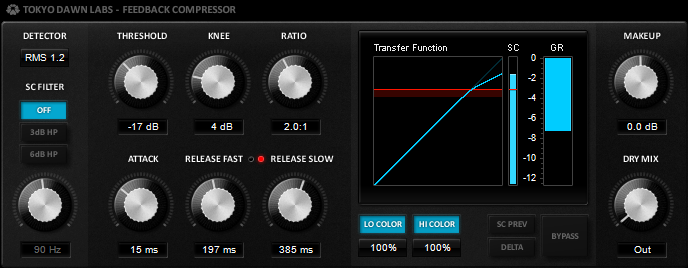
Anyone tried the new TDR Feedback Compressor?

VST, AU, AAX, CLAP, etc. Plugin Virtual Effects Discussion
Post Reply New Topic
RELATED
PRODUCTS

Post

A new update is available!

Image

# New fast/slow release state LEDs
# Bug: "transfer function display doesn't update during parameter automation" fixed
# User-manual finally available! (read it! :) )
# Overall performance improved by ~15%
# Small graphical improvements

Download:
http://www.tokyodawn.net/tdr-feedback-compressor/

(btw you can follow updates here too http://www.kvraudio.com/product/tdr-fee ... -dawn-labs ... maybe someone finds the time for a review ;))

Will play around with the +6dB idea and see how I can improve the situation in a forthcoming update. Found no time to attack the problem properly. Anyway, enjoy the update! (and the new manual!) [/img]
Fabien from Tokyo Dawn Records

Check out my audio processors over at the Tokyo Dawn Labs!

Post

I'm waiting for 1.0 release to say this is my favorite compressor!

Post

vladg wrote:I'm waiting for 1.0 release to say this is my favorite compressor!
what an honour.. Really proud to hear that from you vlad
Fabien from Tokyo Dawn Records

Check out my audio processors over at the Tokyo Dawn Labs!

Post

I have to say man, in a market full of plugins that promise "precise emulation" of analog hardware, it is really refreshing to see a dev that is embracing digital technology.

If people kept using the same formulas for music production, it would'nt be as available to people, and it would'nt sound as diverse.

But yea I love the compressor. I'd love to see you keep developing different plugins after the compressor leave beta!

Post

Nice compressor!

Cheers!!!

Post

Hi everyone,

I just released an update to 0.9.03
Image

Download here: http://www.tokyodawn.net/tdr-feedback-compressor/

I was about to finally release 1.0.0 but several users reported issues with the controls refresh rate in some DAWs, so here's a double check update before I release the final version.

# Color scheme changed
# Rare bug during initialization of the sidechain in some DAWs fixed
# Fixed a bug that extremely slowed down the refresh rate of some controls (in Reaper)
# Fixed a bug in the "Hi Color" section
# Minor performance improvements

I'm currently also working on a new series of small processors dedicated to typical mixing tasks. They all come with neat and simple interfaces, relatively low CPU consumption, a nice sound (of course! ;)) and a few unusual approaches.

The first set will include a de-esser, an expander/gate and a compressor.

More soon!

Meanwhile, enjoy the Feedback Compressor update! :) Tell me if everything works as expected in your environment.[/img]
Fabien from Tokyo Dawn Records

Check out my audio processors over at the Tokyo Dawn Labs!

Post

Cheers, one of my favorite new compressors to date, nice GUI by the way :party:

Post

yeah nice gui indeed (although i preferred the other color scheme), finally a freeware comp with the gui i was expecting!!

Post

moutkie08 wrote:yeah nice gui indeed (although i preferred the other color scheme), finally a freeware comp with the gui i was expecting!!
somebody finally agreed with me :shock: :shock: :shock:

Post

And the manual is great! Easy written and very laconic (in good meaning)! ;-)
Vlad from Tokyo Dawn Labs

Post

vladg wrote:And the manual is great! Easy written and very laconic (in good meaning)! ;-)
You surely can imaging how much I hate the pain of writing a manual, I'm really happy you enjoyed the read. Lol, do only developers read manuals? :D

Oh! just found a bunch of typos in the manual, hope you can live with them until the next update..


Anyway, thanks everyone for the nice words!


BTW, the plugin can be considered as "final". In case you find any issue, pls inform me so I can fix it before the 1.0.0 release.
Fabien from Tokyo Dawn Records

Check out my audio processors over at the Tokyo Dawn Labs!

Post

This is one of the most "useful" compressors I have. It is my first choice when I need to change the shape of a sound. It is my first choice when I need more aggression from the drums and it is the first choice on the mix bus.

I really can't wait for your future creations.
Aiynzahev-sounds
Sound Designer - Soundsets for Pigments, Repro, Diva, Virus TI, Nord Lead 4, Serum, DUNE2, Spire, and others

Post

FabienTDR wrote:BTW, the plugin can be considered as "final". In case you find any issue, pls inform me so I can fix it before the 1.0.0 release.
Thanks for this compressor, Fabien!

I was thinking about the Dry Mix knob: it is somewhat unintuitive. Does it reduce the wet signal when adding volume, or just adds volume?

A Dry-Wet knob could have been a better option.

Or even separate knobs for Dry and Wet signal, with simple readouts of volume levels, so users can mix the two signal streams with more precision, as desired.

Of course this latter suggestion goes far from your current concept, but I'd like to know what you think about it.

[I'm eagerly waiting for the EQ you promised over at gearslutz. Hope it won't be long.]

:love:

Post

sheikh al Dudeilan wrote:
FabienTDR wrote:BTW, the plugin can be considered as "final". In case you find any issue, pls inform me so I can fix it before the 1.0.0 release.
Thanks for this compressor, Fabien!

I was thinking about the Dry Mix knob: it is somewhat unintuitive. Does it reduce the wet signal when adding volume, or just adds volume?

A Dry-Wet knob could have been a better option.

Or even separate knobs for Dry and Wet signal, with simple readouts of volume levels, so users can mix the two signal streams with more precision, as desired.

Of course this latter suggestion goes far from your current concept, but I'd like to know what you think about it.

[I'm eagerly waiting for the EQ you promised over at gearslutz. Hope it won't be long.]

:love:
when you get a wet dry mix nob, slowly rotate from wet 100% to dry 100% and listen to the sound as the nob travels the duration. It goes from over compressed to dry signal, usually I set them around 60% when I want a more natural sound, it adds to a balance of a more natural feel than just having a signal that can be squashed too much, especially when it comes to stuff like final mixes. It can also let the audio material breathe a little too and when you have a lot of bass frequencies combined with the hi pass sidechain you will understand when you try it out and listen

Post

Trakstar wrote:when you get a wet dry mix nob, slowly rotate from wet 100% to dry 100% and listen to the sound as the nob travels the duration. It goes from over compressed to dry signal, usually I set them around 60% when I want a more natural sound, it adds to a balance of a more natural feel than just having a signal that can be squashed too much, especially when it comes to stuff like final mixes. It can also let the audio material breathe a little too and when you have a lot of bass frequencies combined with the hi pass sidechain you will understand when you try it out and listen
Hey, Trakstar, thanks for the heads up, but I happen to already know how a Dry-Wet mix knob works. What I meant with my post above was to ask for more precision, for some 'visual' feedback on how strong the two signals are and how the Dry-Wet [or separate Dry and Wet] mix knob is affecting them.

I can be as intuitive as necessary, but sometimes it just helps to have more control and some visual feedback - numeric displays, for example.

Post Reply

Return to “Effects”