2CAudio B2: Full Body. Maximum Attitude.

VST, AU, AAX, CLAP, etc. Plugin Virtual Effects Discussion
Post Reply New Topic
RELATED
PRODUCTS
B2

Post

V0RT3X wrote: Btw what rendering application are you using for this?

My friend, and design guru, Shuhei Matsuyama in Tokyo did the 3D "boxes/packaging". I believe he uses Lightwave together with Adobe Creative Suite...


He also does all the Galbanum Abstraction series artwork which he hand-draws and then scans and adds vectors and color processing in Illustrator and Photoshop... Very talented dude!


Post

Well, after demoing this thing I ended up buying B2 last night. Some of the more exotic/animated presets sold me.

Post

stikygum wrote:Well, after demoing this thing I ended up buying B2 last night. Some of the more exotic/animated presets sold me.

You mean like these:

http://soundcloud.com/2caudio/b2-sfx-ri ... vine-space

http://soundcloud.com/2caudio/b2-sfx-ri ... ine-binary

http://soundcloud.com/2caudio/b2-sfx-richard-devine

http://soundcloud.com/2caudio/b2-sfx-ri ... vine-dizzy

http://soundcloud.com/2caudio/b2-sfx-ri ... vine-after

??

:D

These were all made by our friend, and sound-designer extraordinaire, Richard Devine. The presets he used are in the file names. Here is the dry source he used:

http://soundcloud.com/2caudio/b2-sfx-richard-devine-dry

Richard had the following to say about B2:
Man B2 is just stunning. I can honestly say that its
probably the best Reverb plug-in I have used so far. It definitely is
giving my Eventide H8000 a run for the money. The Broken Space, and
Resonant presets are amazing. I was totally blown away by how much
detail you can hear. One word: astonishing.
Thanks Richard! Really cool stuff!
Last edited by Andrew Souter on Tue Sep 18, 2012 7:29 am, edited 2 times in total.

Post

Several questions:

1. In the B2 documentation, under the heading "Range", there are statements about how Size and Shape work together. Is that meant to say "Size and Range"?

2. Does the select list control under Contour associate with Contour amount? Not asking for a full explanation ... can wait until the doc. is complete. Just curious.

3. No matter what I set on the Info page, the Oversample control on the main page is disabled and blank. Any ideas why that might be?

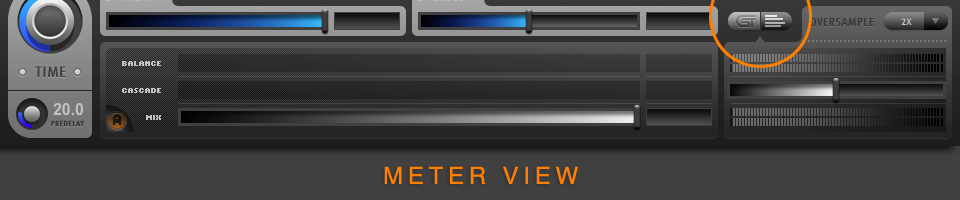
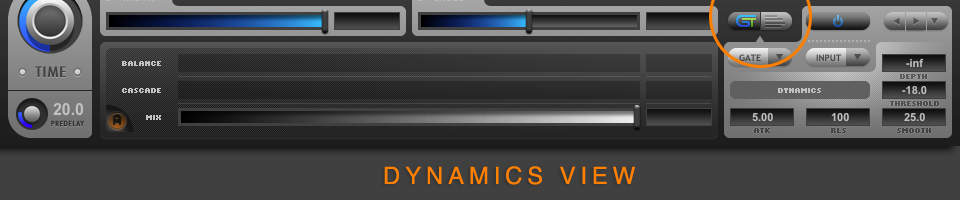
4. What does the button pair to the immediate left of the Oversample label control? I see that it does something, but I have no idea what I'm looking at.

Thanks for any clarifications.

Post

dmbaer wrote:Several questions:

1. In the B2 documentation, under the heading "Range", there are statements about how Size and Shape work together. Is that meant to say "Size and Range"?.

Yes. Several items where still referring to Breeze items. I have corrected them all now, and vastly expanded the relevant sections. Here is the full and final manual text for these features:

/////////////////////////////////////////////////////////////////////////////////

Size Knob

The Size knob sets the general reference delay length, and proportionally scales the length of all delays while retaining the relative Geometry of the given preset. Thus Size controls the perceived size of the reverberant space, since generally speaking larger spaces in the real world have longer traveling time between reflecting surfaces, which translates to longer delay times in the digital world. The Size control is measured in Meters and has a range of 1 to 250 Meters (MET). For the majority of natural sounding presets, the Size parameter should be set in conjunction with Time parameter and these controls should remain roughly proportional to one another for natural sounding presets. There are exceptions to this rule however. The effects of the Size control are represented in the Taps Display by showing how the delay length distribution of the Early Delays is scaled by changes to the Size parameter.

• Extremely Small Sizes (~5 Meters)
o Are great to use to model Early Reflections when feedback is disabled.
o Produce almost instantaneous density buildup when using feedback
o Can produce strong coloration, comb filtering, resonance, and "metallic" sound in some extreme cases
o Can be used intentionally with heavy modulation to achieve very dense, "plate-like" presets

• Small Sizes (5-15 Meters)
o Produce very fast density buildup
o May have some "Small Room" coloration, but can generally avoid strong comb filtering and resonance

• Medium to Large Sizes (15-75 meters)
o Produce moderate to slow density buildup
o Are generally ideal for most Hall and musical performance space presets
o Are large enough to avoid any unwanted coloration
o Are a good choice to use to emulate some classic hardware devices

• Very Large Sizes (75-250 meters)
o Have slow density buildup and are more sparse
o Can be used with high Density settings to customize the rate of density increase in the reverb tail over time
o Can achieve the perception of discrete echoes in the reverb tail
o Can be used with the Cascade control to irregular and clustered composite decay envelopes

From these general guidelines, it can be seen that large sizes not only produce longer delays, but also lower density tails and slower density buildup. Because of these facts, it can sometimes be desirable to use an exaggerated Size setting when additional clarity, sparsity, or "mix space" needs to be achieved in a dense musical project. It can also be particularly useful to use larger setting with positive Density and various Diffusion settings to customize the initial density and the rate of increasing density to achieve the perfect match of these characteristics to the needs of the source sound.


Geometry Controls

The Geometry controls consist of Range, Random, Curve, and Contour. Together they define the virtual geometry of the physical space and determine its complexity. These aspects contribute to the overall character of the reverb both in the time domain and in the spectral domain and will have a large effect on the smoothness and timbre of the reverb. Other developers tend to choose static settings for these types of parameters and do not expose them to the user. Sometimes a small set of these parameters are marketed as different "algorithms" where one configuration may be labeled a hall, and other may be a chamber or a plate. B2 is not confined to such limitations. Instead its Range, Random, and Curve controls define its delay distribution, and its Contour control defines the relative amplitude of these delays using any of twelve different methods. The various combinations of these parameters together with B2's density mode options allow an incredibly diverse set of possible geometries. For all intents and purposes, the range of possibilities is effectively infinite. When combined with B2's Cascade function in its dual-engine mode the results are even more diverse and powerful.

Note: B2's Geometry Controls define relative relationships between its various delays. These relative relationships are preserved when changing the Size parameter. Thus you can think of the Geometry controls as defining a specific type of spatial environment with its own characteristics. When Size is changes, these characteristics are simply scaled proportionally while keeping the Geometry relationships intact.


Range (Knob)

Range is measured in percent (%) and defines the smallest delay possible relative to the current Size setting. In a sense you can consider Size to set the maximum delay length, and Range to set the minimum delay length for the currently active set of delays.

In a physical sense Range increases the perceived complexity of the geometry of the acoustic space. Larger values produce greater variation in delay length, and thus more complex three-dimensional geometry. You may think of it as increasing the number of reflective surfaces in the acoustic space, or increasing the fractal tessellation of a three-dimensional cube if you prefer to be really brainy. Alternatively lower values could be considered to be spaces that are mostly open with few objects inside them, while high values could be considered to be spaces with many interior architectural details or furnishings. The effects of the Range control are represented in the Time and Taps Displays by showing how the delay length distribution of the Early Delays is affected by changes to this parameter.

• Minimum Values close to 0.0
o Range values of less than approximately 10% are not really possible in real physical three-dimensional space; they can be interesting for special effects however
o Range of exactly 0.0 will make all delays almost exactly the same; when feedback is high this can result in "diffusing delay" effects as the delays drift out of sync during feedback

• Low Values
o Represent simple room geometries with few reflecting surfaces
o Can conceptually be thought of as approaching an empty cube at low values around 25%, though this is not completely accurate
o Will produce the strongest emphasis on Size differences and will contain more natural Pre-Delay
o Can, at low values, produce noticeable ripples or clusters of delays in the beginning of the reverb tails that will smooth out over the decay of the tail. This can be especially noticeable at large Size settings or on sources with fast transients, and if this is objectionable for the given musical need it is recommended to raise the Shape value some until this effect is no longer perceivable.

• Medium to High Values
o Represent complex room geometries with many reflecting surfaces and irregularities
o Examples: concert halls with audience seating, natural spaces, small rooms that contain a lot of furniture, buildings with irregular architecture
o Will produce the weakest emphasis on Size differences and will contain less natural Pre-Delay
o Will produce the smoothest amplitude envelope in the tails
o Can exhibit some minor coloration at extreme values approaching 100%
o Can sound noticeably different at different Oversampling settings when Range is exactly 100% regardless of Size.

Size and Range work together to create the illusion of physical dimensionality. Size determines the longest distance between any two exterior walls of the theoretical space, and Range determines the smaller, finer architectural details of the interior of this space. Together Size and Range can affect the general overall timbre of the reverberation, while Random and Contour contribute additional details and subtleties.

Tip: If Size and Range are both set to high values it is possible to achieve lower density and slower build up in the reverb tails without the obvious psychoacoustic characteristics of a large space such as an excessively large Pre-Delay or time between reflections in the initial build up. To some degree, high Range values can reduce the perceived size of the acoustic space and the control works in opposition to the Size control. Using higher than normal values on both controls can be useful to emulate behavior of some classic hardware devices.

Random (Knob)

The Random control effects the random behavior of the delay distribution following our top-secret family recipe. Larger values have more random behavior. We could tell you more, but we'd have to…

• Small values
o Make their parents proud
o Win awards for good behavior
o Like to tuck their shirts in a comb their hair neatly
o Can be a bit too perfect and border on being boring
o Maybe become police officers when they grow up

• Large values
o Are rebellious little monsters
o Have lots of experience in detention
o Where lots of black and spiky things
o Can get a bit out of control and obnoxious
o Will never grow up, but know plenty of police officers from first hand interactions with them

In all seriousness, there are no rules. Adjust this control to taste. There is no right or wrong answer here.

Tip: Extreme Random values can exaggerate the sense of width and spaciousness of the virtual sound field.

Curve (Knob)

The Curve control affects the distribution of the delays within the delay range from the minimum to the maximum delay length as determined by the Size and Range controls. Positive Curve values give more shorter delays that are closer to the minimum. Negative values result in more longer delays that are closer to the maximum.

Image

• Positive values
o Generally will give a slightly smoother decay envelope all else being equal particularly around 25%
o Will give results similar to increasing the Range control value, and physically can be thought of more complex spaces with more interior objects and obstructions
o Are good to use for plate emulations

• Negative values
o Can produce a more textured decay envelope that may exaggerate the sense of size and space
o Will give results similar to decreasing the Range control value, and physically can be thought of more simple spaces with less interior objects and obstructions
o Are good to use to give an exaggerated sense of open space

Tip: More extreme Curve values can be interesting to use with the Cascade control in dual engine configurations, as it seems heuristically once a sufficient level of complexity is reached some of the more objectionable results of using extreme values are masked by the complex interactions of dual engines, and the composite result magically ends up with the desired mystical balance between predictability and surprise.

Tip: Objectionable effects of extreme Curve settings such as obvious rippling can be undone to some degree by trying different and more extreme Random settings.
Last edited by Andrew Souter on Tue Sep 18, 2012 7:10 am, edited 5 times in total.

Post

dmbaer wrote:Several questions:
2. Does the select list control under Contour associate with Contour amount? Not asking for a full explanation ... can wait until the doc. is complete. Just curious.
here you go:

/////////////////////////////////////////////////////////////////////////////////

Contour (Knob)

The Contour control is a Bi-Polar control that is measured in percent and has a range of -100% to 100%. Contour controls the amplitude of each of the delays in the algorithm and can be used to apply envelope characteristics to the early delays in the reverb tail. When Contour is exactly 0%, all delay gains are statistically equal and no envelope is applied. When contour is greater or less than 0% an amplitude envelope is applied to the delay range. B2 currently offers twelve different Contour types. Each type uses a different envelope shape and behavior. The further away from 0% the Contour control is, the more pronounced the effect of the Contour envelope will be and the greater the difference between the maximum and minimum delay amplitudes will be. The effect of the Contour control is represented in the Taps Display.

Tip: To quickly gain an intuitive understanding of the various Contour curve options, load a single-engine preset, set the Density control to the maximum value, set Size, Range, Random, and Curve to their default values by control-clicking on them, and open the Taps Display. Move the Contour control from 0% to 100% and notice the shape of the envelope that is applied to the delays. Move the Contour control from 0% to -100% and notice the new shape of the envelope that is applied to the delays. Negative values should give the opposite or complimentary curve as compared to positive values.

Tip: Extreme Contour settings will have an effect on the timbre and smoothness of the reverb tail as well as the initial attack envelope. This fact can be used purposefully to achieve various textured effects in the reverb tail when desired.

Tip: Moderate to extreme Contour settings can be used in the A-Engine with a large Size setting, and feedback disabled to give a sense of discrete echoes or hard-bounces in the reverb tail. This technique can also be used with Cascade to intentionally created highly textured and clustered decay envelopes.


Contour Type Menu

The Contour Type Menu currently provides 12 different Contour Types:

Image

EXP. Exponential. An exponential decay curve. Negative Contour values result in a slower attack envelope where the delay gains will start at some minimum value and build to a maximum peak before the reverb tail begins its exponential decay. When contour is positive, the effect of the attack envelope is reversed: the very first delay in the tail achieves maximum gain statistically, and subsequent delays in the early phase of the reverb tail have lower gains and fade out over time.

o Extreme negative values (close to -100%)
• Can be used to create something similar to a reverse reverb sound
• Will result in less apparent Density in the reverb tail and can exaggerate a sense of "graininess" in the reverb tail.

o Moderate negative values (-75% to -25%)
• Produce natural build-to-peak response in the reverb envelope
• Are a good choice to use to model large concert hall behavior
• Can be used to minimize the perception of Early Reflections when such reflections may be objectionable on instruments with fast transients
• Can be used instead of additional Pre-Delay to find the optimal timing for the onset of the reverb

o Medium values (-25% to 25%)
• Produce the most resulting "hold time" in the reverb envelope
• Are a good choice to use to model small to medium size spaces such as rooms, chambers, and similar spaces

o Moderate positive values (25% to 75%)
• Generally produce the smoothest exponentially decaying reverb tails with little apparent hold time
• Are a good choice to use to model medium size spaces, and for plate emulation
• Work well on drum and percussion sources in cases where strong Early Reflections are not desired

o Extreme positive values (close to 100%)
• Can be used to create exaggerated group delays and cluster effects
• Can result in "chunky", stepped, uneven reverb envelopes that can exaggerate the perception of space via strong echoes
• Will result in less apparent Density in the reverb tail and can exaggerate a sense of "graininess" in the reverb tail.

Image

BELL. A Gaussian Bell curve. Positive Contour values result in a slower attack envelope where the delay gains will start at some minimum value and build to a maximum peak and then fade back out before the reverb tail begins its exponential decay. When contour is negative, the effect is reversed: the very first delay in the tail achieves maximum gain statistically, and subsequent delays in the early phase of the reverb tail have lower gains up to the center of the range, and then smoothly fade back to the peak values following a Gaussian curve.

o Extreme negative values (close to -100%)
• Can result in the perception of almost two distinct spaces or a large room that connects to a second large room through an open hallway
• May have a sparser build up in density than the average preset

o Moderate negative values (-75% to -25%)
• Can provide quick early reflections, then a period of lower energy, and finally a smooth transition into the late reflections tail section
• Can psycho-acoustically augment clarify and intelligibility by keeping the important 50 to 150ms time region clear of excessive energy and density

o Moderate positive values (25% to 75%)
• Can be a good choice to use to model medium size spaces such as churches
• Can be interesting to use with Cascade to achieve smooth build-up in energy

o Extreme positive values (close to 100%)
• Can be used to create exaggerated rippling the tail that may be interesting for FX presets
• May have a sparser build up in density than the average preset

Image

RAMP. A linear Ramp curve that begins at some minimum value and fades in to a maximum value at the last delay in the case of negative contour values, and the reverse in the case of positive values.

o Large negative values (-50% to -100%)
• Will progressively narrow the region of the Ramp curve, and completely cut out delays outside of the ramp area at the start of the delay range
• At extreme values may result in only one or two delays being left active
• May possibly cut all delays for one or both channels under some circumstances. If this happens, simply use a less extreme Contour value.

o Moderate negative values (-0% to -50%)
• Produce a linear ramp from the first delay to the last delay in the range
• Are a good choice to use to model concert hall behavior
• Can be used to minimize the perception of Early Reflections when such reflections may be objectionable on instruments with fast transients

o Moderate positive values (-0% to -50%)
• Produce the smooth decaying reverb tails with little apparent hold time
• Are good for chamber and room emulation

o Large positive values (-50% to -100%)
• Will progressively narrow the region of the Ramp curve, and completely cut out delays outside of the ramp area at the end of the delay range
• At extreme values may result in only one or two delays being left active
• May possibly cut all delays for one or both channels under some circumstances. If this happens, simply use a less extreme Contour value.

Image

TRI. A triangular curve. Positive values product a linear ramp up to the center or the range and then a linear ramp down to the end of the range. Negative values

o Large negative values (-50% to -100%)
• Will progressively narrow the region of the Triangle curve, and completely cut out delays at the center of the delay range
• At extreme values may result in only one or two delays being left active
• May possibly cut all delays for one or both channels under some circumstances. If this happens, simply use a less extreme Contour value.

o Moderate negative values (-75% to -25%)
• Can provide quick early reflections, then a period of lower energy, and finally a smooth transition into the late reflections tail section
• Can psycho-acoustically augment clarify and intelligibility by keeping the important 50 to 150ms time region clear of excessive energy and density

o Moderate positive values (25% to 75%)
• Can be a good choice to use to model medium size spaces such as churches
• Can be interesting to use with Cascade to achieve smooth build-up in energy

o Large positive values (-50% to -100%)
• Will progressively narrow the region of the Triangle curve, and completely cut out delays at the edges of the delay range
• At extreme values may result in only one or two delays being left active
• May possibly cut all delays for one or both channels under some circumstances. If this happens, simply use a less extreme Contour value.

Image

STEP2. A stair-step curve with two distinct levels. Positive values lower the gain of the second level group. Negative values lower the gain of the first level group. Complex room geometries in real acoustic spaces often result in groups or clusters of reflections that have similar amplitudes, and the Step contour options loosely model this natural phenomenon.

o Negative values
• Can be good for room and chamber emulation

o Positive values
• Can be good for hall emulation

Image

STEP3. A stair-step curve with three distinct levels. Positive values progressively lower the gain of the second and third level group. Negative values progressively lower the gain of the second and first level group. Complex room geometries in real acoustic spaces often result in groups or clusters of reflections that have similar amplitudes, and the Step contour options loosely model this natural phenomenon.

o Negative values
• Can be good for room and chamber emulation

o Positive values
• Can be good for hall emulation

Image

STEP4. A stair-step curve with four distinct levels. Positive values progressively lower the gain of the third, second and first level group. Negative values progressively lower the gain of the second, third, and fourth level group. Complex room geometries in real acoustic spaces often result in groups or clusters of reflections that have similar amplitudes, and the Step contour options loosely model this natural phenomenon.

o Negative values
• Can be good for room and chamber emulation

o Positive values
• Can be good for hall emulation

Image

RSTP3. A Random Step contour curve with three groups. This contour type is similar to the Step3 type, except the width of the groups and their relative amplitudes are completely random. Thus the amplitudes of the groups are not necessarily in order, nor does each group necessarily have the same number of delays or linear width. As the Contour knob moves further from 0.0 in either the positive or negative direction, the range of potential amplitude differences between the groups increases.

o Negative values
• Statistically will have larger groups at the start of the delay range

o Positive values
• Statistically will have larger groups at the end of the delay range

Image

RSTP4. A Random Step contour curve with four groups. This contour type is similar to the Step4 type, except the width of the groups and their relative amplitudes are completely random. Thus the amplitudes of the groups are not necessarily in order, nor does each group necessarily have the same number of delays or linear width. As the Contour knob moves further from 0.0 in either the positive or negative direction, the range of potential amplitude differences between the groups increases.

o Negative values
• Statistically will have larger groups at the start of the delay range

o Positive values
• Statistically will have larger groups at the end of the delay range

Image

RAND. A Random Contour curve. Amplitudes of each delay is subject to a completely random deviation. The random deviation is independent between the left and right channels. As the Contour knob moves further from 0.0 in either the positive or negative direction, the range of potential amplitude differences between the delays increases. There is no effective difference between positive and negative Contour values. This Contour type has several uses:

o Exaggerated sense of spaciousness and width
o Additional irregularities to decay envelopes that can be paired with extreme Random knob settings to get incredibly unpredictable results that might just offer the surprise you are looking for

Image

REXP. A combination of the Exponential and Random Contour Types. The general contour follows the same behavior as the Exponential type described earlier, but the Random behavior is also applied for added interest. This type is particularly useful with large Sizes where random behavior is desired but some kind of overall general envelope needs to be applied to the delay range to keep things sounding natural.

Image

RBELL. A combination of the Bell and Random Contour Types. The general contour follows the same behavior as the Bell type described earlier, but the Random behavior is also applied for added interest. This type is particularly useful with large Sizes where random behavior is desired but some kind of overall general envelope needs to be applied to the delay range to keep things sounding natural.
Last edited by Andrew Souter on Tue Sep 18, 2012 7:08 am, edited 2 times in total.

Post

dmbaer wrote:Several questions:

3. No matter what I set on the Info page, the Oversample control on the main page is disabled and blank. Any ideas why that might be?
The Oversampling Quality settings on the Info page offer all of the same choices as Aether: 1x, 2x, 4x both for realtime and bounces (offline). These choices are all global and will effect ALL instances of the plug (though if multiple instances are in a project, you need to close and reload the project in order to have them all change, as this is a preference that is only read when loading the plug-in.) This is all the same as Aether.

What is new is the "Per Preset" option. This allows you to effectively change the Oversampling Quality Option from a global setting to a Per Preset option, which means it is also now Per Instance, and different instances can use different OS ratios. This has several benefits:

1) Preset designers can specify what OS ratio was used when designing the preset, and you can optionally elect to use the Per Preset option to be sure to hear exactly what they designed. (All filters behave slightly differently at different OS ratios, and some filters choices are only possible when using OS.)

a) Some preset designer may like the sound of 1x OS as it might be closer to classic hardware devices (i.e Den's Single Engine presets are all made at 1x OS and sound great, as well as gnerally being ligher on the CPU).

b) Some preset deigners may be more OCD and insist on using OS when tuning their preset design. (Yes, this would be me; guilty as charged.) :D


2) Some presets do not require OS For example if Modulation and Feedback are off and you are using an instance to create only "ERs", you may not need to use OS, and thus you may save some CPU and (more importantly) some cache/RAM usage.


When using any of the standard 1x, 2x, 4x OS Quality Settings on the Info page, the OS option on the Main page of the GUI is disabled. This is because it has no meaning here, as OS is controlled by the global setting on the Info page in this case. When using the "Per Preset" option on the Info page for Real-time, then we enable the OS option menu on the Main page of the GUI.

Get it?

Post

dmbaer wrote:
4. What does the button pair to the immediate left of the Oversample label control? I see that it does something, but I have no idea what I'm looking at.

Thanks for any clarifications.
Here you go:


Meter/Dynamics Display Switch


The Meter/Dynamics Display Switch switches between showing the global meters, gain slider, and oversampling options or the engine-specific Dynamics parameters. The Dynamics parameters represent a set of advanced controls that are not always needed in every preset. Thus they are kept in this sub-panel where they can be shown when needed while keeping the main GUI uncluttered otherwise.

The Meter/Dynamics Display View Switch also automatically switches the display state of the right-most display that it shown in the Overview Display Mode. It switches between the Attitude Display and the Dynamics display as shown above, so that when you are making changes to Dynamics you have a visual reference to elucidate what you are doing.


Image

Image

Post

Wow!! :o :o :o

Post

Love the sound of B2.

Again, 2CAudio/Galbanum does an incredible job.

Alas, on my part, finances have gotten too tight.

Best wishes.

Post

Galbanum wrote:
stikygum wrote:Well, after demoing this thing I ended up buying B2 last night. Some of the more exotic/animated presets sold me.

You mean like these:
/quote]

Yeah those ones you posted were pretty cool, but there were others that really got me. I'll have to go back and play with them again. Love the modulated type stuff.

Post

Hi Guys,

The guys over at VI-Control have posted some AMAZING examples of B2 in set-up and use for Orchestral scoring work:

Check this out:


It comes from here:

http://Blakus.com/

The discussion started here:

http://www.vi-control.net/forum/viewtop ... 4&start=70

This is very informative stuff! Check it out... :!: :!:

Post

full and final manual text for these features:
Andrew,
Can you give us a shout here when the final manual is ready? The web site still has the "preliminary" one ;-)

Thanks.
John Braner
http://johnbraner.bandcamp.com
http://www.soundclick.com/johnbraner
and all the major streaming/download sites.

Post

jbraner wrote:
full and final manual text for these features:
Andrew,
Can you give us a shout here when the final manual is ready? The web site still has the "preliminary" one ;-)

Thanks.
Updated manual is online now. It's not 100% complete quite yet but it is getting there and is much more thorough than the previous temp version. Final version some time next week. Thanks.

Post

Impro in 3 passes with 2 instruments from Warped Strings and Orangetree Jaco Bass, all 3 instruments processed by the same instance of B2 Reverb using a preset I dialed in this morning:
http://soundcloud.com/sampleconstruct/b ... impro-with

Post Reply

Return to “Effects”