Am I The ONLY Person Who Finds FL Studio EXCEEDINGLY HARD To Understand And Use?

Audio Plugin Hosts and other audio software applications discussion
Locked New Topic
RELATED
PRODUCTS
FL Studio All Plugins Edition

Post

gassle wrote:For me FLstudio was unique and pretty straighforward until version 6 or so. It was all about patterns and playlist blocks. Then when it went after a direction to mimic standart host analogy with the new playlist concept...
If your resize the playlist you still got your "blocks" if you want ;)

Image

Post

JimmiG wrote:With almost any DAW, I can fire it up, load a VST, paint in some notes and have it play them back, without refering to a manual or tutorial for instructions. For me, FL Studio miserably fails this test. I guess it's just too different, which is why people either hate it or love it.
osiris wrote::dog:
No, I agree with JimmiG. It's really hard. I used to use FL and I'm struggling to get on with the little things. Of course I don't have a huge problem referencing stuff but it's not intuitive for me at all.

Post

give me FL on mac and i'll tell you :phew:
"It dreamed itself along"

Post

Ha. I might make a go of it again if they did that! 8)

Post

I remember my first manual. Those clever boys at FL........talking about future releases.

Something about "mac" and never.

Post

JimmiG wrote:With almost any DAW, I can fire it up, load a VST, paint in some notes and have it play them back, without refering to a manual or tutorial for instructions. For me, FL Studio miserably fails this test. I guess it's just too different, which is why people either hate it or love it.
osiris wrote::dog:
+1
"Test" :lol:
Jimmi, that is moreso a test of you than it is of the DAWs.


Camacho 2012!!
ImageImageImageImage

Post

You guys have no idea what you are talking about. He's not saying you shouldn't read a manual to learn something. Anyways, I got it, if other don't, well, keep on kvr'in

Post

I don't see what could be easier. Select a VST. Select piano roll. Draw notes. Hit play (the little arrow that points to the right). That's the easiest part of FL....
Try to load up Grossbeat and hook that up........... :dog:

Post

Is that supposed to be like "the finger" or "stutter edit"? I love both, but it's just too hard to record the parts you want (in any host) Good for live though :shrug:

Post

Can I just say though that I REALLY like "toxic biohazard" though? I mean, I really want it. Haven't tested it outside of FL but I just think it's cool as hell (not blown away by the other synths)

Post

I like FL Studio, but I'm never inspired to finish any songs because it just gets too cluttered for me and takes too long to get everything from the step sequencer patterns to the playlist. For some reason, I usually just end up making loops and it's just a clusterfuck of ideas spread around. However, because of it's unique looping pattern based sequencing I do find it easy to get started very fast and the piano roll is by far the best I've seen and used.

I personally still haven't found the perfect DAW that inspires me, but I would say a combination of FL and Studio One would be amazing. I love the drag and drop abilities and super clean, large interface of Studio One, very easy to navigate. However, my problem with Studio One's workflow is I have a hard time getting started, unlike FL. I think if I could get started, I would finish in Studio One.

Post

Wildfunk wrote:
gassle wrote:For me FLstudio was unique and pretty straighforward until version 6 or so. It was all about patterns and playlist blocks. Then when it went after a direction to mimic standart host analogy with the new playlist concept...
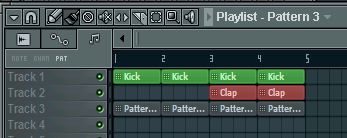
If your resize the playlist you still got your "blocks" if you want ;)

Image
Visually it looks like so. But functionally it's not. In block view each row is a pattern so you can switch between patterns by clicking on the left area. Each row is a single pattern so it's very easy to keep track of what's going on.

In track/clip view, tracks do not correspond to anything. Selecting a new pattern or selecting an existing one is cumbersome. Things get messy much faster in this mode if you are not careful about organization all the time which is what i want to bother with least when I'm in a creative mode.
"when you have nothing to say - shut up." -A friend of Luc Besson

Post

gassle wrote: Visually it looks like so. But functionally it's not. In block view each row is a pattern so you can switch between patterns by clicking on the left area. Each row is a single pattern so it's very easy to keep track of what's going on.

In track/clip view, tracks do not correspond to anything. Selecting a new pattern or selecting an existing one is cumbersome. Things get messy much faster in this mode if you are not careful about organization all the time which is what i want to bother with least when I'm in a creative mode.
The biggest problem is, that you guys always talking without having any clue:

You can lock each track to content of a specific pattern... it behaves 99% to the old pattern playlist...

After lock to content you have a single pattern on each row of the playlist and doubleclicking on the track or one of it's clips brings you into that pattern either in the pianoroll view or into the stepsequencer... depending where you inserted the pattern...

And to select a new pattern... is that this complicated for you to rightclick the pattern selector to choose a new pattern or to use the dropdown list in the playlist???

You are claiming here about issues, that I am always wondering, what you'll do, if you got real problems...

Post

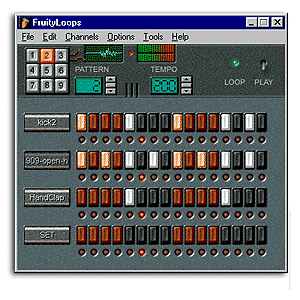
Image

Oh baby, how far you've come...

Post

JimmiG wrote:With almost any DAW, I can fire it up, load a VST, paint in some notes and have it play them back, without refering to a manual or tutorial for instructions. For me, FL Studio miserably fails this test. I guess it's just too different, which is why people either hate it or love it.
It's funny because I figured out how to do that in FL Studio no problem without having to go to a manual - it was really clear to me. But with Sonar - I couldn't - there were sliders and solo and mute buttons everywhere, but I couldn't work out how to load a VST into a channel/track and midi sequence it - I'm sure had I bothered to go to manual or tutorial videos I could have figured it out, but I just didn't have the patience to learn when I already knew how to do it in FL Studio.

Locked

Return to “Hosts & Applications (Sequencers, DAWs, Audio Editors, etc.)”