

2x oversample does not lways equal 2x cpu usage
It is often still more cpu friendly to run 44.1 and oversample where needed
For example a plugin that uses 2% @ 44.1khz will use 4% at 88.2khz
But that plugin @ 44khzz with 2x oversample will use closer to about 3%
Because only oversample necessary functions, not entire plugin.
Atleast this is what I see for guitar rig, synth squad, etc...

24/96khz
-
- KVRist
- 484 posts since 15 Jan, 2009
Compyfox wrote:
@AudioGuy720:
I watched both of the videos (yes, watched the ca 50min of content), and I'm still confused over the whole presentation. Then again, Adam cleared up at the end again what he intentionally wanted to do. It was just hard to follow.
I have several concerns though:
96kHz recording simply downsampled (or cropped) in this example showed that there is no futher data added, just cramped together and the rouge peaks are out of the listenable ranges (funny enough, 44kHz compared to 96kHz resulted in about 3dB higher peaks in the upper frequency range).
Adam (the presenter) however said that the "other way around" is no good, giving the example in one of his comments:When you record at higher (above 48 kHz) sampling rates you leave the option open for degrading your audio quality during the mix. But if you start off with a lo-fi recording and later on want it to sound better...you're out of luck.
Kind of like how you can easily get a black and white photo from color but not vice-versa.
Personally I don't believe so. Since 96kHz is the double of 48kHz, the only thing we'd add is more frequency content, which in turn (and proven in this video) is non-noticable.
Now... if we have a plugin running on 48kHz with at least 2x OS, the endresult should be the similar (read: barely noticable on blind testing) as running the file at 96kHz with non OS active. If ever, in nulling we can analyse artefacts below -90dBFS at either low frequency or high frequency. Out of most people's hearing ranges.
At least to my knowledge.
So I'd say you can(!) upsample a 48kHz recording to (let's say) 192kHz with suitable OS and therefore add information which wasn't there previously. I mean, Adam said so himself "my analog equipment doesn't even reach as high quality and high dynamic range". So other than having a finer resolution, why bother - especially if we still don't have (again) the suitable playback equipment?
And proof that there can be something added, in analogy with his "black and white" picture example, can be seen here:
The main information is there, so why not use and expand on it?
Another concern I have is, that some hosts can't do what Reaper can do.
Meaning: running 96kHz alongside 48kHz or easily switch them after you're done with mixing. Sure as hell, Cubase can't do it (amongst rendering/recording at 64bit float, or I'm blind and haven't found it yet). It always wants to convert unless you drop all files, change the samplerate and then reinmport. But then all your cuts are gone, and chances are, your position settings as well. Not to mention shift in settings of your DAC. All kinds of problems.
I do see a reason to record in 96kHz or even higher, since it's a more finer resolution that you can work with for different kind of media (downsampling). But IMO the audio bit depth (bit rate) is just as important in this case, since it declares how "stepped" the recorded courves are, while the sampling rate declares how close the "steps" are.
[snip]
SUMMARY:
Want some great recordings, get at least the highest bitrate possible. Most ADC/DAC (especially consumer) have the lowest latency and most flat frequency response at 48kHz or even 96kHz, so go from there. IMO upsampling or downsampling doesn't matter - especially with modern mixes.
Unless you go OTB at some stage, then this doesn't matter. But I think the biggest secret in "HD recordings" still hovers around the term "Oversampling" - else OTB Upsampling/Downsampling devices wouldn't exist.
I did my own testing with RightMark Audio Analyzer and found that my particular converters do not record flat from 20 Hz to 22 kHz...the typical audible human range...when set to 44.1 kHz. At 96 kHz it is flat to about 30 kHz and the low end roll-off starts later than when recording at 44.1 (or 48 kHz as well).
On a better converter/interface this may not be the case. As you may know A/D converters (and D/A) internally oversample way higher than recorded formats. What affects quality is how a piece of hardware handles this downconversion. Crappier converters (like mine) don't have ideal (flat) pass bands/transition bands/stop bands and decimators.
I could go on with more technicaly stuff but what all this means to us is our audio fidelity is affected by cheaper gear. You have to run tests on your own gear to know exactly what's going on. You may even find a problem with a particular input (like I did, thanks to RightMark) to ensure what you are feeding your equipment is the best that it can be.
From what I've read about oversampling, not all oversamplers are created equal. I'd rather start off with the best quality my hardware can handle then downsample with a high quality sample rate converter or bounce my tracks if CPU drain becomes a problem.
I'm under the impression that the major difference between 16-bit and 24-bit recording is the quantization noise floor. 24 bit is at around -144 dB and 16 is at -96 dB. So the only thing you have to worry about with a 24-bit system is analog noise.
Let's go back to the photography analogy. All things being equal a picture that starts out at a higher resolution will look better when downsampled. However a low resolution picture that is upsampled will not look as good. Same thing with oversampling audio although not to the same degree of degradation.
The idea with higher sample rates is aliasing/distortion and other artifacts can be spread into the inaudible upper frequency ranges. Then when you downsample for your final format that upper frequency info is eliminated. Oversampling is nice but it isn't as good as "native" higher sample rates. I know that Auto Tune and other pitch/speed-modifying plugins work better at higher sample rates.
I've read a good amount on this topic and come to the conclusion that 96 kHz is "the gold standard." 88.2 kHz used to be when sample rate converters weren't great (and 44.1 kHz was the delivery rate) but that is no longer the case. Above 96 kHz you get serious diminishing returns plus a ton of plugins are incompatible. If CPU drain is a problem then aim for 48 kHz as long as your converter doesn't suck. If it does then record at a higher sample rate then downconvert with a decent piece of software like SoX.
Again, I'm going off the word of DSP coders which I trust. The differences usually rear their ugly head when pushing the extremes. I'm just a guy using the tools they made. Just like a dentist tells me to brush twice daily I will follow their expert advice. But anyone reading this should experiment to reach their own conclusions.
As far as automation/edits being affected by the offline rendering method, that isn't the case. At least not in Reaper and not audibly. The cuts/automation were time-based not sample-based.From http://www.hydrogenaudio.org/forums/ind ... opic=91302
There are some advantages to recording, mixing and producing in higher samplerates, similar to using higher bit depths. In particular, non-linear digital audio manipulation will produce overtones according to the order of the equation.
For example, tape saturation distortion has an effect roughly equivalent to output=log(input). If we use the fourth order taylor series expansion of log(x)
We will produce distortion overtones at 4x the frequency of the existing frequencies in the input. Using a higher sample rate can help prevent or reduce aliasing due to this effect. Sure, you can upsample before the effect, and then downsample after, but it might be easier (less CPU) to just have the whole processing chain be 192kHz or 384kHz, and use a lowpass filter before the effect to lop off any input spectra that would lead to aliasing.
Another advantage is that resonant IIR filters (the kind used in synthesizer filters and guitar effects) typically have non-linear responses between theoretical Fc and actual Fc (due to frequency warping and the non-linear effects of resonance, especially if you use a sub-sample delay in the feedback path to compensate for phase differences, see section 5.3 of http://dafx04.na.infn.it/WebProc/Proc/P_061.pdf). It might be mostly linear, however, to Fs/8, so using a higher sample rate allows the usable audio band to have a linear (and predictable) response to the filter controls.
Whatever works for you, really. Again it's all about trying stuff out. If you can't hear an audible difference don't listen to me or anyone else. Just make some good music...the content is what matters after all!
-

- KVRAF
- 1735 posts since 28 Dec, 2007
ah thats interesting stuff I was curious what the point of eg 8x oversampling was...whyterabbyt wrote:
Maybe that's why oversampling on the more 'modelled' stuff goes up much higher than just doubling; you see up to x16 and such... because a 'mere' doubling of the sample rate isnt actually enough for those cases. And which is why I suspect that in many more cases than people realise the issue of downsampling filters using 'extra' CPU or causing phase issues etc isnt something which is 'bad' at 44.1Kz and 'doesnt happen' at 96Khz. 96KhzKhz 'saves you' one doubling, out of 3 or 4...
thanks dreamkeeper and bertkoor for the other clarifications...

-
- KVRist
- 484 posts since 15 Jan, 2009
Here's another interesting discussion about higher sample rates: http://www.kvraudio.com/forum/viewtopic.php?t=331862
-
 Dean Aka Nekro Dean Aka Nekro https://www.kvraudio.com/forum/memberlist.php?mode=viewprofile&u=162100
 - KVRAF
- 6178 posts since 4 Oct, 2007 from Escaped At Last
No mate that is pretty much the most simple/concise way of explaining itwhyterabbyt wrote:Yup, 'twere crude aproximations only.dreamkeeper wrote:A tad picky... but correct.whyterabbyt wrote:Now, I might just cock this up here, but Im sure doubling the sample rate doesnt 'move aliasing' out of the audible range; it moves the threshold at which aliasing occurs up an octave.analoguesamples909 wrote:However from what Ive heard and gathered from developer comments on the topic (eg useful input from Sean Costello on this very htread)...moving aliasing generated by processing (compression, saturation etc) out of the audible range - by running at 96k - can be beneficial. There is also the issue of some software instruments which may produce aliasing depending on how they have been coded. This can also be moved into the inaudible range.
Apropos picky: that would be 22 and 48 respectively.But aliasing artefacts are a sort of 'foldover'; frequencies which exceed the Nyquist limit get 'reflected' back into the the audible range. That still happens whatever your Nyquist frequency is. At a sample rate of 44Khz, they get 'reflected' back into the 0-20kHz range, and all of them wind up the audible range. At a sample rate of 96Khz, they get 'reflected' back into the 0-40Khz range, and 'half of them' wind up in the audible range. But you still potentially have them across your entire audible range.
(Although Im sure Ive read that although Nyquist states you need to use a sample rate of twice the maximum frequency you want to represent, in reality you're actually better working with a sample rate of 2.2* the maximum frequency you want, because of, hmm, downsampling filter slopes or something? I plead dottled, again. Hence 44.1Khz. That may be apocryphal though, Ive never entirely been sure. )
...arrghhh I am running on total empty, Ain't slept for days. I really think fwiw that downloading those few small but very handy PDFs by Mr Lavry is well worth your time as they are good to have to hand. It is all much better written than I could possibly do and they are at the same time in-depth enough to not skip anything that is important. Main thing why I think that yourself and anyone else would find them useful is because they are written without them being one big sales pitch for his products, No snake oil and negates wikipedia *even though wikipedia can be really indespensable at time*
All the best and hope I'm making sense running in zombie auto-pilot mode!
-
- KVRAF
- 14739 posts since 19 Oct, 2003 from Berlin, Germany
Sorry, but I'm not quoting my own quote.
In theory, this makes an external OS matrix (like some mastering studios have) obsolete, but like you said, you can't be too sure how well the conversion is handled.
Still we have the limitation of 20-20kHz frequency range and (at least with most ADAT devices) 24bit as recording. But that does not mean that it's bad. 24bit gives us a dynamic range of -144dBFS (plus 20dBFS footroom for noise), which is way more than most (I hate to say that) vintage hardware can ever offer (roughly -70dBFS noisefloor), even some modern analog gear doesn't go lower than -105dBFS. However, this is just on the recording and playback side.
What you do within your DAW, lies on a different ballpark. Here you can use 96kHz or even 192kHz (if your module supports it) with 64bit float math precision (if your host supports it, PT and Cubase don't), but the bottleneck is still your ADC/DAC. Then again, if you record/edit within suitable limits, you don't recognize any cropping effects.
Upsampling a low-res image to a high-res image doesn't really work, unless it's a vector. But, as the video by RealHomeRecording (YouTube) somewhat confirmed - 48kHz (half of 96kHz) has barely any audible difference. So I still say it should be (in theory) possible to mix with OS'd plugins in 48kHz and non-OS'd plugins in 96kHz and we should get similar results with only artifacts below our hearing range on null-tests.
Usually I don't trust Hydrogen Audio one single word, since they're very elite in their sections and don't allow different opinions. But in this case, yes the benefits are apparent. But they're so marginal in practical use, it's not even funny.
I said it earlier, I say it again - as long as stuff is pressed to it's limits (read modern audio productions and mastering), we can not(!) appreciate high sampling rates and bitrates. Especially if there are no suitable playback devices other than our PC/MAC.
I didn't do the offline-render method yet. As I said, Cubase is not as flexible in this section and also not that well documented either. It might be interesting at some point, but I don't know yet.
I did however some tests yesterday to see how strong certain plugins affect the CPU in 96kHz. Funny enough, I only used two mono 96kHz/32bit (float or int in Cubase, dunno anymore) files and one instance of GTS-39 per channel. This thing has fixed 8x OS and ate 10% of my i7 920 CPU. But only once - I could run more instances and it didn't raise. Still it's somewhat a no-go for me at such high CPU load, no matter at which sample rate. I adressed this to the dev already, but then again, GTS-39 is not aimed to be a mass-used track compressor.
I have to see how an upsampled project with 16-24 mono channels performs. Though I don't rule out using 96kHz for transfer recordings from tape (R2R or consumer tape) or even vocals. But unless I have the funds for a MADI/AES setup, I have to live with the channel limits of ADAT. Which is fine with me. 48kHz/24bit is a drastic step up from current 44.1/16 releases in both MP3 and FLAC anyway.
I still have to check my current "low-profile" RME/Behringer UltraMatch setup compared to my old Terratec one. Just for completeness sake, RoomEQWizard can be used for the same cause btw.AudioGuy720 wrote:I did my own testing with RightMark Audio Analyzer and found that my particular converters do not record flat from 20 Hz to 22 kHz...the typical audible human range...when set to 44.1 kHz. At 96 kHz it is flat to about 30 kHz and the low end roll-off starts later than when recording at 44.1 (or 48 kHz as well).
I know for example that the RME converters go for OS on both input and output, though I don't know at which rate. The Behringer UltraMatch is listed to use either 128x/64x OS on input and 128x OS on output.AudioGuy720 wrote: On a better converter/interface this may not be the case. As you may know A/D converters (and D/A) internally oversample way higher than recorded formats. What affects quality is how a piece of hardware handles this downconversion. Crappier converters (like mine) don't have ideal (flat) pass bands/transition bands/stop bands and decimators.
In theory, this makes an external OS matrix (like some mastering studios have) obsolete, but like you said, you can't be too sure how well the conversion is handled.
Still we have the limitation of 20-20kHz frequency range and (at least with most ADAT devices) 24bit as recording. But that does not mean that it's bad. 24bit gives us a dynamic range of -144dBFS (plus 20dBFS footroom for noise), which is way more than most (I hate to say that) vintage hardware can ever offer (roughly -70dBFS noisefloor), even some modern analog gear doesn't go lower than -105dBFS. However, this is just on the recording and playback side.
What you do within your DAW, lies on a different ballpark. Here you can use 96kHz or even 192kHz (if your module supports it) with 64bit float math precision (if your host supports it, PT and Cubase don't), but the bottleneck is still your ADC/DAC. Then again, if you record/edit within suitable limits, you don't recognize any cropping effects.
Not every "cheap" gear is crap. A lost has happened over the course of the last two decades. I was browsing a catalog for a famous music store yesterday and took a closer look on the specs of portable recorders. They're pretty much all capable of recording at 96kHz now in WAV PCM, 24bit.AudioGuy720 wrote: I could go on with more technicaly stuff but what all this means to us is our audio fidelity is affected by cheaper gear. You have to run tests on your own gear to know exactly what's going on. You may even find a problem with a particular input (like I did, thanks to RightMark) to ensure what you are feeding your equipment is the best that it can be.
True. 32bit/64bit float is just the icing on the cake. Here we do not worry about dynamic ranges and noise floors at all. It just offers a finer resolution of the recorded material.AudioGuy720 wrote: I'm under the impression that the major difference between 16-bit and 24-bit recording is the quantization noise floor. 24 bit is at around -144 dB and 16 is at -96 dB. So the only thing you have to worry about with a 24-bit system is analog noise.
Agreed, but I was actually going for the analogy: if it's a B/W photograph at a suitable resolution, we can convert (upmix) it to a color version.AudioGuy720 wrote: Let's go back to the photography analogy. All things being equal a picture that starts out at a higher resolution will look better when downsampled. However a low resolution picture that is upsampled will not look as good. Same thing with oversampling audio although not to the same degree of degradation.
Upsampling a low-res image to a high-res image doesn't really work, unless it's a vector. But, as the video by RealHomeRecording (YouTube) somewhat confirmed - 48kHz (half of 96kHz) has barely any audible difference. So I still say it should be (in theory) possible to mix with OS'd plugins in 48kHz and non-OS'd plugins in 96kHz and we should get similar results with only artifacts below our hearing range on null-tests.
As you earlier mentioned, this depends on the offered OS matrix.AudioGuy720 wrote: The idea with higher sample rates is aliasing/distortion and other artifacts can be spread into the inaudible upper frequency ranges. Then when you downsample for your final format that upper frequency info is eliminated. Oversampling is nice but it isn't as good as "native" higher sample rates. I know that Auto Tune and other pitch/speed-modifying plugins work better at higher sample rates.
My go-to SRC is AudioMove, but it seems to be abandonned. Even though it's capable to convert up until 192kHz 64bit.AudioGuy720 wrote: If CPU drain is a problem then aim for 48 kHz as long as your converter doesn't suck. If it does then record at a higher sample rate then downconvert with a decent piece of software like SoX.
AudioGuy720 wrote: From http://www.hydrogenaudio.org/forums/ind ... opic=91302
>snip<
As far as automation/edits being affected by the offline rendering method, that isn't the case. At least not in Reaper and not audibly. The cuts/automation were time-based not sample-based.
Usually I don't trust Hydrogen Audio one single word, since they're very elite in their sections and don't allow different opinions. But in this case, yes the benefits are apparent. But they're so marginal in practical use, it's not even funny.
I said it earlier, I say it again - as long as stuff is pressed to it's limits (read modern audio productions and mastering), we can not(!) appreciate high sampling rates and bitrates. Especially if there are no suitable playback devices other than our PC/MAC.
I didn't do the offline-render method yet. As I said, Cubase is not as flexible in this section and also not that well documented either. It might be interesting at some point, but I don't know yet.
Agreed on that end.AudioGuy720 wrote: Whatever works for you, really. Again it's all about trying stuff out. If you can't hear an audible difference don't listen to me or anyone else. Just make some good music...the content is what matters after all!
I did however some tests yesterday to see how strong certain plugins affect the CPU in 96kHz. Funny enough, I only used two mono 96kHz/32bit (float or int in Cubase, dunno anymore) files and one instance of GTS-39 per channel. This thing has fixed 8x OS and ate 10% of my i7 920 CPU. But only once - I could run more instances and it didn't raise. Still it's somewhat a no-go for me at such high CPU load, no matter at which sample rate. I adressed this to the dev already, but then again, GTS-39 is not aimed to be a mass-used track compressor.
I have to see how an upsampled project with 16-24 mono channels performs. Though I don't rule out using 96kHz for transfer recordings from tape (R2R or consumer tape) or even vocals. But unless I have the funds for a MADI/AES setup, I have to live with the channel limits of ADAT. Which is fine with me. 48kHz/24bit is a drastic step up from current 44.1/16 releases in both MP3 and FLAC anyway.
-
- KVRer
- 17 posts since 18 Sep, 2012
I haven't had the time to read all the pages in this thread, but has anyone brought up the subject of "jitter"?
To go back to the comparison with photography, even if you shoot a picture or film with the highest resolution possible if your camera is shaking, you take a blurred photo at a higher resolution.
If you have an ultra stable tripod and shoot the same photo you get the maximum sharpness or resolution from your highest setting available.
All A/D or D/A have some "jitter" in them. As a general rule the more expensive a converter is, the less "jitter" it has.
The more stable the "clocking" of the incoming samples, the more "accurate" your picture of the incoming audio.
Just like a movie camera you are taking single photos of your sound 44,100, 48,000 or 96,000 times a second, if each frame is not EXACTLY the same duration you are changing the waveform ever so slightly.
To go back to the comparison with photography, even if you shoot a picture or film with the highest resolution possible if your camera is shaking, you take a blurred photo at a higher resolution.
If you have an ultra stable tripod and shoot the same photo you get the maximum sharpness or resolution from your highest setting available.
All A/D or D/A have some "jitter" in them. As a general rule the more expensive a converter is, the less "jitter" it has.
The more stable the "clocking" of the incoming samples, the more "accurate" your picture of the incoming audio.
Just like a movie camera you are taking single photos of your sound 44,100, 48,000 or 96,000 times a second, if each frame is not EXACTLY the same duration you are changing the waveform ever so slightly.
Apple Muncherman
I was thinking about how people seem to read the Bible a whole lot more as they get older; then it dawned on me - they're cramming for their final exam.
George Carlin
I was thinking about how people seem to read the Bible a whole lot more as they get older; then it dawned on me - they're cramming for their final exam.
George Carlin
-
- KVRAF
- 14739 posts since 19 Oct, 2003 from Berlin, Germany
I think the last 5-8 pages were all over jitter issues.
And regarding the "picture analogy". I'm not focusing on "the steadier the camera, the better the pic" thing. I'm focusing on B/W to color conversion - which means: good photo to begin with, and building up on that. Which in turn can be seen as "lofi photo into high quality color picture". Or whatever you want to call it.
DL;DR all the way?
And regarding the "picture analogy". I'm not focusing on "the steadier the camera, the better the pic" thing. I'm focusing on B/W to color conversion - which means: good photo to begin with, and building up on that. Which in turn can be seen as "lofi photo into high quality color picture". Or whatever you want to call it.
DL;DR all the way?
-

- KVRAF
- 16804 posts since 8 Mar, 2005 from Utrecht, Holland
Indeed I missed that portion. Best to be found in printer-friendly version of this thread, combined with Ctrl-F & "jitter". It were mostly lfm and Jupiter8 having the discussion.
That reminds me to comment a bit on this:
The thing is, the crystal your audio interfaces sampling clock is based on doesn't provide 192kHz directly, it gives pulses in the megahertzes region. Ideally a chrystal running at 7.056 GHz is used, it can give both 44.1kHz (divide by 160) and 48kHz (divide by 147.) Now the pure pulses it generates may jitter like hell, but as long as in average the pulses come at a steady pace, there is no problem of jitter. And because of this averaging effect, you'd get relatively less jitter artefact when using lower clock rates.
Now what is jitter exactly? It's the result of a non-steady clock: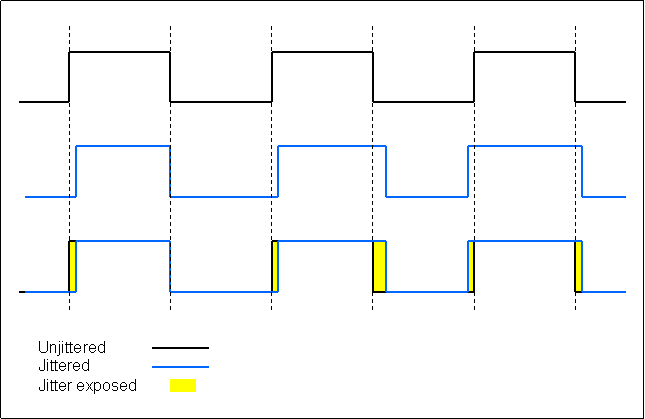
What is the audible result? Microscopic frequency modulation, mostly audible in the upper frequency range. Surely not pops & cracles!
About using an external clock: if your audio interface is synced to an external clock, it is far more prone to jitter. The internal clock is far more precise than a clock it must derive from a relatively slow incoming stream of clock pulses.
That reminds me to comment a bit on this:
Probably the same, when measured in absolute numberslfm wrote:how much jitter is your machine causing at 96k compared to 48k?
The thing is, the crystal your audio interfaces sampling clock is based on doesn't provide 192kHz directly, it gives pulses in the megahertzes region. Ideally a chrystal running at 7.056 GHz is used, it can give both 44.1kHz (divide by 160) and 48kHz (divide by 147.) Now the pure pulses it generates may jitter like hell, but as long as in average the pulses come at a steady pace, there is no problem of jitter. And because of this averaging effect, you'd get relatively less jitter artefact when using lower clock rates.
Now what is jitter exactly? It's the result of a non-steady clock:
What is the audible result? Microscopic frequency modulation, mostly audible in the upper frequency range. Surely not pops & cracles!
About using an external clock: if your audio interface is synced to an external clock, it is far more prone to jitter. The internal clock is far more precise than a clock it must derive from a relatively slow incoming stream of clock pulses.
We are the KVR collective. Resistance is futile. You will be assimilated. 
My MusicCalc is served over https!!
My MusicCalc is served over https!!
-
- KVRist
- 484 posts since 15 Jan, 2009
Compyfox wrote:I think the last 5-8 pages were all over jitter issues.
And regarding the "picture analogy". I'm not focusing on "the steadier the camera, the better the pic" thing. I'm focusing on B/W to color conversion - which means: good photo to begin with, and building up on that. Which in turn can be seen as "lofi photo into high quality color picture". Or whatever you want to call it.
DL;DR all the way?
This is a reply to both of your last posts. I understand better now what you meant. And yeah 24/48 is a good compromise on quality vs. CPU power drain.
Compy are you recording with 32-bit files or mixing with them? I'm not sure how your DAW is setup but that in itself may unnecessarily drain CPU. If you're bouncing tracks to 32-bit that's one thing (because it maintains quality vs. bouncing to 24-bit) but to record at 32-bit instead of 24-bit just adds extra data that doesn't have any benefit.
In REAPER, as long as your Track mixing bit depth setting is set to it, REAPER always mixes at 64 bit float. Even if your files are 8-bit its actually internal processing is done at 64 float. You may want to check on that.
-
- KVRAF
- 14739 posts since 19 Oct, 2003 from Berlin, Germany
Unfortunately, Cubase's and WL's internal mixing engine is still 32bit float. Whether or not 64bit has more impact, is still a thing to debate. According to the RealHomeRecording video, Reaper users wanted a 39bit int mode since it "sounds like PT", which is nonsense IMO.
Currently I record in 24bit, but render out in 32bit for Wavelab. The only advantage I'd get in using 32bit, is being save of rouge peaks, and having (again) a finer resolution of the steps for the sampling rate. But since I barely even reach -3dBFS by now thanks to intensive gain staging, I don't see a need to go higher. Except for mastering purposes of course.
I could go for it and waste the HDD space, but I can't say anything about CPU usage as of yet - barely touched 32bit while recording. My ADC/DAC is 24bit on in/out, so it's really just for "more resolution" within the box.
I need to do further tests for sure, but I'm a bit far from Reaper currently. Maybe at a different state, or as mobile DAW (used PT for that earlier, but Reaper can be modded to PT, and I have an MBox2 lying around that didn't work with WL - so yeah).
I'm watching this topic for sure.
But currently:
I'm recording -> 48kHz/24bit (currently, maybe 96kHz for R2R)
I'm mixing -> 48/24 mostly
I'm rendering -> 48/32 float, sometimes even 96/32 float (couldn't do a proper null for comparision yet)
I'm mastering -> xx/32 float (while xx is either the work or target sampling rate)
I'm doing SRC and bitrate "upconversion" with AudioMove, since it's easier to use. Dithering with the Apogee uv22hr (autoblack, xx bit) of WL7.
Currently I record in 24bit, but render out in 32bit for Wavelab. The only advantage I'd get in using 32bit, is being save of rouge peaks, and having (again) a finer resolution of the steps for the sampling rate. But since I barely even reach -3dBFS by now thanks to intensive gain staging, I don't see a need to go higher. Except for mastering purposes of course.
I could go for it and waste the HDD space, but I can't say anything about CPU usage as of yet - barely touched 32bit while recording. My ADC/DAC is 24bit on in/out, so it's really just for "more resolution" within the box.
I need to do further tests for sure, but I'm a bit far from Reaper currently. Maybe at a different state, or as mobile DAW (used PT for that earlier, but Reaper can be modded to PT, and I have an MBox2 lying around that didn't work with WL - so yeah).
I'm watching this topic for sure.
But currently:
I'm recording -> 48kHz/24bit (currently, maybe 96kHz for R2R)
I'm mixing -> 48/24 mostly
I'm rendering -> 48/32 float, sometimes even 96/32 float (couldn't do a proper null for comparision yet)
I'm mastering -> xx/32 float (while xx is either the work or target sampling rate)
I'm doing SRC and bitrate "upconversion" with AudioMove, since it's easier to use. Dithering with the Apogee uv22hr (autoblack, xx bit) of WL7.
-
- KVRAF
- 16804 posts since 8 Mar, 2005 from Utrecht, Holland
Actually there is a benefit. Since 32bit float is the internal data structure used in VST land, storing that format to a WAV file is a straight forward process. Conversion to 24bit takes some CPU. With any 32bit format you have the benefit of it aligning perfectly to a single "word" (of 4 bytes.)AudioGuy720 wrote:Compy are you recording with 32-bit files or mixing with them? I'm not sure how your DAW is setup but that in itself may unnecessarily drain CPU. If you're bouncing tracks to 32-bit that's one thing (because it maintains quality vs. bouncing to 24-bit) but to record at 32-bit instead of 24-bit just adds extra data that doesn't have any benefit.
So you have the choice: a bit less CPU usage or 3/4 smaller files.
We are the KVR collective. Resistance is futile. You will be assimilated.
My MusicCalc is served over https!!
My MusicCalc is served over https!!
-
- KVRAF
- 14739 posts since 19 Oct, 2003 from Berlin, Germany
Just a quick post, since this is a strange encounter...
I just upsampled a mono 48kHz file, vocals (with drenched reverb unfortunately), to 96kHz.
On Playback in Cubase... either the Cubase playback engine funks around, or the files are really different. On playback on my UltraMatch, the 96kHz sounded like it had a HiShelf boost of about 6dB in direct comparision to the 48kHz file.
Someone knows of a off-line FFT comparision tool that loads different sampling rate files side by side? I want to know what the funk is going on.
I just upsampled a mono 48kHz file, vocals (with drenched reverb unfortunately), to 96kHz.
On Playback in Cubase... either the Cubase playback engine funks around, or the files are really different. On playback on my UltraMatch, the 96kHz sounded like it had a HiShelf boost of about 6dB in direct comparision to the 48kHz file.
Someone knows of a off-line FFT comparision tool that loads different sampling rate files side by side? I want to know what the funk is going on.
-
- KVRian
- 676 posts since 3 May, 2004
Maybe Sonic Visualizer or Ocenaudio. Don't know for sure...Compyfox wrote:Just a quick post, since this is a strange encounter...
I just upsampled a mono 48kHz file, vocals (with drenched reverb unfortunately), to 96kHz.
On Playback in Cubase... either the Cubase playback engine funks around, or the files are really different. On playback on my UltraMatch, the 96kHz sounded like it had a HiShelf boost of about 6dB in direct comparision to the 48kHz file.
Someone knows of a off-line FFT comparision tool that loads different sampling rate files side by side? I want to know what the funk is going on.
-
- KVRAF
- 14739 posts since 19 Oct, 2003 from Berlin, Germany
Unfortunately, both only offer audiograms rather than spectrum analysis. At least from initial look.
A tool that "freezes" which I can then compare with another color would be great. But I fear MeldaProductions FFT can't do this. BlueCat maybe (which I don't own). And I didn't jump on the "continuation" of the ElementalAudio Inspector code: AXIS Plugins Inspektor.
Meh...
A tool that "freezes" which I can then compare with another color would be great. But I fear MeldaProductions FFT can't do this. BlueCat maybe (which I don't own). And I didn't jump on the "continuation" of the ElementalAudio Inspector code: AXIS Plugins Inspektor.
Meh...