Integrating an iPad into DAW workflow

For iOS (iPhone, iPad & iPod), Android, Windows Phone, etc. App and Hardware talk
RELATED
PRODUCTS

Post

Hello guys, I just got an iPad mainly to use lemur as a controller for ableton live, but after hearing so many great synths for it and other apps, I'd like to fully integrate it into my PC - Ableton Live DAW setup.

What is the best way to hook everything up so that:

1)The iPad does not use its (potentially bad) internal DAC
2)Communicates via MIDI to the PC and MIDI controllers
3)iPad audio is accesable via the DAW
4)(does the ipad have audio in?) has audio inputs from PC DAW

What I"m considering is somthing similar to this:
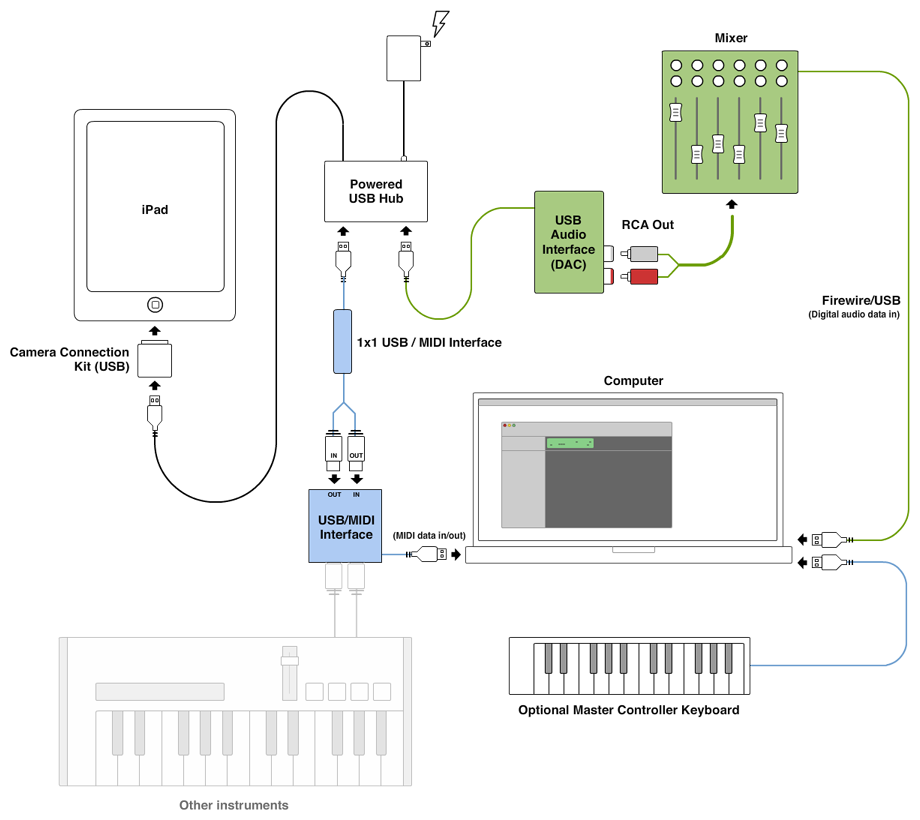

Image
Courtesy of http://zachberry.com/blog/incorporating ... ed-studio/

except the 2 interfaces need to communicate via MIDI, so probably regular MIDI cables.


Am I making this too complicated? Is there an easier / better way?

Post

My iPad works going through my Presonus Audiobox USB both for MIDI and audio (XLR inputs and 1/4inch outputs), so yes, you csn integrate it into your DAW.

However, battery life is the problem. It is hard to charge it and run it through gear at the same time.

Mike

Post

I feel the best for audio is to have an audio interface that can get audio to the computer without going through the analog domain. Your setup is pretty typical since getting digital audio from iOS in real time remains somewhat of a challenge.

Typically this requires one audio/midi interface for the iOS device and another for the main computer, both with SPDIF I/O. The easiest is to lock the computer to the SPDIF clock from the iOS device. At this time I don't think there's such thing as a bridge audio interface that could connect an iOS device directly to a computer, providing direct digital audio and MIDI connectivity. That would be useful...

But the biggest problem with iOS is that none of the interface manufacturers provide any kind of drivers for their sound cards in iOS (that I know of). They rely on class compliant USB core audio and core midi to work and it's up to the software programmer to interface with the hardware. The problem is compounded by Apple not providing apps for control over class compliant devices like it does in OS X. Everything is currently buried and we are at the mercy of individual program implementations.

With some devices, the above results in odd scenarios where you have to first set up an audio interface on a PC or a Mac and then while keeping the power on, plug it into iOS so you don't lose the configuration you've set up. Some newer devices offer some way of accessing setup parameters directly or use a preset system.

And some audio/midi interfaces don't need a powered hub at all; that can significantly minimize the connection count...

A good list of audio interfaces for iOS is maintained by the Auria folks here.

Post

I'm amazed at how many of these DONT charge the iPad...


Seems like a huge issue

Post

I guess that can be rectified some by connecting a hub which is made for charging between the iPad and interface?

I'm trying to find one and they all seem to either charge or connect via usb but not both.

Post

AaronCotton wrote:I guess that can be rectified some by connecting a hub which is made for charging between the iPad and interface?
Not if you're using the CCK; by design the CCK is meant to power external devices (SD cards, USB keys). Power only flows out of the iPad when using the CCK. Unless Apple comes out with a new device, or you have an interface that doesn't need the CCK, then the iPad just can't be charged.

Post

I use a Griffin StudioConnect with my iPad for MIDI in/out along with mono audio in and stereo audio out. Sounds fine through my monitors as well within Sonar X1 on my PC. Digital audio, no. But much better than the old days of 8 bit or even tape.

Best of luck.

Forgot to mention it powers the iPad as well. I even asked Griffin for schematics so I could insert a switch so as not to over charge the battery but to no avail.

Post

These aren't out yet, but lots of people are pretty excited about this, and the iConnect4

http://www.iconnectivity.com/iConnectMIDI2plus

MIDI, audio, can charge iPad....

Post

Aural Chaos wrote:These aren't out yet, but lots of people are pretty excited about this, and the iConnect4

http://www.iconnectivity.com/iConnectMIDI2plus

MIDI, audio, can charge iPad....
Now that looks cool and the price looks ok too.
"I am a meat popsicle"
Soundcloud Vondragonnoggin
Soundclick Wormhelmet

Post

Aural Chaos wrote:MIDI, audio, can charge iPad....
Ha! Brilliant! Just what the doctor ordered... Thanks for the link.

Post

I'm not sure that I understand that iConnectMidi2plus. Does it act as an audio driver on the USB side?
And how does it work with multiple iDevices, can you just create a aggregate device and see all audio io in your daw?
Confused ...

Post

Aural Chaos wrote:These aren't out yet, but lots of people are pretty excited about this, and the iConnect4

http://www.iconnectivity.com/iConnectMIDI2plus

MIDI, audio, can charge iPad....
OMFG! iWOOT!! NOW!!!
Wavetables for DUNE2/3, Blofeld, IL Harmor, Hive and Serum etc: http://charlesdickens.neocities.org/
£10 for lifetime updates including wavetable editor for Windows.

Music: https://soundcloud.com/markholt

Post

mbncp wrote:I'm not sure that I understand that iConnectMidi2plus. Does it act as an audio driver on the USB side?
And how does it work with multiple iDevices, can you just create a aggregate device and see all audio io in your daw?
Confused ...
Pretty much (read the copy...). Don't know about the aggregate device, but once the interface shows up in your OS as a soundcard, there's always a way to route the audio to the DAW (direcly or using Soundflower, Jack, and others...).

From the description, you can also use it to provide an audio/midi bridge between ANY 2 computers (even mac <-> pc). It's a bit of a missing link in today's audio tech. I think they have a winner product on their hands (the older iConnect MIDI interface was just too expensive for most).

I just hope it can handle at least 24-bit @ 44.1 stereo.

I can imagine this eventually getting expanded to multiple channels and multiple machines, becoming a transfer center for a small studio and obviating the use of a sound card on every system. Many people are looking for a cheap reliable way to transfer multiple channels of bit-accurate audio from computer to computer, other than network transfer (which can be expensive and protocol specific) or multiple expensive multi-channel sound cards; this could eventually be it.

Post

Thanks for the info, looks good.

Best would be 3 msec latency over wifi for audio, midi and some air power:)

Until then this looks like a good solution, if I can reduce the number of wires and ditch the motu, the docks and especially the iu2, that would be great. Just a bit worry about the latency of such a system.

Post

how do I do wireless audio with only 3msec latency?

What do I need for that? Bluetooth? Wireless N?

Post Reply

Return to “Mobile Apps and Hardware”