

Mysterious Lag in a high-spec Windows x64 system
-

- KVRAF
- 11162 posts since 16 Mar, 2003 from Porto - Portugal
After the problem I reported,. I changed to the stock cooler (the one that came with the CPU) and everything is fine. If you bought your CPU boxed, it was accompanied by a cooler. Use that one.
Fernando (FMR)
-
- KVRian
- 906 posts since 24 Mar, 2010
I would replace the PSU with something more powerful, something with a good rating. PC Power cooling is the brand im using/recommending. Loving their new line that came out a few months ago.
I have an older Zalman 9xxx thats been going good for years, dont know about their current quality. Its still keeping a spare pc running today. The newer 9xxx seem to have the same design.
Noctura ftw. Evildragon mentioned Scythe, ive heard good things about their fans, and youll find people on the net swear by Noctura coolers with scythe aftermarket fans. That said, my noctura is doing a great job and i havent replaced the fans, but in the future i was planning on going for the scythes when i need to.
As far as recommendations for things to avoid, i would personally avoid those closed loop h2o coolers.
I dont believe you mentioned which case youre using. The link you posted has some different configurations (ie top-flow). If your case doesnt have a vent on the side, i think the top-flows will be fairly useless, just shoving the hot air back in.
People around these parts seem to pay more attention to the noise level of the fans, and i agree its important, but personally, im more concerned with the CFM (cubic feet per minute) flow rating. You said its in the corner under a desk on the floor, so maybe noise level isnt too important for you, and you can get some great airflow with decently low noise levels.
If your case has front / back fans, or room for them, i would say its worth it to investigate replacements along with the cpu cooler. Personally, i think a good front to back, or back to front cooling system will do better than a semi-ok fan system with the side panel taken off.
If my noctura failed on me today, and the shop was out of stock, i would wait for restock (not working on the pc til i get it of course).
I have an older Zalman 9xxx thats been going good for years, dont know about their current quality. Its still keeping a spare pc running today. The newer 9xxx seem to have the same design.
Noctura ftw. Evildragon mentioned Scythe, ive heard good things about their fans, and youll find people on the net swear by Noctura coolers with scythe aftermarket fans. That said, my noctura is doing a great job and i havent replaced the fans, but in the future i was planning on going for the scythes when i need to.
As far as recommendations for things to avoid, i would personally avoid those closed loop h2o coolers.
I dont believe you mentioned which case youre using. The link you posted has some different configurations (ie top-flow). If your case doesnt have a vent on the side, i think the top-flows will be fairly useless, just shoving the hot air back in.
People around these parts seem to pay more attention to the noise level of the fans, and i agree its important, but personally, im more concerned with the CFM (cubic feet per minute) flow rating. You said its in the corner under a desk on the floor, so maybe noise level isnt too important for you, and you can get some great airflow with decently low noise levels.
If your case has front / back fans, or room for them, i would say its worth it to investigate replacements along with the cpu cooler. Personally, i think a good front to back, or back to front cooling system will do better than a semi-ok fan system with the side panel taken off.
If my noctura failed on me today, and the shop was out of stock, i would wait for restock
(not working on the pc til i get it of course).-
- KVRist
- Topic Starter
- 73 posts since 28 Jul, 2010
T Junction and TJMax. Just googled this....
...but curious if this is adjustable.
Because it currently idles at about 47 degrees. But running intensive Cubase 7 project quickly brings it to 67 degrees and then the whole system slows down. And it's supposedly normal for a system to slow down when temperatures get high, right?
But mine is not over clocked, and over-clockers apparently run at high temperatures, so what I don't understand is, what is the point of over locking and hence over heating and hence no distinct performance advantage at all ?
Yes, it's a Gigabyte X58 with latest BIOS and i7 930. And Memtest says the RAM is fine and good to go.
All my memory is 1333, but I remember in the past I had to set it (in bios) at 1066 to get it to run stably for some reason. I should check this again when I get home.
...but curious if this is adjustable.
Because it currently idles at about 47 degrees. But running intensive Cubase 7 project quickly brings it to 67 degrees and then the whole system slows down. And it's supposedly normal for a system to slow down when temperatures get high, right?
But mine is not over clocked, and over-clockers apparently run at high temperatures, so what I don't understand is, what is the point of over locking and hence over heating and hence no distinct performance advantage at all ?
Yes, it's a Gigabyte X58 with latest BIOS and i7 930. And Memtest says the RAM is fine and good to go.
All my memory is 1333, but I remember in the past I had to set it (in bios) at 1066 to get it to run stably for some reason. I should check this again when I get home.
-
- KVRist
- Topic Starter
- 73 posts since 28 Jul, 2010
We are talking about "Core" temperatures here (not system temps), right?
http://i39.tinypic.com/33kat6e.jpg

http://i39.tinypic.com/33kat6e.jpg
-
- KVRian
- 906 posts since 24 Mar, 2010
People who overclock properly know the importance of a good cooling system, something along the lines of a custom built h2o cooler for heavy duty oc'ing. Then there are the ones who dont care about cooling, they build on test benches not in standard cases, oc, run benchmarks, repeat.coffeefox wrote: But mine is not over clocked, and over-clockers apparently run at high temperatures, so what I don't understand is, what is the point of over locking and hence over heating and hence no distinct performance advantage at all ?
The hardcore oc'ers are usually building a new system every couple of months anyway, so if something fries, not a big deal.
You ask what is the point, it would be like asking why do people work on cars when they can go to a dealer and buy one ready to drive. The fun for them is in doing it themselves, seeing how much power they can squeeze out of it.
-

- KVRAF
- 2750 posts since 2 Feb, 2005 from Raincoast of Grayland
The point is more performance, at lower temps than the stock cooler at stock clocks. Most high quality air coolers (Noctura, Thermalright) easily achieve that goal with a modest overclock.coffeefox wrote:But mine is not over clocked, and over-clockers apparently run at high temperatures, so what I don't understand is, what is the point of over locking and hence over heating and hence no distinct performance advantage at all ?
I missed the memo, didn't see what sort of case and its airflow. If the case doesn't support efficient airflow then your heat problem is still a hot issue.
Another vote for a new Seasonic power supply, like the G Series 550W. You know what you're getting and what you're getting is very good.
perception: the stuff reality is made of.
-
- KVRist
- Topic Starter
- 73 posts since 28 Jul, 2010
Understood. Over clockers get increased performance because they have well ventilated systems and coolers keeping their CPU temperature down.
I'm in the process of finding a new CPU cooler. I'll try that first then look into a PSU and case if it's not adequate.
(current case is generic ATX and PSU generic 450W)
No need to remove the motherboard to change the PSU, is there??
My system used to work great and without issues. Then the stock intel cooler started generating a LOT of noise. I took it back and they changed it for a Chinese branded ("PC Cooler") copper-coloured cooler... That was just over a year ago - but haven't had so many chances to use the system since.
Hopefully it'll be sorted soon. I have a relatively large (album) mixing project to complete by next week!
I'm in the process of finding a new CPU cooler. I'll try that first then look into a PSU and case if it's not adequate.
(current case is generic ATX and PSU generic 450W)
No need to remove the motherboard to change the PSU, is there??
My system used to work great and without issues. Then the stock intel cooler started generating a LOT of noise. I took it back and they changed it for a Chinese branded ("PC Cooler") copper-coloured cooler... That was just over a year ago - but haven't had so many chances to use the system since.
Hopefully it'll be sorted soon. I have a relatively large (album) mixing project to complete by next week!
-

- KVRAF
- 24411 posts since 7 Jan, 2009 from Croatia
No need to remove the mobo to remove the PSU. However that would also depend on your case. Can you find a link/picture to the case you have, that would help us visualise your situation
-
- KVRAF
- 11162 posts since 16 Mar, 2003 from Porto - Portugal
I think THIS explains everything.coffeefox wrote: My system used to work great and without issues. Then the stock intel cooler started generating a LOT of noise. I took it back and they changed it for a Chinese branded ("PC Cooler") copper-coloured cooler... That was just over a year ago - but haven't had so many chances to use the system since.
Fernando (FMR)
-
- KVRist
- Topic Starter
- 73 posts since 28 Jul, 2010
Me again!
So, i got the cooler swapped out for a Zalman. Definitely improved things, until the heat-wave and seemed to be overheating again.
Outside, the weather is sometimes hitting 37 degrees C here in summer and it's very humid.
So, i thought, sod it, i'll do this myself.
So, i ordered a NZXT Hush 2 ATX ("silent") Case and a Notua NH-U12P (SE2) Cooler/Fan.

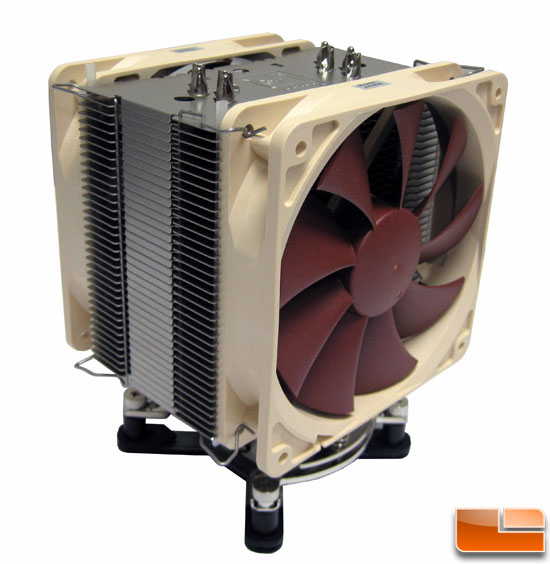
I've put the computer together, and the results aren't so impressive.
When the case was open, with just 1 SSD hard-disk installed, it was idling around 49-51 degrees.
With all 5 hard-disks installed and the case closed, it idles around 54-59 degrees. These figures come from "CoreTemp".
I used a PEA-sized amount of thermal paste, in the middle, as instructed in the manual and many youtube videos. I'm not sure if it was enough though. It was Noctua thermal paste.
Any thoughts?

So, i got the cooler swapped out for a Zalman. Definitely improved things, until the heat-wave and seemed to be overheating again.
Outside, the weather is sometimes hitting 37 degrees C here in summer and it's very humid.
So, i thought, sod it, i'll do this myself.
So, i ordered a NZXT Hush 2 ATX ("silent") Case and a Notua NH-U12P (SE2) Cooler/Fan.
I've put the computer together, and the results aren't so impressive.
When the case was open, with just 1 SSD hard-disk installed, it was idling around 49-51 degrees.
With all 5 hard-disks installed and the case closed, it idles around 54-59 degrees. These figures come from "CoreTemp".
I used a PEA-sized amount of thermal paste, in the middle, as instructed in the manual and many youtube videos. I'm not sure if it was enough though. It was Noctua thermal paste.
Any thoughts?
-
- KVRist
- 259 posts since 8 May, 2010 from US-Washington
I'm not a total computer geek, but if it was me I'd see how the computer works with only 2 or 3 hdd's engaged. Also, see if performance improves maybe like 6 in the morning before it starts getting hot. Perhaps what you need is some air conditioning or a dehumidifier I your space.
-
- KVRAF
- 1869 posts since 15 Sep, 2003 from Land of Crazies, USA
Do you still have that odd lag issue? Maybe where the computer pauses for a second or two? Open up Task Manager and click on the performance tab. Let it sit there for a bit. If you have any spikes that coincide with the pauses/lags, I'd suspect the mainboard.
It's the mainboard that reports the CPU temp. Couple that with the missing RAM you posted about, the reboots/hangs, etc...
It's the mainboard that reports the CPU temp. Couple that with the missing RAM you posted about, the reboots/hangs, etc...
-

- KVRAF
- 5913 posts since 17 Aug, 2004 from Berlin, Germany
Actual CPUs are not so hot anymore, a 3770 with a better cooler should be about 30-35°C idle and can go without problems to 80°C if using Prime 95.coffeefox wrote:...
Afaik this is also true with the i7 930, so 50°C is IMO a bit too much.
The north-bridge temp is also a bit too high (near 50°C) I would expect something between 25-30°C. System temp with 39°C (this means more the mainboard temperature) is IMO also a bit too high for idle.
Hmm... maybe there is more a problem in the case with the air flow. You can try to use a high-end case cooler like the Noctua NF-S12A (it can be also used for ultra-silent PCs, there is a low noise adapter included to let the fan run only at max 900rpm).
 | Links
-

- KVRAF
- 2083 posts since 28 Feb, 2011
What kinds of temps are you seeing with the gpu? Those AMD cards sometimes run really hot. If a fan on the gpu is malfunctioning for example that could cause a lot of heat to build up. I still suspect the psu though.
-

- KVRAF
- 2707 posts since 23 Mar, 2005 from Detroit
The problems you mentioned in the first post, I had them too. I sorted them out from not having the proper exact drivers for my integrated graphics on my mobo. My computer was an older 6 year old stock Dell though, and I had recently upgraded to Win 7 with a new system/OS install. The old drivers weren't specifically for Win 7, and they gave me warnings about installing them, so I didn't, and began having random lagging and shutdown problems (with no BSOD). I then force installed the old Win XP drivers and it worked without those problems.
That computer has since died stemming from a storm/power surge, and I have not been able to nail down the exact cause or problem part, whether it is the PSU, or mother board or something else. I get the notorious famed Dell "orange light of death" on the power button and no bootup.
So now I am in the same situation yo are, where I want to build a new upgraded faster computer and I don't know where to start, and I don't want to have stability problems with mismatched hardware and build errors.
That computer has since died stemming from a storm/power surge, and I have not been able to nail down the exact cause or problem part, whether it is the PSU, or mother board or something else. I get the notorious famed Dell "orange light of death" on the power button and no bootup.
So now I am in the same situation yo are, where I want to build a new upgraded faster computer and I don't know where to start, and I don't want to have stability problems with mismatched hardware and build errors.