
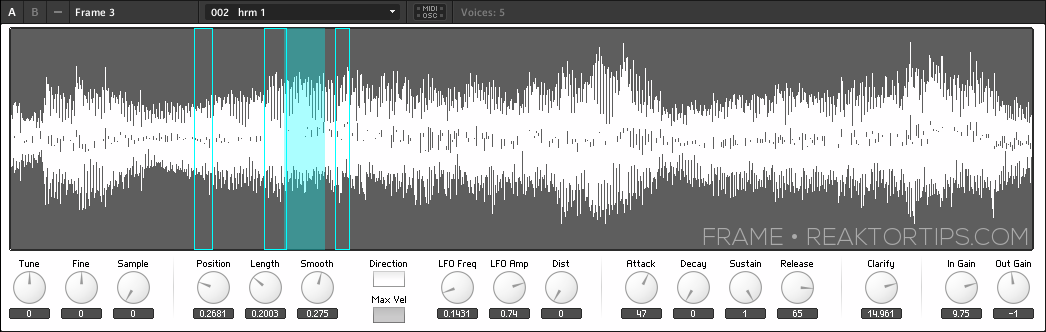
Frame 3 - Free Creative Sampler for Reaktor + Tutorial Series

VST, AU, AAX, CLAP, etc. Plugin Virtual Instruments Discussion
RELATED
PRODUCTS

Post

Image

Frame is a simple Reaktor sampler I built to implement a type of freeform looping and creative sampling I felt was missing from most other software samplers on the market. Frame allows you to define a window of sound and sweep it across the sample as it plays without glitching or popping.

Get it here

Post

~Pd~ wrote:Image

Frame is a simple Reaktor sampler I built to implement a type of freeform looping and creative sampling I felt was missing from most other software samplers on the market. Frame allows you to define a window of sound and sweep it across the sample as it plays without glitching or popping.

Get it here
Looks great, thanks :)

Post

~Pd~ wrote:Image

Frame is a simple Reaktor sampler I built to implement a type of freeform looping and creative sampling I felt was missing from most other software samplers on the market. Frame allows you to define a window of sound and sweep it across the sample as it plays without glitching or popping.

Get it here
Looks amazing. Will check it out. It is sounding like it is working kinda like grain samplers. Which is cool of course..

Post

kmonkey wrote:
~Pd~ wrote:Image

Frame is a simple Reaktor sampler I built to implement a type of freeform looping and creative sampling I felt was missing from most other software samplers on the market. Frame allows you to define a window of sound and sweep it across the sample as it plays without glitching or popping.

Get it here
Looks amazing. Will check it out. It is sounding like it is working kinda like grain samplers. Which is cool of course..
Yup, it's based on a granular sample module. But it can also do more typical "standard sampler" types of sounds.

Post

Part 2 of the Reaktor Tips Frame sampler tutorial: learn the method and madness behind sample position and length.

http://www.reaktortips.com/2013/05/fram ... n-and.html

Post

Great tool! Loving Loupe 2 as well :)
music // twolegs // geometriae
sounddesign // twolegstoneworks

Post

Is it possible to implement sample loading using drag and drop like in Skanner?

Post

Thanks, metal!

aMUSEd: it pretty much will work by dropping a sample on top of the waveform display, but you still have to choose the new sample from the sample selector control. It'd be nice if I could make the control automatically select a newly added sample, but that would require scripting which Reaktor doesn't have (yet). Skanner, if I recall correctly, uses the sample lookup modules where each one only holds one sample at a time.

Post

THanks for this. Is there an ipad template for this one too like the others?

Post

I could not figure out how to replace the sample with my own... :( Any tips? Thanks

Post

Same as the above - sample loading is by far the weakest/most unintuitive part of reaktor. Its so convoluted, whenever I discover how to do it, I forget if Im not doing it constantly.

The ensemble looks really great, cannot wait to get my own samples in it, so a quick workflow to load our own samples would really help.

Im guessing its something to do with making our own sample maps? (I know how to do that much!). Having to create a sample map when trying to simply load a single sample is again something thats unintuitive with reaktor.

A little step by step would be so useful if at all possible.

Thanks!

Post

I'll do something with TouchOSC, Konkreet and Lemur mappings in an upcoming tutorial.

Regarding adding samples - I'll do a quick and dirty screencast to address sample loading specifically in Frame 3.

Thanks for the feedback, guys!

Post

Thanks so much, whats throwing me off personally is that when you drop in a sample, it doesnt update the "presets" part of frame 3. But now I think thats not whats meant to happen at all.

So...

How does the sample maps relate to the drop down presets box?

Is there a way to collect the samples used automatically when saving the ensemble or will it always reference the original locations?


The easiest workflow I now have is -

Record track in ableton
Right click and select show in browser
Then physically drag the file name to the keyboard mapping on the bottom (not the gui waveform.)

Saving that sample within the ensemble (so its never lost) and then saving midi controls is the next hurdle to cross! So yep, a "quick and dirty" vid would be so good.

Thanks again!

Post

Also - any chance of a unison feature?! Definitely would beat Live's simpler hands down then. Playing with it now - its very very good. Going to play with some fx after it!


Just have to add -

This ensemble has one of the nicest gui's Ive ever used in Reaktor - simple, responds to mouse clicks - YOU CAN ACTUALLY CLICK ON THE WAVEFORM AND IT DOES SOMETHING! :) All reaktor gui's feel like they were created before laptop touchpads. But this is modern, and really fun to play.

Post

Jumpercable - I just did a video that covers adding samples and embedding the sample in the ensemble (or not) -

http://www.reaktortips.com/2013/05/addi ... ative.html

The snapshots (presets) are distinct from the samples - you can have multiple presets using the same sample.

Unison is an interesting idea - simply bump up the number of voices in the instrument's function palette tab, and set the min / max to a factor of the voice count. Here for example, each note you play will have four voices. Play with the "spread" control too, which determines the amount of detune between unison voices.

Image

Thanks for the kind words on the GUI. I worked hard to make it functional as well as pretty. :D

Post Reply

Return to “Instruments”