

I havn't looked at nectar yet. Will go have a quick look now, thanks.V0RT3X wrote:Izotope has delay modules in Nectar and Trash 2 if your interestedfaun2500 wrote:Gotta say that this GUI looks horrible. I don't know if its too bright/saturated or if its ALL THE LINES!!
When you use a bit of software all day everyday then the GUI is very important. Just wish Izotope made a delay.

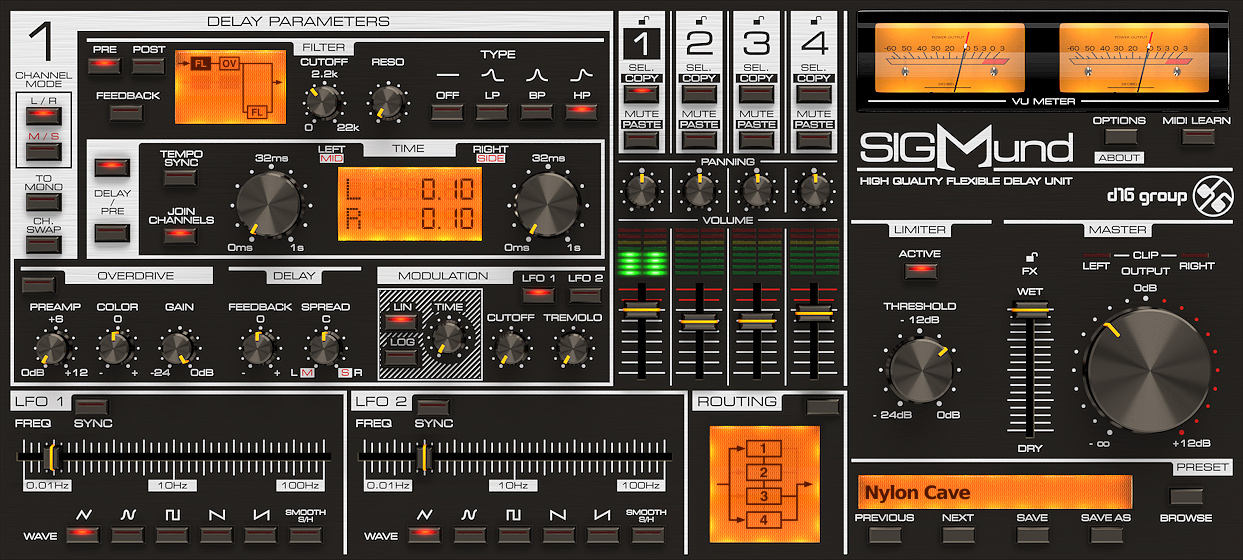
d16 SIGMUND V1 - Released / Demo Available
-
- KVRian
- 1416 posts since 27 Nov, 2008 from uk
Pigments Presets, Omnisphere Expansions, Dune, Serum, and Thorn Sound Packs. Diva, Zebra, TAL, and Repro Sound Banks.  Massive discounts - https://NewLoops.com
Massive discounts - https://NewLoops.com-
- KVRian
- 1416 posts since 27 Nov, 2008 from uk
Looked at it. If I used vocals (wish I did) I would buy this tomorrow! But OVERKILL for a delay. 
Pigments Presets, Omnisphere Expansions, Dune, Serum, and Thorn Sound Packs. Diva, Zebra, TAL, and Repro Sound Banks. Massive discounts - https://NewLoops.com
Massive discounts - https://NewLoops.com-

- KVRAF
- 5223 posts since 20 Jul, 2010
There's nothing to stop you treating an instrumental line like a vocal, giving it the richness of modulation that a voice has and treating it with the same effects you'd treat a vocal with.faun2500 wrote:Looked at it. If I used vocals (wish I did) I would buy this tomorrow! But OVERKILL for a delay.
http://sendy.bandcamp.com/releases < My new album at Bandcamp! Now pay what you like!
-

- KVRAF
- 2818 posts since 30 Aug, 2001 from where dinosaurs are still alive
I'm somehow surprised to see people clicking with silverline Guis.
Maybe some details of this new delay interface are a bit rough but, quoting some early posts, the '80 feel is quite nice, reminds me of old Teac racks
the signal flow looks blazing clear...(+1)
let's hope the preset menagment gets trashed and see you all at the groupbuy
Maybe some details of this new delay interface are a bit rough but, quoting some early posts, the '80 feel is quite nice, reminds me of old Teac racks
the signal flow looks blazing clear...(+1)
let's hope the preset menagment gets trashed and see you all at the groupbuy
-
- KVRist
- 159 posts since 24 Jul, 2011
I could be wrong but I don't see an overview tab/page on that GUI. (Constantly changing between 4 delay tabs is gonna get annoying really quick).
-

- KVRAF
- 37429 posts since 14 Sep, 2002 from In teh net
What's wrong with it?waiting man wrote: let's hope the preset menagment gets trashed
-
- KVRAF
- 1759 posts since 11 Nov, 2009 from Northern CA
It looks to me like the entire right side of the UI is global. The left side looks to be delay-specific, and probably identical for each of the four delays selected. I don't see any problem with that.n0rd wrote:I could be wrong but I don't see an overview tab/page on that GUI. (Constantly changing between 4 delay tabs is gonna get annoying really quick).
-
- KVRAF
- 2818 posts since 30 Aug, 2001 from where dinosaurs are still alive
"program change" and therefore automation of presets missing.aMUSEd wrote:What's wrong with it?waiting man wrote: let's hope the preset menagment gets trashed

-
- KVRian
- 806 posts since 1 Sep, 2008 from US
Look aside, the demo didn't impress me much, particularly the saturation. Hopefully real thing is better.
-

- KVRAF
- 2177 posts since 12 Nov, 2009
Guys, before you think about buying this, check out this beast:
http://www.eareckon.com/en/products/ear ... st-au.html
I promise it will be worth your time.
http://www.eareckon.com/en/products/ear ... st-au.html
I promise it will be worth your time.
Finally!
-
 thecontrolcentre thecontrolcentre https://www.kvraudio.com/forum/memberlist.php?mode=viewprofile&u=76240
 - KVRAF
- 37262 posts since 27 Jul, 2005 from Scottish Borders
Looks like some f'ugly 80's ghetto blaster ... horrible.
Hmmmmcyphersuit wrote: http://www.eareckon.com/en/products/ear ... st-au.html
-
- KVRist
- 159 posts since 24 Jul, 2011
That's the problem:dmbaer wrote:The left side looks to be delay-specific, and probably identical for each of the four delays selected. I don't see any problem with that.
"What's delay 1 cutoff?" click delay 1 tab...
"What's delay 3 time?" click delay 3 tab...
"Wait, what's delay 2 time?" click delay 2 tab...
"Need to change blah" click on tab...
"Need to change..." click on tab...
click on tab...
click on tab...
click on tab...
-
- KVRAF
- 1759 posts since 11 Nov, 2009 from Northern CA
Did you follow the Lush-101 conversation when it was released? A good deal of it revolved around complaints that the UI was too big (because they put everything on a single panel). Just can't win no matter what.n0rd wrote: "What's delay 1 cutoff?" click delay 1 tab...
"What's delay 3 time?" click delay 3 tab...
"Wait, what's delay 2 time?" click delay 2 tab...
"Need to change blah" click on tab...
"Need to change..." click on tab...
click on tab...
click on tab...
click on tab...

-

- KVRAF
- 14182 posts since 20 Nov, 2003 from Lost and Spaced
There's delays in Stutter Edit, but yes an Izotope dedicated delay would be choice.
-
- KVRAF
- 1924 posts since 15 Oct, 2008 from Germany
I didn't try the demo so I can't speak from a usability perspective, but unlike many here I like the UI visually 