The All In One Source Bitwig Information & Speculation Thread

Audio Plugin Hosts and other audio software applications discussion
Locked New Topic
RELATED
PRODUCTS
Bitwig Studio 6-25%$299.00Buy

Post

paterpeter wrote:I don't know if anything has been said about it (it's hard to keep up to this thread), but are there dedicated automation clips (as in "real" automation, not only MIDI CC)?
Hm, not sure I understand you right, but the automation lanes are quite extensive.
For every device element (synth knob, effect...) you can rightclick and create an automation lane for it.
The same is true for each and every VST parameter.

Those are not "clips" on their own, but you have a setting to make automation follow clips on the timeline.

In addition, you have all the usual CCs, mixer, pan, sends, macros etc.

In a track with a drum machine this is pretty brutal - you can access all parameters also directly from a dropdown in the automation lanes down to the last effect on the hihats own split layers...

The automation is nice to edit - you click with ALT pressed on a line and can drag it up and down to make it a curve.

So I personally would call it one of the best automation systems I know (where the "that I know" is of course limited).

Cheers,

Tom
"Out beyond the ideas of wrongdoing and rightdoing, there is a field. I’ll meet you there." · Rumi
UrbanFlow.art · Instagram · YouTube

Post

paterpeter wrote:I don't know if anything has been said about it (it's hard to keep up to this thread), but are there dedicated automation clips (as in "real" automation, not only MIDI CC)?
My understanding is that you can have track automation and clip automation... that is what the website says anyway

Post

Wow! This keeps getting better and better :love:

Cheers
Dennis

Post

ThomasHelzle wrote:I repeat this from my post on page 68:

As for Audio Editing: not sure what the question actually is? It has all the standard options like cutting and moving stuff around, fade-in and fade out times (with visual feedback in the wave-view), transpose (with automation), different stretch algorithms, "Onset detection" (sounds like what otherwise is often called transients) and you can automatically split at onsets and then move the individual snippets around (a clip in BW can contain multiple audio snippets ) - should be stutter-editors paradise You can revers audio, quantize lenght and tempo...

But it's not an "audio-editor" but a nondestructive arranger, not Photoshop but InDesign.

Otherwise, like pxindy said, I need better questions ;-)

Cheers,

Tom
Tom, I missed your first response on page 68 because it looked like you quoted others in your responses, but no quote - I was scanning for a quote from my username - so my sincere apologies for missing your reply first time around.

As for audio fades: Here's a very specific question - how about automated cross-fades between audio sections? This is something I have come to depend on like sleep and food and shelter, and I remember when ProTools came around with this - they made a huge splash about it at a local event, and here it was something I was doing with a NFR copy of Tracktion for at least a couple years before that.

I see you replied that there are fade in and fade out times, but what about graphical manipulation/setting of fade time/types as in Tracktion like here: http://www.tracktion.com/features/edit (also non-destructive)

The auto cross-fade that is in Tracktion is also a huge time saver when comping and editing down speeches and lectures to remove pregnant pauses, repeats, coughs, etc. (something I've had to do quite a bit in the past)

I would have to believe that other DAW besides Tracktion and ProTools have some type of auto cross fade function (simply drag the beginning of the following clip onto the end of the previous clip and hit a cross fade button/command or the 'X' key and it's done. In a typical 60 minute speech, I would have at least 120 of these edits and the way that Tracktion accomplished that was a huge time saver over manually doing cross-fading. Same is true for comping a comp audio track from a set of 3 or 4 takes.

Post

ThomasHelzle wrote:
paterpeter wrote:I don't know if anything has been said about it (it's hard to keep up to this thread), but are there dedicated automation clips (as in "real" automation, not only MIDI CC)?
Hm, not sure I understand you right, but the automation lanes are quite extensive.
For every device element (synth knob, effect...) you can rightclick and create an automation lane for it.
The same is true for each and every VST parameter.

Those are not "clips" on their own, but you have a setting to make automation follow clips on the timeline.

In addition, you have all the usual CCs, mixer, pan, sends, macros etc.

In a track with a drum machine this is pretty brutal - you can access all parameters also directly from a dropdown in the automation lanes down to the last effect on the hihats own split layers...

The automation is nice to edit - you click with ALT pressed on a line and can drag it up and down to make it a curve.

So I personally would call it one of the best automation systems I know (where the "that I know" is of course limited).

Cheers,

Tom
What I mean is if automation can be created in a non-linear way, too. For example, in FL Studio, you can create "reusable" automation clips just like you'd create a MIDI clip. Then, wherever you put the automation clip in the normal arrangement the automation is played. But maybe that's what pdxindy means with "clip automation"?

Here's an example in FL Studio:

Post

@rockstar Reaper has auto crossfades. It is a very powerful audio editor, and it's got a lot of stuff, like the action list and macros, that can really help with monotonous tasks. I'd say check it out. The demo is uncrippled and you can install it in about 5 minutes. No kidding.

Post

Ogopogo wrote:@rockstar Reaper has auto crossfades. It is a very powerful audio editor, and it's got a lot of stuff, like the action list and macros, that can really help with monotonous tasks. I'd say check it out. The demo is uncrippled and you can install it in about 5 minutes. No kidding.
I can second this... As you mention ProTools and as Ogopogo mentions Reaper are great for this. I haven't tried Traktion but I'm intrigued by this since it's a single window DAW which would be even better (for me) editing. I have to do the same with Dialogue, and I don't know what I'd do without those options either.

I'd aslo love to know if BW can do this too (I mean imagine that... one DAW to rule them all?). :hihi:

Post

Ogopogo wrote:Cool, thank you. And that last button right after the toolbar, is that snap?

How about the views; I'm looking at what I assume are the view buttons at the bottom left of the screen and bitwig seems to be similar to Live in that you have your "main" views (session/arrange) and then you have the windows at the bottom that you can switch between, but it looks like there is some extra stuff. The "edit" view is one of these main views? How does that work? And then you have your midi editor and devices that you can show at the bottom, but also there is an automation view and whatever that three column icon is? How do those last two work?

How you tried it with multiple monitors and if so how are the "profiles" working for you?

Then what are the three button on the bottom right? I assume one opens the browser?
Sorry, forgot that one since it's not a tool - it makes the arrangement follow the playback (autoscroll).

You have a lot of view buttons actually and tons of options there - unlike in Live.
- the i down in the left corner toggles the info panel on the left, where all object related info is shown, depending on if you select a midi or audio clip, notes, automation... It also contains all the tools for those items (can be seen in the BW videos).

Then you have three major views, Arrange, Mix, Edit.
But those are way less static as in Live, since in the Arrangement you can also see your clips (in front of the timeline in that case) using the icons below the main window. So this is where the magic happens for me - clip launcher and timeline in harmony and usable at the same time with a button to toggle between clip and timeline per track. Love it.
This will be the main view to use for me.

Below that main view you can toggle between note/audio editor, automation editor, device panel and mixer. Very nice.

In the Mix view - which is similar to the session view in Live - you can have the device chain, the automation editor or the note/audio editor down there. Here you don't see the timeline. The Clips are top down like in Live.

Finally you have the fullscreen Edit mode, where whatever clip etc. you have selected is visible in a huge editor window for detail work together with automation. You can switch between single and layer editing and between editing a whole track vs. a single clip.

Very nice, especially when you think multimonitor: have the arrangement on the main monitor and fullscreen editing on the second etc. IMO they found a perfect balance for a flexible Layout without the overkill some software has where you can configure the GUI to death - which I don't want.

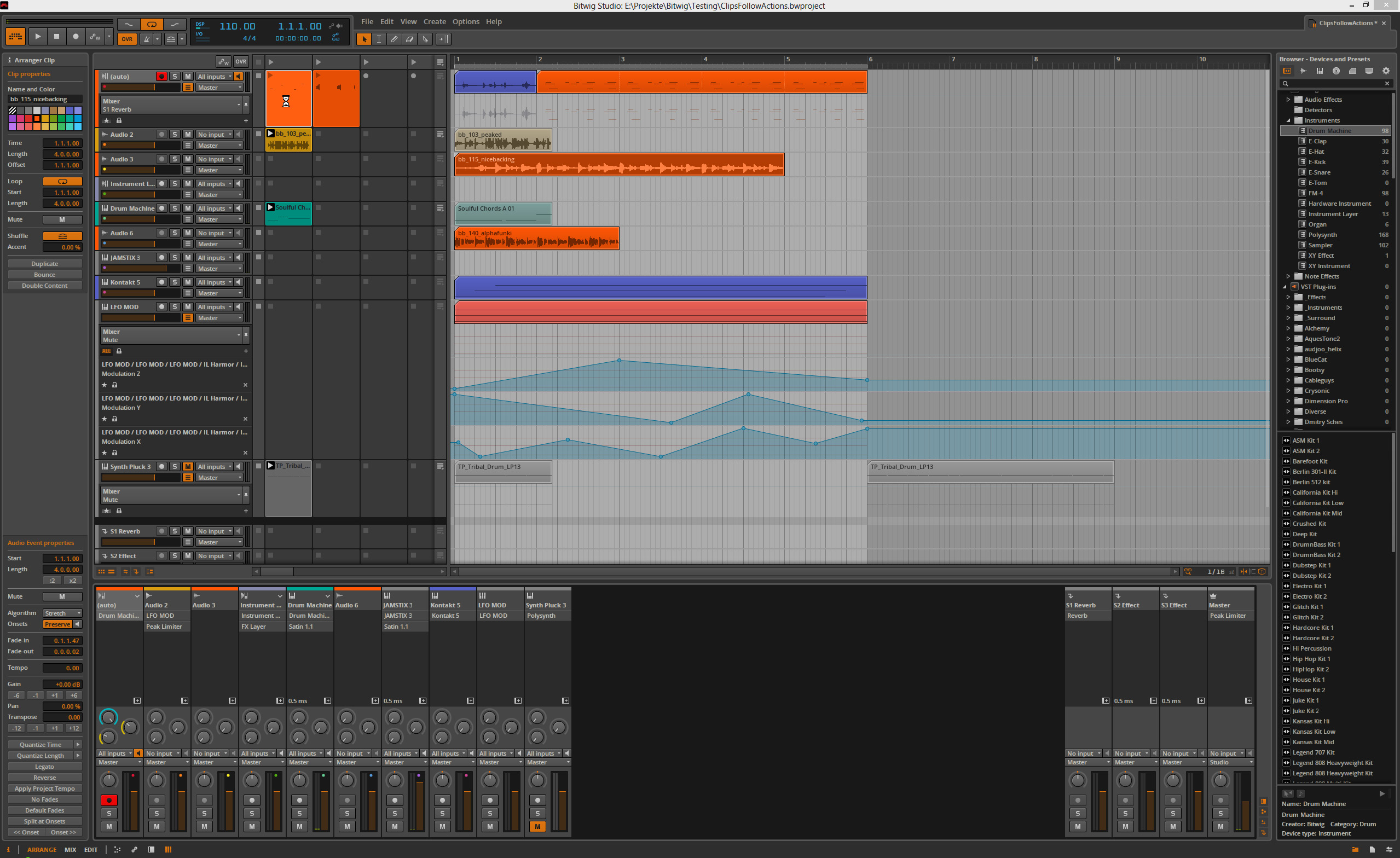
I made a screenshot of my current test projects with the arrangement open and the mixer below:

Image

With two monitors it works beautifully for me and the existing presets are just what you would want, basically variations of the available options.

The three buttons on the lower right are first the browser, then Project where you set Info like Title, Artist, Album etc., Used Files where you can search for missing files, collect and save them and delete unused, Used Plugins where you see all Plugins you used in the project and - very nice - in what version! If there are plugins missing or there are version conflicts, you will see it here. The last, third icon down on the right side is Studio I/O where you can select your output monitors, set it to mono, define a Cue/Preview Output and work with the installed controllers.

Puh, I hope this helps - :D

Cheers,

Tom
"Out beyond the ideas of wrongdoing and rightdoing, there is a field. I’ll meet you there." · Rumi
UrbanFlow.art · Instagram · YouTube

Post

n/m, I've lost what little interest I had :?
Last edited by hibidy on Fri Oct 04, 2013 8:29 pm, edited 1 time in total.

Post

elxsound wrote:
Ogopogo wrote:@rockstar Reaper has auto crossfades. It is a very powerful audio editor, and it's got a lot of stuff, like the action list and macros, that can really help with monotonous tasks. I'd say check it out. The demo is uncrippled and you can install it in about 5 minutes. No kidding.
I can second this... As you mention ProTools and as Ogopogo mentions Reaper are great for this. I haven't tried Traktion but I'm intrigued by this since it's a single window DAW which would be even better (for me) editing. I have to do the same with Dialogue, and I don't know what I'd do without those options either.

I'd aslo love to know if BW can do this too (I mean imagine that... one DAW to rule them all?). :hihi:
I've tried Reaper. In fact, I did the thing where I made an SD card on it with self-contained Reaper - I keep it in my USB microphone case and now and then I tossed it into my suitcase for business trips and I had a self-contained audio recording/editing toolkit.

Then I bought a Mikey Digital for my iPhone and Garageband for iOS and I haven't touched Reaper since.

Tracktion's fades and autocross fades are great, if you ask me. I'm a sort of Tracktion fan-boy, the one window construct and M.O. really fit hand-in-glove for my brain, but I was disappointed with the Tracktion 4 release being really nothing new. I'm cranking away on Tracktion 3 to this day.

-Scott

Post

very cool tom, much appreciated

Post

Wow that is all awesome stuff, thanks.

Are all those kits from the factory library? How is the factory library?

Post

hibidy wrote:oh ffs with the "perfect question" stuff.........guys......it's an AUDIO HOST, not a surgical kit :roll:

@audio: How specific do you want? I have live. What are the main benefits of using bitwig while recording audio like guitar?
Mono inputs?
Timestretch like live? How does it compare?

Let's start there, but honestly, this "only soup for you thing" is kinda stale. :evil:
I don't know if this was aimed at my specific question. The one guy on here who seems to be able to answer specific question said that my very general 'how about audio?' question several pages back wasn't specific enough.

So I tried to think about one simple feature of what I'm currently used to, that I would hate to live without simply due to the time savings it currently provides.

Is that any different than someone asking about the Live does/doesn't do this does Bitwig feature questions?

Maybe you weren't directing this at me - it's hard to tell, but since I was one of the only folks asking about audio manipulation instead of midi manipulation, I'm thinking it was directed here.

Not looking for a surgical kit - just whether a certain feature that has become as useful to me as pencil and paper will be included in the basics. The official Bitwig information is silent on the topic as far as I can tell.

Post

^Yeah, I know hibidy already edited that comment, but I just want to say that this is the stuff that differentiates hosts from each other so why not ask about it? Also we've been waiting forever and I'm just curious.

Post

Some shorts:

- As far as I know there is no comping. If I find out more I'll let you know.

- ATM I can't have overlapping clips at all - if I drag something on top of something else the lower thing is removed.

- Therefore no crossfades either as far as I can see?

- As I said, I don't think there are dedicated Automation Clips, but otherwise the automation is amazing.

I hope I didn't overlook something important, the speed is going up indeed in this thread ;-)

One more thing:

If you think that something important is missing from BW, keep in mind that this is 1.0
Look at Live 1.0 and BW looks VERY impressive ;-)

For me this is the basis and groundwork for a new DAW, 1.0 is the start, not the end.
For me personally it will replace Ableton Live nicely I think, since it has a better balance between clips/loops and timeline and the automation and modulation are much more to my taste.
I also look forward to the nodal view and the other things announced for later updates.

And no, it's not the DAW to replace all others - and I don't think that was ever the intention ;-)


Cheers,

Tom
Last edited by ThomasHelzle on Fri Oct 04, 2013 9:01 pm, edited 1 time in total.
"Out beyond the ideas of wrongdoing and rightdoing, there is a field. I’ll meet you there." · Rumi
UrbanFlow.art · Instagram · YouTube

Locked

Return to “Hosts & Applications (Sequencers, DAWs, Audio Editors, etc.)”