

That might have been funny a decade ago but now it's just gotten really old.Numanoid wrote:OK, so is that the same case for One Ping Only?

Admiral Quality Poly-ana offers custom skinning (and win a free license)!
-

- KVRAF
- 19806 posts since 16 Sep, 2001 from Las Vegas,USA

None are so hopelessly enslaved as those who falsely believe they are free. Johann Wolfgang von Goethe
-

- KVRAF
- 12522 posts since 21 Mar, 2008 from Hannover, Germany
Currently looking forward to Poly-Ana v1.30 Beta 3 to fix the line up for the knobs (should be simpler in Beta 3). At the moment they are slightly shifted to the left. Fixing this for every knob manually is possible but will take more time. Anyway i alraedy started doing it for some knobs.
So far i used the knob available from the Beta website and that one was at least almost correct in terms of placing the knob correctly.
Have started checking the knobs library both included with JKnobMan and the corresponding website and with those knobs it first takes some time to find teh correct size setting in JKnobMan and at the correct size those knobs are far offf from the places where they should be.
Again a way to shift multiple knobs at once (in the XML file for the skin) would be helpful for this.All knobs of the same type (or the same PNG file) seem to more or less have the same offset from the center where they should be placed. Single knobs could be also further adjusted later.
For the switches and LED in my current skin this is no problem i i just re-coloured existing PNG files.
The part of the XML file where the position of knobs could be adjusted looks like this (of course this is much longer...):
So far i used the knob available from the Beta website and that one was at least almost correct in terms of placing the knob correctly.
Have started checking the knobs library both included with JKnobMan and the corresponding website and with those knobs it first takes some time to find teh correct size setting in JKnobMan and at the correct size those knobs are far offf from the places where they should be.
Again a way to shift multiple knobs at once (in the XML file for the skin) would be helpful for this.All knobs of the same type (or the same PNG file) seem to more or less have the same offset from the center where they should be placed. Single knobs could be also further adjusted later.
For the switches and LED in my current skin this is no problem i i just re-coloured existing PNG files.
The part of the XML file where the position of knobs could be adjusted looks like this (of course this is much longer...):
<!-- All the control definitions. Assign which image name (assigned to filenames, above) each uses and its origin (top/left) pixel position on the background. -->
<CtrlDefs>
<!-- Volume and Tune are not saved in program (*.pap) and bank (*.pab) files and should not be surrounded with a border. (They are of course saved and recalled with host project state.) -->
<CtrlInfo><ID>Volume</ID><ImgName>BigKnob</ImgName><PosX>49</PosX><PosY>578</PosY></CtrlInfo>
<CtrlInfo><ID>Tune</ID><ImgName>BigKnob</ImgName><PosX>-3</PosX><!-- Yes, you can position control origins outside the background bounds! --><PosY>578</PosY></CtrlInfo>
<!-- All other controls are saved in program (*.pap) and bank (*.pab) files and should be surrounded by a border to indicate that. -->
<!-- Performance Section, usually to right side of keyboard -->
<CtrlInfo><ID>Pitch</ID><ImgName>PMWheel</ImgName><PosX>150</PosX><PosY>692</PosY></CtrlInfo>
<CtrlInfo><ID>Wheel</ID><ImgName>PMWheel</ImgName><PosX>175</PosX><PosY>692</PosY></CtrlInfo>
<CtrlInfo><ID>PortaTim</ID><ImgName>SmallKnob</ImgName><PosX>101</PosX><PosY>722</PosY></CtrlInfo>
<CtrlInfo><ID>PortaLeg</ID><ImgName>LightButton</ImgName><PosX>120</PosX><PosY>685</PosY></CtrlInfo>
<CtrlInfo><ID>Detune</ID><ImgName>SmallKnob</ImgName><PosX>55</PosX><PosY>722</PosY></CtrlInfo>
<CtrlInfo><ID>Priority</ID><ImgName>3StateHSlider</ImgName><PosX>55</PosX><PosY>640</PosY></CtrlInfo>
<CtrlInfo><ID>CycleAsn</ID><ImgName>LightButton</ImgName><PosX>16</PosX><PosY>685</PosY></CtrlInfo>
<CtrlInfo><ID>TrigLeg</ID><ImgName>LightButton</ImgName><PosX>96</PosX><PosY>685</PosY></CtrlInfo>
<CtrlInfo><ID>P-phony</ID><ImgName>SmallKnob</ImgName><PosX>8</PosX><PosY>718</PosY></CtrlInfo>
<CtrlInfo><ID>PolyMode</ID><ImgName>3StateHSlider</ImgName><PosX>2</PosX><PosY>640</PosY></CtrlInfo>
<CtrlInfo><ID>PB-Range</ID><ImgName>SmallKnob</ImgName><PosX>55</PosX><PosY>683</PosY></CtrlInfo>
<CtrlInfo><ID>KBOctave</ID><ImgName>3StateHSlider</ImgName><PosX>101</PosX><PosY>640</PosY></CtrlInfo>
<!-- Env 1 -->
<CtrlInfo><ID>E1VelLev</ID><ImgName>SmallKnob</ImgName><PosX>214</PosX><PosY>551</PosY></CtrlInfo>
<CtrlInfo><ID>E1VlATim</ID><ImgName>SmallKnob</ImgName><PosX>251</PosX><PosY>551</PosY></CtrlInfo>
<CtrlInfo><ID>E1VlDTim</ID><ImgName>SmallKnob</ImgName><PosX>287</PosX><PosY>551</PosY></CtrlInfo>
<CtrlInfo><ID>E1VlRTim</ID><ImgName>SmallKnob</ImgName><PosX>324</PosX><PosY>551</PosY></CtrlInfo>
<CtrlInfo><ID>E1RVel</ID><ImgName>LightButton</ImgName><PosX>349</PosX><PosY>542</PosY></CtrlInfo>
<CtrlInfo><ID>E1KeyTim</ID><ImgName>SmallKnob</ImgName><PosX>363</PosX><PosY>551</PosY></CtrlInfo>
<CtrlInfo><ID>E1Curve</ID><ImgName>SmallKnob</ImgName><PosX>399</PosX><PosY>551</PosY></CtrlInfo>
<CtrlInfo><ID>E1Attack</ID><ImgName>BigKnob</ImgName><PosX>210</PosX><PosY>581</PosY></CtrlInfo>
<CtrlInfo><ID>E1Decay</ID><ImgName>BigKnob</ImgName><PosX>267</PosX><PosY>581</PosY></CtrlInfo>
<CtrlInfo><ID>E1Sustai</ID><ImgName>BigKnob</ImgName><PosX>322</PosX><PosY>581</PosY></CtrlInfo>
<CtrlInfo><ID>E1Releas</ID><ImgName>BigKnob</ImgName><PosX>377</PosX><PosY>581</PosY></CtrlInfo>
Last edited by Ingonator on Sat Jul 25, 2015 6:47 am, edited 3 times in total.
Ingo Weidner
Win 10 Home 64-bit / mobile i7-7700HQ 2.8 GHz / 16GB RAM //
Live 10 Suite / Cubase Pro 9.5 / Pro Tools Ultimate 2021 // NI Komplete Kontrol S61 Mk1
Win 10 Home 64-bit / mobile i7-7700HQ 2.8 GHz / 16GB RAM //
Live 10 Suite / Cubase Pro 9.5 / Pro Tools Ultimate 2021 // NI Komplete Kontrol S61 Mk1
-
- Banned
- 454 posts since 30 Apr, 2013
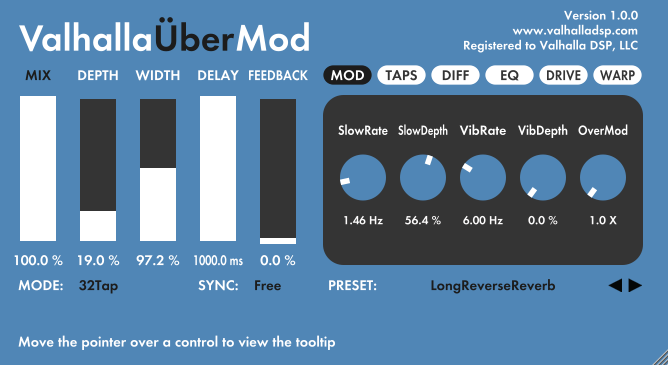
Great, this is the direction a new skin should be going - improved readability. I'd say don't give up, Teksonik, it's just three controls - a chicken head, the small circular knob and the switch - all of them very difficult to read in their current state, due to shape, lighting, fx, etc. - so I think you can do it pal, just as simple as possible, as readable as possible.Teksonik wrote:I'm trying to clean up the white skin edit....see Osc 1 as opposed to Osc 2 but it really needs lighter knobs. I've stumbled around Knobman long enough to know I have neither the talent or time to gain skills enough to do a new knob so if anyone could give it a shot I'd appreciate it a great deal.

 Lots or really simple knobs can be your examples - Ableton, Valhalla, etc.!
 I'd really like to see a skin from you, this background is exactly what I was hoping for

-
- Banned
- 454 posts since 30 Apr, 2013
Readability:
-
- KVRAF
- 12522 posts since 21 Mar, 2008 from Hannover, Germany
Just did first approaches to correct the knob positions in my current skin manually using the XML file (also see my post above).
Here is a screenshot with the knobs for ENV1 corrected, you could compare to ENV2 and ENV3:

UPDATE: deleted, that skin no longer exists...
I also found that shifting all similar knobs at once like it will be maybe possible in the next Beta will maybe not be the best solution in all cases.
For some knobs manualy tweaking could be still necessary. In that example above the 3 left small knobs have a slightly different offset than the others at ENV1.
For other custom knobs than this one (which is based on the one found at the Poly-Ana Beta website) such corrections are even more important as those could be off from the center up to half of the knob size or even more.
UPDATE:
This is an updated version of my current skin after correcting knob positions (both x- and y-axis), slightly updating the knobs and changing the drop-down menus background color to light red:

This skin is maybe not fully optimized in terms of readability/ergonomics but represent two ideas i had in my mind yesterday and the effort to get those was reasonable.
As i am totally new to this (creating custom skins) of course those skins were also used for learning certain quite certain things in short time (less than one day).
For a totally optimized skin also the background picture (including fonts) and the knob positions would have to be changed which is more than i am able to do at the moment.
BTW the knob graphics use 360 steps so using them seems to look smooth.
So far using the custom skins worked nicely without any crash or problems with certain controls.
UPDATE:
screenshots deleted, that skin no longer exists...
Here is a screenshot with the knobs for ENV1 corrected, you could compare to ENV2 and ENV3:
UPDATE: deleted, that skin no longer exists...
I also found that shifting all similar knobs at once like it will be maybe possible in the next Beta will maybe not be the best solution in all cases.
For some knobs manualy tweaking could be still necessary. In that example above the 3 left small knobs have a slightly different offset than the others at ENV1.
For other custom knobs than this one (which is based on the one found at the Poly-Ana Beta website) such corrections are even more important as those could be off from the center up to half of the knob size or even more.
UPDATE:
This is an updated version of my current skin after correcting knob positions (both x- and y-axis), slightly updating the knobs and changing the drop-down menus background color to light red:
This skin is maybe not fully optimized in terms of readability/ergonomics but represent two ideas i had in my mind yesterday and the effort to get those was reasonable.
As i am totally new to this (creating custom skins) of course those skins were also used for learning certain quite certain things in short time (less than one day).
For a totally optimized skin also the background picture (including fonts) and the knob positions would have to be changed which is more than i am able to do at the moment.
BTW the knob graphics use 360 steps so using them seems to look smooth.
So far using the custom skins worked nicely without any crash or problems with certain controls.
UPDATE:
screenshots deleted, that skin no longer exists...
Last edited by Ingonator on Thu Jul 30, 2015 4:29 pm, edited 5 times in total.
Ingo Weidner
Win 10 Home 64-bit / mobile i7-7700HQ 2.8 GHz / 16GB RAM //
Live 10 Suite / Cubase Pro 9.5 / Pro Tools Ultimate 2021 // NI Komplete Kontrol S61 Mk1
Win 10 Home 64-bit / mobile i7-7700HQ 2.8 GHz / 16GB RAM //
Live 10 Suite / Cubase Pro 9.5 / Pro Tools Ultimate 2021 // NI Komplete Kontrol S61 Mk1
-
fluffy_little_something fluffy_little_something https://www.kvraudio.com/forum/memberlist.php?mode=viewprofile&u=281847
- Banned
- 12880 posts since 5 Jun, 2012
Those scales are too big in my view, which contributes to the crowded impression. And the difference in thickness between min and max is so little that that type of scale doesn't make much sense at all. The difference was bigger, i.e. better, with the old scales, albeit wrong.
On the big knobs the scales are still wrong in Env1, as if those knobs were bipolar.
Hardly any gui designer gets scales right for whatever reason. I think it's better not to have any scale, maybe just a dot where zero is (i.e. at 7 or 12 o'clock). That also makes it easier to see the marker on the knob's cap.
The master level knob scale on this one looks good (if a scale is used):
http://www.phuturetone.com/css/images/phutura.jpg
On the big knobs the scales are still wrong in Env1, as if those knobs were bipolar.
Hardly any gui designer gets scales right for whatever reason. I think it's better not to have any scale, maybe just a dot where zero is (i.e. at 7 or 12 o'clock). That also makes it easier to see the marker on the knob's cap.
The master level knob scale on this one looks good (if a scale is used):
http://www.phuturetone.com/css/images/phutura.jpg
-
- KVRAF
- 12522 posts since 21 Mar, 2008 from Hannover, Germany
Not sure why the big knobs at the envelopes do look "bipolar" to you. The small knobs are indeed bipolar and the labels for minimum and maximum seem to be the same as the displayed values. The first 5 small knobs t the envelopes are for velocity settings.fluffy_little_something wrote:Those scales are too big in my view, which contributes to the crowded impression. And the difference in thickness between min and max is so little that that type of scale doesn't make much sense at all. The difference was bigger, i.e. better, with the old scales, albeit wrong.
On the big knobs the scales are still wrong in Env1, as if those knobs were bipolar.
Hardly any gui designer gets scales right for whatever reason. I think it's better not to have any scale, maybe just a dot where zero is (i.e. at 7 or 12 o'clock). That also makes it easier to see the marker on the knob's cap.
The master level knob scale on this one looks good (if a scale is used):
http://www.phuturetone.com/css/images/phutura.jpg
The master volume parameter is from 0 to 100%.
Currently as a background picture i use the one provided by AdmiralQuality with some changes in color.
Have not changed any of the labels yet.
Last edited by Ingonator on Thu Jul 30, 2015 4:30 pm, edited 1 time in total.
Ingo Weidner
Win 10 Home 64-bit / mobile i7-7700HQ 2.8 GHz / 16GB RAM //
Live 10 Suite / Cubase Pro 9.5 / Pro Tools Ultimate 2021 // NI Komplete Kontrol S61 Mk1
Win 10 Home 64-bit / mobile i7-7700HQ 2.8 GHz / 16GB RAM //
Live 10 Suite / Cubase Pro 9.5 / Pro Tools Ultimate 2021 // NI Komplete Kontrol S61 Mk1
-
fluffy_little_something fluffy_little_something https://www.kvraudio.com/forum/memberlist.php?mode=viewprofile&u=281847
- Banned
- 12880 posts since 5 Jun, 2012
The scales (I mean the curved bars, not the labels) look bipolar, which doesn't make sense for the big envelope knobs.
-
- KVRAF
- 12522 posts since 21 Mar, 2008 from Hannover, Germany
Now i got an aidea from where that confusin maybe comes and maybe i also have to correct the knob positions due to that.
The "scales" around the knobs actually seem to be same thickness from minimum to maximum.
You could see this here:
http://www.admiralquality.com/products/ ... s_v130.pdf
Will try to adjust the knobs in a way that this is more clear (either the knob position or the size of the knobs).
If i look at it now many of the knobs indeeed still seem to be positioned wrongly (at least slightly). After a while of tweaking you sometimes start to miss such things. Now it is more obvious.
Also looks like teh big knobs are slightly too big.
The "scales" around the knobs actually seem to be same thickness from minimum to maximum.
You could see this here:
http://www.admiralquality.com/products/ ... s_v130.pdf
Will try to adjust the knobs in a way that this is more clear (either the knob position or the size of the knobs).
If i look at it now many of the knobs indeeed still seem to be positioned wrongly (at least slightly). After a while of tweaking you sometimes start to miss such things. Now it is more obvious.
Also looks like teh big knobs are slightly too big.
Last edited by Ingonator on Thu Jul 30, 2015 4:30 pm, edited 5 times in total.
Ingo Weidner
Win 10 Home 64-bit / mobile i7-7700HQ 2.8 GHz / 16GB RAM //
Live 10 Suite / Cubase Pro 9.5 / Pro Tools Ultimate 2021 // NI Komplete Kontrol S61 Mk1
Win 10 Home 64-bit / mobile i7-7700HQ 2.8 GHz / 16GB RAM //
Live 10 Suite / Cubase Pro 9.5 / Pro Tools Ultimate 2021 // NI Komplete Kontrol S61 Mk1
-
fluffy_little_something fluffy_little_something https://www.kvraudio.com/forum/memberlist.php?mode=viewprofile&u=281847
- Banned
- 12880 posts since 5 Jun, 2012
Interesting to see the GUI alone without the controls 
Yes, for bipolar controls, you would have to push the knob axis a bit towards 12 o'clock, for unipolar ones towards 7 o'clock.
Yes, for bipolar controls, you would have to push the knob axis a bit towards 12 o'clock, for unipolar ones towards 7 o'clock.
-
- KVRAF
- 19806 posts since 16 Sep, 2001 from Las Vegas,USA
I'm pretty sure the idea behind allowing user skinning for Poly-Ana was not to make it look like a Synth-Edit project from 2005. Hopefully some of the real skinners that frequent KVR will work their magic.
I'm hoping Beta 3 will drop today...........
I'm hoping Beta 3 will drop today...........
None are so hopelessly enslaved as those who falsely believe they are free. Johann Wolfgang von Goethe
-

- KVRAF
- 6466 posts since 18 Jul, 2008 from New York
Ingonator wrote:
 My eyes are bleeding from the extreme color contrasts.
-
- KVRAF
- 12522 posts since 21 Mar, 2008 from Hannover, Germany
I am also pretty sure that this allows to have fun with some own ideas (li my first approaches here) and not just "hunting" for the best readability and/or ergonomics.Teksonik wrote:I'm pretty sure the idea behind allowing user skinning for Poly-Ana was not to make it look like a Synth-Edit project from 2005. Hopefully some of the real skinners that frequent KVR will work their magic.
I'm hoping Beta 3 will drop today...........
For me my approaches look nice (especially the black one) and if nobody wants to have them it's also no problem for me.
Just doing a boring grey skin was just not what i had in mind when i started with this yesterday.
Anyway i am still using those skins to learn and my current skins are indeed not fully optimized yet, especially the calibration of knobs size and positions. Sometimes i almost feel the need to shift a knob just a half pixel (in the XML file) to get it perfect.
For those who expect a perfect GUI from me after a bit more than one day of designing my own skin (never did that before) do expect a bit too much. Anyway this thread does not seem to be just for the "Pros".
Last edited by Ingonator on Sat Jul 25, 2015 7:14 pm, edited 1 time in total.
Ingo Weidner
Win 10 Home 64-bit / mobile i7-7700HQ 2.8 GHz / 16GB RAM //
Live 10 Suite / Cubase Pro 9.5 / Pro Tools Ultimate 2021 // NI Komplete Kontrol S61 Mk1
Win 10 Home 64-bit / mobile i7-7700HQ 2.8 GHz / 16GB RAM //
Live 10 Suite / Cubase Pro 9.5 / Pro Tools Ultimate 2021 // NI Komplete Kontrol S61 Mk1
-

- KVRAF
- 25849 posts since 20 Jan, 2008 from a star near where you are
It's a startIngonator wrote:For me my approaches look nice (especially the black one
Could you try some other button for the many on/off switches, you haven't changed those.
Could you try to make the buttons in lighter blue instead of red ?
Could you try to change the background color of the fields to something else than yellow, maybe some kind of greytone.