

Yeah that is very awesome! Nektar is clearly the best thing out there for people who want to emulate the hardware experience with soft synths. I would have bought one by now but I haven't had my studio set up for the last year since I've been renovating my home. But if/when I get set up again, I definitely want a Nektar. Also the ability to use specific mapping for different presets is huge. So it's actually useful for Reaktor ensembles! (Unlike Novation automap)justin3am wrote:The cool thing about the Nektar plug-in map for Diva, is the mapping is dynamic. So when you change oscillator or filter modes, the parameters mapped to the oscillator and filter pages change. This way, you always see the controls which are relevant to each mode. This dynamic mapping was also done for the envelope and effect pages. It makes it very easier to understand which parameters apply to each mode and also reduces the amount of pages you need to navigate.Echoes in the Attic wrote:Another thing to keep in mind too is that with most hardware controllers you can repeat controls on different pages so with Nektar or automap for example, you might want to create a different page for each osc section so that you can clearly see which controls are used. There really aren't that many controls so having different osc model pages isn't so bad really on a good controller.

I Finally Bit The Diva Bullet
-
Echoes in the Attic Echoes in the Attic https://www.kvraudio.com/forum/memberlist.php?mode=viewprofile&u=180417
- KVRAF
- 12066 posts since 12 May, 2008
-

- KVRAF
- 37536 posts since 14 Sep, 2002 from In teh net
Is this host dependent or would it provide the same template in any host?justin3am wrote:The cool thing about the Nektar plug-in map for Diva, is the mapping is dynamic. So when you change oscillator or filter modes, the parameters mapped to the oscillator and filter pages change. This way, you always see the controls which are relevant to each mode. This dynamic mapping was also done for the envelope and effect pages. It makes it very easier to understand which parameters apply to each mode and also reduces the amount of pages you need to navigate.Echoes in the Attic wrote:Another thing to keep in mind too is that with most hardware controllers you can repeat controls on different pages so with Nektar or automap for example, you might want to create a different page for each osc section so that you can clearly see which controls are used. There really aren't that many controls so having different osc model pages isn't so bad really on a good controller.
-
- KVRian
- 1074 posts since 1 Jan, 2004
Ohh, I didnt know that. That's very nice.justin3am wrote: The cool thing about the Nektar plug-in map for Diva, is the mapping is dynamic. So when you change oscillator or filter modes, the parameters mapped to the oscillator and filter pages change.
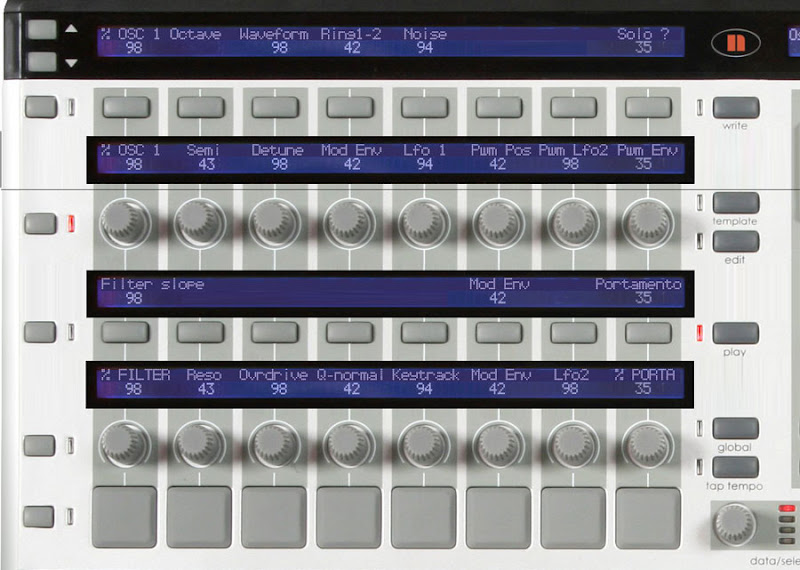
2-3 years ago I used Automap with Novation Remote Zero SL (i liked that there were a lot of knobs, sliders) and dynamic mapping was the thing i wanted

But still, if the synth is quite simple (for example I created my own, custom mapping for Novation V-Station) then it felt almost like hardware. The general experience, creativity sky rockets
At least when you like program synths.I figured out some naming convention I liked and It was very nice
I had like 2 or 3 "pages" of mappings so the general workflow was very usable Example below (half of the remote zero sl screen, as far as i remember
):
ps. you can buy Novation Remote Zero SL very cheap on ebay. I imho the first version, for pure synth programming purpose / having fun
 , was much better then second (lack of second digital screen - so as a result you could see much less settings / mappings at once)
Soundbanks: Sylenth, V-Station, Z3TA+, Toxic Biohazard - good EDM Soundbanks
VST Cafe - music production blog
VST Cafe - music production blog
-

- KVRAF
- 13141 posts since 7 May, 2006 from Southern California
-
- KVRian
- 920 posts since 1 Mar, 2007
Wow that is really awesome. I wonder if Akai Advance does anything like this. I think I might get a Panorama sometime.justin3am wrote:
The cool thing about the Nektar plug-in map for Diva, is the mapping is dynamic. So when you change oscillator or filter modes, the parameters mapped to the oscillator and filter pages change. This way, you always see the controls which are relevant to each mode. This dynamic mapping was also done for the envelope and effect pages. It makes it very easier to understand which parameters apply to each mode and also reduces the amount of pages you need to navigate.
-

- KVRian
- 652 posts since 2 Mar, 2015 from UK
Make sure you have multicore selected in DIVA it will spread the load across all your CPU cores. My first gen i7 manages multiple DIVA's although with all the Soundtoys and Slate effects added on, it does get bogged down. Another thing to do is increase the samples in your DAWs settings that will give your CPU more time to do everything.