

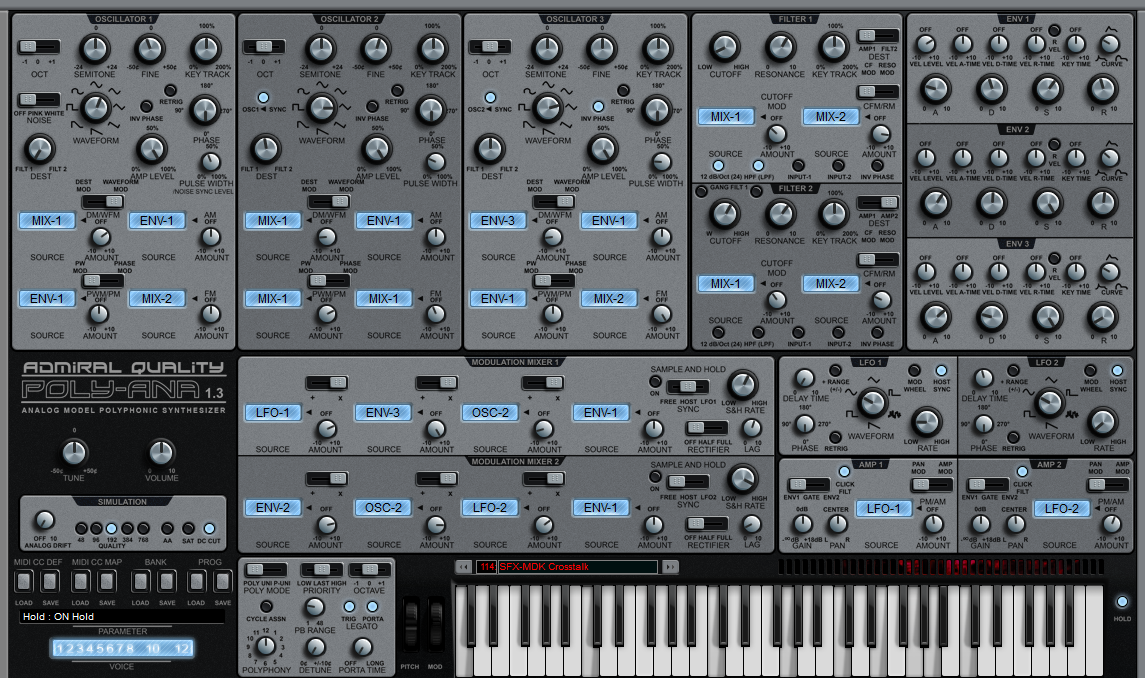
Just checked that Hoverland skin. While it indeed looks nice it is almost identical to the SEM like skin that was published by AQ including the fonts/labels.
All that was changed from the SEM like skin was adding new knobs/switches and a different background color.
If i would have known that this would be enough to make people happy i would not have rearranged all the controls in my own skin (that i published yesterday) and just added new knobs and background color to the SEM skin.

Admiral Quality Poly-ana offers custom skinning (and win a free license)!
-

- KVRAF
- 12522 posts since 21 Mar, 2008 from Hannover, Germany
Last edited by Ingonator on Fri Aug 07, 2015 2:12 pm, edited 5 times in total.
Ingo Weidner
Win 10 Home 64-bit / mobile i7-7700HQ 2.8 GHz / 16GB RAM //
Live 10 Suite / Cubase Pro 9.5 / Pro Tools Ultimate 2021 // NI Komplete Kontrol S61 Mk1
Win 10 Home 64-bit / mobile i7-7700HQ 2.8 GHz / 16GB RAM //
Live 10 Suite / Cubase Pro 9.5 / Pro Tools Ultimate 2021 // NI Komplete Kontrol S61 Mk1
-

- KVRAF
- 9091 posts since 28 May, 2005 from Netherneverlands
+1 really good looking and easy on the eyesH-man wrote:Yeah nice work HoverlandGosh wrote:beautifulTeksonik wrote:http://www.admiralquality.com/products/ ... #Hoverland
New skin from Hoverland. Great work !


No band limits, aliasing is the noise of freedom!
-
- KVRian
- 650 posts since 26 Sep, 2014 from Kingshill Valley
yes, that's definitely one proper looking skinNielzie wrote:+1 really good looking and easy on the eyesH-man wrote:Yeah nice work HoverlandGosh wrote:beautifulTeksonik wrote:http://www.admiralquality.com/products/ ... #Hoverland
New skin from Hoverland. Great work !
 if now someone could do a symbiosis of this one and the one from norbz it could be perfect
-

- KVRAF
- 11162 posts since 16 Mar, 2003 from Porto - Portugal
Don't regret. Regarding placement, I still prefers yours, although the elements (knobs, more than anything else) of this are perfect. Also, the keyboard shadow is in sync with the knobs shadow, which also helps tpo the overall balance. Finally, I like the blue background in the drop down boxes. Very well done. Now, Norbz, take these knobs as reference, and make some alike, and take the keyboard shadow in sync with the rest of the skin. The end result of your skins will look much better, you'll see.Norbz wrote: Beautiful workGot me wishin' I spent less time on trying to redo the darn thing from scratch and just make skins with the current size/labels as they are. +1 Hov.
Fernando (FMR)

-
- KVRAF
- 11162 posts since 16 Mar, 2003 from Porto - Portugal
OK, I honoured my word. I think I now can consider there is a relatively safe expectation that I will get a manageable skin to work with, so I bought Poly-Ana. Thanks to all the people that made it happen (Mike included, of course), and keep the good work,. I will still be here to make my (sometimes harsh) comments.
Fernando (FMR)
-
- KVRAF
- 12522 posts since 21 Mar, 2008 from Hannover, Germany
Personally while that new "variation" of the existing SEM skin (new knobs/switches and different background coior) by Hoverland looks good personally i prefer to have more of my own approach including some rearrangement of the controls.fmr wrote:Don't regret. Regarding placement, I still prefers yours, although the elements (knobs, more than anything else) of this are perfect. Also, the keyboard shadow is in sync with the knobs shadow, which also helps tpo the overall balance. Finally, I like the blue background in the drop down boxes. Very well done. Now, Norbz, take these knobs as reference, and make some alike, and take the keyboard shadow in sync with the rest of the skin. The end result of your skins will look much better, you'll see.Norbz wrote: Beautiful work
Norbz besides keeping the basic layout of the default and the SEM skin at least did quite a lot of rearrangement inside the sections. By "sections" i mean Oscs, Filter, ENV, LFO etc. Besides that he also decreases the overall size of the skin which means most controls had to be rearranged/shifted.
This is much closer to an actual "redesign" than the new Hoverland skin (which is nice on it's own).
Last edited by Ingonator on Fri Aug 07, 2015 10:22 pm, edited 13 times in total.
Ingo Weidner
Win 10 Home 64-bit / mobile i7-7700HQ 2.8 GHz / 16GB RAM //
Live 10 Suite / Cubase Pro 9.5 / Pro Tools Ultimate 2021 // NI Komplete Kontrol S61 Mk1
Win 10 Home 64-bit / mobile i7-7700HQ 2.8 GHz / 16GB RAM //
Live 10 Suite / Cubase Pro 9.5 / Pro Tools Ultimate 2021 // NI Komplete Kontrol S61 Mk1
-
 thecontrolcentre thecontrolcentre https://www.kvraudio.com/forum/memberlist.php?mode=viewprofile&u=76240
 - KVRAF
- 37262 posts since 27 Jul, 2005 from Scottish Borders
Now that's more like itTeksonik wrote:http://www.admiralquality.com/products/ ... #Hoverland
New skin from Hoverland. Great work !
-

- KVRAF
- 25849 posts since 20 Jan, 2008 from a star near where you are
That's very niceTeksonik wrote:http://www.admiralquality.com/products/ ... #Hoverland
New skin from Hoverland. Great work !
I think it is a good idea to use a bit of different colors for the different modules, it sets them apart more.
-
Echoes in the Attic Echoes in the Attic https://www.kvraudio.com/forum/memberlist.php?mode=viewprofile&u=180417
- KVRAF
- 12029 posts since 12 May, 2008
Hoverland. Beauty.
-

- KVRAF
- 5564 posts since 13 Jan, 2005 from the bottom of my heart
No hard feelings Ingo thats usually the result when a guy with real talent on skinning just added new knobs and background color to the SEM skin.Ingonator wrote:Just checked that Hoverland skin. While it indeed looks nice it is almost identical to the SEM like skin that was published by AQ including the fonts/labels.
All that was changed from the SEM like skin was adding new knobs/switches and a different background color.
If i would have known that this would be enough to make people happy i would not have rearranged all the controls in my own skin (that i published yesterday) and just added new knobs and background color to the SEM skin.

Whoever wants music instead of noise, joy instead of pleasure, soul instead of gold, creative work instead of business, passion instead of foolery, finds no home in this trivial world of ours.
-
Echoes in the Attic Echoes in the Attic https://www.kvraudio.com/forum/memberlist.php?mode=viewprofile&u=180417
- KVRAF
- 12029 posts since 12 May, 2008
It looks nothing like the SEM skin at all. The knobs, switches and background are what make up the entirely of the look of a skin for heaven's sake! The only thing that is the same is the layout.Ingonator wrote:Just checked that Hoverland skin. While it indeed looks nice it is almost identical to the SEM like skin that was published by AQ including the fonts/labels.
All that was changed from the SEM like skin was adding new knobs/switches and a different background color.
This is absurd. So if you had known that all people wanted was a really nice skin with really nice knobs, switches, background and everything that you can see with your eyes, and is pleasant to look at, then you would have just done that no problem rather than use the ugly knobs and background and switches. You only used those because you thought people didn't care about the look of the skin. This has all the maturity of a 9 year old whose jealous that someone else got praise. I actually don't mean to be harsh, but there is a reason for the praise for the Hoverland skin and it seems you're trying to diminish that, which I don't think is very cool.Ingonator wrote: If i would have known that this would be enough to make people happy i would not have rearranged all the controls in my own skin (that i published yesterday) and just added new knobs and background color to the SEM skin.
Last edited by Echoes in the Attic on Fri Aug 07, 2015 9:52 pm, edited 2 times in total.
-
- KVRian
- 650 posts since 26 Sep, 2014 from Kingshill Valley
thank you, murnaumurnau wrote:No hard feelings Ingo thats usually the result when a guy with real talent on skinning just added new knobs and background color to the SEM skin.
-

- KVRian
- 730 posts since 26 Dec, 2007 from Australia
Hey Norbz, all,
Just playing around with some aspects, bi-polar dials, colours etc. I'm not really wedded to any of this, just testing stuff along the way using Norbz's template. Any comments welcome.
Note: there is a new mod selector to be added and the voices dial is still wrong but all WIP.
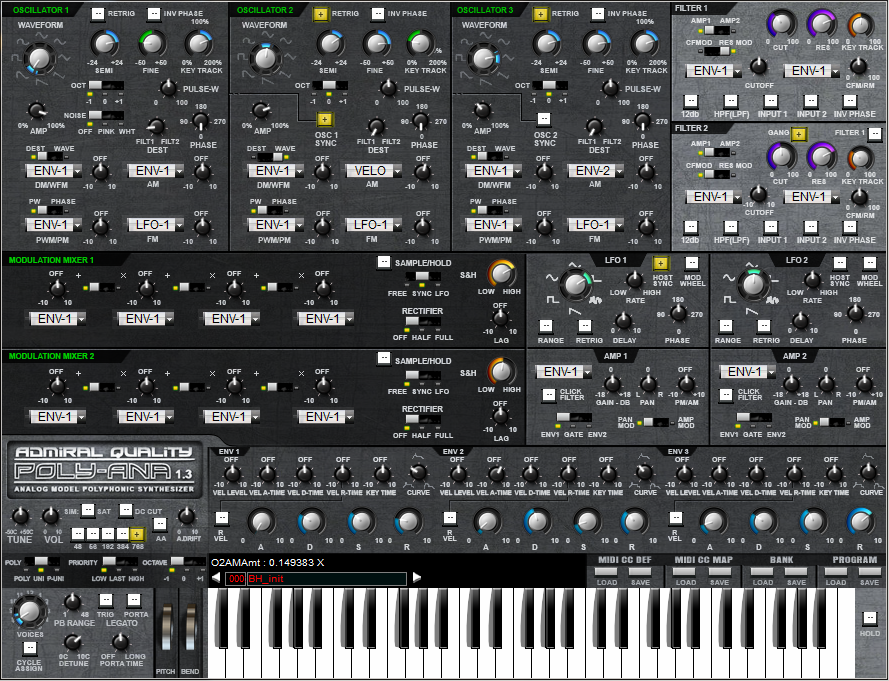
Just playing around with some aspects, bi-polar dials, colours etc. I'm not really wedded to any of this, just testing stuff along the way using Norbz's template. Any comments welcome.
Note: there is a new mod selector to be added and the voices dial is still wrong but all WIP.
-
- KVRAF
- 12522 posts since 21 Mar, 2008 from Hannover, Germany
I am sorry if my comments sounded a bit harsh but i aleady mentioned that the Hoverland skin looks good,independent of if the SEM skin from AQ was used for doing this (which is a fact...).
Ingo Weidner
Win 10 Home 64-bit / mobile i7-7700HQ 2.8 GHz / 16GB RAM //
Live 10 Suite / Cubase Pro 9.5 / Pro Tools Ultimate 2021 // NI Komplete Kontrol S61 Mk1
Win 10 Home 64-bit / mobile i7-7700HQ 2.8 GHz / 16GB RAM //
Live 10 Suite / Cubase Pro 9.5 / Pro Tools Ultimate 2021 // NI Komplete Kontrol S61 Mk1