


Sylenth1 v3

-
fluffy_little_something fluffy_little_something https://www.kvraudio.com/forum/memberlist.php?mode=viewprofile&u=281847
- Banned
- 12880 posts since 5 Jun, 2012
I had said I don't care enough about skinning to get into it myself. That is not the same as not caring about skins. I like the way Dune 2 works. One can select a different skin every day of the week and yet it takes just one second and they are all well done.Teksonik wrote:I thought you didn't care about skinning..............fluffy_little_something wrote:I hope it will be included only as an option because I don't want that skin with that purple crap in it, it gives me eye cancer
Does the background color change when selecting the other layer like with the original?
Trust me I'll edit the "purple crap" out of it in two minutes if the new version of Sylenth is released but perhaps you missed the screenshot of the version Lance did that has no purple. That's the whole point of user skinning. Some people like the purple bits....those who don't can change them.

I like the black skin of the teaser. But really, I find the current skin good enough, I would only use a different skin if the displays were easier to read.
-
hyperconnectedspace hyperconnectedspace https://www.kvraudio.com/forum/memberlist.php?mode=viewprofile&u=339285
- KVRist
- 67 posts since 8 Oct, 2014
yes he should skin Spire.tristan- wrote:I want Lance to skin every synth I have!
mac v3 is out, waiting for windows now.
Lenovo IdeaPad U330p Win8.1 Pro x64 | Ableton Suite 9.1.5 x32 | Some Synths
-
fluffy_little_something fluffy_little_something https://www.kvraudio.com/forum/memberlist.php?mode=viewprofile&u=281847
- Banned
- 12880 posts since 5 Jun, 2012
Will be so cool to finally see that Check for Updates menu option in action 
-

- KVRAF
- 1925 posts since 23 Sep, 2005
Any hints what the new Windows version of Sylenth1 will offer ?
I don't have Sylenth1, but might buy it after the new Windows version is out.
I don't have Sylenth1, but might buy it after the new Windows version is out.
-
- KVRAF
- 8094 posts since 16 Oct, 2006
Iv'e just had an hour checking the new version out. On the skins you can either select 100 or 200% but better still you can resize to your own liking by dragging the corners to suit. Really great feature. Love the new skins. See screenshots at 200% here and then a smaller size.fluffy_little_something wrote:I hope it will be included only as an option because I don't want that skin with that purple crap in it, it gives me eye cancer
Does the background color change when selecting the other layer like with the original?
V3.0 skin Part A

Part B

Kautschuk Skin 200%
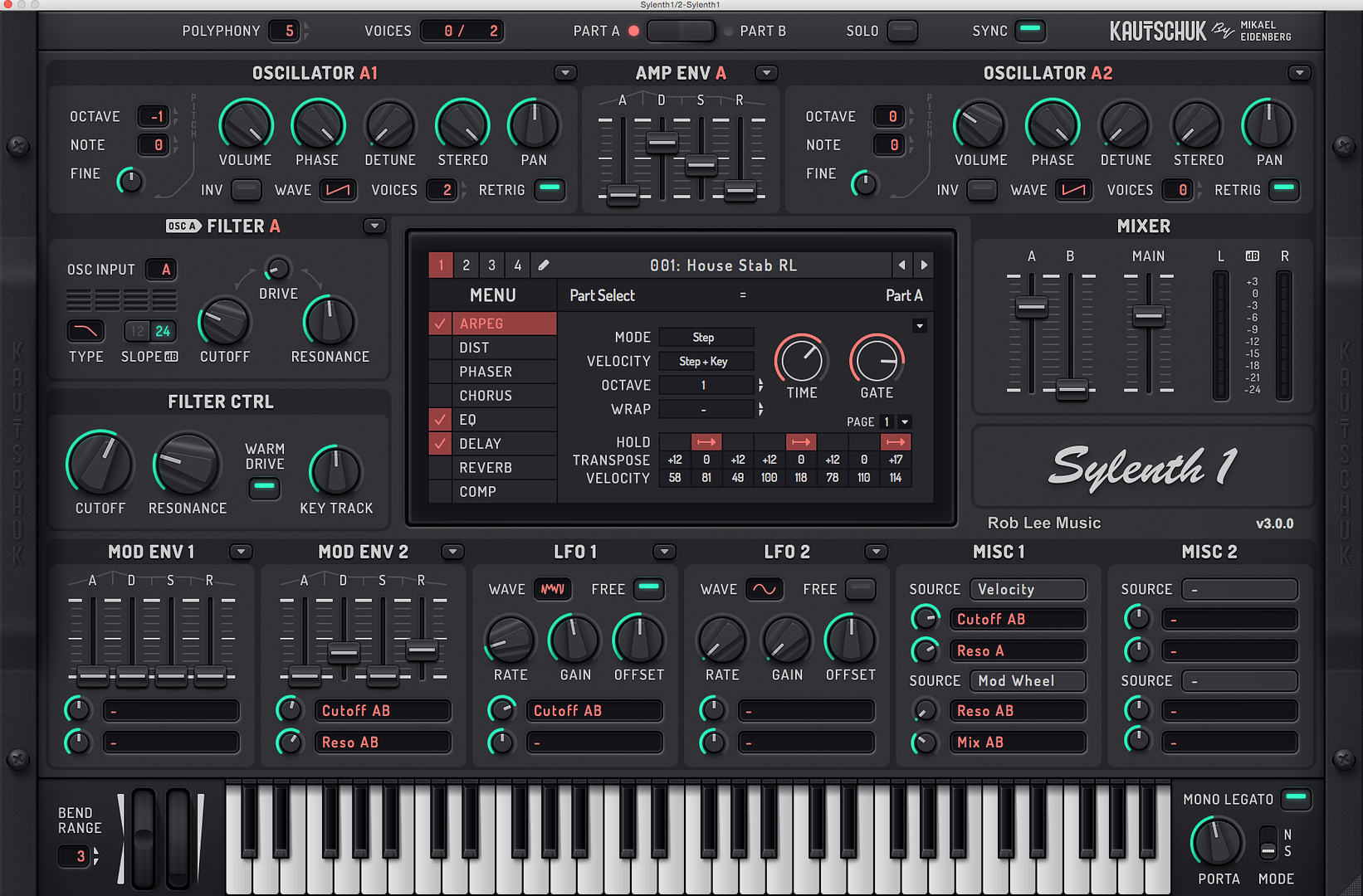
Random size A

Random Size B Tiny

Lances Skins below, one shows large by dragging corners and the other shows massive size on 27" Thunderbolt in Live 9 to give an idea.
A

B - Massive Size in Live 9

vst and au versions both running perfect on mac. also any sound banks you have from previous versions work perfectly fine with this one I've tested for a few hours now all is good.
Rob
-
fluffy_little_something fluffy_little_something https://www.kvraudio.com/forum/memberlist.php?mode=viewprofile&u=281847
- Banned
- 12880 posts since 5 Jun, 2012
Wow, cool skins 
With the first skin and layer 2 selected, the little buttons for the copy and paste feature within the green panels can hardly be seen, though.
With the first skin and layer 2 selected, the little buttons for the copy and paste feature within the green panels can hardly be seen, though.
-
- KVRAF
- 8094 posts since 16 Oct, 2006
Your right I hadn't noticed that at all good one. On part A there's arrows to click (see pic) but on part B it's just a black box.. good spotfluffy_little_something wrote:Wow, cool skins
With the first skin and layer 2 selected, the little buttons for the copy and paste feature within the green panels can hardly be seen, though.

-
- KVRAF
- 8094 posts since 16 Oct, 2006
Just made a quick video clip on the skin resizing, also selecting custom banks in the menu seems to find your Silent banks wherever they are on your hard drives regardless of where you've stored them which is great. Anyways nothing special just a quick flick through some skins and resizing. Great feature for any size screen now.
-
- KVRAF
- 3959 posts since 10 Sep, 2010 from A shit hole (Ireland).
I like the new skins... Especially the actual Sylenth V3 skins.
I will take the Lord's name in vain, whenever I want. Hail Satan! And his little goblins too. 
-
fluffy_little_something fluffy_little_something https://www.kvraudio.com/forum/memberlist.php?mode=viewprofile&u=281847
- Banned
- 12880 posts since 5 Jun, 2012
The displays seem easier to read
What I don't like so much is that both with the copy&paste feature and the Menu they have added another level, i.e. more clicks. I hate those menus with sub-menus to the side of the menu, I often move too far up or down with the mouse when moving to the right or left.
What I don't like so much is that both with the copy&paste feature and the Menu they have added another level, i.e. more clicks. I hate those menus with sub-menus to the side of the menu, I often move too far up or down with the mouse when moving to the right or left.
-

- KVRAF
- 19832 posts since 16 Sep, 2001 from Las Vegas,USA
Woa nice ! Love the resize feature. Can you edit the skins or are they hard coded in the .dll ?
Come on Windows version ! (this is the first time I've ever envied Mac users )
Come on Windows version !
(this is the first time I've ever envied Mac users )None are so hopelessly enslaved as those who falsely believe they are free. Johann Wolfgang von Goethe
-
- KVRAF
- 8094 posts since 16 Oct, 2006
I'm not sure about being able to edit the skins but maybe they are hard coded I'm not clued up on skinning and dll's. The skins though look great IMO and being able to resize the gui to suit your monitor is fantastic, just drag to suit. Iv'e tried on 27" Thunderbolt and 15" Macbook, couldn't get any better. Hope you windows users get yours soonTeksonik wrote:Woa nice ! Love the resize feature. Can you edit the skins or are they hard coded in the .dll ?
Come on Windows version !
I haven't had a crash and Iv'e been using it all night and this I think is the beta version as they mention over on the LD website but it's solid here on the mac and Yosemite. The gui designers have done a great job indeed.
@fluffy
I preferred the old way of copy/paste but I can live with a few more clicks I suppose.
Rob
-
fluffy_little_something fluffy_little_something https://www.kvraudio.com/forum/memberlist.php?mode=viewprofile&u=281847
- Banned
- 12880 posts since 5 Jun, 2012
They should have done it like in Ultra Analog, where you open a similar menu by right-clicking, and then directly import the settings from the desired section. I. e. just 2 clicks instead of 4 or 5, depending on whether or not you have to switch the layer.rob_lee wrote:
@fluffy
I preferred the old way of copy/paste but I can live with a few more clicks I suppose.
Rob
https://app.box.com/s/aw2nqpj05zof5mf86kbuypdcp2dhtgad
Last edited by fluffy_little_something on Wed Sep 09, 2015 1:00 am, edited 1 time in total.