Polyphonic voice distributor VST?

VST, AU, AAX, CLAP, etc. Plugin Virtual Instruments Discussion
RELATED
PRODUCTS

Post

Recently I was looking for way to stack multiple instances of monophonic synths (e.g. OBXD with maximum unison or Tyrell N6 with max unison) and play them back polyphonically, but I soon realized you can't accomplish that with the simple layering function in FL-Studio. :cry:

Of course I could just split chords into individual synth instances, but that's just a lame offline solution.

How awesome would it be, if you had a plugin that could turn any mono synth into a polyphonic synth by distributing the voices to the whole keyboard depending on how many keys you have pressed and how many instances you have loaded into the plugin? Apparently there is a Mac-only plugin that does just that called "Polymer", but there doesn't seem to be a solution for Windows users. :cry:

Post

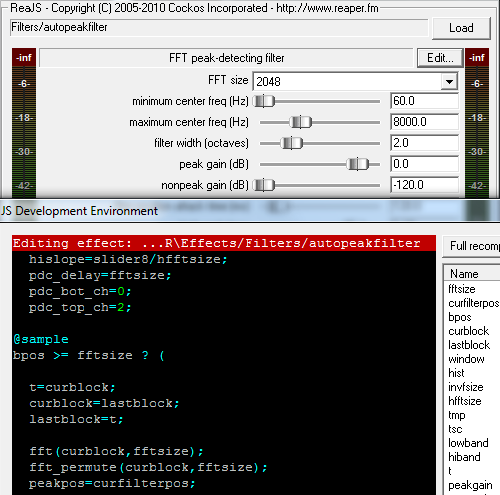
this plugin can do it (reajs itself, not the specific filter pictured)
Image

vst 64 bit, osx or win

just be really polite at the reaper forum and someone might help.

Post

tbh, I was looking for something less complicated.

Post

[====[\\\\\\\\]>------,

Ay caramba !

Post

You can use a midi plugins that distribute each voice of a chord to a different midi channel. I use it for horn section stuff, but would serve your purpose too, I think.

InsertPizHere KVR forum has a free series VST midi plugins
midiChordSplit or midiPolyphony would work, but one is more featured.

Post

How am I supposed to use this? I tried linking notelogic and 2 synths to the same input/output port so the effect can communicate with the synths and vice versa but all it does is playing both synths at once. I have the same problem with midiPolyphony by pizmidi.

Post

Record a long sample and put it into a sampler. That works well if you don't want to apply sophisticated modulation.
Blog ------------- YouTube channel
Tricky-Loops wrote: (...)someone like Armin van Buuren who claims to make a track in half an hour and all his songs sound somewhat boring(...)

Post

fischkopf wrote:
How am I supposed to use this? I tried linking notelogic and 2 synths to the same input/output port so the effect can communicate with the synths and vice versa but all it does is playing both synths at once. I have the same problem with midiPolyphony by pizmidi.
Did you make sure the synths were on different midi channels?

edit : in fact you dont say -how- you connected them or in what.

you need to be able to do

midi input -> notelogic -> synth 1 (on midi channel 1)
(same instance of notelogic) ->synth 2 (on midi channel 2)


more info needed.
An idiot on Set Theory:
"In some cases there is an object called red that contains everything that is red. In much the same way a pot is a plate."

Post

whyterabbyt wrote:
fischkopf wrote:
How am I supposed to use this? I tried linking notelogic and 2 synths to the same input/output port so the effect can communicate with the synths and vice versa but all it does is playing both synths at once. I have the same problem with midiPolyphony by pizmidi.
Did you make sure the synths were on different midi channels?

edit : in fact you dont say -how- you connected them or in what.

you need to be able to do

midi input -> notelogic -> synth 1 (on midi channel 1)
(same instance of notelogic) ->synth 2 (on midi channel 2)


more info needed.
All I did was linking the two synths and the effect to the same port, I have no idea how to set the midi channels for individual synths in FL Studio... I can set the input/output port for a synth by clicking the little gear icon in the title bar, it says nothing about channels though.

Post

Could something like this work on hardware synths? I have a 4 voice analog (creatively named "Analog Four.") that I'd love to chain together with another to use as an 8 voice synth, but the developer has no chaining implementation like Moog, Studio Electronics and DSI have implemented.
Zerocrossing Media

4th Law of Robotics: When turning evil, display a red indicator light. ~[ ●_● ]~

Post

fischkopf wrote:
whyterabbyt wrote:
fischkopf wrote:
How am I supposed to use this? I tried linking notelogic and 2 synths to the same input/output port so the effect can communicate with the synths and vice versa but all it does is playing both synths at once. I have the same problem with midiPolyphony by pizmidi.
Did you make sure the synths were on different midi channels?

edit : in fact you dont say -how- you connected them or in what.

you need to be able to do

midi input -> notelogic -> synth 1 (on midi channel 1)
(same instance of notelogic) ->synth 2 (on midi channel 2)


more info needed.
All I did was linking the two synths and the effect to the same port, I have no idea how to set the midi channels for individual synths in FL Studio... I can set the input/output port for a synth by clicking the little gear icon in the title bar, it says nothing about channels though.
I guess I'm not the only person with this problem after all: http://forum.image-line.com/viewtopic.p ... 92&start=0

I think for now I'll just use Reaper according to this tutorial...

Post

I've been meaning to look into doing something like this, except I want to drive analog monosynths to play polyphonic parts. What I've done in the past is to manually edit my midi performances into mono lines, or just play each voice in manually. This looks like a much better approach.
Incomplete list of my gear: 1/8" audio input jack.

Post

zerocrossing wrote:
Could something like this work on hardware synths? I have a 4 voice analog (creatively named "Analog Four.") that I'd love to chain together with another to use as an 8 voice synth, but the developer has no chaining implementation like Moog, Studio Electronics and DSI have implemented.
I never used it , but i remember AD posting a clip of his mono hardware synth doing a polyphonic song thanks to that plugin.

I'll look for it now.

[edit]It is there on the page of that plugin at the very bottom.
aciddose wrote:Try using my "notelogic" voice allocator plugin.

https://soundcloud.com/xhip/megamonopoly
This is the plugin applied to a real analog monosynth, my own design "x1" synthesizer.

This will allow you to set up three or more instances (up to 16) and take MIDI input on a specific channel on each. The voice allocator plugin assigns each note you play to a unique MIDI channel.

http://xhip.net/effects/?p=notelogic
[====[\\\\\\\\]>------,

Ay caramba !

Post

In FL you would generally want to load this all up in Patcher and route your midi vst through Color Mapper and send it out to your synth VSTs from there. Each color represents a midi channel. Each color in the piano roll represent a different midi channel, too.

Post

lectrixboogaloo wrote:In FL you would generally want to load this all up in Patcher and route your midi vst through Color Mapper and send it out to your synth VSTs from there. Each color represents a midi channel. Each color in the piano roll represent a different midi channel, too.
Thanks, finally a solution to my problem that works within FL-Studio. I wish I knew about this "Color Mapper" thing earlier...

I can now finally use pizmidi MidiPolyphony and turn any monosynth (or polysynth with maxed unison) into a polysynth. :love:

In case anyone wants to try this out:

Add a "Patcher" to any mixer channel. Right click on "From FL Studio", go to outputs, select a MIDI port (I used port 1), connect that port to a color mapper (by default 4 midi channels are enabled, although you can enable all 16), add any monosynth you like up to 16 instances. Now add a "MidiPolyphony" as an instrument channel, click on the gear icon and set input/output port to 1, you're done.

Post Reply

Return to “Instruments”