


Trouble is, many Mac users may have problems running it as I have found, and its bloody annoying. It turns out this is because of Apple's tight control on security in order to protect its system from potential threats. As a result the app may appear as "damaged" and won't run.
I don't know whether Waves is aware of this issue but I figured a way around it. Here are the steps if anyone is interested...
Goto System Preferences -> Security & Privacy -> Firewall and unlock it
Select Firewall Options, add Waves Central to "Allow Incoming Connections"
Close the System Preferences
Waves Firewall Preferences
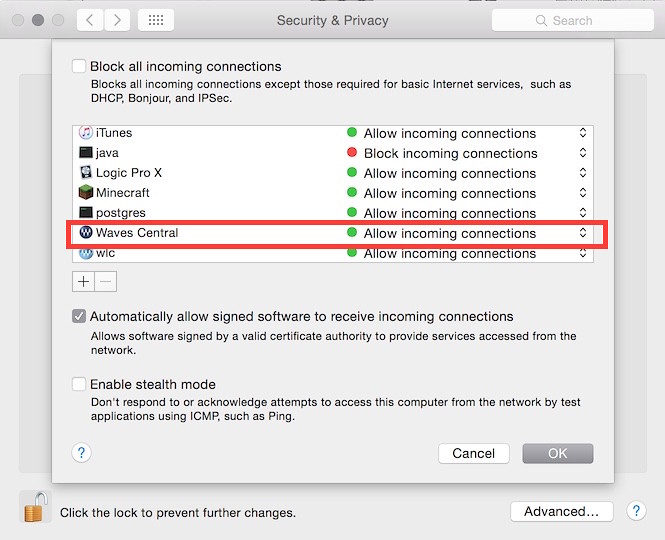
You should be able to keep your security settings as normal and it will run. If you have issues getting this to work for you, try doing the following step first, because that's basically what I did to get it working.
Goto System Preferences -> Security & Privacy -> General and select the "Anywhere" option
Run the app, make sure it connects fine.
Quit, follow the steps mentioned earlier
Change your security settings back to their default and close the System Preferences.
The new Waves Central seems to be the WLC with a new skin, upgraded to include an installation process. It is definitely much improved with these changes that were also needed by many.
On the plus side, with the introduction of Waves Central it now means Mac users will no longer have to download the full Offline Installer to install only small handful of plugins.
About freakin' man, because that was also bloody annoying!!


 You are right. You can install an upgrade within v9 containing a new plugin, this plugin will report having no license, but others will work.