


UVI Falcon - v4 = 2026 released - rumors, ads, praise, kindergarden, auto-sampling and off-topic inside!
-

- KVRAF
- 22892 posts since 8 Oct, 2014
Thomas, I haven't gotten to scripts yet. Did you actually create this in Falcon? How exactly are scripts made? Is there a tutorial somewhere?ThomasHelzle wrote:As a positive action in a crazy world, I'd like to present you guys with my very first Lua script ever to play with:
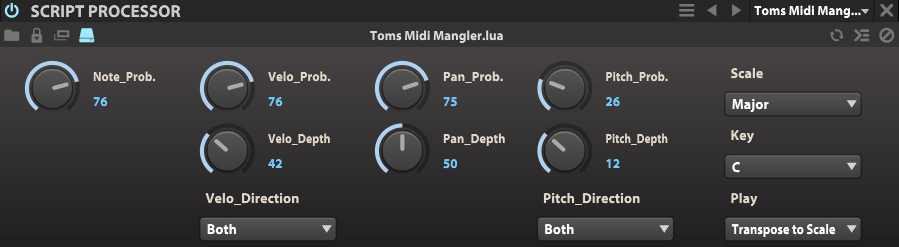
Toms Midi Mangler is a tool you can use in the "Events" tab to randomize incoming midi.
The combination of probability and separate maximum random values sounds the most natural to me and provides the most flexibility in many scenarios.
- Note Probability allows you to set how probable it is that the note will sound at all. Higher values will only drop a note every now and then, low values will make dense note clusters sparse...
- Velocity Probability sets the probability for the velocity to be randomly changed in percent.
- Velocity Depth is the maximum amount of the random change from 0-127.
- Velocity Direction allows you to select if you want the change only to go up, only down or up and down.
- Pan Probability defines how probable it is that Pan will change randomly.
- Pan Depth is the amount of random change around the center.
- Pitch Probability once more defines the probability of pitch changes in percent.
- Pitch_Depth defines the maximum pitch change in halftone steps.
- Pitch Direction defines if the pitch change should go up, down, or both.
- Scale allows you to apply a scale to the end result of the mangling. Set it to Chromatic if you don't want that.
- Key sets the key for the scale.
- Play defines what notes go through:
"Only Notes in Scale" will only play the notes that fit the scale after the mangling, all other will be discarded.
"Transpose to Scale" on the other hand will transpose the notes in a random direction to fit the scale (therefore all notes will sound)
This tool also works great together with other note processors like after an arpeggiator. Be sure to try that out!
If you only want to use the conform to scale part, set note probability to 100, all other probabilities to zero and set your Scale, Key and the Play setting to taste.
Let me know if you encounter any problems!
The tool is free for private use, if you use it for a commercial library, I'd be happy if you sent me a copy
Download:
http://www.screendream.de/stuff/Falcon/ ... angler.zip
Put the extracted file "Toms Midi Mangler.lua" in your ...Documents\UVI\Falcon\User Presets\EventProcessors\ScriptProcessor folder, then it should show up in Falcon in the Script Processor tab.
Enjoy!!!
Cheers,
Tom
-

- KVRAF
- 24411 posts since 7 Jan, 2009 from Croatia
-

- KVRAF
- 6535 posts since 9 Dec, 2008 from Berlin
Thanks, I fixed this in the posting.SJ_Digriz wrote:figured it out, you need a space in script processor
And yes, Falcon should really create all the directories on installation, so users know what goes where.
And we also need a way to define our own user preset directory location in preferences...
@wagtunes: http://www.uvi.net/uviscript/
All you need is a text editor...

Notepad ++, Sublime Text or any other such code editor should do.
Komodo Edit does syntax highlighting but not autocomplete for Lua as I found out today...
Cheers,
Tom
Last edited by ThomasHelzle on Sat Nov 14, 2015 11:52 pm, edited 1 time in total.
"Out beyond the ideas of wrongdoing and rightdoing, there is a field. I’ll meet you there." · Rumi
UrbanFlow.art · Instagram · YouTube
UrbanFlow.art · Instagram · YouTube
-

- KVRAF
- 6097 posts since 5 Jul, 2001 from Just about .... there
Very Cool Tom! I just started messing with Lua in Reaper. I still suck at it, but you've given me motivation. That's a seriously cool behavior for such a smallish script.ThomasHelzle wrote:Thanks, I fixed this in the posting.SJ_Digriz wrote:figured it out, you need a space in script processor
Cheers,
Tom
If you have to ask, you can't afford the answer
-
- KVRAF
- 6097 posts since 5 Jul, 2001 from Just about .... there
By the way, it would be nice if we could right click and Open in Editor from the right hand browser window instead of having to load it into a program first. Or am I just being a big baby?
If you have to ask, you can't afford the answer
-
- KVRAF
- 6535 posts since 9 Dec, 2008 from Berlin
Yeah, Lua in Falcon is extremely efficient. My Reaktor ensemble doing almost the same is much more complex and was a total pain to get to not produce hanging notes...SJ_Digriz wrote:By the way, it would be nice if we could right click and Open in Editor from the right hand browser window instead of having to load it into a program first. Or am I just being a big baby?
(https://www.native-instruments.com/en/r ... /show/7841)
When developing, I usually open the script directly from the harddrive. And you want it to be open inside of Falcon anyway, to see if everything works.
If you activate the little computer icon on the top left, the script autoupdates whenever you change something and save the script in the editor (stops working here after a while though).
The middle icon on the right is the console where you can see any output you post with:
print("your message").
This Lua integration is very well done.

What I missed:
- I seem to be unable to modulate the parameters of the script, not sure if I need to specify this explicitly somehow? I can create modulations for the knobs, but they don't do anything.
- I would prefer to use the smaller knobs with modulation rings used everywhere else in Falcon - is that possible?
- It would be great to be able to define presets for scripts (or even inside scripts).
- I would prefer the main title not to be "Script Processor" but the title of the tool. Can that be done?
- Flyouts did not work for me - I'd love to put little help messages for each knob in tooltips.
- I was unable to give the knobs names with spaces. I tried all the stuff from the docs I thought could be what I look for but to no avail. Can it be done?
Cheers,
Tom
"Out beyond the ideas of wrongdoing and rightdoing, there is a field. I’ll meet you there." · Rumi
UrbanFlow.art · Instagram · YouTube
UrbanFlow.art · Instagram · YouTube
-
- KVRian
- 989 posts since 27 Jun, 2011
No and yes it has been asked.bundoo wrote:Is it possible to access the samples in soundbanks? Would be good to use them in granular oscillators etc. Sorry if already asked.
 I'm rather uninterested in even using my $100 voucher because of this. I understand the reasoning (and it's been explained again here by Simon/Sampleconstruct), but to state the obvious, it reduces the value of the product compared to one where you can use included samples - in your own (other) Falcon presets at least.
-

- KVRAF
- 12522 posts since 21 Mar, 2008 from Hannover, Germany
Edited. See the update my next post at this page.
Last edited by Ingonator on Sun Nov 15, 2015 1:10 pm, edited 3 times in total.
Ingo Weidner
Win 10 Home 64-bit / mobile i7-7700HQ 2.8 GHz / 16GB RAM //
Live 10 Suite / Cubase Pro 9.5 / Pro Tools Ultimate 2021 // NI Komplete Kontrol S61 Mk1
Win 10 Home 64-bit / mobile i7-7700HQ 2.8 GHz / 16GB RAM //
Live 10 Suite / Cubase Pro 9.5 / Pro Tools Ultimate 2021 // NI Komplete Kontrol S61 Mk1
-
- KVRAF
- 6535 posts since 9 Dec, 2008 from Berlin
Well, that isn't totally true - I just tried: if you go to the Sample oscillator for instance in "Mello" - Flutes and Oboe, you can save the sample out manually from the three-horizontal-lines menu. Of course this can get tedious for larger per-note samples, since you have to do it for every sample, especially since the "Save as" file dialog does not start with the original sample name by default (hint hint).wasi wrote:No and yes it has been asked.bundoo wrote:Is it possible to access the samples in soundbanks? Would be good to use them in granular oscillators etc. Sorry if already asked.
Saving the Program or Multi with samples as... did not work for me in this case.
You also can just start your own program with a program from the library and change the oscillator to a grain one etc.
IIRC Otristan said at one point that they may think about more direct access to the samples (I hope I understood him correctly) - it would indeed make buying libraries more interesting.
Cheers,
Tom
"Out beyond the ideas of wrongdoing and rightdoing, there is a field. I’ll meet you there." · Rumi
UrbanFlow.art · Instagram · YouTube
UrbanFlow.art · Instagram · YouTube
-

- KVRAF
- 37396 posts since 14 Sep, 2002 from In teh net
Thanks - I don't seem to have a folder in that path, I do have \Users\st_ephen\Documents\UVI\Falcon\UVIScript - should it go there instead?ThomasHelzle wrote: Put the extracted file "Toms Midi Mangler.lua" in your ...Documents\UVI\Falcon\User Presets\EventProcessors\Script Processor folder, then it should show up in Falcon in the Script Processor tab.
-
- KVRAF
- 6535 posts since 9 Dec, 2008 from Berlin
You have to create the path if you want to see it in the note event tools browser tab. (UVI please solve that!)aMUSEd wrote:Thanks - I don't seem to have a folder in that path, I do have \Users\st_ephen\Documents\UVI\Falcon\UVIScript - should it go there instead?ThomasHelzle wrote: Put the extracted file "Toms Midi Mangler.lua" in your ...Documents\UVI\Falcon\User Presets\EventProcessors\Script Processor folder, then it should show up in Falcon in the Script Processor tab.
But you can also put it wherever you want and just navigate there via the file browser...

Cheers,
Tom
"Out beyond the ideas of wrongdoing and rightdoing, there is a field. I’ll meet you there." · Rumi
UrbanFlow.art · Instagram · YouTube
UrbanFlow.art · Instagram · YouTube
-
- KVRAF
- 12522 posts since 21 Mar, 2008 from Hannover, Germany
I just created a second wavetable based on the DW-8000 waveforms where i tried to sort the waveforms by the amount of harmonics (based on the harmonics/partials display in Audio Term) and also added additional interpolated waveforms based on the corresponding feature in Audio Term.Ingonator wrote:I just sampled the 16 waveforms in my Korg DW-8000 (synth with digital waves and real analog filter) that i got recently around the same week when i also got my Ensoniq ESQ-1 (digital waves and real analog filter too).
Based on the sample i create dsingle cycles and using Audio Term i created a wavetable in the *.WT format that is now supported by Faclon. Here is a download link for that wavetable:
https://dl.dropboxusercontent.com/u/532 ... etable.zip
This is compatible with both Falcon and DUNE 2. If you need other formats you could import this in Audio Term and export at other formats.
It is recommended to use Falcon v1.0.1 (or higher) as in v1.0.0 the WT files were not imported properly.
This wavetable is a collection of single waveforms but if you like you could try using it for wavetable scanning.
If smoothing is activated in the Falcon wavetable oscillator (in DUNE 2 this always seems to be activated) you could also reach interplations between two waveforms when using the wave index knob.
If you only need the original waveforms you could also switch off the smoothing switches ("Index" and/or "Octave").
PS:
Both the DW-8000 and theESQ-1 have very nice real anlog filters which could make a big difference. Due to that it is difficult to make a softsynth sound really similar. Anyway those waveforms in the wavetable when loaded in Falcon could sound very nice in their own way.
Compared to the original wavetable this adds additional interpolated waveforms and while maye still not really "smooth" when used for wavetable sweeps it works better than the orignal wavetable for that purpose.
Here is the link for the updated download (the original files was updated so those are identical now):
https://dl.dropboxusercontent.com/u/532 ... etable.zip
Ingo Weidner
Win 10 Home 64-bit / mobile i7-7700HQ 2.8 GHz / 16GB RAM //
Live 10 Suite / Cubase Pro 9.5 / Pro Tools Ultimate 2021 // NI Komplete Kontrol S61 Mk1
Win 10 Home 64-bit / mobile i7-7700HQ 2.8 GHz / 16GB RAM //
Live 10 Suite / Cubase Pro 9.5 / Pro Tools Ultimate 2021 // NI Komplete Kontrol S61 Mk1
-
- KVRian
- 989 posts since 27 Jun, 2011
Thanks, at least there's a kind of workaround. I was thinking more the other way around though, as in 'how would this sound using another sample?'. The workaround is not practical for that kid of exploration. I hope they make the samples accessible in the future.ThomasHelzle wrote:Well, that isn't totally true - I just tried: if you go to the Sample oscillator for instance in "Mello" - Flutes and Oboe, you can save the sample out manually from the three-horizontal-lines menu. Of course this can get tedious for larger per-note samples, since you have to do it for every sample, especially since the "Save as" file dialog does not start with the original sample name by default (hint hint).wasi wrote:No and yes it has been asked.bundoo wrote:Is it possible to access the samples in soundbanks? Would be good to use them in granular oscillators etc. Sorry if already asked.
Saving the Program or Multi with samples as... did not work for me in this case.
You also can just start your own program with a program from the library and change the oscillator to a grain one etc.
IIRC Otristan said at one point that they may think about more direct access to the samples (I hope I understood him correctly) - it would indeed make buying libraries more interesting.
Cheers,
Tom