

Hello everyone!
I am looking for an android app for playing samples live. From what I have read, it seems that G-stomper comes close, but by looking on the online documentation, it is a bit unclear if it has certain features I need. Is there an app that allows me to trigger sample from the beginning and then loop just one part of the sample indefinitely? I can see that there is a loop button in G-Stomper interface, but I am not sure about its function, and I guess it is just simply looping the sample from the start to the end?
Other feature I am looking for is a possibility to stop sample by pressing same pad once more, instead of just re-playing sample from the beginning. Work around would be to use "empty" pad that is in the same choke group, but possibility to choose behavior of sample pad would be better.
Here is one example: There is this drone, Eastern sounding sample, that our band used to play as an intro while going on stage. It has slow fade in, and than there is 20 seconds that should play in loop and then a "release" part of the sample that gets played when pad is pressed again. This was easy to do with keyboard or PC, but we don't have a keyboard player anymore. I would also like to simplify our setup, and just take small android tablet instead of laptop with us on stage. I always thought that possibility to choose start and end loop point was something that is essential for any sampler, but it seems that there is no software on android that would allow that?
Android app for live samples playing with advanced loop function?
-
- KVRist
- 227 posts since 27 May, 2003
-
- KVRian
- 812 posts since 27 Oct, 2011 from Pacific Northwest
Try looking at Stagelight. Their version 2.3 was JUST released yesterday and is FREE for some functionality. http://us.openlabs.com/stagelight/
I've been using it on my Windows machine for a few months now and has worked extremely well. But I haven't yet done any audio with it, so not sure how audio editing works. I downloaded the Android version on my phone last night and played around with it a little.
I've been using it on my Windows machine for a few months now and has worked extremely well. But I haven't yet done any audio with it, so not sure how audio editing works. I downloaded the Android version on my phone last night and played around with it a little.
-

- KVRAF
- 7412 posts since 8 Feb, 2003 from London, UK
Have you thought of using something like TouchOSC for remote control of the laptop (running, say, Reaper)? (It does MIDI as well as OSC.)
I've been beta testing Stagelight and it's a nice DAW - it's not a sampler and it's not designed for the kind of easy control I think you're after. There may be native Android alternatives, though.
Also, unless latency isn't something you're too worried by, you may find Android problematic. (Subject to version, hardware, vendor, etc...)
I've been beta testing Stagelight and it's a nice DAW - it's not a sampler and it's not designed for the kind of easy control I think you're after. There may be native Android alternatives, though.
Also, unless latency isn't something you're too worried by, you may find Android problematic. (Subject to version, hardware, vendor, etc...)
-
- KVRist
- 152 posts since 14 Jun, 2011
Hi Vervil
I'm Andreas, the developer of G-Stomper Studio.
The loop feature on the G-Stomper main drum machine is part of the sequencer. In case of a pattern with a length of multiple measures/bars, it lets you loop within one measure/bar rather than playing all bars sequencially.
What you're looking for is in fact something that any wavetable capable synthesizer does.
And wavetable synthesis is coming to G-Stomper with the next big update (e.t.a. Jan 2016).
With that new version you'll be able to load samples of any size to a synthesizer preset, which will take care of the loop markers of the sample. If you use this in combination with the "kb hold" feature, you can do exactly what you're looking for: Press the Piano Key (which is held by the kb hold forever) and let the loop potion loop until you disable the kb hold again by a single tap.
But as said, this is not yet available. It'll come with G-Stomper Studio 5.0.
Caustic from SinglecCell does already have a wavetable synth, but as far as I see, there's no kb hold feature. But it's definitely worth a try. Just load up your sample to the pcm synth.
I'm Andreas, the developer of G-Stomper Studio.
The short answer is "no, not yet, but pretty soon".Vervil wrote:I am looking for an android app for playing samples live. From what I have read, it seems that G-stomper comes close, but by looking on the online documentation, it is a bit unclear if it has certain features I need. Is there an app that allows me to trigger sample from the beginning and then loop just one part of the sample indefinitely? I can see that there is a loop button in G-Stomper interface, but I am not sure about its function, and I guess it is just simply looping the sample from the start to the end?
Other feature I am looking for is a possibility to stop sample by pressing same pad once more, instead of just re-playing sample from the beginning. Work around would be to use "empty" pad that is in the same choke group, but possibility to choose behavior of sample pad would be better.
The loop feature on the G-Stomper main drum machine is part of the sequencer. In case of a pattern with a length of multiple measures/bars, it lets you loop within one measure/bar rather than playing all bars sequencially.
What you're looking for is in fact something that any wavetable capable synthesizer does.
And wavetable synthesis is coming to G-Stomper with the next big update (e.t.a. Jan 2016).
With that new version you'll be able to load samples of any size to a synthesizer preset, which will take care of the loop markers of the sample. If you use this in combination with the "kb hold" feature, you can do exactly what you're looking for: Press the Piano Key (which is held by the kb hold forever) and let the loop potion loop until you disable the kb hold again by a single tap.
But as said, this is not yet available. It'll come with G-Stomper Studio 5.0.
Caustic from SinglecCell does already have a wavetable synth, but as far as I see, there's no kb hold feature. But it's definitely worth a try. Just load up your sample to the pcm synth.
-
musical android musical android https://www.kvraudio.com/forum/memberlist.php?mode=viewprofile&u=298141
- KVRist
- 251 posts since 5 Feb, 2013 from spain
The SunVox sampler allows for this and many more things. It is pretty easy to do in it.Vervil wrote:Is there an app that allows me to trigger sample from the beginning and then loop just one part of the sample indefinitely?
-

- KVRAF
- 9096 posts since 5 Feb, 2004
Caustic has a sampler that does this too, plus a whole lot more. IMO best Android app by a wide margin.
If you have requests for Korg VST features or changes, they are listening at https://support.korguser.net/hc/en-us/requests/new
-
- KVRist
- Topic Starter
- 227 posts since 27 May, 2003
Thanks everyone! I have taken some time and checked those apps. Unfortunately, it seems that Caustic and Sunvox cant really do it. As far as I can see, both lack possibility to have independent control of keyboard behavior. In Caustic, there are few modes, but in case I want to loop part of the sample, I have to keep key pressed, as there is no keyboard hold + loop function. It seems there is no option for keyboard hold in SunVox too. Being a guitar player, I need to be able to start a sample by single hit and have it loop indefinitely so I can have both hands free to play while part of the sample is looping. I tried to demo Stagelight, but it won't work with my girlfriends LG G2 (I have Lumia). I am not sure it would work for me anyway, though.
I find it strange that there are full blown music composing solutions for Android and at the same time, there is no simple Akai sampler clone app, or a very simplified Kontakt style sampler. I can only guess that reason for this is that Android tablet is not considered "perfomance tool".
I find it strange that there are full blown music composing solutions for Android and at the same time, there is no simple Akai sampler clone app, or a very simplified Kontakt style sampler. I can only guess that reason for this is that Android tablet is not considered "perfomance tool".
Thanks for the info Andreas, I will check out G-Stomper later when the next version is out.planeth wrote:Hi Vervil
I'm Andreas, the developer of G-Stomper Studio.
The short answer is "no, not yet, but pretty soon".
The loop feature on the G-Stomper main drum machine is part of the sequencer. In case of a pattern with a length of multiple measures/bars, it lets you loop within one measure/bar rather than playing all bars sequencially.
What you're looking for is in fact something that any wavetable capable synthesizer does.
And wavetable synthesis is coming to G-Stomper with the next big update (e.t.a. Jan 2016).
With that new version you'll be able to load samples of any size to a synthesizer preset, which will take care of the loop markers of the sample. If you use this in combination with the "kb hold" feature, you can do exactly what you're looking for: Press the Piano Key (which is held by the kb hold forever) and let the loop potion loop until you disable the kb hold again by a single tap.
But as said, this is not yet available. It'll come with G-Stomper Studio 5.0.
Caustic from SinglecCell does already have a wavetable synth, but as far as I see, there's no kb hold feature. But it's definitely worth a try. Just load up your sample to the pcm synth.
I think it would make everything even more complicated. In this scenario I would have to take both laptop AND tablet with me. Compared to that, cheap keyboard that can take beating would be a better solution as a controler. I just thought that I could make it simple and at the same time get cheap tablet to use for reading ebooks etc when I'm on the road.pljones wrote:Have you thought of using something like TouchOSC for remote control of the laptop (running, say, Reaper)? (It does MIDI as well as OSC.)
I've been beta testing Stagelight and it's a nice DAW - it's not a sampler and it's not designed for the kind of easy control I think you're after. There may be native Android alternatives, though.
Also, unless latency isn't something you're too worried by, you may find Android problematic. (Subject to version, hardware, vendor, etc...)
-
- KVRist
- 152 posts since 14 Jun, 2011
If you already own G-Stomper Studio (bought on Google Play), and you want the new version a as soon as possible... you are free to join the G-Stomper Public BETA Group on google+. The beta tests for v.5.0 did not start yet, but they will soon.Vervil wrote:Thanks for the info Andreas, I will check out G-Stomper later when the next version is out
If want to join the tests, just visit the G-Stomper Public BETA Group on google+ and click "ask to join".
Regarding an MPC like sampler you might look at:
- MPA https://play.google.com/store/apps/deta ... t.apps.mpa (but this one seems to be abandoned and won't work on the latest OS)
- MPC Machine https://play.google.com/store/apps/deta ... tware.main
I don't know, if any of these two can handle loop markers, but it's worth a try (they both have free demo versions)
Last edited by planeth on Sun Dec 13, 2015 4:09 pm, edited 1 time in total.
-
- KVRian
- 631 posts since 19 Sep, 2012
What about the folks (like me) that bought it on the Amazon store?planeth wrote:If you already own G-Stomper Studio (bought on Google Play), and you want the new version a as soon as possible... you are free to join the G-Stomper Public BETA Group on google+. The beta tests for v.5.0 did not start yet, but they will soon.Vervil wrote:Thanks for the info Andreas, I will check out G-Stomper later when the next version is out
If want to join the tests, just visit the G-Stomper Public BETA Group on google+ and click "ask to join".
Regarding an MPC like sampler you might look at:
- MPA https://play.google.com/store/apps/deta ... t.apps.mpa (but this one seems to be abandoned and won't work on the latest OS)
- MPC Machine https://play.google.com/store/apps/deta ... tware.main
I don't know, if any of these two can handle loop markers, but it's worth a try (they both have free demo versions)
Instant human just add coffee
-
- KVRist
- 152 posts since 14 Jun, 2011
Of course every legal owner of G-Stomper Studio (bought on Google Play, Amazon or SlideME) will get v.5.0 as a free update.BiancaNeve wrote: What about the folks (like me) that bought it on the Amazon store?
But only Google Play buyers can join the beta tests. I mean, you can of course join the public beta group to get the latest news. But as an amazon or slideME buyer, you won't get pre-releases, since Amazon and SlideME are both not connected with the Google Play store's beta system.
Sorry, but I cannot change this, unfortunately technically impossible.
-

- KVRAF
- 10148 posts since 16 Dec, 2002
Syntheogen has a Sampler with looping capabilities
-
- KVRist
- 152 posts since 14 Jun, 2011
And here it is. G-Stomper Studio 5.0 just went live last Friday.Vervil wrote:Thanks for the info Andreas, I will check out G-Stomper later when the next version is out
All details here:
http://www.kvraudio.com/news/planet-h-u ... east-32568
With the new Sample based module you should be able to do exactly what you're looking for.
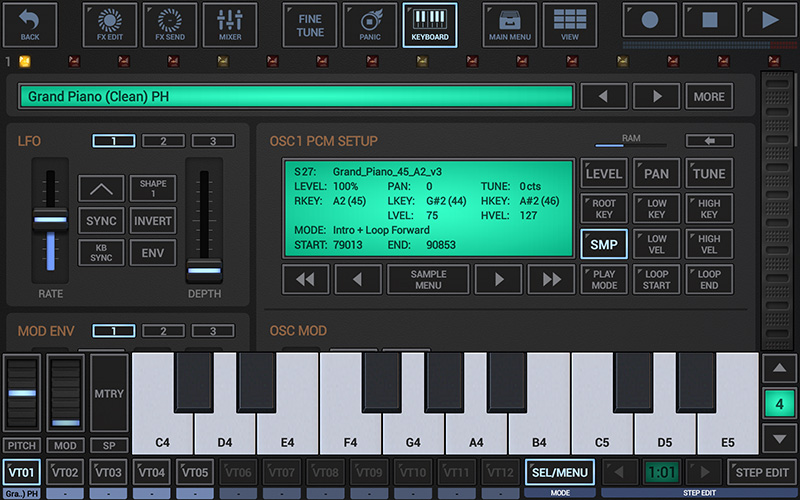
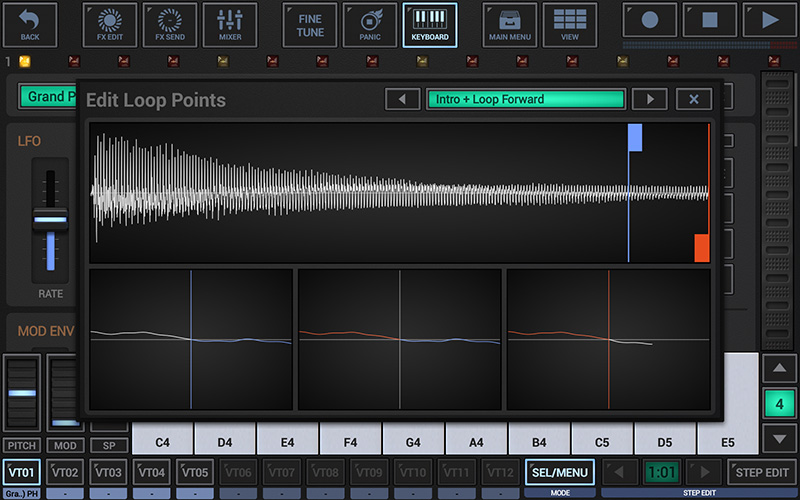
Last edited by planeth on Mon Feb 08, 2016 9:23 am, edited 1 time in total.
-
- KVRAF
- 10148 posts since 16 Dec, 2002
Is this actaul wavetable synthesis with scanning though?
looks like its just normal sample playback unfortunately
looks like its just normal sample playback unfortunately
-
- KVRist
- 152 posts since 14 Jun, 2011
It is actually Multi-Sample based synthesis. Scanned Wavetable synthesis is planned for the futureVariKusBrainZ wrote:Is this actaul wavetable synthesis with scanning though?
looks like its just normal sample playback unfortunately