

Not too long ago, a Virus B was still going for 400-500 € on eBay... dunno what it goes for now, but i consider that a shit load of money considering its age, and its many successors (and it's limitations by nowadays standards). Now imagine how much it would cost if there hadn't be any successors, and if they would become more and more rare.zerocrossing wrote: Anyway, my point is that while some digital "classics" retain their value or become more valuable, the hard truth is that most do not. Look at the Virus. No one is paying more for the original because it's "vintage."
Novation MiniNova
-
- KVRAF
- 35689 posts since 11 Apr, 2010 from Germany

-
- KVRer
- 3 posts since 24 Nov, 2022
Despite its more than 10 years old hardware, also can do great job in edm-dance oriented genres too.
I made some Trance/electronic/edm soundsets for Novation Mininova/Ultranova and Roland SH-201 synths
-
- KVRist
- 118 posts since 1 Nov, 2018
I recently purchased a Mininova, but cant seem to get some sounds out of it through my computer. I have it connected with a midi cable. Bitwig detects midi activity, but no luck with the sound. Or should i connect it both in my computer and in my sound card?
Thanks in advance!
Thanks in advance!
-
- KVRAF
- 5224 posts since 13 Jul, 2004 from Earth
You need to connect a audio cable from the output of the Mininova to your soundcard input.Proken wrote: Tue Sep 17, 2024 9:38 pm I recently purchased a Mininova, but cant seem to get some sounds out of it through my computer. I have it connected with a midi cable. Bitwig detects midi activity, but no luck with the sound. Or should i connect it both in my computer and in my sound card?
Thanks in advance!
Also remember to set local controll to off if you are going to use it with a Daw,
-
- KVRist
- 118 posts since 1 Nov, 2018
Thank you! Will buy some audio cables later today.D-Fusion wrote: Tue Sep 17, 2024 9:47 pmYou need to connect a audio cable from the output of the Mininova to your soundcard input.Proken wrote: Tue Sep 17, 2024 9:38 pm I recently purchased a Mininova, but cant seem to get some sounds out of it through my computer. I have it connected with a midi cable. Bitwig detects midi activity, but no luck with the sound. Or should i connect it both in my computer and in my sound card?
Thanks in advance!
Also remember to set local controll to off if you are going to use it with a Daw,
-
- KVRAF
- 5224 posts since 13 Jul, 2004 from Earth
Proken wrote: Wed Sep 18, 2024 6:09 amThank you! Will buy some audio cables later today.D-Fusion wrote: Tue Sep 17, 2024 9:47 pmYou need to connect a audio cable from the output of the Mininova to your soundcard input.Proken wrote: Tue Sep 17, 2024 9:38 pm I recently purchased a Mininova, but cant seem to get some sounds out of it through my computer. I have it connected with a midi cable. Bitwig detects midi activity, but no luck with the sound. Or should i connect it both in my computer and in my sound card?
Thanks in advance!
Also remember to set local controll to off if you are going to use it with a Daw,

To set it up so it works in Bitwig you must also remember to Create a Stereo Audio Input Channel for the Mininova in the Settings/Audio menu from the Input Channel from your sound card which probably will be input 1-2.
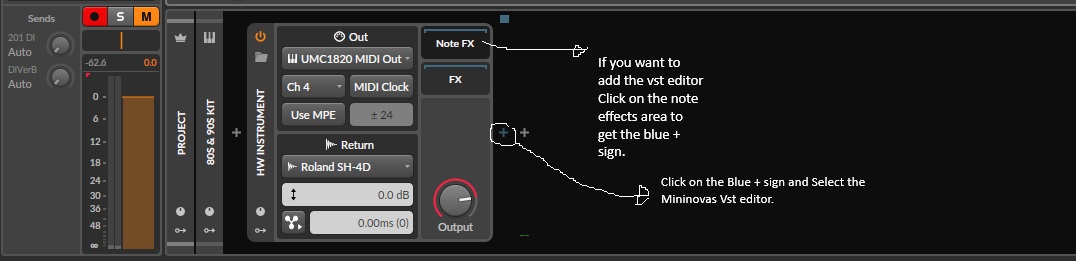
Then Create a track with Bitwig's built in HW Instrument plugin and in the out section in that plugin you select the Mininova and in the Return you select the Audio Channel that you created in the Settings/Audio menu and everything should work perfectly

And remember to set local to off in the Settings menu on your Mininova so you don't get any nasty Midi feedback.
Here is also the correct way to add any vst editor in Bitwig
-
- KVRer
- 1 posts since 23 Jan, 2026
Hi there!
My Mininova was doing all well until one day after not using it for a few weeks, the top C key did not work, and there was an unwanted noise at certain places. The first time I heard it was when working on a new patch, a fairly so-to-say experimental one, and I just assumed that it was me who had gone too extreme with all the editing. I then used it to play some of my old patches with no issues. Some days later I was working on another new patch, and it all sounded good for a while until a similar noise began to appear.
In the end it seems like the unwanted noise appears on newly made patches, but since this problem seemed to appear more I have actually just left it turned off, being worried that something else will screw up.
What I’m assuming is a reasonable thing to do is to backup my patches, factory reset the Mininova and/or install the latest firmware update? I have not yet used it with my laptop, but I just downloaded the MiniNova 1.7 with the librarian that looks like it’s pretty straight-forward. This page has a guide for how to update the firmware, seems like I need MIDIOX, which I’ve downloaded.
But yes, before I set this whole thing in motion, I’m a bit curious to see if anyone have an idea of what’s been going on, and perhaps other possible solutions for it. It seems like the issue began around the same time as the top key stopped working (the top key by the way is physically not good, it doesn’t really press all the way down). It also seems like it is just affecting new patches, and not immediately, but after a little while. And I haven’t really used it to trial and error, so perhaps the noise will affect all the patches down the line?
Any help or input highly appreciated!
My Mininova was doing all well until one day after not using it for a few weeks, the top C key did not work, and there was an unwanted noise at certain places. The first time I heard it was when working on a new patch, a fairly so-to-say experimental one, and I just assumed that it was me who had gone too extreme with all the editing. I then used it to play some of my old patches with no issues. Some days later I was working on another new patch, and it all sounded good for a while until a similar noise began to appear.
In the end it seems like the unwanted noise appears on newly made patches, but since this problem seemed to appear more I have actually just left it turned off, being worried that something else will screw up.
What I’m assuming is a reasonable thing to do is to backup my patches, factory reset the Mininova and/or install the latest firmware update? I have not yet used it with my laptop, but I just downloaded the MiniNova 1.7 with the librarian that looks like it’s pretty straight-forward. This page has a guide for how to update the firmware, seems like I need MIDIOX, which I’ve downloaded.
But yes, before I set this whole thing in motion, I’m a bit curious to see if anyone have an idea of what’s been going on, and perhaps other possible solutions for it. It seems like the issue began around the same time as the top key stopped working (the top key by the way is physically not good, it doesn’t really press all the way down). It also seems like it is just affecting new patches, and not immediately, but after a little while. And I haven’t really used it to trial and error, so perhaps the noise will affect all the patches down the line?
Any help or input highly appreciated!
-
- KVRer
- 3 posts since 24 Nov, 2022
Show the issue on video with good quality audio and you have more chance to receive any usable tip. Open the case and repair the broken key first and then lets see if something changes
I made some Trance/electronic/edm soundsets for Novation Mininova/Ultranova and Roland SH-201 synths