New Ableton Live 9.x Skin

Audio Plugin Hosts and other audio software applications discussion
Post Reply New Topic
RELATED
PRODUCTS

Post

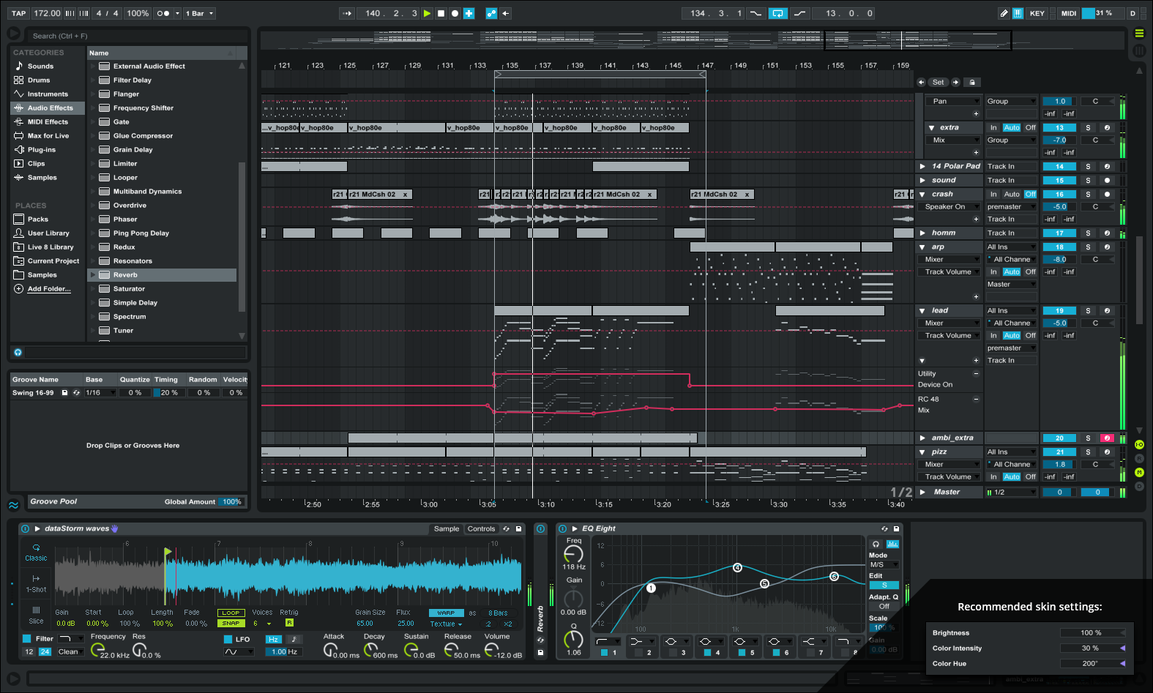
Dropping by to share a Live 9 skin I've been working on for about a year on and off. Had a fair bit of attention via twitter screenshots, so here it is. Please keep in mind it's still a WIP although you can download now. Live has never been easily skinnable and most skins out there use an outdated app that isn't compatible with Live 9, so they can look pretty poor... For this, I used an incredibly tedious but great maxx device for modding the colors. More info on deviantArt.

Anyway, hopefully it'll help with the late night sessions to save those precious eyes. :wink:

Download from here:
http://pureav.deviantart.com/art/Ableto ... -589338351
Image
Last edited by Skyre on Mon Feb 08, 2016 7:42 pm, edited 2 times in total.

Post

Nice work! Thanks for sharing :)
:borg:

Post

Damn, actually looks pretty nice mate! The only dark live skin I've used thus far is the disco, and the grid is practically impossible to see when using the piano roll. This loops like a very promising compromise. How does it look at 200% Brightness?

Post

Fantastic. Love it.

Post

[DELETED]

Post

Thanks for the kind words fellas.

@TheoM
You can of course use the brightness slider in preferences. It holds together pretty well. As for higher contrast, I might make some variations, though the point in this one specifically was low contrast for dim/no room lighting. No need for paid work on these, I'll just keep in mind the ideas from everyone for the next one. =]

I was hesitant to even release this because it's technically impossible to skin it completely. For example on this skin (and every single skin), the text labels to the left of the piano keys are black, and they cannot be changed, hence everybody who attempts a dark skin gets slammed for being a shit designer, haha. Also, colors are shared across parameters, so you may make a button blue, but then suddenly a load of text labels are also blue as well as the border stroke of an effect and the face plate of another. It's a nightmare and I hope to spread awareness. I empathize with the skinners before me!

Post

Damn. Going by the comments, I should probably reword the OP. Although it's a WIP, it IS actually up for download to use! Follow the deviantArt link. I made it look like a preview...not my intention.

EDIT: Done. Sorry for confusion if any.

Post

[DELETED]

Post

TheoM wrote:I'd still be willing to pay you for a custom skin (just for me) if you are interested. I love live but don't like any of the factory skins.. there is always something that is not quite there with the colours.
Well again, I wouldn't be able to give you the exact skin you want. I can't even give myself what I want and I have the tools to do so. I wouldn't take a penny off of anybody for something I don't have complete control over.

I'll most likely be making more of these, perhaps a complete pack with different color combos. Until then, you're welcome to share reference shots of the kinda contrast/colors you're after and I could probably make some adjustments to this one for you.

Post

[DELETED]

Post

cool, a lighter version would be great :-)

Post

FYI, for OSX the process is as follows:

1 Show Package Contents by right clicking on the app itself;
2 Place the LT.ask file into Contents -- > Resources --> Skins

We go through this routinely with Logic too (showing package contents.)

BTW-- Looking Awesome!
***************************************
* AKAI, KRK, UAD, Softube Vol 1, Soundtoys
* Live, Logic, Serum, Spire, Dune 2, Hive

Post

Used it a bit more tonight. Man.... just... so great. Thanks again. Seriously happy with this. Cheers ! :)

Post

Wow, this looks stunningly beautiful. :)

Post

I'll try it tonight for sure !

Post Reply

Return to “Hosts & Applications (Sequencers, DAWs, Audio Editors, etc.)”
