

Hi KVRians!
I haven't made computer music in a dozen years and have some questions regarding getting myself set up to make music again. The tech has really passed me by, though... so I need some sage answers to what may sound like stupid questions... so here goes...
1) I'm really concerned with latency issues involved with USB interfaces. I read an article that said if I had USB 2 on my computer, it would be labelled as such... but the article was written in 2004. My modern PC shows no USB ports labelled as such... It was built in 2011... should I assume that USB 2 was standard at that point?
2) I have an old (circa 2003) M-Audio Delta 44 with 4-ins/4-outs. It's a PCI card, IIRC. I did have a PCI card slot built into my PC (Phenom 2 Quadcore, 3.2 G drives, 4 G DDR2 Ram), but a guy at the local GC told me there could be in many incompatibilities with an old card and new system. And I'm concerned about DAC quality as well. An article I read from 2009 mentioned that DAC quality had gone way up lately. Should I consider plugging my old M-Audio Delta 44 into my much newer computer?
3) I hear talk about zero-latency with these new interfaces. How accurate is that? From my research, I've been led to believe that a direct connect to the motherboard via a PCI slot was preferable in terms of latency. How close in latency are the USB interfaces to the sound card interfaces?
Old-School Fool Needs Modern Knowledge
-
Karl the Hermit Karl the Hermit https://www.kvraudio.com/forum/memberlist.php?mode=viewprofile&u=203618
- KVRist
- 105 posts since 21 Mar, 2009 from West Pennsyltucky, USA
-
fluffy_little_something fluffy_little_something https://www.kvraudio.com/forum/memberlist.php?mode=viewprofile&u=281847
- Banned
- 12880 posts since 5 Jun, 2012
USB 2.0 was standard in 2011, yes, so yours likely are 2.0 as well. I built my computer in the same year if I remember correctly, and it already has 2 USB 3.0 ports.
Your Phenom processor might be a problem though, even my sex-core Phenom is quite weak compared to modern processors, so I can't really use many modern plugins.
(I will build myself a new budget system as soon as AMD's Athlon 880K processor becomes available (it will ship with their new, very quiet stock cooler). I will combine it with an Asus or Asrock motherboard, which has a built-in high-quality audio interface. That seems to be the new trend with top-of-the-line motherboards.)
Your Phenom processor might be a problem though, even my sex-core Phenom is quite weak compared to modern processors, so I can't really use many modern plugins.
(I will build myself a new budget system as soon as AMD's Athlon 880K processor becomes available (it will ship with their new, very quiet stock cooler). I will combine it with an Asus or Asrock motherboard, which has a built-in high-quality audio interface. That seems to be the new trend with top-of-the-line motherboards.)
Last edited by fluffy_little_something on Sun Feb 21, 2016 6:33 pm, edited 1 time in total.
-

- KVRAF
- 1794 posts since 9 Apr, 2011
1) Yes
2) I would try it! If there are incompatibilities, you'll find out, but there shouldn't be any harm in testing it out.
3) I think you're right, PCI is generally much lower latency. USB latency depends on the interface, but if you are careful with system resources you can generally get it down to 5ms, maybe less.
2) I would try it! If there are incompatibilities, you'll find out, but there shouldn't be any harm in testing it out.
3) I think you're right, PCI is generally much lower latency. USB latency depends on the interface, but if you are careful with system resources you can generally get it down to 5ms, maybe less.
"musician."
http://soundcloud.com/nine-of-kings
http://soundcloud.com/nine-of-kings
-

- Beware the Quoth
- 35449 posts since 4 Sep, 2001 from R'lyeh Oceanic Amusement Park and Funfair
Yup, its pretty much standard, so much so that they dont really need labelled. They can be identified quite easily by sight.Karl the Hermit wrote:I read an article that said if I had USB 2 on my computer, it would be labelled as such... but the article was written in 2004. My modern PC shows no USB ports labelled as such... It was built in 2011... should I assume that USB 2 was standard at that point?
Google images will help with that eg
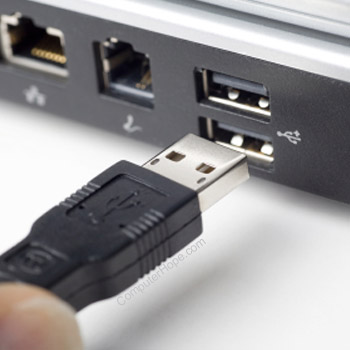
Depending on how new 'much newer' is, you may not be able to, and even if you can, it might not be without issues. Computers generally have PCIe now, not the older PCI. And some motherboards which have both dont have 'good enough' PCI behaviour for something as finnicky as audio.2) I have an old (circa 2003) M-Audio Delta 44 with 4-ins/4-outs. It's a PCI card, IIRC. I did have a PCI card slot built into my PC (Phenom 2 Quadcore, 3.2 G drives, 4 G DDR2 Ram), but a guy at the local GC told me there could be in many incompatibilities with an old card and new system. And I'm concerned about DAC quality as well. An article I read from 2009 mentioned that DAC quality had gone way up lately. Should I consider plugging my old M-Audio Delta 44 into my much newer computer?
Without knowing what your new computer's motherboard is, its impossible to be more precise, Im afraid.
[/quote]3) I hear talk about zero-latency with these new interfaces. How accurate is that? From my research, I've been led to believe that a direct connect to the motherboard via a PCI slot was preferable in terms of latency. How close in latency are the USB interfaces to the sound card interfaces?
Zero-latency on an interface refers to zero-latency monitoring, ie there's a way of hearing the input signal with zero latency, direct from the interface and before it heads into the computer . That's not the same as zero-latency recording or playback, of which there is no such thing. And obviously if you listen to the version the computer is recording as well as the zero-latency version, you'd hear one delayed against the other, which would be bad, so you may have to do some things -slightly- differently.
USB interface latency can be pretty good now compared to card-based, although it varies with the interface and the manufacturer's skill at writing drivers.
An idiot on Set Theory:
"In some cases there is an object called red that contains everything that is red. In much the same way a pot is a plate."
"In some cases there is an object called red that contains everything that is red. In much the same way a pot is a plate."
-
- KVRist
- 122 posts since 29 Dec, 2003
Whether or not the M-Audio card will work for you likely depends whether there are drivers to allow it to run on your operating system. Check here to see if it is supported on whatever operating system you are using:
http://www.m-audio.com/support/drivers-search
http://www.m-audio.com/support/drivers-search