


BlueARP VST Arpeggiator development - let's discuss! (Apple M1 ready, 4K)
-
- KVRer
- 10 posts since 4 Apr, 2014
Hi,
As I can see it's possible to export/import Arpeggio presets.
Is it also possible to add/import MIDI files?
For example a 4 bar MIDI track which contains notes.
Those could be used as template for an Arpeggio.
(Like styles of keyboards.)
P.S. Or maybe it's possible to convert MIDI information to blue arp preset files?
Regards
As I can see it's possible to export/import Arpeggio presets.
Is it also possible to add/import MIDI files?
For example a 4 bar MIDI track which contains notes.
Those could be used as template for an Arpeggio.
(Like styles of keyboards.)
P.S. Or maybe it's possible to convert MIDI information to blue arp preset files?
Regards
-
- KVRian
- 673 posts since 6 Dec, 2015
Hello graywolf2004, thank you for your cool instrument.
Also, I have two remarks:
1) the manual p. 6, for REAPER, I think you mean you have to click the FX button, not the Input FX button.
2) I'm using Blue Arp v2.17 with REAPER 5.16, and I get irregular patterns. I don't know if I've done something special, but the pattern is played differently (from a rythmic POV) from one piano roll note to the other even though they are of equal length. Some arpeggiator notes are even missing on occasions.
Is this a bug or something I've failed to understand ?
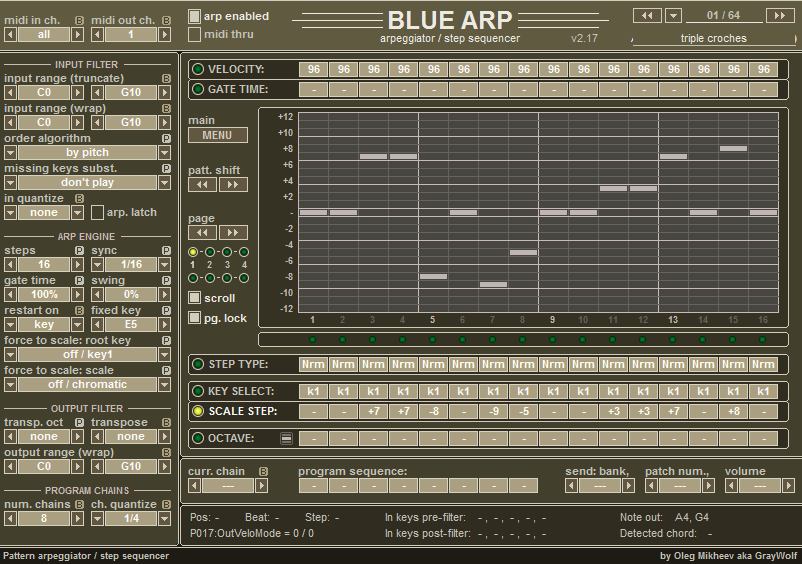
Also, is it possible to increase Sync to 1/128, please (1/64, 1/96, 1/128) ? I need this to match the arp in one of my synths.
Thx
Also, I have two remarks:
1) the manual p. 6, for REAPER, I think you mean you have to click the FX button, not the Input FX button.
2) I'm using Blue Arp v2.17 with REAPER 5.16, and I get irregular patterns. I don't know if I've done something special, but the pattern is played differently (from a rythmic POV) from one piano roll note to the other even though they are of equal length. Some arpeggiator notes are even missing on occasions.
Is this a bug or something I've failed to understand ?

Also, is it possible to increase Sync to 1/128, please (1/64, 1/96, 1/128) ? I need this to match the arp in one of my synths.
Thx
Last edited by lolilol1975 on Fri Mar 18, 2016 11:53 am, edited 2 times in total.
-
- KVRian
- 673 posts since 6 Dec, 2015
Bump
-
- KVRer
- 1 posts since 18 Mar, 2016
+1 for 1/64, 1/96 and 1/128 sync. This would be quite a boon when recreating classic chiptune-style arps 
While it's possible to get e.g. 1/96 by doubling your project's BPM and selecting 1/48 sync in BlueARP, this is a rather ugly hack which makes some other plugins behave erratically (at least in FL12).
While it's possible to get e.g. 1/96 by doubling your project's BPM and selecting 1/48 sync in BlueARP, this is a rather ugly hack which makes some other plugins behave erratically (at least in FL12).
-
- KVRist
- 295 posts since 26 Sep, 2006 from UK
Famous Arps & Basses by Opax v1.1 is available.
- 68 .fxp patches (4 new)
- Some previous patches corrected
- All reprogrammed using version 2.1.7 Mac OS X VST version
- All compatible with version 2.1.9 Audio Unit version
Enjoy!
- 68 .fxp patches (4 new)
- Some previous patches corrected
- All reprogrammed using version 2.1.7 Mac OS X VST version
- All compatible with version 2.1.9 Audio Unit version
Enjoy!
You do not have the required permissions to view the files attached to this post.
Opax
-
- KVRAF
- 1660 posts since 13 Jan, 2014
Hi Opax,
these are absolutely brilliant
I have tried blue arp for some times but really having difficulties with all the possibilities to get something "useable" (for me) out of it and the included presets are more or less like starting points but youre presets, wow, really love it and make the great blue arp at least really useable for me.
Would appreciate any new genious strikes from you in the future


these are absolutely brilliant
I have tried blue arp for some times but really having difficulties with all the possibilities to get something "useable" (for me) out of it and the included presets are more or less like starting points but youre presets, wow, really love it and make the great blue arp at least really useable for me.
Would appreciate any new genious strikes from you in the future
-
- KVRAF
- 5710 posts since 24 May, 2004 from []1
Tried loading .fxb files into BlueArp via BlueArp Menu and also Load Preset File and Import Preset in Studio One, but patches aren't showing up. Any ideas why they aren't loading?
-
- KVRian
- 673 posts since 6 Dec, 2015
Banks are .fxb files and patches are .fxp files.
I personnally prefer to have bank files instead of patch files.
I personnally prefer to have bank files instead of patch files.
-
- KVRian
- 673 posts since 6 Dec, 2015
Looks like I can't reproduce the behavior described above, so I don't know what happened.
-
- KVRist
- 295 posts since 26 Sep, 2006 from UK
Thank you for your kind words. They are very much appreciated.tatanka wrote:Hi Opax,
these are absolutely brilliant
I have tried blue arp for some times but really having difficulties with all the possibilities to get something "useable" (for me) out of it and the included presets are more or less like starting points but youre presets, wow, really love it and make the great blue arp at least really useable for me.
Would appreciate any new genious strikes from you in the future
There are two main reasons for creating these patches. For those who like to record cover versions or perform live versions of the tracks which I've programmed, but mostly for those who want to further their knowledge on how a sequencer works. You could consider these patches as starting points for your own creations.
I would be more than happy to create more and more patches. I will even take requests. So if there is a particular arp, sequence, bassline of a piece of music that you would like programming, just ask.
If anyone enjoys using the patches, and would like me to make more, please consider making a small donation (PM me for details). A lot of time and effort went into making these patches, not to mention reprogramming them all so they would work in v2.1.7. This is the only time I will ask this.

Last edited by Opax on Sun Mar 20, 2016 2:15 pm, edited 1 time in total.
Opax
-
- KVRist
- 295 posts since 26 Sep, 2006 from UK
If you originally downloaded v1, the bank will only load in the Mac OS X Audio Unit version of the plug-in, because they were originally created using that version (2.1.9). They won't open in Windows and Mac OS X VST version 2.1.7.Musical Gym wrote:Tried loading .fxb files into BlueArp via BlueArp Menu and also Load Preset File and Import Preset in Studio One, but patches aren't showing up. Any ideas why they aren't loading?
Download v1.1 and load each patch (or program) individually. They were all reprogrammed using the current VST version (2.1.7).
Last edited by Opax on Sun Mar 20, 2016 11:39 am, edited 1 time in total.
Opax
-
- KVRist
- 295 posts since 26 Sep, 2006 from UK
I too prefer banks. For the next version I will create individual banks per artist.lolilol1975 wrote:Banks are .fxb files and patches are .fxp files.
I personnally prefer to have bank files instead of patch files.
Personally, I think it would be even better if the developer allowed for 128 patches to be saved within a bank.
Opax
-
- KVRAF
- 5710 posts since 24 May, 2004 from []1
Thanks Opax. At least one of the .fxp loaded for me and I'm on Windows. I'll try more.Opax wrote:If you originally downloaded v1, the bank will only load in the Mac OS X Audio Unit version of the plug-in, because they were originally created using that version (2.1.9). They won't open in Windows and Mac OS X VST version 2.1.7.Musical Gym wrote:Tried loading .fxb files into BlueArp via BlueArp Menu and also Load Preset File and Import Preset in Studio One, but patches aren't showing up. Any ideas why they aren't loading?
Download v1.1 and load each patch (or program) individually. They were all reprogrammed using the current VST version (2.1.7).
I appreciate you letting me know I can't load the banks.
-

- KVRian
- Topic Starter
- 805 posts since 15 Apr, 2012
Wow. A lot of new messages here, I've read them all but have no time to answer everyone.
Here's the release - BlueARP v2.2.1 - Windows 32&64 bit, OSX VST 32&64 bit, OSX MIDI-FX 64 bit.
Links are on top of this page
http://graywolf2004.net/wp/?page_id=35
Main changes:
1. Polyphonic key select. Works the same way as polyphonic octave
2. Added option value for MENU -> Settings -> putput note velocity. Now you can select 'bar + input key'.
It means velocity from value bar adjusted to input key velocity (kind of miltiplied)
Edit:
3. Added 'pentatonic blues' and 'pentatonic neutral' scales
May be some minor changes in force to scale logic. This stuff is still quite experimental.
Here's the release - BlueARP v2.2.1 - Windows 32&64 bit, OSX VST 32&64 bit, OSX MIDI-FX 64 bit.
Links are on top of this page
http://graywolf2004.net/wp/?page_id=35
Main changes:
1. Polyphonic key select. Works the same way as polyphonic octave
2. Added option value for MENU -> Settings -> putput note velocity. Now you can select 'bar + input key'.
It means velocity from value bar adjusted to input key velocity (kind of miltiplied)
Edit:
3. Added 'pentatonic blues' and 'pentatonic neutral' scales
May be some minor changes in force to scale logic. This stuff is still quite experimental.
Last edited by graywolf2004 on Mon Mar 28, 2016 9:25 pm, edited 1 time in total.