

So how far back does this go? I need to find a backup that actually works.thejonsolo wrote:Yes this is disappointing. The problem is that I have this issue with 6.5.4, 6.4.6, and now 6.5 (those are the versions I kept separate copies of).
George please advise as to what to do! How quickly can this be resolved?
JDNZ- when did you report this?
What makes it bad is that it affects the whole channel...nothing...no effects...nothing goes to stereo.

Discovery Pro synthesizer 6.4 to 8.0
-

- KVRAF
- 37379 posts since 14 Sep, 2002 from In teh net
-

- KVRAF
- 2990 posts since 13 Apr, 2008 from Charleston, SC
I have only back to 6.3 or 6.4 and have always had that issue which is why I used Corona and Vertigo but never Discovery Pro.
Now I can on the new 6.5. It is really a good update. I just wish George would chime in and at least make it clear if he is willing to send backups to those requesting it. It is not a lot of money to invest in the update, but the other side of the coin is just as valid...no one likes to be forced into updating just to have a copy of a program they have already paid for.
Jon
Now I can on the new 6.5. It is really a good update. I just wish George would chime in and at least make it clear if he is willing to send backups to those requesting it. It is not a lot of money to invest in the update, but the other side of the coin is just as valid...no one likes to be forced into updating just to have a copy of a program they have already paid for.
Jon
-
- KVRAF
- Topic Starter
- 5632 posts since 18 Jul, 2002
We have updated Discovery Pro to Release 6.5.
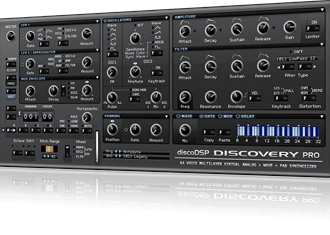
What's new
Customers below 6.5 releases can request a temporary download link at http://www.discodsp.com/contact/
What's new
- Fixed Cubase issues.
- Updated framework for better stability and performance.
- OS X: Compiled with Xcode 7.3. OS X 10.6 or higher is required.
Customers below 6.5 releases can request a temporary download link at http://www.discodsp.com/contact/
-
- KVRAF
- Topic Starter
- 5632 posts since 18 Jul, 2002
A new build 6.5.1 build is now available fixing some bugs.
What's new
What's new
- Fixed Cubase getting silent after bank change.
- Fixed AU hosts not loading the plug-in properly.
-
- KVRAF
- Topic Starter
- 5632 posts since 18 Jul, 2002
We published a OS X guide tor those not willing to use installers 
http://www.discodsp.com/forum/viewtopic.php?t=942
Windows to follow soon.
http://www.discodsp.com/forum/viewtopic.php?t=942
Windows to follow soon.
-
- KVRAF
- 37379 posts since 14 Sep, 2002 from In teh net
Still not clear on this, is it definitely fixed?aMUSEd wrote:So how far back does this go? I need to find a backup that actually works.thejonsolo wrote:Yes this is disappointing. The problem is that I have this issue with 6.5.4, 6.4.6, and now 6.5 (those are the versions I kept separate copies of).
George please advise as to what to do! How quickly can this be resolved?
JDNZ- when did you report this?
What makes it bad is that it affects the whole channel...nothing...no effects...nothing goes to stereo.
-
- KVRAF
- Topic Starter
- 5632 posts since 18 Jul, 2002
Yes, and multi-channel VST/AU should be implemented in 6.5.2aMUSEd wrote:Still not clear on this, is it definitely fixed?
-
- KVRAF
- Topic Starter
- 5632 posts since 18 Jul, 2002
New guides for manual plug-in installations this time for Windows and Linux.
Windows: http://www.discodsp.com/forum/viewtopic.php?t=943
Linux: http://www.discodsp.com/forum/viewtopic.php?t=944
Windows: http://www.discodsp.com/forum/viewtopic.php?t=943
Linux: http://www.discodsp.com/forum/viewtopic.php?t=944
-
- KVRAF
- 2990 posts since 13 Apr, 2008 from Charleston, SC
Just 2nding the fact that it is fixed. Multi-channel!!!!! YES!!!!
-
- KVRAF
- Topic Starter
- 5632 posts since 18 Jul, 2002
6.5.2 multi-channel teaser 

-

- KVRist
- 173 posts since 22 May, 2013
Be aware. 6.5.1 doesn't allow resizing of the GUI on OSX retina displays. Makes it too hard to use on my retina Macbook Pro. I switched back to 6.5.
-

- KVRAF
- 7787 posts since 20 Jul, 2004 from Clearwater
Is there an upgrade available from Discovery to Discovery Pro, and is there a way to keep the blue skin when using Discovery Pro?
Wavsen.com - Professional mix delivery platform with client approval, watermarking, and portfolio page builder.
-
- KVRAF
- Topic Starter
- 5632 posts since 18 Jul, 2002
GUI code has not changed anything on that regard for 6.5.x. What do you mean with resizing? Which host? Thanks.larsomat wrote:Be aware. 6.5.1 doesn't allow resizing of the GUI on OSX retina displays. Makes it too hard to use on my retina Macbook Pro. I switched back to 6.5.
Last edited by george on Wed Apr 13, 2016 9:37 am, edited 1 time in total.
-
- KVRAF
- Topic Starter
- 5632 posts since 18 Jul, 2002
Yes, check at Members Area. Cross grade is 79 EUR. Skinning is not available (yet).djanthonyw wrote:Is there an upgrade available from Discovery to Discovery Pro, and is there a way to keep the blue skin when using Discovery Pro?
-
- KVRist
- 173 posts since 22 May, 2013
From our email exchange a few days ago:George wrote:GUI code has not changed anything on that regard for 6.5.x. What do you mean with resizing? Which host? Thanks.larsomat wrote:Be aware. 6.5.1 doesn't allow resizing of the GUI on OSX retina displays. Makes it too hard to use on my retina Macbook Pro. I switched back to 6.5.
Me:
George:Hi,
I downloaded the new version. At first I wasn't registered anymore.
But I could fix that by copying the license file from
"Documents/discoDSP/Discovery Pro 6" to "Documents/discoDSP/Discovery
Pro" (which the installer created).
But now the GUI size cannot be changed and the moog filters don't seem
to work... maybe more problems... I stopped
testing after that. If you need more information don't hesitate to ask...
regards, lars.
Me:GUI size won't be able to be changed using Retina resolutions.
Moog filters seem to work ok.
Still, a new 6.5.1. release will be out very soon to fix some channel issues in some hosts.
That was 9 days ago, I didn't get another response.Hm, ok.
I switch back to 6.5.0 for now.
"Edit-Menu -> GUI size" has no effect in 6.5.1 but works in 6.5.0
OSX 10.11
I guess I tested in Bitwig.