Signalizer: Sidechaining update! Open-source & free audio visualization plugin (v. 0.4.3)

VST, AU, AAX, CLAP, etc. Plugin Virtual Effects Discussion
Post Reply New Topic
RELATED
PRODUCTS
Signalizer

Post

David Else wrote:
fese wrote:Huh - either I'm too stupid or it just doesn't work here - the spectrum tab is just a plain black window and the vectorscope just a grid. Nothing else.
I already installed the latest graphics drivers (Ivy Bridge HD Graphics 4000, 10.18.10.4358), OpenGL works as tested with CPU Caps Viewer. Win 7 x64, Cubase 6.5 64bit, Signalizer 0.2.7. OpenGL Rendering engine enabled (when i set it to software, signalizer displays "Enable OpenGL in settings to use the vectorscope)
Any idea anyone?
No graphics for me either, Reaper x64 PC Intel HD Graphics 4600 OpenGL 4.3
Can you verify that the 'Window size' control in the panel for either view is not set to zero?

If this is true, please enable 'diagnostics' (found under the wrench pages under a view), at report back what is written in blue text; a screenshot will suffice.

Post

Finally got to playing with this again. @v 2.7

CPU use on my machine is now 5%.

Initially there are no problems, but after about 5 minutes of tweaking, the lag creeps in affecting the host display and controls as well; they respond very belatedly and it gets progressively worse


FL Studio 12 32bit
Windows 8.1 64bit
AMD FX-8350
16G 1866 RAM

Post

I can confirm that v0.2.7 works in Wavelab 9 and Christian Budde's VST Plugin Analyzer.

In the latter however, you need to press the cogwheel to open the configuration panels. The arrow dropdown doesn't work. But it's nice to see that your suite can(!) be used for plugin measurement. Though here I'd love to see a "Magnitude View" mode.

Speaking of view modes, it's a bit irritating that you have to "load" the mode in question first. For the FFT (Spectrum Analysis), on default that's the "Nautical View" rather than the Analytical View (which I prefer). I'd love to see a feature on the first control panel of the view in question, where i can select that. Or where that loads in default. I don't want to go into the load panel for that.


In Wavelab, things seem to work fine. But a bit wonky.
For example: Signalizer is listed as "Lightbridge" as Developer, not the folder I put it in.


Then the Vector Scope as the Input-Gain "velocity sensitive mode" constantly engaged. I can't turn this off
If I double click on Window Size and enter a numeric value, it drops back down to 6ms, 2ms or 12ms. This is really, really strange. On plugin reload, the background for the "numeric fields" also turn black, also the font color and the values can't be read anymore.

I'd love to know which of the Correlation Meters do what. I take it the Vertical one is for the actual "stereo" field"? (sorry, I'm only used to one correlation needle view)


Oscilloscope and Statistics don't work (yet?)


And sometimes if you press on the name of the mode (Vector Scope / Goniometer), usually the settings menu dropdown appears. Sometimes it works, sometimes not. The arrow rotates, but the settings do not open.

Another thing that is very Wavelab specific is the "GUI recall" on host relaunch. If you do that, parameters are either reset, or the view goes apesh*t. The correlation meter for example jumps around like a madman after I do that, and the RMS mode of the VectorScope creates a lot of glitches.


It's an alpha, so that's to be expected...but a very usable alpha so far.

Open GL works on my end (on Dual Screens even), Software mode doesn't. Else, no hickups. It runs in constant 59.9frames per second windowed. In Fullscreen that's a different game, here I run 23-25fps avg and 27fps max with the X/Y Oscilloscope (Vector Scope). And 10fps avg on the FFT (Analytics view) in fullscreen, and 25fps avg Windowed. Granted, my GPU is old, but it should be able to run faster than this... way faster even. Especially at merely 7% CPU (absolute max!). Though I don't know if Wavelab 9's QT5 core uses OpenGL for GUI rendering now. I can tickle out a couple more frames, if I use MSI's Afterburner to Overclock my GPU... but I'd rather not? And others probably neither (no gaming rig, no overclocking possible, etc).

Actually, Wavelab 8 runs even slower, doesn't want to start the Spectrum View without trying to load the Analytical view a coupl eof times, then it's at 16fps avg. So please, improvements on this end! Especially with "locked screen sizes" (see FR below). Though mind you, I used the default setting with 16x AA (Antialising), Stable FPS, Vertical Sync off... If I reduce AntiAlising to 2x, I do get 40fps avg (no OC) to 54fps avg (OC'd) at roughly 720p (1280x720) and the FFT view (default settings). Plugin caps at 59.9fps. There is not much difference in terms of AA 1x to 2x on my end, things start to drop frame wise if I go beyond 4x. But to me, 2x AA is absolutely fine, maybe 4x. We're not talking Ego Shooters here.

Another thing I'd love to see, is better buttons. At the moment, the gradient type buttons are irritating what mode is active and what not. Maybe a better solution would be LED's to the side of the buttons, or on the buttons themselves.


Definitely looking forward to more features, especially if we talk Waveform View, a "Magnitude View" for measurements, FFT with x octaves, metering standards like Digital, PPM, RMS/VU, etc... A multi channel Vector Scope maybe... But we're still at the beginnings.

Another nice feature to see would be a global setting where we can set "screen sizes"in pixel, as default window size. And yet another feature (that I filed as FR with Dualism) is a custom view mode, where we can select the views we need, but on one page. Like digital meter, FFT (Analytical Mode) and X/Y Oscilloscope side by side for mastering purposes


Host:
Wavelab 9.0.x x64
NVidia 9500GT (Drivers v320.49), Open GL 2.1, Dual Screen setup (2x 1680x1050) - stock clock
Windows 7 Pro x64 SP1
[ Mix Challenge ] | [ Studio Page / Twitter ] | [ KVRmarks (see: metering tools) ]

Post

OK, here is the blue text screen dump as requested.
You do not have the required permissions to view the files attached to this post.

Post

What you could try, and this worked for me... go into the loading panel (you're already on that screenshot), then click "load" preset", select the preset you want (Analytical for example), the grid AND the FFT should now pop up.

This worked for me last night in Wavelab 8. The Dropdown doesn't work (changes the view type, but doesn't show values).


So I guess this is some sort of recall bug.
[ Mix Challenge ] | [ Studio Page / Twitter ] | [ KVRmarks (see: metering tools) ]

Post

David Else wrote:OK, here is the blue text screen dump as requested.
I can't help but notice your controls are set to default (non-preset initiated) values. Are you sure you copied the whole package, and not just the plugin? More specifically, did you include the presets in the releases? Try opening the 'default.main' preset through the global settings editor (the multiple gears button to the upper left), and open the wrench tab - that should give access to loading/saving presets.
Compyfox wrote:What you could try, and this worked for me... go into the loading panel (you're already on that screenshot), then click "load" preset", select the preset you want (Analytical for example), the grid AND the FFT should now pop up.

This worked for me last night in Wavelab 8. The Dropdown doesn't work (changes the view type, but doesn't show values).


So I guess this is some sort of recall bug.
See the above notice, it seems your presets are not included correctly. The folder structure needs to be as it is in the release folders.
Debutante wrote:Finally got to playing with this again. @v 2.7

CPU use on my machine is now 5%.

Initially there are no problems, but after about 5 minutes of tweaking, the lag creeps in affecting the host display and controls as well; they respond very belatedly and it gets progressively worse


FL Studio 12 32bit
Windows 8.1 64bit
AMD FX-8350
16G 1866 RAM
Are your problems invariant of what view you're using? Can you somehow narrow down the use-case that seems to provoke the problem (ie. does it happen only if you're using the vectorscope with some specific setting)? Also, how does cpu usage evolve - monitor the system cpu usage through the tasklist, not the built-in in the DAW. Any info on how fps measures evolves are welcome (see comment above to enable diagnostics).
Compyfox wrote:I can confirm that v0.2.7 works in Wavelab 9 and Christian Budde's VST Plugin Analyzer.

In the latter however, you need to press the cogwheel to open the configuration panels. The arrow dropdown doesn't work. But it's nice to see that your suite can(!) be used for plugin measurement.
The 'arrow dropdown' refers to the textual tabs at the top (spectrum/oscilloscope etc.)?
Though here I'd love to see a "Magnitude View" mode.
Can elaborate on what you specifically mean by magnitude view? The spectrum analyser is, per definition, a magnitude view of the spectrum..
Speaking of view modes, it's a bit irritating that you have to "load" the mode in question first. For the FFT (Spectrum Analysis), on default that's the "Nautical View" rather than the Analytical View (which I prefer). I'd love to see a feature on the first control panel of the view in question, where i can select that. Or where that loads in default. I don't want to go into the load panel for that.
You can access default presets in the global settings view - accessed through the cogwheels button in the upper right corner, and then go to the diskette/save tab. Anything save/load here will modify all the state in the instance, and the special default state is the preset automatically opened when you instantiate a fresh instance. So for instance, if you load signalizer, select the analytical mode, and go to the global save/load as explained, and save, the analytical mode will be default for all new instances from now on :)
In Wavelab, things seem to work fine. But a bit wonky.
For example: Signalizer is listed as "Lightbridge" as Developer, not the folder I put it in.
This is a hardcoded value users cannot change, and this should be the expected behaviour from all plugins.
Then the Vector Scope as the Input-Gain "velocity sensitive mode" constantly engaged. I can't turn this off
So the combo-box menu doesn't appear if you click the drop-down menu?
If I double click on Window Size and enter a numeric value, it drops back down to 6ms, 2ms or 12ms. This is really, really strange.
This is because you have to include the unit of your numerical value. By default, it interprets the values as a time window in samples, not milliseconds. If you input "10 ms" it should work, right?
On plugin reload, the background for the "numeric fields" also turn black, also the font color and the values can't be read anymore.
Can you provide a screenshot of this?
I'd love to know which of the Correlation Meters do what. I take it the Vertical one is for the actual "stereo" field"? (sorry, I'm only used to one correlation needle view)
The horizontal (bottom) one is showing the balance of the stereo signal, while the vertical (left) shows the correlation/cancellation of the stereo signal. The balance can be used to identify panning problems, while the others shows phase issues.
Oscilloscope and Statistics don't work (yet?)
Nope, working on it :)

And sometimes if you press on the name of the mode (Vector Scope / Goniometer), usually the settings menu dropdown appears. Sometimes it works, sometimes not. The arrow rotates, but the settings do not open.
I can see there are some problems here, thanks.
Another thing that is very Wavelab specific is the "GUI recall" on host relaunch. If you do that, parameters are either reset, or the view goes apesh*t. The correlation meter for example jumps around like a madman after I do that, and the RMS mode of the VectorScope creates a lot of glitches.
I have no idea what GUI recall is or what it is supposed to do, can't find any information online either. What kind of glitches are we talking about - could this be a case of the phase and balance windows are being set to a very low value, like 0? This would make them flicker, since they react instantly to the signal.
Open GL works on my end (on Dual Screens even), Software mode doesn't. Else, no hickups. It runs in constant 59.9frames per second windowed. In Fullscreen that's a different game, here I run 23-25fps avg and 27fps max with the X/Y Oscilloscope (Vector Scope). And 10fps avg on the FFT (Analytics view) in fullscreen, and 25fps avg Windowed. Granted, my GPU is old, but it should be able to run faster than this... way faster even. Especially at merely 7% CPU (absolute max!). Though I don't know if Wavelab 9's QT5 core uses OpenGL for GUI rendering now. I can tickle out a couple more frames, if I use MSI's Afterburner to Overclock my GPU... but I'd rather not? And others probably neither (no gaming rig, no overclocking possible, etc).
Software mode isn't implemented usably, yet. Have you tried making the window of comparable size to the full-screen size - does this create the same problems? Otherwise, it sounds like a driver issue. I would not advice turning vsync off, unless it creates problems - perhaps turn on vsync, and set swap interval to a low value? With that said, the graphics rendering is not that optimized but I haven't seen any GPUs not able to render it at full fps. If you can provide a screen shot of the diagnostic info as explained above in both windowed and fullscreen modes, it would help as well.
Actually, Wavelab 8 runs even slower, doesn't want to start the Spectrum View without trying to load the Analytical view a coupl eof times, then it's at 16fps avg. So please, improvements on this end!
It seems to work weirdly with Wavelab.. I guess I'll have to try out the host.
Another thing I'd love to see, is better buttons. At the moment, the gradient type buttons are irritating what mode is active and what not. Maybe a better solution would be LED's to the side of the buttons, or on the buttons themselves.
That's actually not a bad idea. The buttons will be redesigned soon, anyway.
Another nice feature to see would be a global setting where we can set "screen sizes"in pixel, as default window size. And yet another feature (that I filed as FR with Dualism) is a custom view mode, where we can select the views we need, but on one page. Like digital meter, FFT (Analytical Mode) and X/Y Oscilloscope side by side for mastering purposes
The idea about the sandbox mode is something I've thought about as well. It's a nice idea, it just takes some more work behind-the-scenes before it will be easy to implement. I'm not sure what you mean about the screen size, you can resize you window as you see fit - and this gets saved to the global preset.

Btw, thanks for the very thorough testing and feedback guys, it really helps a lot.

Post

All right, I now also tried it in Cubase 7.5 - and it also works there. However, with the same mistakes/bugs I reported for Wavelab.

Mayae wrote:See the above notice, it seems your presets are not included correctly. The folder structure needs to be as it is in the release folders.
I copied everything from the release folder over to the VST Plugin Folder in question (I did call it by your name, sans special letters). Wavelab 8 doesn't properly initialize, Wavelab 9 does. So I guess it's down to how well the host interprets the VST plugin code


Mayae wrote:The 'arrow dropdown' refers to the textual tabs at the top (spectrum/oscilloscope etc.)?
Correct.


Mayae wrote:
Though here I'd love to see a "Magnitude View" mode.
Can elaborate on what you specifically mean by magnitude view? The spectrum analyser is, per definition, a magnitude view of the spectrum..
Even better, this is how the screen should look like if you use the right test tone, and messed with EQ settings:
EQ Test.png
It actually works already if you go into Spectrum View, Analytical, then raise the update speed to 1s (would love to see higher values in this case). The only problem is, that the frequency plot this creates is now at around -120dB rather than +/-0dB


A Phase View would also be great. And I do hope that we see a "waveform view" that we can speed down to a near halt as well (which is also useful for testing delay times, how a compressor responds, etc.

There are still so many possibilities with your metering suite.


Mayae wrote:
Speaking of view modes, it's a bit irritating that you have to "load" the mode in question first. For the FFT (Spectrum Analysis), on default that's the "Nautical View" rather than the Analytical View (which I prefer). I'd love to see a feature on the first control panel of the view in question, where i can select that. Or where that loads in default. I don't want to go into the load panel for that.
You can access default presets in the global settings view - accessed through the cogwheels button in the upper right corner, and then go to the diskette/save tab. Anything save/load here will modify all the state in the instance, and the special default state is the preset automatically opened when you instantiate a fresh instance. So for instance, if you load signalizer, select the analytical mode, and go to the global save/load as explained, and save, the analytical mode will be default for all new instances from now on :)
I hear you, but I'd love to see buttons or a "first panel" dropdown menu rather than going through either a global preset, or "per view" presets first. This is especially time consuming if you want to switch between Specrogram and FFT. The Vector View does offer this with a dropdown from Lissajous to Polar.


Mayae wrote:
In Wavelab, things seem to work fine. But a bit wonky.
For example: Signalizer is listed as "Lightbridge" as Developer, not the folder I put it in.
This is a hardcoded value users cannot change, and this should be the expected behaviour from all plugins.
Actually - no.

Wavelab and Cubase read out the plugin names via "ID" (as do many other VST hosts), that the developer can set. For example: if you set the developer as "Lightbridge", then this shows up rather than your company or your name. The plugin itself is properly tagged as "Signalizer"


Mayae wrote:
Then the Vector Scope as the Input-Gain "velocity sensitive mode" constantly engaged. I can't turn this off
So the combo-box menu doesn't appear if you click the drop-down menu?
Right Mouse Click on the Input Gain opens a dropdown with several options:
Velocity Sensitive Mode
Rotary Mode

The third rotary mode is selected, however there is no checkmark for Velocity Sensitive Mode. I set it, I un-set it. No change. The input gain adjusts automatically. Just to rule out that this is not a host dependent issue, I tried this in Cubase as well. Here, it also auto-adjusts without me setting anything. And I can't turn it off either.

Also, if the playback stops, the Input Gain rises until infinity.

I guess this is a bug.


Mayae wrote:
If I double click on Window Size and enter a numeric value, it drops back down to 6ms, 2ms or 12ms. This is really, really strange.
This is because you have to include the unit of your numerical value. By default, it interprets the values as a time window in samples, not milliseconds. If you input "10 ms" it should work, right?
it does work, and it is a bug.

Because I can set values without writing ms post the numeric value for the Spectrogram view, but not for the Vector Scope. Here I explicitly need to add the ms.


Mayae wrote:
On plugin reload, the background for the "numeric fields" also turn black, also the font color and the values can't be read anymore.
Can you provide a screenshot of this?
There is no screenshot to provide.
The text turns black on a black background rather than grey-ish on a black background.


Mayae wrote:
I'd love to know which of the Correlation Meters do what. I take it the Vertical one is for the actual "stereo" field"? (sorry, I'm only used to one correlation needle view)
The horizontal (bottom) one is showing the balance of the stereo signal, while the vertical (left) shows the correlation/cancellation of the stereo signal. The balance can be used to identify panning problems, while the others shows phase issues.
So I assumed somewhat right - the "right" meter (vertical) is for the correlation.
Most correlation meters these days really only have indication of phasing issues, no stereo balance. Maybe there should be a suitable tagging for these meters?

Speaking of views, are you aware of these two view modes?

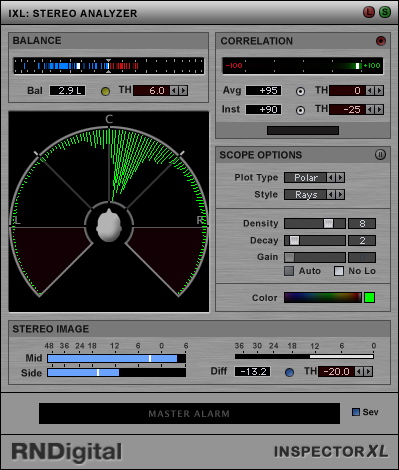
This is the "Polar View" of old Inspector XL.
Image
What I really like on this view, that it shows the strengths of the signal "around the head".


And then there is the HOFA Plugin:
Goniometer and Correlation view (which is like an angle/elbow opening and closing) of HOFA 4U Plugins

What I like here, is the fact that it shows Mid (Top), Side (Bottom) and L and R on the Polar View. Your Polar view only shows the vertical half


Mayae wrote:
Another thing that is very Wavelab specific is the "GUI recall" on host relaunch. If you do that, parameters are either reset, or the view goes apesh*t. The correlation meter for example jumps around like a madman after I do that, and the RMS mode of the VectorScope creates a lot of glitches.
I have no idea what GUI recall is or what it is supposed to do, can't find any information online either. What kind of glitches are we talking about - could this be a case of the phase and balance windows are being set to a very low value, like 0? This would make them flicker, since they react instantly to the signal.
Okay, very simple spoken, "GUI RECALL" means that if you have a project that you're reloading, or in case of Wavelab a plugin setup (the host can reload with your last settings used), all parameters are recalled as good as possible. Sometimes, this doesn't properly work. Like - parameters are getting reset. Both visually and internally. Sometimes only internally or visually.

In case of Wavelab, it seems to be internally. I don't have any flickering, but the parameters are suddenly "extended" (boosted even further than possible). This happened for me with the Vector Scope, the balance and correlation meters also jumped around like crazy. Project recall in Cubase with Signalizer loaded didn't cause any issues. Though I initially setup "Analytic" mode in Spectrum View, but on project reload it reverts back to "Nautical". (I guess this is another bug)


Additional to that - Wavelab doesn't run plugins in realtime (constantly), but only on demand. Read: no playback, plugins are in halt mode (stop the playback, the scopes freeze). Other hosts run this plugin in constant realtime mode (stop the playback, scope's fall back to -inf).


Mayae wrote:Software mode isn't implemented usably, yet. Have you tried making the window of comparable size to the full-screen size - does this create the same problems? Otherwise, it sounds like a driver issue. I would not advice turning vsync off, unless it creates problems - perhaps turn on vsync, and set swap interval to a low value?
I am using your default settings:
- buttons are hard to interpret, so I can't tell you which state I'm at (didn't touch them)
- Swap Interval = 1
- Anti Aliasing = 16
- screen size (without config panels): 1280x720


Mayae wrote:With that said, the graphics rendering is not that optimized but I haven't seen any GPUs not able to render it at full fps. If you can provide a screen shot of the diagnostic info as explained above in both windowed and fullscreen modes, it would help as well.
If I reduce the AA to 2x, things drastically improve frame wise. 16x AA is a killer task for most cards and 3D applications. Especially for gaming (where even 2x can already be absolute murderous unless you have a highend card). I don't think that this is a driver issue - like I said, overclocking can offer some more frames, but I think ultimately your render code needs improvement.

This is why a mass-testing is actually great, because we have the most different GPU's there are. Others might even have a less strong card than I have (GT x10 to x30 series, basically only 2D bureau cards), so the performance there would be even worse.

Don't expect users on Win/Mac and Linux to ultimately have gamer cards in their rig.


Screenshots are here:
GPU Test (zip, ca 2,3MB, PNG)

You'll notice that I had a 720p window and a 1680x1050 fullscreen. I only turned on overclocking for the Spectrum View (as this was the most tasking). Please take note of the file tags. The "diagnosis" doesn't show correct values on the taken screenshot.

The settings were all default (4ms update speed, window size 8192). The Vector View was 300ms rather than 5ms however. Difference, 3-4 frames less on faster drawing times in this case..


However - these screenshots clearly show the correlation between Antialising 16x and 2x (which still looks fine). Antialising is a GPU resource eater. Or your code is not optimized enough yet (take your pick).


BTW: The NVidia 9500GT, albeit a couple of years old, was considered a highend GPU. I can still play PS2 games in 1080 and 30fps on it (depending on the game, age and 3D assets - think 5-6 years back). PSP Emulation even in 60fps (720p, which is 2,5x the size of the PSP - and emulators are more tasking than optimized PC games - I play a lot of Wipeout Pure/Pulse to unwind in my sparetime). Though granted with Overclocking activated and DirectX rather than OpenGL. But this should give an indication of what this card is still capable of. And compared to the GT x10 to x30 series (210 to 230, up to 410/420 - classic bureau application cards), it's also more powerful.

Drivers don't change much - actually nothing at all. And I really don't want to setup NVidia GPU presets for Cubase/Wavelab. Nobody should need to do that, neither is it even possible on a Mac with the stock GPU.


Mayae wrote:It seems to work weirdly with Wavelab.. I guess I'll have to try out the host.
The only way to properly try it in Wavelab is:
a) Wavelab LE or Elements
b) buy Wavelab Pro (expensive)


Mayae wrote:That's actually not a bad idea. The buttons will be redesigned soon, anyway.
Looking forward to that.


Mayae wrote:The idea about the sandbox mode is something I've thought about as well. It's a nice idea, it just takes some more work behind-the-scenes before it will be easy to implement. I'm not sure what you mean about the screen size, you can resize you window as you see fit - and this gets saved to the global preset.
Resizing is a pain - Cubase for example doesn't properly give you the right-low corner drag icon. Wavelab does. I'm thinking more along the lines of three presets (via a checkbox or something) and one "custom field" where you can type in your own screen sizes.

Think of Kontakt's Window Resize Feature.

And as sizes I'd love to see things like:
960x540, 1280x720, 1920x1080, Custom Size


Sandbox Mode would be great.


Mayae wrote:Btw, thanks for the very thorough testing and feedback guys, it really helps a lot.
[/quote]

You're welcome. I hope my beta testing experience with other companies does help you.
You do not have the required permissions to view the files attached to this post.
[ Mix Challenge ] | [ Studio Page / Twitter ] | [ KVRmarks (see: metering tools) ]

Post

Amazing - thank you for making this available for free!! The peak tracking feature on the video looks like my new best friend! :) Will check it out tonight.
aka rktic. demoscener (Farbrausch, Holon, MFX, Still), sound designer, ux-dude, sth @AudioRealism, human synthesizer—not necessarily in that order.

Post

I copied everything from the release folder over to the VST Plugin Folder in question (I did call it by your name, sans special letters). Wavelab 8 doesn't properly initialize, Wavelab 9 does. So I guess it's down to how well the host interprets the VST plugin code
That specific comment was directed towards "David Else".
Mayae wrote:The 'arrow dropdown' refers to the textual tabs at the top (spectrum/oscilloscope etc.)?
Correct.
Okay, you are making sure to actually click on the arrow (inside it)?
Mayae wrote:
Though here I'd love to see a "Magnitude View" mode.
Can elaborate on what you specifically mean by magnitude view? The spectrum analyser is, per definition, a magnitude view of the spectrum..
Even better, this is how the screen should look like if you use the right test tone, and messed with EQ settings:
EQ Test.png
Unfortunately, your image didn't get included (?)Okay, I get what you mean now. To do this, you need to propagate digital impulse samples through the plugin in question and into signalizer, with the window set to 'Rectangular' - that should produce the exact same output. At some point, I want to add scripting support for situations like this - to support pausing the view on detection of impulses, for instance.
It actually works already if you go into Spectrum View, Analytical, then raise the update speed to 1s (would love to see higher values in this case). The only problem is, that the frequency plot this creates is now at around -120dB rather than +/-0dB
I'm still not sure what you're trying to achieve. I'm assuming you're referring to the 'Update speed' inside the spectrum panel, and not the frame-rate update? The former doesn't affect anything if you're using the line graph view (not the spectrogram).
A Phase View would also be great.
Again, not quire sure what you mean about phase view... Signalizer can present this information in spatial time (oscilloscope/vectorscope) or frequency domain (spectrum using side/phase channels).
And I do hope that we see a "waveform view" that we can speed down to a near halt as well (which is also useful for testing delay times, how a compressor responds, etc.
Only a matter of time :)
I hear you, but I'd love to see buttons or a "first panel" dropdown menu rather than going through either a global preset, or "per view" presets first. This is especially time consuming if you want to switch between Specrogram and FFT. The Vector View does offer this with a dropdown from Lissajous to Polar.
You can do this similarly with the "Display mode" dropdown menu in the spectrum. Notice that the presets are just settings of the existing controls, they don't control anything 'hidden' or specific modes..
Actually - no.
Wavelab and Cubase read out the plugin names via "ID" (as do many other VST hosts), that the developer can set. For example: if you set the developer as "Lightbridge", then this shows up rather than your company or your name. The plugin itself is properly tagged as "Signalizer"
So how is this not working as intended? (Lightbridge is the company name - you have to have one).
Right Mouse Click on the Input Gain opens a dropdown with several options:
...
Also, if the playback stops, the Input Gain rises until infinity.
Ah, but you need to use the dropdown menu to the left of it, called 'auto-gain mode'! :) I guess I could consider grouping the controls more together. The auto-gain should maximally reach -120dB, it goes beyond that?
Mayae wrote:This is because you have to include the unit of your numerical value. By default, it interprets the values as a time window in samples, not milliseconds. If you input "10 ms" it should work, right?
it does work, and it is a bug.

Because I can set values without writing ms post the numeric value for the Spectrogram view, but not for the Vector Scope. Here I explicitly need to add the ms.
The units are different (smps - samples - vs ms). But I just noticed it interprets units wrong, so there's that.
Mayae wrote:
On plugin reload, the background for the "numeric fields" also turn black, also the font color and the values can't be read anymore.
Can you provide a screenshot of this?
There is no screenshot to provide.
The text turns black on a black background rather than grey-ish on a black background.
Hmm, just a random guess: Does the drop-down menus or labels for values in the edit mode of colour controls turn white/blueish (edit mode is when you double-click and click the arrow to the right)?
Maybe there should be a suitable tagging for these meters?
True, I don't see why not.
Image
What I really like on this view, that it shows the strengths of the signal "around the head".
It makes sense on an intuitive level, but the visualization is actually wrong - no signal ever goes 'behind' your head, unless you apply some HRTF contextual model.
And then there is the HOFA Plugin:
Goniometer and Correlation view (which is like an angle/elbow opening and closing) of HOFA 4U Plugins

What I like here, is the fact that it shows Mid (Top), Side (Bottom) and L and R on the Polar View. Your Polar view only shows the vertical half
True, but the same information is still present (they basically stretch the half-circle to a full-circle). I'll consider adding it, as said it is a minor difference
Okay, very simple spoken, "GUI RECALL" means that if you have a project that you're reloading, or in case of Wavelab a plugin setup (the host can reload with your last settings used), all parameters are recalled as good as possible. Sometimes, this doesn't properly work. Like - parameters are getting reset. Both visually and internally. Sometimes only internally or visually.

In case of Wavelab, it seems to be internally. I don't have any flickering, but the parameters are suddenly "extended" (boosted even further than possible). This happened for me with the Vector Scope, the balance and correlation meters also jumped around like crazy.
This sounds like corrupt data being delivered back to the plugin... I'll have to test it here.
Project recall in Cubase with Signalizer loaded didn't cause any issues. Though I initially setup "Analytic" mode in Spectrum View, but on project reload it reverts back to "Nautical". (I guess this is another bug)
This is also wrong, I'll try to get it tested in cubase. But does that mean no changes persist through project openings/closings? Like, if you set some knob to some value, and save the project, the knob will be reset upon loading of the same project again?
Additional to that - Wavelab doesn't run plugins in realtime (constantly), but only on demand. Read: no playback, plugins are in halt mode (stop the playback, the scopes freeze). Other hosts run this plugin in constant realtime mode (stop the playback, scope's fall back to -inf).
Yeah, Logic does the same - nothing I have control over (beyond some dirty hacks I don't like applying).
- buttons are hard to interpret, so I can't tell you which state I'm at (didn't touch them)
:) Haha, I'll get around to them..
If I reduce the AA to 2x, things drastically improve frame wise. 16x AA is a killer task for most cards and 3D applications. Especially for gaming (where even 2x can already be absolute murderous unless you have a highend card). I don't think that this is a driver issue - like I said, overclocking can offer some more frames, but I think ultimately your render code needs improvement.
True, the AA can be a killer especially on older cards - in fact, it may not even be supported so it is emulated in software (dead slow!) - currently no check is done to see whether the setting is hardware supported, but it's on the checklist.
This is why a mass-testing is actually great, because we have the most different GPU's there are. Others might even have a less strong card than I have (GT x10 to x30 series, basically only 2D bureau cards), so the performance there would be even worse.

Don't expect users on Win/Mac and Linux to ultimately have gamer cards in their rig.
True, the only reason why I responded with the driver comment was, that you're the first to (say you) have issues about bad performance. The program does in no way expect users to have high-end rigs, but there are associated costs with fullscreen high-fps antialiased graphics, I can't do much about. With that said, I've just implemented a 'fix' in the next version that disables rendering with antialiased lines while doing flood fills. That should improve your situtation.
Drivers don't change much - actually nothing at all. And I really don't want to setup NVidia GPU presets for Cubase/Wavelab. Nobody should need to do that, neither is it even possible on a Mac with the stock GPU.
Conversively, I've had massive problems with CPU usage as soon as I use threaded OpenGL rendering (even though I don't draw anything). Flicking a 'multicore optimization' off in the GPU driver settings fixed the problem. I agree that obviously noone should have to do this, but the reality of the situation is, that even for AAA game titles, google will be riddled with a subset of users on a specific configuration having weird (performance) issues. There are too many factors in the system, and in the end my program has access to exactly zero of that information.. So the best I can do is to suggest stuff like driver updates, or investigate trending/similar configuration issues.
Resizing is a pain - Cubase for example doesn't properly give you the right-low corner drag icon. Wavelab does. I'm thinking more along the lines of three presets (via a checkbox or something) and one "custom field" where you can type in your own screen sizes.

Think of Kontakt's Window Resize Feature.

And as sizes I'd love to see things like:
960x540, 1280x720, 1920x1080, Custom Size
I know the resizing corner is weird- it's on the todo list. I've always hated the Kontakt/Reaktor fixed sizes (they never seem to be what I need), but granted. I'll consider it..
Last edited by Mayae on Wed May 11, 2016 6:46 pm, edited 1 time in total.

Post

Ronny Pries wrote:Amazing - thank you for making this available for free!! The peak tracking feature on the video looks like my new best friend! :) Will check it out tonight.
No problem, hope it suits your needs.

Post

Mayae wrote:
Ronny Pries wrote:Amazing - thank you for making this available for free!! The peak tracking feature on the video looks like my new best friend! :) Will check it out tonight.
No problem, hope it suits your needs.
It does - it's a struck of genius! So many highly useful applications for it!

Would it be possible to implement manual window resizing?
aka rktic. demoscener (Farbrausch, Holon, MFX, Still), sound designer, ux-dude, sth @AudioRealism, human synthesizer—not necessarily in that order.

Post

Ronny Pries wrote:
Mayae wrote:
Ronny Pries wrote:Amazing - thank you for making this available for free!! The peak tracking feature on the video looks like my new best friend! :) Will check it out tonight.
No problem, hope it suits your needs.
It does - it's a struck of genius! So many highly useful applications for it!

Would it be possible to implement manual window resizing?
Thanks at lot!! You're talking about directly inputting the values (like 1280x720?)

Post

That or simply drag'n'drop resizing.
aka rktic. demoscener (Farbrausch, Holon, MFX, Still), sound designer, ux-dude, sth @AudioRealism, human synthesizer—not necessarily in that order.

Post

Maybe I should jump to Mail reports or something? The posts are staring to get a little bit confusing.

Mayae wrote:
Mayae wrote:The 'arrow dropdown' refers to the textual tabs at the top (spectrum/oscilloscope etc.)?
Correct.
Okay, you are making sure to actually click on the arrow (inside it)?[/quote]

Yes.


Mayae wrote:Okay, I get what you mean now. To do this, you need to propagate digital impulse samples through the plugin in question and into signalizer, with the window set to 'Rectangular' - that should produce the exact same output. At some point, I want to add scripting support for situations like this - to support pausing the view on detection of impulses, for instance.
Not talking white or pink noise, but DIRAC. Actually tested "Rectangular", no change really. Test signal is also (strangely) at -52dBFS on the analytic view


Mayae wrote:I'm still not sure what you're trying to achieve. I'm assuming you're referring to the 'Update speed' inside the spectrum panel, and not the frame-rate update? The former doesn't affect anything if you're using the line graph view (not the spectrogram).
I'm using Spectrum view, and the Update speed. There is no frame rate setting to edit here.


Mayae wrote:Again, not quire sure what you mean about phase view... Signalizer can present this information in spatial time (oscilloscope/vectorscope) or frequency domain (spectrum using side/phase channels).
I think you should take a look at Christian Budde's VST Plugin Analyzer, "Frequency Analysis", Domain: Phase.


Mayae wrote:You can do this similarly with the "Display mode" dropdown menu in the spectrum. Notice that the presets are just settings of the existing controls, they don't control anything 'hidden' or specific modes..
Can't confirm this. From all the Spectrum View panels, I can not trigger the "Analytic View"/Grid. Only the blank nautical view and Spectogram (Color Spectrum, horizontal scroll).

Actually, I found out that the "grid" has been colored "black", so the colors reset on project/host reload. So if you select Line Graph from the Dropdown, it's "Nautical" due to the missing (black/transparent) grid.


Mayae wrote:So how is this not working as intended? (Lightbridge is the company name - you have to have one).
Wait, "your" company is Lightbridge, or it is the company name of the tool you used to program Signalizer?
I'm confused.


Mayae wrote:Ah, but you need to use the dropdown menu to the left of it, called 'auto-gain mode'! :) I guess I could consider grouping the controls more together. The auto-gain should maximally reach -120dB, it goes beyond that?
+ values.
Peak Decay and RMS as "auto gain" are taking things too far. But turning that off, no jumpy behavior anymore.

And I'd like to point out now that a manual would REALLY help understanding things at this point.


Mayae wrote:Hmm, just a random guess: Does the drop-down menus or labels for values in the edit mode of colour controls turn white/blueish (edit mode is when you double-click and click the arrow to the right)?
As this happened for me now, a screenshot:
Signalizer - Numeric Value bug.png

Mayae wrote:True, but the same information is still present (they basically stretch the half-circle to a full-circle). I'll consider adding it, as said it is a minor difference
A difference nonetheless, and actually used in xyz tools on the market. One I do consider to be among the best, is RME's DigiCheck.


Mayae wrote:But does that mean no changes persist through project openings/closings? Like, if you set some knob to some value, and save the project, the knob will be reset upon loading of the same project again?
The change "persists", but only half of the settings seem to be forwarded.
Also, it really depends on the host. Like I earlier wrote - WL8 behaves different than WL9, which also behaves different to Cubase.


Mayae wrote:True, the AA can be a killer especially on older cards - in fact, it may not even be supported so it is emulated in software (dead slow!) - currently no check is done to see whether the setting is hardware supported, but it's on the checklist.
It should be a top priority IMO.
Also, the plugin should start at 2xAA at max... the real difference is really just slightly smoothed out lines of the FFT and X/Y Oscilloscope, nothing more.


Mayae wrote:True, the only reason why I responded with the driver comment was, that you're the first to (say you) have issues about bad performance. The program does in no way expect users to have high-end rigs, but there are associated costs with fullscreen high-fps antialiased graphics, I can't do much about. With that said, I've just implemented a 'fix' in the next version that disables rendering with antialiased lines while doing flood fills. That should improve your situtation.
Taking note of the recent posts prior to me, I'm not hte only one reporting slowdowns or even no GUI's at all.

Speaking of "no GUI"... I found out that in Wavelab, the first time you open the Spectrum View, the signal shown on the graph is super low, even if the input is at -10dB RMS... This could be a potential bug.


Mayae wrote:There are too many factors in the system, and in the end my program has access to exactly zero of that information.. So the best I can do is to suggest stuff like driver updates, or investigate trending/similar configuration issues.
I think this is why you used OpenGL, to have a unified source for rendering on all engines. Still... I'd say that OpenGL 2 should remain absolute minimum for all rigs, and you should try to optimize the code as good as you can.


Mayae wrote:I know the resizing corner is weird- it's on the todo list. I've always hated the Kontakt/Reaktor fixed sizes (they never seem to be what I need), but granted. I'll consider it..
This is why I mentioned 3 sizes in 16:9 and a custom panel for those that want "custom sizes" (manual resizing to given numeric values). Something that Kontakt (at least up until Kontakt 4) does not offer. If you then save your settings globally, it should be recalled like you set it up.

There... one global settings, only needed to be setup once.


I think you now have a starting point for a couple of things.
I'm looking forward to the next improvements, add-ons, overhauls - but most importantly: bugfixes...
You do not have the required permissions to view the files attached to this post.
[ Mix Challenge ] | [ Studio Page / Twitter ] | [ KVRmarks (see: metering tools) ]

Post

hi mayae,

first off a very big thank you for this marvellous plugin, i absolutely love it. i'm doing a lot of mixing and mastering as well as sounddesign as my main job, and this plugin is by far the best analyser i had my hands on. and that for free (!!). so again, thank you for that.

but i have a few issues with is that you may be able to adress:

- the slope value (high frequency vs. low frequency) is not stored in the presets.
- even with a short audiofile there are spikes, meaning when i play f.e. a kick in cycle, the individual frequencies have different amplitudes every time. sometimes the click (2-5khz) of the kick has say-30db, next time it has -20db, even if nothing in the signal obviously changes.
- in low frequencies (f.e. a kick), initially theres a build up, meaning the kick has to run 3 or 4 times trough the analyser to be correctly displayed.
- the grid color is coupled with the color of the readout peak window. but i would like to set up the grid rather not so bright, however - the readout should be bright and clearly readable. could you maybe decouple these 2, so that one can set these up independantly?
- with such a vast amount of set up options it would be nice to have a nice, indepth but not only technical manual. i'm 25 years in the profesional studio business, yet on a lot of parameters i don't have a clue what they are good for, nor do i know what they do... :)
- could you maybe implement a metering window, that can be displayed next to the analyser? right now i have to use another plugin for that, which prevents me from being able to use the analyser in fullscreen mode. i use a third monitor exclusively for measurement tasks, so that would be wholeheartedly welcome...

other than that i can only say thank you, again. please keep up the good work!
regards,
brok landers
BIGTONEsounddesign
gear is as good as the innovation behind it-the man

Post Reply

Return to “Effects”