

I' ve got a question for all you uvi falcon users out there .
It seems that the drum module is verry capable , been looking at some promo vid's and it has essentially the same architecture as in microtonic .
Audio rate lfo , multifilter for noise etc .
Just out of curiosity ,since microtonic is verry gentle on the cpu , how does an 8 voice falcon drum synth performs ....
Really curious ..

UVI Falcon - v4 = 2026 released - rumors, ads, praise, kindergarden, auto-sampling and off-topic inside!
-
 gentleclockdivider gentleclockdivider https://www.kvraudio.com/forum/memberlist.php?mode=viewprofile&u=203660
 - Banned
- 6787 posts since 22 Mar, 2009 from gent
Eyeball exchanging
Soul calibrating ..frequencies
Soul calibrating ..frequencies
-
 Sampleconstruct Sampleconstruct https://www.kvraudio.com/forum/memberlist.php?mode=viewprofile&u=191286
 - KVRAF
- Topic Starter
- 16748 posts since 12 Oct, 2008 from Here and there
The drum synth oscillator in Falcon is light on CPU, as I don't use Microtonic, I have no comparison to make though.

-

- KVRAF
- 2627 posts since 16 May, 2004 from Soviet Union
ThomasHelzle good addition, thanks.
Sampleconstruct hm cool exemplar.Sampleconstruct wrote:A little bit of granular Falcon power.
<span class="skimlinks-unlinked">>
-
gentleclockdivider gentleclockdivider https://www.kvraudio.com/forum/memberlist.php?mode=viewprofile&u=203660
- Banned
- 6787 posts since 22 Mar, 2009 from gent
Uvi stole my gui ..
I demand a free version

I demand a free version
Eyeball exchanging
Soul calibrating ..frequencies
Soul calibrating ..frequencies
-

- KVRAF
- 1912 posts since 26 Feb, 2013 from Sweden
Wow, this was more than a littleSampleconstruct wrote:A little bit of granular Falcon power.

I'm numb. Stunning and very inspiring!
Thanks for the listen.
Soundsets and presets for Absynth.
Sounds and presets for UVI Falcon "Iterata X".
Bazille soundset - Crystalline Textures 3.
Sounds and presets for UVI Falcon "Iterata X".
Bazille soundset - Crystalline Textures 3.
-
Sampleconstruct Sampleconstruct https://www.kvraudio.com/forum/memberlist.php?mode=viewprofile&u=191286
- KVRAF
- Topic Starter
- 16748 posts since 12 Oct, 2008 from Here and there
Thank's Mikael.liv wrote:Wow, this was more than a littleSampleconstruct wrote:A little bit of granular Falcon power.
I'm numb. Stunning and very inspiring!
Thanks for the listen.
-
- KVRist
- 168 posts since 20 Jun, 2003
The benefit of Falcon over Microtonic is that you can layer samples over the top of them, and filter to your hearts content! etc...Sampleconstruct wrote:The drum synth oscillator in Falcon is light on CPU, as I don't use Microtonic, I have no comparison to make though.
Uniphonic - Sounds for Synths || My music: Gravity Evasion ||
-

- KVRAF
- 6539 posts since 9 Dec, 2008 from Berlin
Just a quick notice that the "Toms Midi Mangler" Lua script for Falcon now has an explicit home on my new website:
http://www.screendream.de/code/toms-midi-mangler/
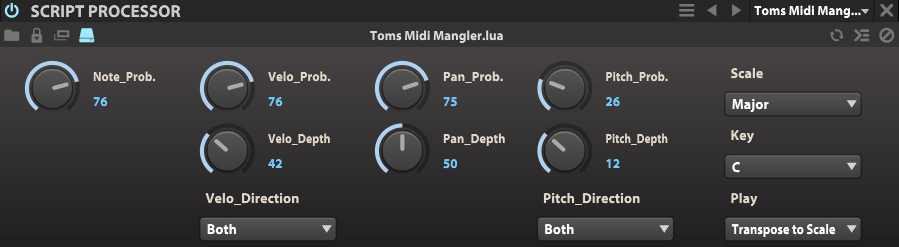
Feel free to have a look around the site - there are also some other tools and lots of new artworks
Cheers,
Tom
http://www.screendream.de/code/toms-midi-mangler/
Feel free to have a look around the site - there are also some other tools and lots of new artworks
Cheers,
Tom
"Out beyond the ideas of wrongdoing and rightdoing, there is a field. I’ll meet you there." · Rumi
UrbanFlow.art · Instagram · YouTube
UrbanFlow.art · Instagram · YouTube
-
- KVRist
- 45 posts since 4 Nov, 2004
Greetings Fellow Falcon Users:
I am trying to create my first sampled instrument with Falcon and have a number of issues I'm trying to sort out.
My first question is, is this the best (or only) Falcon forum around? Is there any dedicated Falcon forum with topics, etc. or is this one long thread on this KVR forum the best we have for now?
Second question: The sample editor window seems way too small and narrow. Is there any way to make it bigger? It seems the only way to zoom is holding down option or shift and scrolling with a mousewheel. Is there no other method? If so, I am not liking this, and hope UVI improves the situation. I am finding it really hard to drag the tiny sample start and end points.
Thanks,
Babz
I am trying to create my first sampled instrument with Falcon and have a number of issues I'm trying to sort out.
My first question is, is this the best (or only) Falcon forum around? Is there any dedicated Falcon forum with topics, etc. or is this one long thread on this KVR forum the best we have for now?
Second question: The sample editor window seems way too small and narrow. Is there any way to make it bigger? It seems the only way to zoom is holding down option or shift and scrolling with a mousewheel. Is there no other method? If so, I am not liking this, and hope UVI improves the situation. I am finding it really hard to drag the tiny sample start and end points.
Thanks,
Babz
-
- KVRist
- 45 posts since 4 Nov, 2004
Answering my own question ... I just discovered that clicking on the little gear icon that hides the sample editor controls makes the window much larger! OK, let's see how well I can work with this!Babz wrote: Second question: The sample editor window seems way too small and narrow. Is there any way to make it bigger?
-
- KVRist
- 45 posts since 4 Nov, 2004
OK, next question ... This all has to do with the IRCAM STRETCH function.
What I'm trying to do seems pretty basic, but I can't tell if things are buggy or if IRCAM Stretch is just so processor demanding that it can easily lock up and overload your computer.
I have some vocal samples that are in the key of C#m at 110 bpm and I want them to play a semitone higher at Dm and a little faster at 112 bpm.
I have a simple program with 5-6 samples assigned to keys. My buffer is set at 256. I'm on a quad core i7 Mac with plenty of RAM. I get really great performance on highly complex projects with many instances of Kontakt and other VIs....
Questions:
First of all it seems that if you set IRCAM STRETCH to anything other than "Default" (i.e., High Quality or Voice) it totally overloads my computer. Is this "normal"? That is, do others find this to be the case? Do you get overload at 256 buffer when you choose High Quality for IRCAM STRETCH?
Also, I have a program with 5 samples, each mapped to different keys with IRCAM STRETCH. When you drag them in they come in with "Transients" set under Options. Since these are vocals, I have Transients unchecked and Envelope and Stereo set. Now when I drag in a 6th sample, change it to IRCAM STRETCH and try to change it from Transients to Envelope and Stereo, it locks up my DAW (spinning beachball) and I have to force quit. Same thing in stand-alone Falcon, frozen and unresponsive and have to force quit (but no beachball).
In short... What is the deal? Is this is this bugs or is IRCAM STRETCH just so demanding that it is almost unusable for even for a simple task such as this? Am I asking it to do too much?
Thanks,
Babz
P.S. In stand alone mode, I can't find any way to get the samples to play at a faster bpm. I have sync set to Tempo and change the tempo but the samples play at the same speed. What the secret here?
What I'm trying to do seems pretty basic, but I can't tell if things are buggy or if IRCAM Stretch is just so processor demanding that it can easily lock up and overload your computer.
I have some vocal samples that are in the key of C#m at 110 bpm and I want them to play a semitone higher at Dm and a little faster at 112 bpm.
I have a simple program with 5-6 samples assigned to keys. My buffer is set at 256. I'm on a quad core i7 Mac with plenty of RAM. I get really great performance on highly complex projects with many instances of Kontakt and other VIs....
Questions:
First of all it seems that if you set IRCAM STRETCH to anything other than "Default" (i.e., High Quality or Voice) it totally overloads my computer. Is this "normal"? That is, do others find this to be the case? Do you get overload at 256 buffer when you choose High Quality for IRCAM STRETCH?
Also, I have a program with 5 samples, each mapped to different keys with IRCAM STRETCH. When you drag them in they come in with "Transients" set under Options. Since these are vocals, I have Transients unchecked and Envelope and Stereo set. Now when I drag in a 6th sample, change it to IRCAM STRETCH and try to change it from Transients to Envelope and Stereo, it locks up my DAW (spinning beachball) and I have to force quit. Same thing in stand-alone Falcon, frozen and unresponsive and have to force quit (but no beachball).
In short... What is the deal? Is this is this bugs or is IRCAM STRETCH just so demanding that it is almost unusable for even for a simple task such as this? Am I asking it to do too much?
Thanks,
Babz
P.S. In stand alone mode, I can't find any way to get the samples to play at a faster bpm. I have sync set to Tempo and change the tempo but the samples play at the same speed. What the secret here?
Last edited by Babz on Thu Aug 11, 2016 5:33 pm, edited 1 time in total.
-
Sampleconstruct Sampleconstruct https://www.kvraudio.com/forum/memberlist.php?mode=viewprofile&u=191286
- KVRAF
- Topic Starter
- 16748 posts since 12 Oct, 2008 from Here and there
IRCAM Stretch is IRCAM Stretch, it sounds great but is not made for real time processing other than maybe playing 2-3 voices at the highest possible sample buffer.Babz wrote:OK, next question ... This all has to do with the IRCAM STRETCH function.
What I'm trying to do seems pretty basic, but I can't tell if things are buggy or if IRCAM Stretch is just so processor demanding that it can easily lock up and overload your computer.
I have some vocal samples that are in the key of C#m at 110 bpm and I want them to play a semitone higher at Dm and a little faster at 112 bpm.
I have a simple program with 5-6 samples assigned to keys. My buffer is set at 256. I'm on a quad core i7 Mac with plenty of RAM. I get really great performance on highly complex projects with many instances of Kontakt and other VIs....
Questions:
First of all it seems that if you set IRCAM STRETCH to anything other than "Default" (i.e., High Quality or Voice) it totally overloads my computer. Is this "normal"? That is, do others find this to be the case? Do you get overload at 256 buffer when you choose High Quality for IRCAM STRETCH?
Also, I have a program with 5 samples, each mapped to different keys with IRCAM STRETCH. When you drag them in they come in with "Transients" set under Options. Since these are vocals, I have Transients unchecked and Envelope and Stereo set. Now when I drag in a 6th sample, change it to IRCAM STRETCH and try to change it from Transients to Envelope and Stereo, it locks up my DAW (spinning beachball) and I have to force quit. Same thing in stand-alone Falcon, frozen and unresponsive and have to force quit (but no beachball).
In short... What is the deal? Is this is this bugs or is IRCAM STRETCH just so demanding that it is almost unusable for even a simple task as this?
Thanks,
Babz
P.S. In stand alone mode, I can't find any way to get the samples to play at a faster bpm. I have sync set to Tempo and change the tempo but the samples play at the same speed. What?
-
Sampleconstruct Sampleconstruct https://www.kvraudio.com/forum/memberlist.php?mode=viewprofile&u=191286
- KVRAF
- Topic Starter
- 16748 posts since 12 Oct, 2008 from Here and there
There is no dedicated Falcon forum, we have this thread and an FAQ thread in my own forum, all other requests go directly to UVI via e-mail support.Babz wrote:Greetings Fellow Falcon Users:
I am trying to create my first sampled instrument with Falcon and have a number of issues I'm trying to sort out.
My first question is, is this the best (or only) Falcon forum around? Is there any dedicated Falcon forum with topics, etc. or is this one long thread on this KVR forum the best we have for now?
Second question: The sample editor window seems way too small and narrow. Is there any way to make it bigger? It seems the only way to zoom is holding down option or shift and scrolling with a mousewheel. Is there no other method? If so, I am not liking this, and hope UVI improves the situation. I am finding it really hard to drag the tiny sample start and end points.
Thanks,
Babz
-
- KVRAF
- 6539 posts since 9 Dec, 2008 from Berlin
Simon beat me to it
This is UVIs idea of a linear or serial forum - every question and answer stringed out in one long thread.
Everybody else thinks it's ridiculous for a complex instrument like Falcon.
Yes, IRCAM stretch is exactly like that. Awesome sound but extremely demanding. Higher quality only for final rendering I'd say.
Cheers,
Tom
This is UVIs idea of a linear or serial forum - every question and answer stringed out in one long thread.
Everybody else thinks it's ridiculous for a complex instrument like Falcon.
Yes, IRCAM stretch is exactly like that. Awesome sound but extremely demanding. Higher quality only for final rendering I'd say.
Cheers,
Tom
"Out beyond the ideas of wrongdoing and rightdoing, there is a field. I’ll meet you there." · Rumi
UrbanFlow.art · Instagram · YouTube
UrbanFlow.art · Instagram · YouTube
-
- KVRist
- 45 posts since 4 Nov, 2004
I see. If that is the case, then this is quite helpful. (And disappointing, since IRCAM Stretch was a main reason why I bought Falcon.) I was expecting something more like a higher quality version of the Kontakt sample stretching engine. But I guess not?Sampleconstruct wrote: IRCAM Stretch is IRCAM Stretch, it sounds great but is not made for real time processing other than maybe playing 2-3 voices at the highest possible sample buffer.
So I wonder now what is the best way to do what I need to do, Melodyne? There is also a stand alone IRCAM Tools TS app, but it has no way to change tempo via bpm.
Or maybe I just need to do it one phrase at a time, printing as I go along.... Hmmmm....
Well, at least I now know that what I am experiencing it "normal."
Best,
Babz
What about my question about changing tempo in stand alone Falcon, anyone know how it is done?