



KONTAKT GUI Maker in development [RELEASED]
-

- KVRist
- Topic Starter
- 205 posts since 23 Dec, 2015 from Berlin
-

- KVRAF
- 4315 posts since 31 Oct, 2004
This is an excellent idea, I'm going to check out the beta in detail tonight (I sleep by day). Expect a full report in a couple of hours!rigidaudio wrote:Currently having an excellent idea:
KGM now comes by default with a set of basic knobs and sliders. These can be assigned to alter different
KONTAKT engine parameters in an also included "template.nki" instrument.
This will feature all the bells and whistles that KONTAKT has to offer, including filters, effects and modulation stuff. So basically, all you have to do is importing / mapping your samples inside that template instrument afterwards and you are good to go!
What do you guys think?
-
- KVRAF
- 4315 posts since 31 Oct, 2004
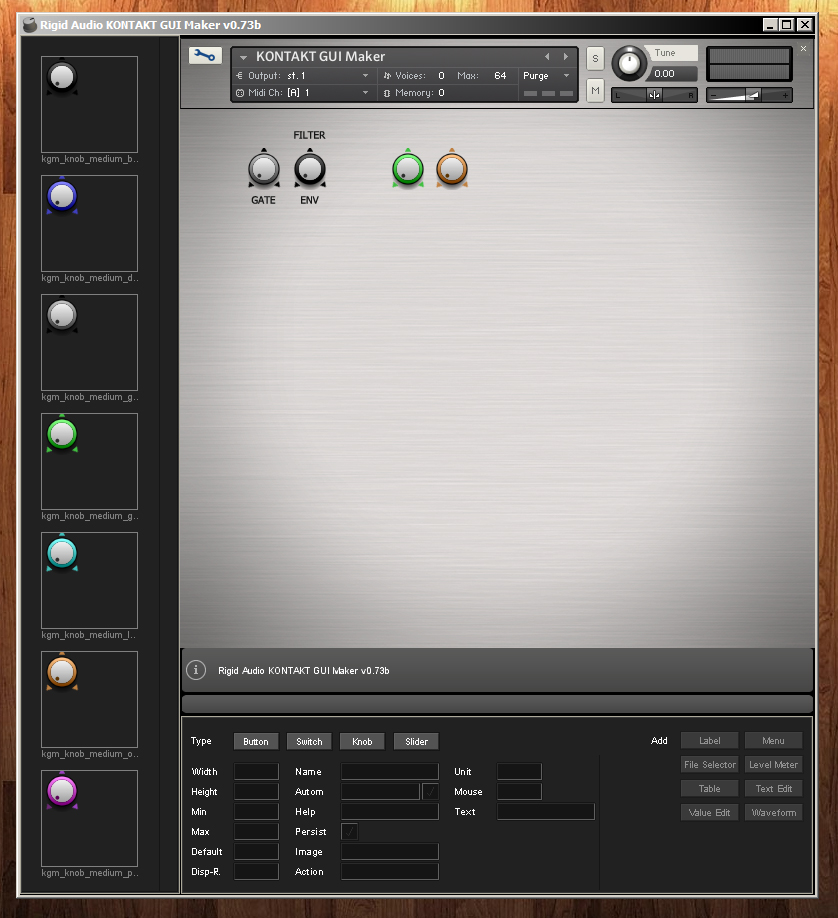
The current beta is way too limited. There isn't much I can do with it (so far), even the free Kontakt GUI Generator app offers more options. At least the beta doesn't crash, which is good. Having to load my own script in a program made to generate scripted GUI is counter intuitive. For the bare minimum I would expect:
* To be able to assign a knob to a function/parameter
* To be able to graphically import my own knobs and wallpaper directly in the app
* To be able to ad menus, labels, knobs, etc. directly in the app using the right corner buttons. (As it is, it doesn't work. I wonder why it's there.)
It gets me worried a bit, I hope this is not vaporware and that it will be completed. As it is I can only drag elements from the left column on the GUI, that's it!
Hopefully, I won't sound too negative, as I'd really like this project to lift off. I really like the concept, just wish it would be more advanced.
Looking forward the next beta!
* To be able to assign a knob to a function/parameter
* To be able to graphically import my own knobs and wallpaper directly in the app
* To be able to ad menus, labels, knobs, etc. directly in the app using the right corner buttons. (As it is, it doesn't work. I wonder why it's there.)
It gets me worried a bit, I hope this is not vaporware and that it will be completed. As it is I can only drag elements from the left column on the GUI, that's it!
Hopefully, I won't sound too negative, as I'd really like this project to lift off. I really like the concept, just wish it would be more advanced.
Looking forward the next beta!
-
- KVRist
- Topic Starter
- 205 posts since 23 Dec, 2015 from Berlin
Thanks for the feedback.SampleScience wrote:The current beta is way too limited. There isn't much I can do with it (so far), even the free Kontakt GUI Generator app offers more options. At least the beta doesn't crash, which is good. Having to load my own script in a program made to generate scripted GUI is counter intuitive. For the bare minimum I would expect:
* To be able to assign a knob to a function/parameter
* To be able to graphically import my own knobs and wallpaper directly in the app
* To be able to ad menus, labels, knobs, etc. directly in the app using the right corner buttons. (As it is, it doesn't work. I wonder why it's there.)
It gets me worried a bit, I hope this is not vaporware and that it will be completed. As it is I can only drag elements from the left column on the GUI, that's it!
Hopefully, I won't sound too negative, as I'd really like this project to lift off. I really like the concept, just wish it would be more advanced.
Looking forward the next beta!
The idea was to let the user load an existing script and let him change knobs and sliders and stuff like that. But yes - i´ve quickly realised this could result in too much hassle / trouble.
The next beta will autogenerate a script so that you don´t have to create one yourself. (Currently KGM will be shipped with a basic template script file to work with).
Yes, that´s exactly whats planned now. Therefore the idea with the included template KONTAKT instrument *.nki file!* To be able to assign a knob to a function/parameter
* To be able to graphically import my own knobs and wallpaper directly in the app
* To be able to ad menus, labels, knobs, etc. directly in the app using the right corner buttons. (As it is, it doesn't work. I wonder why it's there.)
You *can* import your own graphic files already, you simply have to copy them into the project folder.
All the other stuff is in the works (menu, label, knos etc.) It just takes a lot of time

-
- KVRAF
- 4315 posts since 31 Oct, 2004
I overlooked that, sorry. Thank you for taking it well, I know this kind of project is no small task so I didn't want to sound too negative or discourage you.rigidaudio wrote:You *can* import your own graphic files already, you simply have to copy them into the project folder.
All the other stuff is in the works (menu, label, knos etc.) It just takes a lot of time
Keep it up!

-

- KVRAF
- 14029 posts since 19 Jun, 2008 from Seattle
Please don't remove this feature. In addition to your other plans/features, THIS one is vital for me. I have scripts that I just want to hide/change/rearrange certain elements of, and add other elements to, without having to rewrite anything/much.rigidaudio wrote: The idea was to let the user load an existing script and let him change knobs and sliders and stuff like that. But yes - I´ve quickly realized this could result in too much hassle / trouble.
Great work thus far. Thanks.
I'm not a musician, but I've designed sounds that others use to make music. http://soundcloud.com/obsidiananvil
-
- KVRAF
- 14029 posts since 19 Jun, 2008 from Seattle
As an convenience/option this is wonderful, yes.rigidaudio wrote: [...] KGM now comes by default with a set of basic knobs and sliders. These can be assigned to alter different
KONTAKT engine parameters in an also included "template.nki" instrument.
This will feature all the bells and whistles that KONTAKT has to offer, including filters, effects and modulation stuff. So basically, all you have to do is importing / mapping your samples inside that template instrument afterwards and you are good to go!
What do you guys think?
I've made and collected tons of knobs/sliders/buttons/switches, over the years. Am I correct in assuming that I can place these in appropriately named sub-folders within an 'assets/resources' folder, to pic and choose/mix and match as I please?

I'm not a musician, but I've designed sounds that others use to make music. http://soundcloud.com/obsidiananvil
-
- KVRist
- Topic Starter
- 205 posts since 23 Dec, 2015 from Berlin
This feature will still be included, no worriesShabdahbriah wrote:Please don't remove this feature. In addition to your other plans/features, THIS one is vital for me. I have scripts that I just want to hide/change/rearrange certain elements of, and add other elements to, without having to rewrite anything/much.rigidaudio wrote: The idea was to let the user load an existing script and let him change knobs and sliders and stuff like that. But yes - I´ve quickly realized this could result in too much hassle / trouble.
Great work thus far. Thanks.
(KGM reads out all script data of interest and leaves the rest untouched - this will remain in the future).
-
- KVRist
- Topic Starter
- 205 posts since 23 Dec, 2015 from Berlin
Absolutely rightShabdahbriah wrote:As an convenience/option this is wonderful, yes.rigidaudio wrote: [...] KGM now comes by default with a set of basic knobs and sliders. These can be assigned to alter different
KONTAKT engine parameters in an also included "template.nki" instrument.
This will feature all the bells and whistles that KONTAKT has to offer, including filters, effects and modulation stuff. So basically, all you have to do is importing / mapping your samples inside that template instrument afterwards and you are good to go!
What do you guys think?
I've made and collected tons of knobs/sliders/buttons/switches, over the years. Am I correct in assuming that I can place these in appropriately named sub-folders within an 'assets/resources' folder, to pic and choose/mix and match as I please?
EDIT: But remember that you still need corresponding txt files for all your PNG images in the format of:
Code: Select all
Has Alpha Channel: yes
Number of Animations: 64
Horizontal Animation: yes
Vertical Resizable: no
Horizontal Resizable: no
Fixed Top: 0
Fixed Bottom: 0
Fixed Left: 0
Fixed Right: 0
-
- KVRAF
- 1991 posts since 12 Mar, 2004
So what exactly is being released in oct ?
Would like to get on this in the beta period, but right now it doesn't really offer that much and development stalled for a good while, have you not considered pushing the beta period a little longer with the reduced price, at least until OSX is working ?
Would like to get on this in the beta period, but right now it doesn't really offer that much and development stalled for a good while, have you not considered pushing the beta period a little longer with the reduced price, at least until OSX is working ?
Duh
-
- KVRist
- Topic Starter
- 205 posts since 23 Dec, 2015 from Berlin
Hopefully an excellent working program that helps the user to craft lovely KONTAKT GUI´s in no time!bungle wrote:So what exactly is being released in oct ?
Would like to get on this in the beta period, but right now it doesn't really offer that much and development stalled for a good while, have you not considered pushing the beta period a little longer with the reduced price, at least until OSX is working ?
I have thought about that,yes. Maybe, it´s truly a good idea to push it back a *little* bit (let´s say 1 or 2 weeks with beta discount still running) to polish everything and iron out possible OSX bugs and stuff...
-
- KVRist
- Topic Starter
- 205 posts since 23 Dec, 2015 from Berlin
-
- KVRAF
- 1991 posts since 12 Mar, 2004
I would definitely get on board then, my windows machines are currently a long distance from me, but i have a macbook air to test onrigidaudio wrote:Hopefully an excellent working program that helps the user to craft lovely KONTAKT GUI´s in no time!bungle wrote:So what exactly is being released in oct ?
Would like to get on this in the beta period, but right now it doesn't really offer that much and development stalled for a good while, have you not considered pushing the beta period a little longer with the reduced price, at least until OSX is working ?
I have thought about that,yes. Maybe, it´s truly a good idea to push it back a *little* bit (let´s say 1 or 2 weeks with beta discount still running) to polish everything and iron out possible OSX bugs and stuff...
Duh
-
- KVRist
- Topic Starter
- 205 posts since 23 Dec, 2015 from Berlin
bungle wrote:I would definitely get on board then, my windows machines are currently a long distance from me, but i have a macbook air to test onrigidaudio wrote:Hopefully an excellent working program that helps the user to craft lovely KONTAKT GUI´s in no time!bungle wrote:So what exactly is being released in oct ?
Would like to get on this in the beta period, but right now it doesn't really offer that much and development stalled for a good while, have you not considered pushing the beta period a little longer with the reduced price, at least until OSX is working ?
I have thought about that,yes. Maybe, it´s truly a good idea to push it back a *little* bit (let´s say 1 or 2 weeks with beta discount still running) to polish everything and iron out possible OSX bugs and stuff...
