


eaReckon - EAReverb 2
-

- KVRAF
- 6288 posts since 8 Jul, 2009
Logic has a not too bad surround space mode. use your google-fu.
#NONFR Check out my music at Bandcamp  Free Streaming!
Free music with your support on Patreon | Youtube: Music of Plexus Videos (music videos) | Youtube: Plexus Productions (audio related) Stop whining. Make music.
Free Streaming! Free music with your support on Patreon | Youtube: Music of Plexus Videos (music videos) | Youtube: Plexus Productions (audio related) Stop whining. Make music.
-

- KVRist
- 341 posts since 30 Apr, 2004 from France
Thanks again for all your friendly messages.
Out Level (OutLvl)
Pan L/R (Pan)
Dry/Wet (DryWet)
ER Diffusion (ERSmth)
ER Complex (ERCplx)
ER Spread (ERSprd)
ER LF Cut (ERLFCut)
ER Absorb (ERAbsrb)
LR LF Cut (LRLFCut)
LR HF Cut (LRHFCut)
LR Damp (LRDamp)
Auditorium Distance (ADDist) [Auditorium Algorithm Only]
All the best,
Philippe
Here is the list of automatable parameters affected by the POS dot:I read online that the POS automation is made of five different automatable parameters (plus other non-automatable ones; in total, all those that appear on the PRO page of the reverb), but the problem for me is to understand which ones can be used to record automation data.
Out Level (OutLvl)
Pan L/R (Pan)
Dry/Wet (DryWet)
ER Diffusion (ERSmth)
ER Complex (ERCplx)
ER Spread (ERSprd)
ER LF Cut (ERLFCut)
ER Absorb (ERAbsrb)
LR LF Cut (LRLFCut)
LR HF Cut (LRHFCut)
LR Damp (LRDamp)
Auditorium Distance (ADDist) [Auditorium Algorithm Only]
All the best,
Philippe

-

- KVRist
- 495 posts since 18 Aug, 2006 from Italy
PFozz, thank you very much! This was exactly what I was looking for. If it doesn't work in Logic Pro X, I'll try to do the automation in another DAW.
(No, surround is beyond my purpose, I really need something like what Eareverb is doing.)
(No, surround is beyond my purpose, I really need something like what Eareverb is doing.)
-
- KVRist
- 341 posts since 30 Apr, 2004 from France
You're welcome!
-
- KVRAF
- 6288 posts since 8 Jul, 2009
For track location mixing, I use Panorama 5. However it uses a human head model that requires the effect be set for the intended transducer (headphones or speakers). It uses a built in reverb to help create the sense of position. the position can be automated.XComposer wrote:PFozz, thank you very much! This was exactly what I was looking for. If it doesn't work in Logic Pro X, I'll try to do the automation in another DAW.
(No, surround is beyond my purpose, I really need something like what Eareverb is doing.)
Here is a track I wrote using it. There is a track specific to speakers and headphones:
https://soundcloud.com/musicofplexus/fu ... rain-remix
https://soundcloud.com/musicofplexus/fu ... headphones
#NONFR Check out my music at Bandcamp Free Streaming!
Free music with your support on Patreon | Youtube: Music of Plexus Videos (music videos) | Youtube: Plexus Productions (audio related) Stop whining. Make music.
Free Streaming! Free music with your support on Patreon | Youtube: Music of Plexus Videos (music videos) | Youtube: Plexus Productions (audio related) Stop whining. Make music.
-
- KVRist
- 495 posts since 18 Aug, 2006 from Italy
This panorama is working well, it seems. It can clearly be heard, especially from 1:50.
I am not thinking to buy it, for the moment, because I am really looking for something that is above all a reverb (besides having a good control on positioning). Anyway, I found that Eareverb works really very well (and can be automated in another DAW that I have), so I am happy with it. Besides, I own also another very good reverb, which can also be automated very well with very good results, especially in combination with pan, stereo width, and volume and with the addition of free plug-ins such as Tokyo Dawn Labs Proximity or Airwindows Distance (in this case, they are better after the reverb, in my opinion).
I am not thinking to buy it, for the moment, because I am really looking for something that is above all a reverb (besides having a good control on positioning). Anyway, I found that Eareverb works really very well (and can be automated in another DAW that I have), so I am happy with it. Besides, I own also another very good reverb, which can also be automated very well with very good results, especially in combination with pan, stereo width, and volume and with the addition of free plug-ins such as Tokyo Dawn Labs Proximity or Airwindows Distance (in this case, they are better after the reverb, in my opinion).
-
- KVRist
- 341 posts since 30 Apr, 2004 from France
Thanks again for all the friendly messages about EAReverb 2!
For your information, the plug-in has been updated to v2.1.0.
New/Improvements
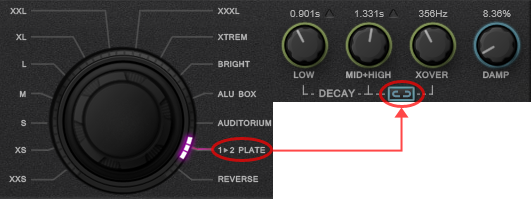
- “1>2 Plate” dual decay
It is now possible to set the decay time independently, for each of the two frequency ranges that are defined by a crossover value.
- Revised pre-delay knob behavior
EAReverb 2 computes the late reverb’s build-up time (depending on the algorithm, …) and internally considers this time as a minimum (unchangeable) pre-delay.
This helps to get more consistent results when synchronizing the late reverb to tempo.
The pre-delay value, that is displayed on the interface, now has this (build up time) value as its minimum accessible value.
The pre-delay knob curve is not linear anymore. It should make it easier to fine tune, when a short time is needed.
Fixes
- Automation: better handling of the “position point” related parameters in the context of some specific DAWs.
- Fixes a rare bug that could make the host crash when removing the plug-in while its GUI is opened (AU only - DAW/OS specific).
Other
- Updated manuals.
All the best,
Philippe
For your information, the plug-in has been updated to v2.1.0.
New/Improvements
- “1>2 Plate” dual decay
It is now possible to set the decay time independently, for each of the two frequency ranges that are defined by a crossover value.
- Revised pre-delay knob behavior
EAReverb 2 computes the late reverb’s build-up time (depending on the algorithm, …) and internally considers this time as a minimum (unchangeable) pre-delay.
This helps to get more consistent results when synchronizing the late reverb to tempo.
The pre-delay value, that is displayed on the interface, now has this (build up time) value as its minimum accessible value.
The pre-delay knob curve is not linear anymore. It should make it easier to fine tune, when a short time is needed.
Fixes
- Automation: better handling of the “position point” related parameters in the context of some specific DAWs.
- Fixes a rare bug that could make the host crash when removing the plug-in while its GUI is opened (AU only - DAW/OS specific).
Other
- Updated manuals.
All the best,
Philippe
-
- KVRian
- 1201 posts since 25 Sep, 2002
Thanks Philippe, continued improvement of a really great reverb 
-
- KVRAF
- 7045 posts since 28 Apr, 2004 from france
Eareverb2 is my favourite reverb for sound design jobs, i'm glad to see it's still updated
-
- KVRist
- 495 posts since 18 Aug, 2006 from Italy
I see that, in the POS mode, automation recording is much, much improved in Logic Pro X, now. Thank you very much! Now, moving sound sources can be created and their movements can be automated. Great!
The resulting automation curves, after an automation recording by carefully moving the Position Point manually, are still jagged and – so to speak – made of sudden steps, rather than of gradual smooth curves, so I have to edit them with the pencil tool later to make then smoother, but this is very easy to do, once the basic trajectories have already been sketched automatically during the automation recording, and so the position movements automation is much easier to accomplish, now.
Just a question: is there anything I can do to obtain smoother curves already from the first automation recording, without having to perfect them with the pencil later? (Some hidden automation thinning setting to alter, somewhere?)
Anyway: this is a great improvement of an already really excellent tool! Thank you again.
The resulting automation curves, after an automation recording by carefully moving the Position Point manually, are still jagged and – so to speak – made of sudden steps, rather than of gradual smooth curves, so I have to edit them with the pencil tool later to make then smoother, but this is very easy to do, once the basic trajectories have already been sketched automatically during the automation recording, and so the position movements automation is much easier to accomplish, now.
Just a question: is there anything I can do to obtain smoother curves already from the first automation recording, without having to perfect them with the pencil later? (Some hidden automation thinning setting to alter, somewhere?)
Anyway: this is a great improvement of an already really excellent tool! Thank you again.
-
- KVRAF
- 6288 posts since 8 Jul, 2009
Thanks for the update, especially the plate decay and automation (I use logic). One of fav reverbs and GUIs.
#NONFR Check out my music at Bandcamp Free Streaming!
Free music with your support on Patreon | Youtube: Music of Plexus Videos (music videos) | Youtube: Plexus Productions (audio related) Stop whining. Make music.
Free Streaming! Free music with your support on Patreon | Youtube: Music of Plexus Videos (music videos) | Youtube: Plexus Productions (audio related) Stop whining. Make music.
-
- KVRist
- 341 posts since 30 Apr, 2004 from France
Many thanks for the kind words!
I've tried to find some information on the web but even if the problem has been reported elsewhere (with other plug-ins), it seems other Logic users do the same as you do (by post editing the curve). I just found quite old threads, though.
I'm not sure there is something I can change in the plug-in that could help.Is there anything I can do to obtain smoother curves already from the first automation recording, without having to perfect them with the pencil later?
I've tried to find some information on the web but even if the problem has been reported elsewhere (with other plug-ins), it seems other Logic users do the same as you do (by post editing the curve). I just found quite old threads, though.
-
- KVRist
- 495 posts since 18 Aug, 2006 from Italy
Thank you very much for your kind reply! It will not be a great problem for me editing the curves: the important thing is that automation is working now.
(If I myself find anything else that may help with regard to this, I'll tell here in this thread.)
(If I myself find anything else that may help with regard to this, I'll tell here in this thread.)
-
- KVRist
- 495 posts since 18 Aug, 2006 from Italy
I have just discovered a trick (to obtain smoother automation curves with Eareverb 2 in Logic Pro X):
- Temporarily slow the metronome tempo very much (e.g. from 120 to 30) (the music will of course sound wrong, but don't pay attention to that, it's just a temporary condition);
- Record automation by moving the position point in Eareverb;
- Smooth the curves by editing them with the pencil;
- Set the metronome tempo again to the original value (e.g. to 120 again);
- In Logic, from the menu Mix choose Delete Automation > Delete Redundant Automation points
This seems to help a little bit.
- Temporarily slow the metronome tempo very much (e.g. from 120 to 30) (the music will of course sound wrong, but don't pay attention to that, it's just a temporary condition);
- Record automation by moving the position point in Eareverb;
- Smooth the curves by editing them with the pencil;
- Set the metronome tempo again to the original value (e.g. to 120 again);
- In Logic, from the menu Mix choose Delete Automation > Delete Redundant Automation points
This seems to help a little bit.
-
- KVRer
- 20 posts since 5 Aug, 2017
Hello.
I would like to know whether it’s true or not: every instance of Eareverb simulates it’s own space without any cross-talk between instances besides placement of nodes in GUI. So there’s no “shared” space simulation similar to MIR or VSS2?
Thank you.
I would like to know whether it’s true or not: every instance of Eareverb simulates it’s own space without any cross-talk between instances besides placement of nodes in GUI. So there’s no “shared” space simulation similar to MIR or VSS2?
Thank you.