Boyss-Sound-e-Scapes new website-offer 20-30% off and free section

For discussion and announcements of soundware - patches, presets, soundsets, soundbanks, loop libraries, construction kits, MIDI libraries, etc.
Post Reply New Topic
RELATED
PRODUCTS

Post

Boyss-Sound-e-Scapes has now dedicated website:
http://www.boyss-sound-e-scapes.com

Image

For the occasion of the website launch, all products are on discount (time limited): for all users: 20% off, for those who subscribe 30% off anything on the site. More info: http://www.boyss-sound-e-scapes.com/specials

We now also have section for all free kontakt/sfz instruments, wav, midi etc.
http://www.boyss-sound-e-scapes.com/free

We hope that you´ll like and find our new website easy to use
Post

Liked your free stuff and now I should actually buy something. I've tried to make account on your website but it doesn't seem to work properly for me. I click "Create Account", fill in my details, hit "Create Account" and nothing happens, am I doing something wrong?

Post

Hi, thanks. There is no need for account creation unless you are referring to gumroad account (Gumroad handles all the payments). I am going to make pictures since its easier to show than to explain, wait a moment

Post

All I was really trying to do was apply the code to the cart, but upon entering the code I could see no way to update the total, so I thought if I had an account I could 'get at the cart' if you see what I mean thinking there might be more cart options available.

Post

Edit: We created page with detailed explanation: http://www.boyss-sound-e-scapes.com/store-help.html

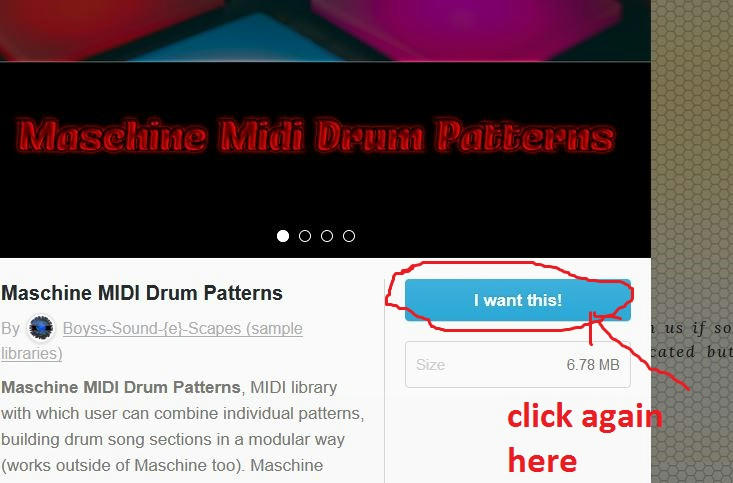
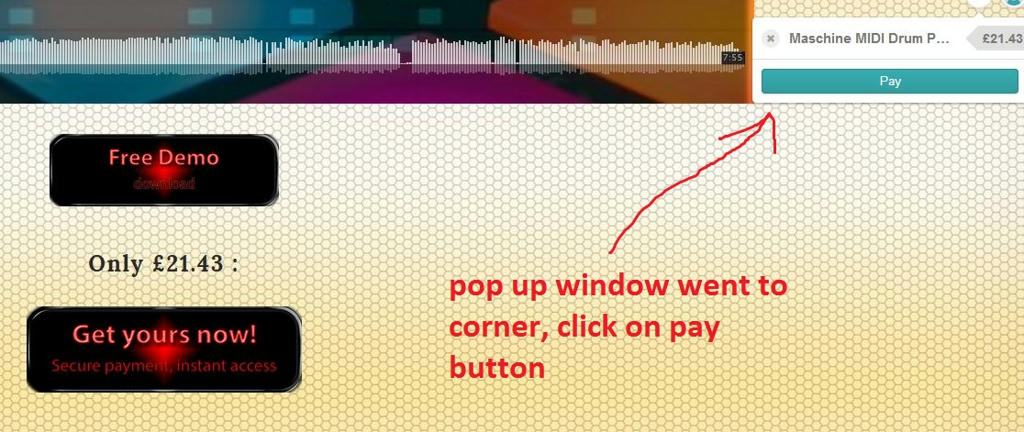
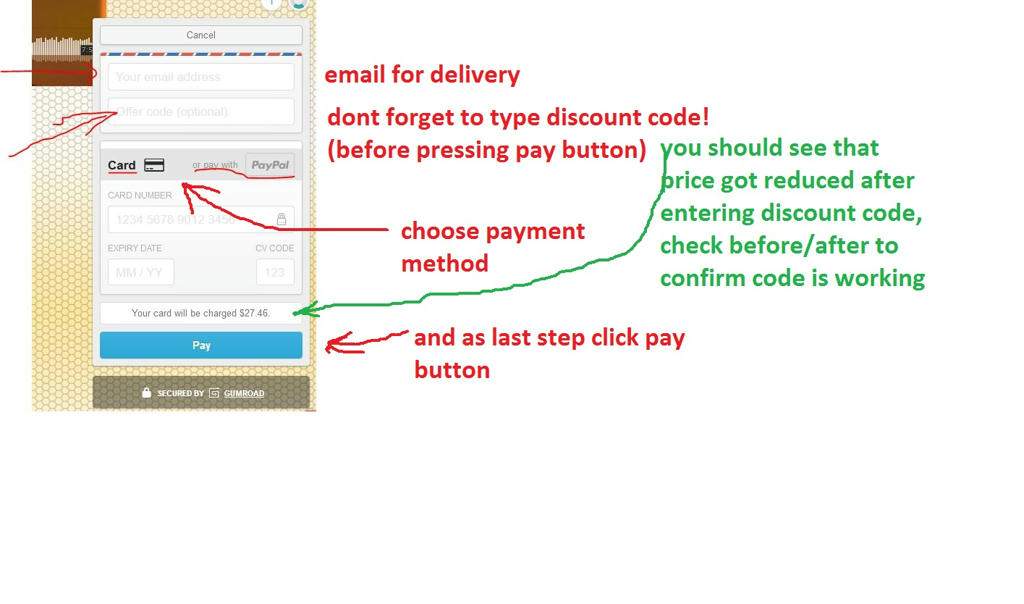
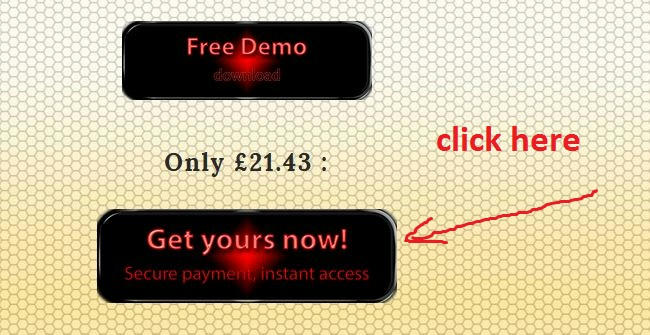
I made 4 steps picture (Maschine MDP was just example, its similar for all)
1:
Image
2:
Image
3:
Image
4:
Image

Only disadvantage is that you buy single product at the time. If you navigate somewhere else without going trough whole process than it will be probably removed from the cart. There is a way achieve that, by going to this gumroad store link:
https://gumroad.com/boyss_sound_e_scapes/ But I guess going 1 by 1 isnt that much of an issue.
Last edited by bojanboyss on Fri Apr 21, 2017 6:20 pm, edited 2 times in total.

Post

OK well I can't see the images, but it seems odd to me that there's a line to add a coupon, which i did, but then no update button, no way I can see to apply the coupon.

Please tell gumroad to update their interface. I'm no computer dummy but even if I was they should make this stuff foolproof.

I've just pulled four 12-hour overnight shifts in a row so I might be a bit tired and thick and missing the obvious here.

Post

Pictures were showing up last nigh :neutral: I updated image links, now they should show appear. Just in case I´ll make web page with them and post here latter.

You´ll see (green text and arrow) small field that shows price just above bottom blue pay button. Look whats showing (what price), then type or paste code and it should update immediately without clicking any "apply". You can remove code and apply again to test if you forget (just dont click "pay button" until you are sure).
You can apply code for any product (its the same code) but once per product.

Regarding account creation (optional): You can go to https://gumroad.com/ and try to create account at any time. Even if you have stuff from other creators and you created account just now it will show in your "library". Just use same email address.
For example when I log in to Gumroad I can choose "switch to buying" from drop down menu on the right and it will show me all products I have in my library that I got from Gumroad. Even if you just downloaded our free stuff they should be there (probably for the need of re-download).

Post

OK, now that I've had a sleep I see what was happening. The price I saw was in GB pounds, around £8 something. When I check out its in US dollars (about $12), so with the code applied it was $8 something. So I just saw the '8' and though it was still £8 if you see what I mean. :D

Post

Edited post with images above, added page to website with detailed explanation:
http://www.boyss-sound-e-scapes.com/store-help.html

Yeah, I know what you mean, I experienced the same when I was testing codes for the first time. Then I noticed it applies live update, as soon as typed. There wouldn't be confusion if they made price field bigger, its not noticeable at first. Unfortunately I have no control over that.
Thanks for your purchase, I hope you´ll find it useful

Post Reply

Return to “Soundware”