The "lofi VHS" Melt panel taken from the brilliant Phonec synth and beefed up into a proper multi-effect modulation unit:
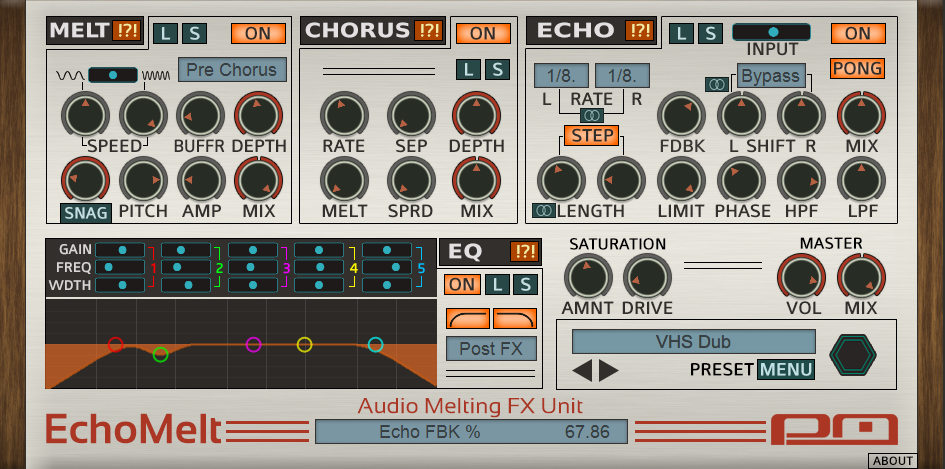
http://www.psychicmodulation.com/echomelt.html
Now updated to V2!
jack [psychicmodulation] wrote:For the record, here is the info about the latest update:
--------------------------------------------------------------------
EchoMelt has received an important update that fixes an issue with a VST ID conflict. Basically the EchoMelt and Phonec VST versions have the same unique ID, which may cause potential issues in some hosts. Most hosts won't even notice this conflict, but to be safe we are going to fix this. And if you're wondering why we're jumping to v2.0 so soon, it's because in order to correct the ID conflict properly, EchoMelt must have a new filename, otherwise any previous projects using EchoMelt will not load the plugin properly. So the remedy is to release this update as EchoMelt2.
Because we are jumping to v2 so soon, we've decided to implement a few new features as well. These are as follows:
Randomize switches for each effect section
Each effect can be randomized separately
Single/Dual switches for Echo controls
For Echo: Rate, Length and Shift. Clicking these will constrain the dual controls to one control. When in single mode, it will follow the Left control. So for example, if L Rate is 1/4 and R Rate is 1/8, switching to single mode will be 1/4. This can be fun to switch back and forth, because you can hear the result in the delay path, creating interesting effects.
Echo Input Control
This is the Input level going into the Echo. It works like a 'send' control for the delay. This can be very useful for dub echo effects. If set at 0, no signal is sent into the delay. Set to max is full signal into delay. So essentially, this can be used for sending in bits and fragments of the signal for momentary delays that will continue to feedback even after the Input is lowered. Try this on a drum loop, turning the Input up and down for only certain drum hits. Even more fun is to use this while tweaking the Length controls for some truly dubbed out sounds.
Load/Save MIDI CC Map
This new option is located in the main preset 'Menu'. It allows you to save your MIDI CC maps as a separate file. Normally, all MIDI learn settings are saved with the Bank. With this feature, you can save those settings to load up into other banks. Or you can have different sets of MIDI assignments ready to load up for different controllers if needed. We have also added an option to change the MIDI channel, found on the 'about' panel.
Chorus Melt speed can now be controlled via Melt Speed 1
Use the first speed control on the main Melt panel to control the rate of the Chorus's own Melt.
*If you are a registered EchoMelt user, you will receive an email with information about how to access your free update. If you do not receive this email, contact me and we'll get it sorted out.