

I'm recording a 5 hr net-radio show each week.
It saves each song with titles to a folder.
I have folder set to order files by (content created)
Now I'd like to be able to number them in this order.
This is not a function within the explorer, unless I'm missing it.
Can anyone help me with this?
Thanks.
Barry.
Help:Want to batch number files within a Win7 folder
-

- KVRAF
- 6179 posts since 29 Mar, 2003 from Location: Location
....................Don`t blame me for 'The Roots', I just live here. 

-
- KVRer
- 14 posts since 25 Jul, 2010 from Paris
I use ‘Advanced Renamer’ for this (Windows), free and very flexible...
Lucas
Lucas
-
- KVRAF
- Topic Starter
- 6179 posts since 29 Mar, 2003 from Location: Location
Hi Lucas,Lucas-Paris wrote:I use ‘Advanced Renamer’ for this (Windows), free and very flexible...
Lucas
I see this: "Renumbering Method" (You cannot use this method to add new numbers, for that use the New Name or Add method)
- "New Name"(Use the New Name Method when you want to completely alter the filenames. )
- "Add" (If your filename is missing some words or letters, use this method to add some extra to your filename at a given position.)
I'm not seeing it, can you assist me?
....................Don`t blame me for 'The Roots', I just live here.
-
- KVRAF
- Topic Starter
- 6179 posts since 29 Mar, 2003 from Location: Location
I tried it. Didn't work.
- Add Method =Add
- checked "use regular expressions"
Hit "Start Batch/Start Renaming".
Imported files in list disappear. No change to original files.
- Add All Successful Items = shows files again with no added numbers.
Does anyone know how to batch number files in a win 7 folder!?
Never mind, I figured it out for myself.
had to write - <Inc Nr:1>
Thanks for all your help...not.
- Add Method =Add
- checked "use regular expressions"
Hit "Start Batch/Start Renaming".
Imported files in list disappear. No change to original files.
- Add All Successful Items = shows files again with no added numbers.
Does anyone know how to batch number files in a win 7 folder!?
Never mind, I figured it out for myself.
had to write - <Inc Nr:1>
Thanks for all your help...not.
Last edited by annode on Sun Oct 29, 2017 5:47 pm, edited 1 time in total.
....................Don`t blame me for 'The Roots', I just live here.
-

- KVRAF
- 2065 posts since 3 May, 2014
http://www.bulkrenameutility.co.uk/Features.php
Works on 10,should be the same for 7,below is a template for numbering

Works on 10,should be the same for 7,below is a template for numbering
Last edited by ere2learn on Sun Oct 29, 2017 5:51 pm, edited 2 times in total.
-
- KVRAF
- 2807 posts since 8 Sep, 2009
Try "Total Commander". I'm not 100% sure but I think it does batch operations with the 'free' version.
http://www.ghisler.com
Edit: screenshot
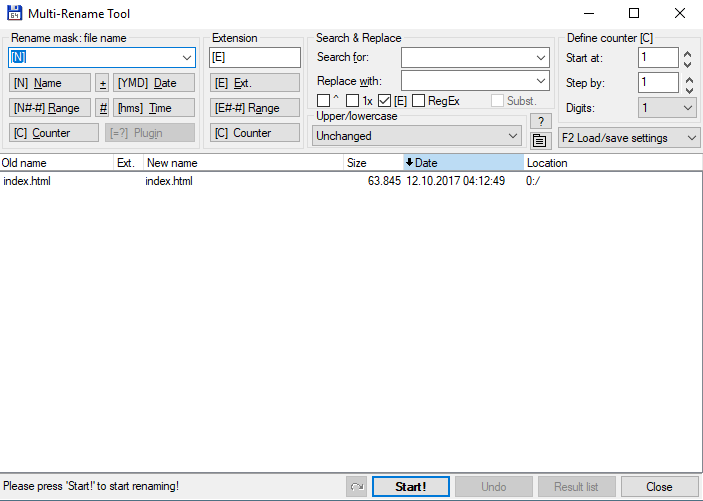
http://www.ghisler.com
Edit: screenshot
-
- KVRAF
- Topic Starter
- 6179 posts since 29 Mar, 2003 from Location: Location
Finally figured it out.
Thanks for your other options.
Thanks for your other options.
....................Don`t blame me for 'The Roots', I just live here.