


Hey Attila,
I have done that and checked that it is the DB dir where the other files already are (dont remember exact path), but now I am at work so I just wanted to show the result of the unpack process cause I was not sure if they were right.
Only thing I can imagine that there might be more then one "DB" dir from RC on my pc, maybe from different installations ?
Chord Progressions categorized (acording to Music Theories/Ambiance/etc)
-

- KVRAF
- 1782 posts since 10 Mar, 2004
yay! 
what i did...
-updated the 7-zip (to v16.04)
-created a folder "jeanpaulruche" extracted all content of the DB rar in to this folder
and moved this folder to my "C:\Users\me\Documents\RapidComposerV3\DB"
Thank you Attila!

what i did...
-updated the 7-zip (to v16.04)
-created a folder "jeanpaulruche" extracted all content of the DB rar in to this folder
and moved this folder to my "C:\Users\me\Documents\RapidComposerV3\DB"
Thank you Attila!
-
- KVRAF
- 1782 posts since 10 Mar, 2004
Hi tatanka,tatanka wrote:Hey Attila,
I have done that and checked that it is the DB dir where the other files already are (dont remember exact path), but now I am at work so I just wanted to show the result of the unpack process cause I was not sure if they were right.
Only thing I can imagine that there might be more then one "DB" dir from RC on my pc, maybe from different installations ?
RC switched to "Documents" folder for long time..
but ... just in case:
did you tried via putting them to the old location?
"C:\Users\you\AppData\Roaming\RapidComposerV3\DB" ?
-
- KVRAF
- 1660 posts since 13 Jan, 2014
Hi Attila,
will check that when I am back at home from work, now that it worked for yellukhan even with a new generated dir it is the only idea I have that I copied to an old dir maybe. Will give feedback after I checked.
will check that when I am back at home from work, now that it worked for yellukhan even with a new generated dir it is the only idea I have that I copied to an old dir maybe. Will give feedback after I checked.
-
- KVRAF
- 1782 posts since 10 Mar, 2004
Hi jeanpaulruche,
testing progressions right now!
let me say Wow!!
Thank you so much for this generous sharing !
EDIT:
and i have a tough (at least to me) question for everyone
what would you suggest for defining the Scales for this type of progressions?
so we can also use Melody Generator (& other generators that produces scale notes) with them.
EDIT2:
as an answer to my question..
only way i found is open Scale inspector and change the scale root till you find "less" red chords
testing progressions right now!
let me say Wow!!
Thank you so much for this generous sharing !
EDIT:
and i have a tough (at least to me) question for everyone
what would you suggest for defining the Scales for this type of progressions?
so we can also use Melody Generator (& other generators that produces scale notes) with them.
EDIT2:
as an answer to my question..
only way i found is open Scale inspector and change the scale root till you find "less" red chords
-
 musicdevelopments musicdevelopments https://www.kvraudio.com/forum/memberlist.php?mode=viewprofile&u=223336
 - KVRAF
- 6010 posts since 9 Jan, 2010
Yes, please make sure you move the files to your C:\Users\Richard\Documents\RapidComposerV3\DB folder.tatanka wrote:Hi Attila,
will check that when I am back at home from work, now that it worked for yellukhan even with a new generated dir it is the only idea I have that I copied to an old dir maybe. Will give feedback after I checked.
The AppData folder is not used anymore.
You can put all files into a JeanPaulRuche folder as yellukhan did.
https://www.musicdevelopments.com
Home of RapidComposer, Melodya, MIDI Mutator and Syne
Summer Sale • June 3-15 • 40% off RapidComposer, Melodya, MIDI Mutator, Syne
Home of RapidComposer, Melodya, MIDI Mutator and Syne
Summer Sale • June 3-15 • 40% off RapidComposer, Melodya, MIDI Mutator, Syne
-
musicdevelopments musicdevelopments https://www.kvraudio.com/forum/memberlist.php?mode=viewprofile&u=223336
- KVRAF
- 6010 posts since 9 Jan, 2010
Now I see a scale finder is missing! I'll implement a "Suggest Scale" menu in the inspector. It already works when importing MIDI, I think most of the scale suggestions are good (based on used notes in the tracks).
https://www.musicdevelopments.com
Home of RapidComposer, Melodya, MIDI Mutator and Syne
Summer Sale • June 3-15 • 40% off RapidComposer, Melodya, MIDI Mutator, Syne
Home of RapidComposer, Melodya, MIDI Mutator and Syne
Summer Sale • June 3-15 • 40% off RapidComposer, Melodya, MIDI Mutator, Syne
-
- KVRAF
- 2152 posts since 15 May, 2017
Really need to ditch .rar.. no need for it.. it's obsolete linux era anayways
-
- KVRAF
- 1660 posts since 13 Jan, 2014
No I tried:did you tried via putting them to the old location?
"C:\Users\you\AppData\Roaming\RapidComposerV3\DB" ?
which was wrong too, sighh, just to many RC folders used over the time....C:\Program Files\RapidComposer V3 (x64)\Data\DB
but now with the right one it worked
-
- KVRAF
- 2152 posts since 15 May, 2017
I may have a missing post.. (I posted on this already) it is just my opinion.. but, .rar is very old linux based. Really, no need for it. It is why all the problems .. Windows already supports .zip... .rar is antiquated ..I support not using .rar. please stop.
-
musicdevelopments musicdevelopments https://www.kvraudio.com/forum/memberlist.php?mode=viewprofile&u=223336
- KVRAF
- 6010 posts since 9 Jan, 2010
Sorry for the confusion, reallytatanka wrote:No I tried:which was wrong too, sighh, just to many RC folders used over the time...C:\Program Files\RapidComposer V3 (x64)\Data\DB
 For a long-time user it may not be easy to follow the changes.
This folder was used by the installer, but not anymore. Now the installer directly copies files to your user Documents folder. You can delete the Data folder from RapidComposer V3 (x64)...
Thanks,
Attila
https://www.musicdevelopments.com
Home of RapidComposer, Melodya, MIDI Mutator and Syne
Summer Sale • June 3-15 • 40% off RapidComposer, Melodya, MIDI Mutator, Syne
Home of RapidComposer, Melodya, MIDI Mutator and Syne
Summer Sale • June 3-15 • 40% off RapidComposer, Melodya, MIDI Mutator, Syne
-

- KVRAF
- 1722 posts since 21 Sep, 2007 from USA
I don't believe RAR is a linux-based format: https://en.wikipedia.org/wiki/RAR_(file_format)BluGenes wrote:I may have a missing post.. (I posted on this already) it is just my opinion.. but, .rar is very old linux based. Really, no need for it. It is why all the problems .. Windows already supports .zip... .rar is antiquated ..I support not using .rar. please stop.
Perhaps, you are thinking of the TAR format? https://en.wikipedia.org/wiki/Tar_(computing)
I actually prefer WinRAR over over WinZIP.
[Core i7 8700 | 32GB DDR4 | Win11 x64 | Studio One 7 Pro | WASAPI ]
-
- KVRAF
- 1722 posts since 21 Sep, 2007 from USA
Sounds good!musicdevelopments wrote:Now I see a scale finder is missing! I'll implement a "Suggest Scale" menu in the inspector. It already works when importing MIDI, I think most of the scale suggestions are good (based on used notes in the tracks).
Plugin Boutique has a new Chord Progression utility plug-in called Scaler that has a scale detection feature:
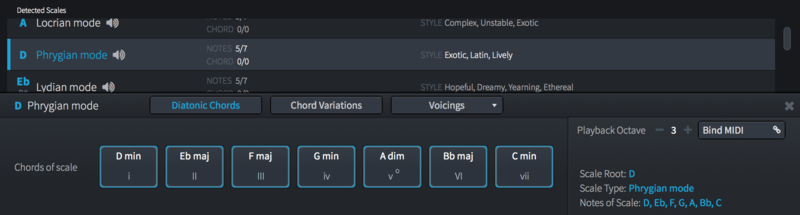
[Core i7 8700 | 32GB DDR4 | Win11 x64 | Studio One 7 Pro | WASAPI ]
-
musicdevelopments musicdevelopments https://www.kvraudio.com/forum/memberlist.php?mode=viewprofile&u=223336
- KVRAF
- 6010 posts since 9 Jan, 2010
I see, Tony. Oh, I can't see RC in your signature... 
https://www.musicdevelopments.com
Home of RapidComposer, Melodya, MIDI Mutator and Syne
Summer Sale • June 3-15 • 40% off RapidComposer, Melodya, MIDI Mutator, Syne
Home of RapidComposer, Melodya, MIDI Mutator and Syne
Summer Sale • June 3-15 • 40% off RapidComposer, Melodya, MIDI Mutator, Syne
-
- KVRAF
- 1722 posts since 21 Sep, 2007 from USA
Indeed. I should add RC to my signaturemusicdevelopments wrote:I see, Tony. Oh, I can't see RC in your signature...
(and possibly remove Sonar Platinum  ).
). I think of RapidComposer as a rapid prototyping tool for music composition. Since RC also supports the recording, editing, and playback of multi-track MIDI, could it also be classified as a MIDI sequencer?
[Core i7 8700 | 32GB DDR4 | Win11 x64 | Studio One 7 Pro | WASAPI ]