

Where is the setting for MediaBay in Cubase 9.5 so it will show files in subdirectories rather than just the selected directory?
I can't see any settings that are different from v9, but v9 works as I want.
MediaBay in Cubase 9.5: show sub folders content option?
-
- KVRist
- Topic Starter
- 486 posts since 17 Jun, 2010
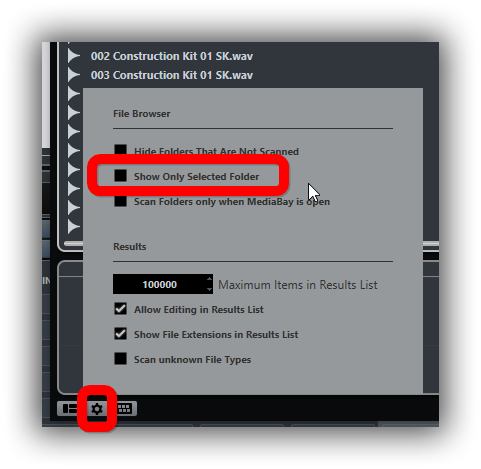
That's where it was pre v9.SJ_Digriz wrote:at the bottom of the media bay page, click the properties/settings cog.
Someone on another forum just advised me it's now a little button up the top. (Icon is a folder with lines in and below it)
Thanks anyway though.

-
- KVRist
- Topic Starter
- 486 posts since 17 Jun, 2010
That's the control for showing only the selected folder in the file browser, not for showing files including those in subfolders.
Here's the control I was looking for:

Here's the control I was looking for:
-

- KVRAF
- 6097 posts since 5 Jul, 2001 from Just about .... there
I'm pretty sure they are the same setting... when I click or unclick that setting I showed it shows all files below the current folder. I've never used the thing you are showing.barryfell wrote:That's the control for showing only the selected folder in the file browser, not for showing files including those in subfolders.
Here's the control I was looking for:
If you have to ask, you can't afford the answer
-
- KVRist
- Topic Starter
- 486 posts since 17 Jun, 2010
The one you are talking about shows/hides non-selected folders in the file browser on the left. I was talking about getting MediaBay to show sub folder content in the main panel on the right.
-
- KVRAF
- 6097 posts since 5 Jul, 2001 from Just about .... there
ah yeah, you are right .. one is files, one is folders. I just always show all and let the filters decide what shows, so never needed a difference I guess.
If you have to ask, you can't afford the answer