

okay, ive managed to get myself a bit confused here; i sussed editing the .ini file to get decently nested plugin folders... but...
1) Under the Track Editor it only appear to give me 6 plugin slots, each of which has a 'triangle' button launching a dropdown menu to choose what plugin to insert. There's the pre-defined plugin menus (Dynamics to Modulation) for the included effects, and the dropdown also lets me insert plugins from 'VST FX' and 'VSTi' nested submenus as well as a 'MAGIX plugins' nested submenu.
2) In the Track header area under 'Pan', I initially see one empty plugin slot, but I can insert more than 6 plugin slots by right-clicking and using the Track Effects menu. However, in terms of plugins I can insert, I only have the choice of the pre-defined menus, then 'essential effects' or the 'MAGIX plugins'.
I cant directly insert any of my 3rd-party VST/VSTi plugin, there's no appropriate menu. Once Ive inserted a non-VST plugin, though, I can use the 'triangle' button to access the same menu choice as in (1)
So I have two questions : Should I be able to directly insert a VST/VSTi plugin via the Track Header menu, rather than have to insert something else and then replace it with a VST/VSTi? And, if Ive inserted more than 6 plugins on a Track, meaning there are more than 6 plugin -slots- should I be able to see more than just the first 6 slots in the Track Editor?
edit : okay, so it looks like the Mixer view behaves like the Track Editor, except in this case you can either see the first 4 slots or the first 10 slots.
Also, Ive reaslised that for some reason, on any given track, I can only insert one single instance of any given 'non-VST' plugin? (ie the ones on the predefined category menu)
Samplitude Pro X3 Suite sale $149.00 until Dec 20th
-

- Beware the Quoth
- 35432 posts since 4 Sep, 2001 from R'lyeh Oceanic Amusement Park and Funfair
An idiot on Set Theory:
"In some cases there is an object called red that contains everything that is red. In much the same way a pot is a plate."
"In some cases there is an object called red that contains everything that is red. In much the same way a pot is a plate."
-
- KVRian
- 969 posts since 5 Sep, 2014 from Heaven
Could someone please confirm that this deal - Samplitude Pro X3 Suite - includes the Magix Vandal plugin? I understand that it will probably be locked to use within Samplitude, which is fine but I just want to know if Vandal is included in full and not some reduced version...or if there is some other catch. Thanks
 M O N O S Y N T H S F O R E V E R
 -

- KVRAF
- 2765 posts since 15 Feb, 2017 from a worn out vinyl groove
I can confirm that you are correct on both counts... full version included but locked to SamP.spunkmuffin wrote:Could someone please confirm that this deal - Samplitude Pro X3 Suite - includes the Magix Vandal plugin? I understand that it will probably be locked to use within Samplitude, which is fine but I just want to know if Vandal is included in full and not some reduced version...or if there is some other catch. Thanks
-

- Rad Grandad
- 38041 posts since 6 Sep, 2003 from Downeast Maine
ok in EE is a new thread about all daws sounding the same, I moved the posts here to there...please keep all posts pertaining to that topic there...also note before I could move the posts someone said in before the lock which is why I asked not to go down this street. NO MORE POSTS ON THE SUBJECT WILL BE MOVED, THEY WILL BE DELETED
The highest form of knowledge is empathy, for it requires us to suspend our egos and live in another's world. It requires profound, purpose‐larger‐than‐the‐self kind of understanding.
-

- KVRist
- 60 posts since 9 Apr, 2017 from São Paulo, Brazil
Only 1 day!!!
-
 Robert Randolph Robert Randolph https://www.kvraudio.com/forum/memberlist.php?mode=viewprofile&u=7328
 - KVRAF
- 2226 posts since 25 May, 2003 from Saint Petersburg, Florida
Hasn't it already been "Only 1 day" a few times now?Johnny Blade wrote:Only 1 day!!!
-
- KVRist
- 60 posts since 9 Apr, 2017 from São Paulo, Brazil
Only some hours !!!
-
- Beware the Quoth
- 35432 posts since 4 Sep, 2001 from R'lyeh Oceanic Amusement Park and Funfair
Anyone?whyterabbyt wrote:So I have two questions : Should I be able to directly insert a VST/VSTi plugin via the Track Header menu, rather than have to insert something else and then replace it with a VST/VSTi? And, if Ive inserted more than 6 plugins on a Track, meaning there are more than 6 plugin -slots- should I be able to see more than just the first 6 slots in the Track Editor?
An idiot on Set Theory:
"In some cases there is an object called red that contains everything that is red. In much the same way a pot is a plate."
"In some cases there is an object called red that contains everything that is red. In much the same way a pot is a plate."
-

- KVRian
- Topic Starter
- 1028 posts since 11 Jun, 2004 from London
The default Camo skin is limited to 6 slots in the Track Editor although you can keep adding plug-ins beyond the 6 limit. If you right click on the small rectangle to the right of where it says "plug-ins" you will see a plug-in manager which gives you access to 7th plug-in and beyond. This also allows you to position VST effects post or pre-fade.whyterabbyt wrote:Anyone?whyterabbyt wrote:So I have two questions : Should I be able to directly insert a VST/VSTi plugin via the Track Header menu, rather than have to insert something else and then replace it with a VST/VSTi? And, if Ive inserted more than 6 plugins on a Track, meaning there are more than 6 plugin -slots- should I be able to see more than just the first 6 slots in the Track Editor?
however if you choose the Camo skin short it gives you 8 slots same as the Camo Slim. You can switch skins by pressing Y and the Design>Skins.
Camo Short and Camo Slim.


The track header lets you view unlimited plugins.
Standard Camo Skin

Hope that makes sense I just woke up so not quite with it.
Regards, Kraznet
Asus Z97-A| i7 4770K|32GB DDR3|Samsung 850 Pro 512 SSD System|Crucial 960gb SSD A/V|Crucial 960 SSD Samples|GTX 960 2GB|RME Raydat|Windows 10 x64, Philips 40" 4K
My Samplitude/Sequoia Tutorials are here :
http://www.youtube.com/kraznet
My Samplitude/Sequoia Tutorials are here :
http://www.youtube.com/kraznet
-
- Beware the Quoth
- 35432 posts since 4 Sep, 2001 from R'lyeh Oceanic Amusement Park and Funfair
Yeah, that concurs with what I was seeing. Would you be able to confirm whether or not I should be able to insert VST/VSTi plugins on the Track Header?
Basically Im trying to reconcile the fact that it seems that I can
1) only directly add VST/VSTi plugins where I have a limited number of visible slots
2) can only see an unlimited number of slots on the Track Header (or the Plugin Manager) but I cannot directly add VST/VSTi in the Track Header (or add anything via the Plugin Manager)
(3)can only add one instance each of any given non-VST/VSTi plugin to a track
which adds up to a somewhat awkward combination of restrictions...
Cheers for your time.
Basically Im trying to reconcile the fact that it seems that I can
1) only directly add VST/VSTi plugins where I have a limited number of visible slots
2) can only see an unlimited number of slots on the Track Header (or the Plugin Manager) but I cannot directly add VST/VSTi in the Track Header (or add anything via the Plugin Manager)
(3)can only add one instance each of any given non-VST/VSTi plugin to a track
which adds up to a somewhat awkward combination of restrictions...
Cheers for your time.
An idiot on Set Theory:
"In some cases there is an object called red that contains everything that is red. In much the same way a pot is a plate."
"In some cases there is an object called red that contains everything that is red. In much the same way a pot is a plate."
-
- KVRian
- Topic Starter
- 1028 posts since 11 Jun, 2004 from London
Samplitude only allows one VSTi per track so no stacking of virtual instruments. Although it's something I've been lobbying MAGIX to implement for ages.
Hopefully this graphic and the gif will explain what does what.
Difference between track header and track editor:

Virtual instruments can also be added from the midi out slot:
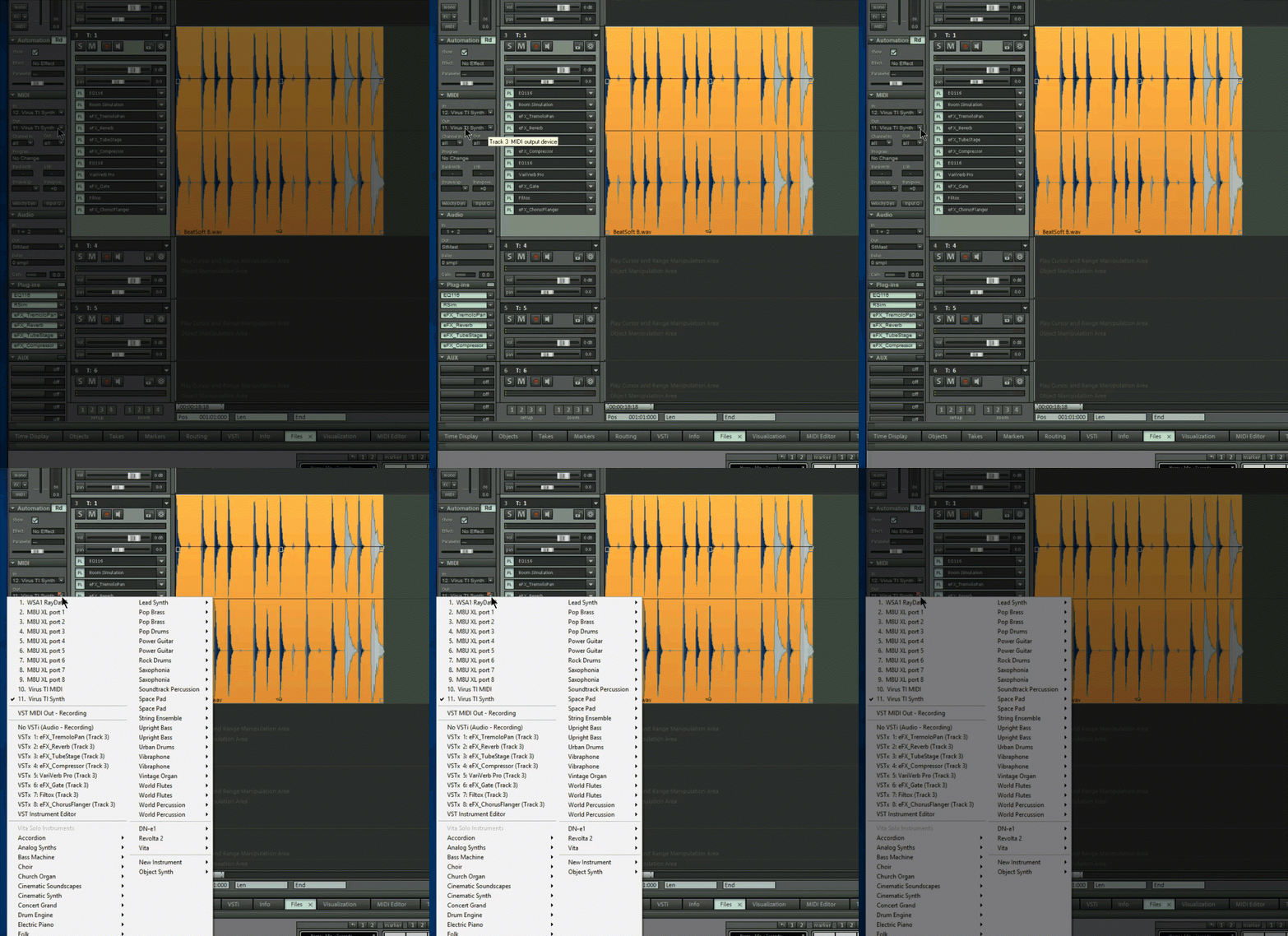
Although I just noticed if you aad a VSTi to the track header slot it will suddenly appear in the track editor slot as well. Haven't quite worked out the logic of that yet.
Hopefully this graphic and the gif will explain what does what.
Difference between track header and track editor:
Virtual instruments can also be added from the midi out slot:
Although I just noticed if you aad a VSTi to the track header slot it will suddenly appear in the track editor slot as well. Haven't quite worked out the logic of that yet.
Asus Z97-A| i7 4770K|32GB DDR3|Samsung 850 Pro 512 SSD System|Crucial 960gb SSD A/V|Crucial 960 SSD Samples|GTX 960 2GB|RME Raydat|Windows 10 x64, Philips 40" 4K
My Samplitude/Sequoia Tutorials are here :
http://www.youtube.com/kraznet
My Samplitude/Sequoia Tutorials are here :
http://www.youtube.com/kraznet
-
- Beware the Quoth
- 35432 posts since 4 Sep, 2001 from R'lyeh Oceanic Amusement Park and Funfair
Yeah, I think I noticed that limit on VSTi.
Im more concerned about effects plugins though; where your screengrab shows 'Add VST/VSTi plugins here' on the Track Header, Im just not seeing any capability of directly inserting 3rd party VST plugins at all; only the ones that come with Samplitude. If I want to add a 3rd-party VST plugin, I have to insert something else directly, then change the plugin on that slot from the Track Editor. Except the Track Editor doesnt show all the slots, only the first 6.
Do you see what Im getting at?
edit : Whoah, Samplitude has just finished yet another rescan of my plugins and now it finally is showing VST plugins on the Track Header slot dropdown menu. That's the first time its done that since I installed Samplitude despite nearly a dozen rescans in the interim (I tried multiple times before I made the first post asking) So that answers my original main question about whether I should have been able to see them there in the first place, though now I have no idea why I could only see them on the other menu in the Track Editor menu dropdown. Very weird.
Im more concerned about effects plugins though; where your screengrab shows 'Add VST/VSTi plugins here' on the Track Header, Im just not seeing any capability of directly inserting 3rd party VST plugins at all; only the ones that come with Samplitude. If I want to add a 3rd-party VST plugin, I have to insert something else directly, then change the plugin on that slot from the Track Editor. Except the Track Editor doesnt show all the slots, only the first 6.
Do you see what Im getting at?
edit : Whoah, Samplitude has just finished yet another rescan of my plugins and now it finally is showing VST plugins on the Track Header slot dropdown menu. That's the first time its done that since I installed Samplitude despite nearly a dozen rescans in the interim (I tried multiple times before I made the first post asking) So that answers my original main question about whether I should have been able to see them there in the first place, though now I have no idea why I could only see them on the other menu in the Track Editor menu dropdown. Very weird.
An idiot on Set Theory:
"In some cases there is an object called red that contains everything that is red. In much the same way a pot is a plate."
"In some cases there is an object called red that contains everything that is red. In much the same way a pot is a plate."
-
- KVRAF
- 3496 posts since 30 Dec, 2014
Criky...that's one over complicated gui for a daw 
KVR S1-Thread | The Intrancersonic-Design Source > Program Resource | Studio One Resource | Music Gallery | 2D / 3D Sci-fi Art | GUI Projects | Animations | Photography | Film Docs | 80's Cartoons | Games | Music Hardware |
-
- KVRist
- 60 posts since 9 Apr, 2017 from São Paulo, Brazil
"Deep", I would say.
-
- KVRian
- Topic Starter
- 1028 posts since 11 Jun, 2004 from London
I wouldn't say it's particularly complicated. The track editor can be hidden so can the track header section so you have a choice of one or the other, both or non.THE INTRANCER wrote:Criky...that's one over complicated gui for a daw
Asus Z97-A| i7 4770K|32GB DDR3|Samsung 850 Pro 512 SSD System|Crucial 960gb SSD A/V|Crucial 960 SSD Samples|GTX 960 2GB|RME Raydat|Windows 10 x64, Philips 40" 4K
My Samplitude/Sequoia Tutorials are here :
http://www.youtube.com/kraznet
My Samplitude/Sequoia Tutorials are here :
http://www.youtube.com/kraznet