


Yes good idea, Articulation Wizard !
I got hold of that IK MPII, and had a look, big job !! if I was not doing other things at the moment I would get into it, it is very slack that IK did not have a text list for it.
v3 Beta Feedback And Discussion (Bugs, Features, Suggestions)
-
crossovercable crossovercable https://www.kvraudio.com/forum/memberlist.php?mode=viewprofile&u=329708
- KVRian
- 576 posts since 26 May, 2014
-
crossovercable crossovercable https://www.kvraudio.com/forum/memberlist.php?mode=viewprofile&u=329708
- KVRian
- 576 posts since 26 May, 2014
At the moment I can't have controllers in a phrase, so I'm just using RC to import the phrase with pitch bends, convert to relative form with articulations, transpose the phrase to the key/chord I need, then drag into Reaper.
The only problem is the keyswitches are now only a micro sec long.
If you could make them longer on Export would be good.
If we had the Note Lock (No Transpose) I could just highlight all the switches and Set to "Lock" before I convert to Relative form with articulations so the notes can transpose to another Chord/Key and the switches stay locked on their on note in absolute. Then when I drag them into the Reaper chord track they will play correct and they will be big enough to edit sill.

The only problem is the keyswitches are now only a micro sec long.
If you could make them longer on Export would be good.
If we had the Note Lock (No Transpose) I could just highlight all the switches and Set to "Lock" before I convert to Relative form with articulations so the notes can transpose to another Chord/Key and the switches stay locked on their on note in absolute. Then when I drag them into the Reaper chord track they will play correct and they will be big enough to edit sill.
-
 musicdevelopments musicdevelopments https://www.kvraudio.com/forum/memberlist.php?mode=viewprofile&u=223336
 - KVRAF
- Topic Starter
- 6014 posts since 9 Jan, 2010
Hi crossovercable,
I will implement 'Note Lock' and increase the length of the key-switch note in early January.
Thanks,
Attila
I will implement 'Note Lock' and increase the length of the key-switch note in early January.
Thanks,
Attila
-
crossovercable crossovercable https://www.kvraudio.com/forum/memberlist.php?mode=viewprofile&u=329708
- KVRian
- 576 posts since 26 May, 2014
Thanks, again and again and again.......
-
musicdevelopments musicdevelopments https://www.kvraudio.com/forum/memberlist.php?mode=viewprofile&u=223336
- KVRAF
- Topic Starter
- 6014 posts since 9 Jan, 2010
Merry Christmas, lulukom, and everyone!
-

- KVRAF
- 1782 posts since 10 Mar, 2004
Merry Christmas & Happy new year & Happy Holidays! 
-
- KVRAF
- 2154 posts since 15 May, 2017
Merry Christmas everyone!
And Attila, once you resume work, I found a mute bug.. it doesn't work if you drop midi onto a track from a vst. Meaning, I had EZ drummer loaded as a vst in RC standalone, dragged midi from that to RC, but, it won't mute. In fact, it will cause the midi to drop down a bit, click again, it returns to correct spot. Gave interesting drum pattern result.. lol
And Attila, once you resume work, I found a mute bug.. it doesn't work if you drop midi onto a track from a vst. Meaning, I had EZ drummer loaded as a vst in RC standalone, dragged midi from that to RC, but, it won't mute. In fact, it will cause the midi to drop down a bit, click again, it returns to correct spot. Gave interesting drum pattern result.. lol
-
- KVRAF
- 2154 posts since 15 May, 2017
crossovercable wrote:Yes good idea, Articulation Wizard !
I got hold of that IK MPII, and had a look, big job !! if I was not doing other things at the moment I would get into it, it is very slack that IK did not have a text list for it.
Yea, the tedious part was actually testing each articulation.. but, it was fun and well worth it.. don't know how many times I typed Potato instead of Portato.. lol
-
- KVRAF
- 1782 posts since 10 Mar, 2004
Hi there,
a thinking out loud moment..
Replace master track chords according to pre defined alternative chords (in Scale)
how to define alternatives:
for example in C Major Scale
Chord1: C Maj
alternatives would:
(C) 5, sus2, sus4, add4, maj7, maj7sus2, maj7sus4, add9
Chord2: D Min
alternatives:
(Dm) 5, sus2, sus4, madd4, 7sus2, 7sus4, madd9
..
Chord7: B dim
(B dim) m7b5, m7#5...etc.
let the user define own alternatives for all 7 chords in scale (Major - Minor)
and use this definitions when randomizing/alternating master track chords.
and finally (optionally maybe)
obey the Master track scale and do not alternate out of scale/borrowed chords.
what do you think?
Nothing urgent!
a thinking out loud moment..
Replace master track chords according to pre defined alternative chords (in Scale)
how to define alternatives:
for example in C Major Scale
Chord1: C Maj
alternatives would:
(C) 5, sus2, sus4, add4, maj7, maj7sus2, maj7sus4, add9
Chord2: D Min
alternatives:
(Dm) 5, sus2, sus4, madd4, 7sus2, 7sus4, madd9
..
Chord7: B dim
(B dim) m7b5, m7#5...etc.
let the user define own alternatives for all 7 chords in scale (Major - Minor)
and use this definitions when randomizing/alternating master track chords.
and finally (optionally maybe)
obey the Master track scale and do not alternate out of scale/borrowed chords.
what do you think?
Nothing urgent!
-
musicdevelopments musicdevelopments https://www.kvraudio.com/forum/memberlist.php?mode=viewprofile&u=223336
- KVRAF
- Topic Starter
- 6014 posts since 9 Jan, 2010
Yes, very good idea!
What I was planning for some time is the following: you will be able to assign variations to master track chords. There will be a small ribbon displayed under the chords, where you can add/drag-and-drop/draw chord variations to certain (from-to) positions. I have many ideas about these variations which can be muted of course if needed. One variation could be what you described, the Chord Replacer. I hope this sounds good.
What I was planning for some time is the following: you will be able to assign variations to master track chords. There will be a small ribbon displayed under the chords, where you can add/drag-and-drop/draw chord variations to certain (from-to) positions. I have many ideas about these variations which can be muted of course if needed. One variation could be what you described, the Chord Replacer. I hope this sounds good.

-
- KVRAF
- 1782 posts since 10 Mar, 2004
Thank you! seems even bettermusicdevelopments wrote:Yes, very good idea!
What I was planning for some time is the following: you will be able to assign variations to master track chords. There will be a small ribbon displayed under the chords, where you can add/drag-and-drop/draw chord variations to certain (from-to) positions. I have many ideas about these variations which can be muted of course if needed. One variation could be what you described, the Chord Replacer. I hope this sounds good.
-if will cover also auto random variations all or selected master track chords at once.
-if we can choose our preferred variations to use in randomize.

&
Idea Tool / Replace "Part" function ?
i imagine this would a little tricky-needs to be careful to use but i think it would also useful.
&
add Scales as like the chord markers in to the exported midi file.. would beautiful bonus

-
crossovercable crossovercable https://www.kvraudio.com/forum/memberlist.php?mode=viewprofile&u=329708
- KVRian
- 576 posts since 26 May, 2014
A Re-Channel option for Import would be good, as a lot of guitar midi uses ch11-16 for the 6 strings so you get 6 tracks but if you could select to re-channel all to one channel one track.
Also, with the Articulations to add vibrato to a note I add a keyswitch to turn it on then I need to add another keyswitch on the next note to turn it off
If you could have an option in the rcCTRL to only activate for as long as that note is played so we don't need to add an off switch.
This way we could also add pitch bends using keyswitches and add a variable to say how fast the pitch bend controller target is reached is linear=50 or linear=10 or reverse bends linear=-50 or linear=-10 or sine=15 or sine=5 or triangle=5 to give a vibrato effect with the Bend Controller relative to the tempo and note being played.
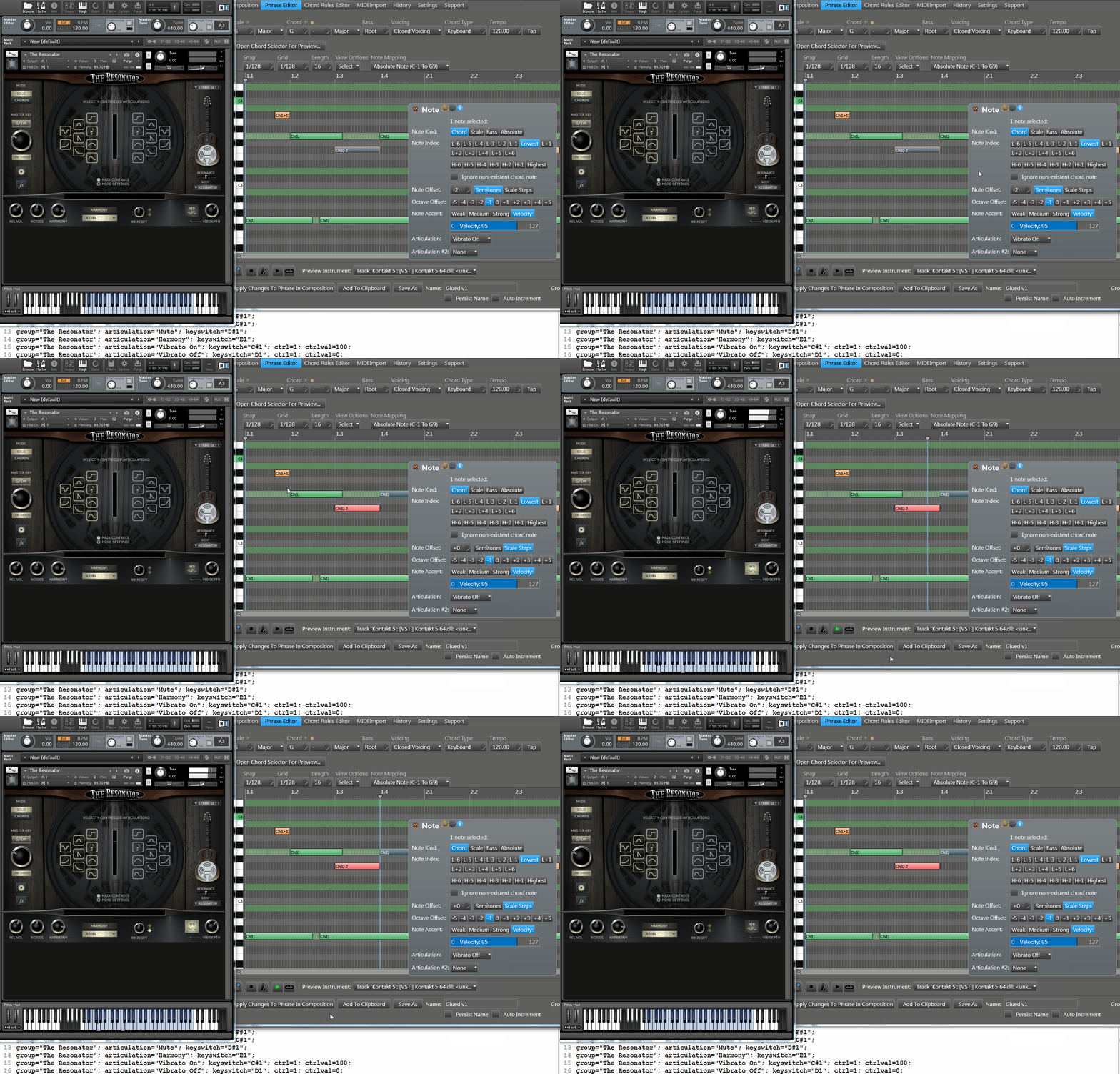
Also, with the Articulations to add vibrato to a note I add a keyswitch to turn it on then I need to add another keyswitch on the next note to turn it off
Code: Select all
group="The Resonator"; articulation="Vibrato On"; keyswitch="C#1"; ctrl=1; ctrlval=100;
group="The Resonator"; articulation="Vibrato Off"; keyswitch="D1"; ctrl=1; ctrlval=0;This way we could also add pitch bends using keyswitches and add a variable to say how fast the pitch bend controller target is reached is linear=50 or linear=10 or reverse bends linear=-50 or linear=-10 or sine=15 or sine=5 or triangle=5 to give a vibrato effect with the Bend Controller relative to the tempo and note being played.