

Good to know! Is there any chance a 32-bit version will appear for Win7?Andrew Souter wrote:JerGoertz wrote:Hopefully this wasn't answered earlier, but is a Win7 guaranteed to be available and working by the time this is officially released?
It should work already so long as you are using a 64bit host. Please try the demo to verify all is well on your specific machine etc.

2CAudio Breeze | 2.5 | Simple. Light. Pristine. Intelligently Adaptive.
-
- KVRAF
- 4317 posts since 20 Feb, 2004
A well-behaved signature.
-

- KVRAF
- Topic Starter
- 2621 posts since 12 Sep, 2008
PS 3 = PS 2.5 + Breeze 2 + Breeze Simply Better Expansionplexuss wrote:What is Perfect Storm 3? I didn't get an email about this.Andrew Souter wrote:great! sorry if we didn't see your email immediately... tons of emails at the moment as you can imagine... mostly asking how to go from PS 2.5 to 3.0, bc it seems I didn't make that clear enough in the original email...plexuss wrote:Denis helped me. He pointed me to the Applications Support folder (macOS) and I saw that the permissions were messed up. So I set them to something normal and all my 2c products authed and worked including Breeze 2. Thanks for the help!

If you have PS 2.5 all you have to do is order Breeze 2.0 using the crossgrade which makes it $50, and we will deposit the "Simply Better Expansion" in your account once it is complete in a couple weeks. Then you have PS 3.0.
-
- KVRAF
- Topic Starter
- 2621 posts since 12 Sep, 2008
Currently unknown. There are complications to that and there are other things we'd like to do first.JerGoertz wrote: Good to know! Is there any chance a 32-bit version will appear for Win7?
I know win7 is still popular, but even MS does not support it now. We don't have any win7 machines to test on internally any more. But win7 64 with 64bit hosts does work and people in this thread are using it.
-
- KVRAF
- 4317 posts since 20 Feb, 2004
Kicking and screaming I will be dragged away from my 32-bit hosts. But it's happening.Andrew Souter wrote:Currently unknown. There are complications to that and there are other things we'd like to do first.JerGoertz wrote: Good to know! Is there any chance a 32-bit version will appear for Win7?
I know win7 is still popular, but even MS does not support it now. We don't have any win7 machines to test on internally any more. But win7 64 with 64bit hosts does work and people in this thread are using it.

A well-behaved signature.
-

- KVRAF
- 6279 posts since 8 Jul, 2009
#NONFR Check out my music at Bandcamp  Free Streaming!
Free music with your support on Patreon | Youtube: Music of Plexus Videos (music videos) | Youtube: Plexus Productions (audio related) Stop whining. Make music.
Free Streaming! Free music with your support on Patreon | Youtube: Music of Plexus Videos (music videos) | Youtube: Plexus Productions (audio related) Stop whining. Make music.
-

- KVRAF
- 5641 posts since 15 Dec, 2011
I definitely don't, as I never used it. You know, I'm all for the Dark Side and stuff...Andrew Souter wrote:BTW, does anyone miss the light/white theme from Breeze 1.x?

-
- KVRian
- 1201 posts since 25 Sep, 2002
Hi does anyone have this working in Studio One (Win 10 64)?
Purchased today & have it working in Cubase 9.0 but it's showing a blank GUI for S1.
Oh, and I only briefly scanned through in Cubase but it sounded glorious!!
Purchased today & have it working in Cubase 9.0 but it's showing a blank GUI for S1.
Oh, and I only briefly scanned through in Cubase but it sounded glorious!!
-
- KVRAF
- 5201 posts since 16 Nov, 2014
Oh, i would like to have a white version. Kind of a negative version like f.e. DRC synth offers where everything which is dark/black etc. is white.
I´m normally on the dark side of things but sometimes i like light.
However, if you are ever going to update Aether and B2 i hope they get that great coloration as well.
That would be nice for Kaleidoscope too. I mean it doesn´t affect the sound but i love the hue feature.
The bad thing i spend more time to create different custom color settings than creating presets for reverb settings
I´m normally on the dark side of things
but sometimes i like light.However, if you are ever going to update Aether and B2 i hope they get that great coloration as well.
That would be nice for Kaleidoscope too. I mean it doesn´t affect the sound but i love the hue feature.
The bad thing i spend more time to create different custom color settings than creating presets for reverb settings
-
- KVRist
- 392 posts since 8 Jan, 2012
I've got it working perfectly in 64bit Studio One 3.5.4 Prof. and Windows 7 Pro, Series Pack 1.don1thedon wrote:Hi does anyone have this working in Studio One (Win 10 64)?
Purchased today & have it working in Cubase 9.0 but it's showing a blank GUI for S1.
Oh, and I only briefly scanned through in Cubase but it sounded glorious!!
-
- KVRist
- 447 posts since 17 Jun, 2003 from UK 'ish
I had it working in Studio One 3.5.4 in Windows 8.1, 64bit.
I've just updated to Windows 10, 64bit a day ago, I tried Breeze 2 in Studio One a moment ago and it works ok.
Since the GUI relys on Open GL, I would have suggested looking at something to do with your Grapics card, but seeing as it works in Cubase ok, that is probably not the direct cause.
I've tried to recreate your problem by removing Skin files and renaming dll files etc, but all it did was fail to load the whole of Breeze 2 itself and notify me of the failure - so that's also not the likely problem.
What version of Studio One are you using?
Any problems thrown up when Studio One did the initail scan of Breeze 2 VST?
Perhaps, when Andrew comes back online he'll have a better sense of what to look for. In the meantime, it might be a good idea to list some of your Computer specs to help with the diagnosis:
Intel/AMD processor type
Graphics card etc.
I've just updated to Windows 10, 64bit a day ago, I tried Breeze 2 in Studio One a moment ago and it works ok.
Since the GUI relys on Open GL, I would have suggested looking at something to do with your Grapics card, but seeing as it works in Cubase ok, that is probably not the direct cause.
I've tried to recreate your problem by removing Skin files and renaming dll files etc, but all it did was fail to load the whole of Breeze 2 itself and notify me of the failure - so that's also not the likely problem.
What version of Studio One are you using?
Any problems thrown up when Studio One did the initail scan of Breeze 2 VST?
Perhaps, when Andrew comes back online he'll have a better sense of what to look for. In the meantime, it might be a good idea to list some of your Computer specs to help with the diagnosis:
Intel/AMD processor type
Graphics card etc.
-
- KVRian
- 1201 posts since 25 Sep, 2002
Thanks for the detail Dunc. I'm on S1 3.5.4 using an i7 Acer laptop that in fairness is now ageing a little and I was half expecting it not to work due to Open GL but when it popped up in Cubase OK thought I'd check for S1 user feedback.Dunc wrote:I had it working in Studio One 3.5.4 in Windows 8.1, 64bit.
I've just updated to Windows 10, 64bit a day ago, I tried Breeze 2 in Studio One a moment ago and it works ok.
Since the GUI relys on Open GL, I would have suggested looking at something to do with your Grapics card, but seeing as it works in Cubase ok, that is probably not the direct cause.
I've tried to recreate your problem by removing Skin files and renaming dll files etc, but all it did was fail to load the whole of Breeze 2 itself and notify me of the failure - so that's also not the likely problem.
What version of Studio One are you using?
Any problems thrown up when Studio One did the initail scan of Breeze 2 VST?
Perhaps, when Andrew comes back online he'll have a better sense of what to look for. In the meantime, it might be a good idea to list some of your Computer specs to help with the diagnosis:
Intel/AMD processor type
Graphics card etc.
I do need to move to another laptop but keep putting off reinstalling everything
 , this should really help me get of that fence! Thanks again, appreciated.
Just a brief update: I've started installing onto my newer laptop and Breeze2 shows up just fine in S1 so I will assume the issue was graphics related. I'm not concerned to get it working on the older laptop now as I will start to migrate over.
-
- KVRian
- 912 posts since 2 May, 2005
just a quick note that i could finally try the 2.0.1 demo and it works and sounds fantastic now on my win7 64bit system. will upgrade once the new year's eve festivities are over, wishing you all all the best for 2018.
cheers
cheers
-
- KVRAF
- Topic Starter
- 2621 posts since 12 Sep, 2008
Thanks for all the compliments guys! 
I've spent the last week working on all the new presets, and have some really great stuff to share shortly.
Meanwhile, regarding the LightMode GUI theme, it will look something like this:
http://www.2caudio.com/sitecontent/prod ... MockUp.png
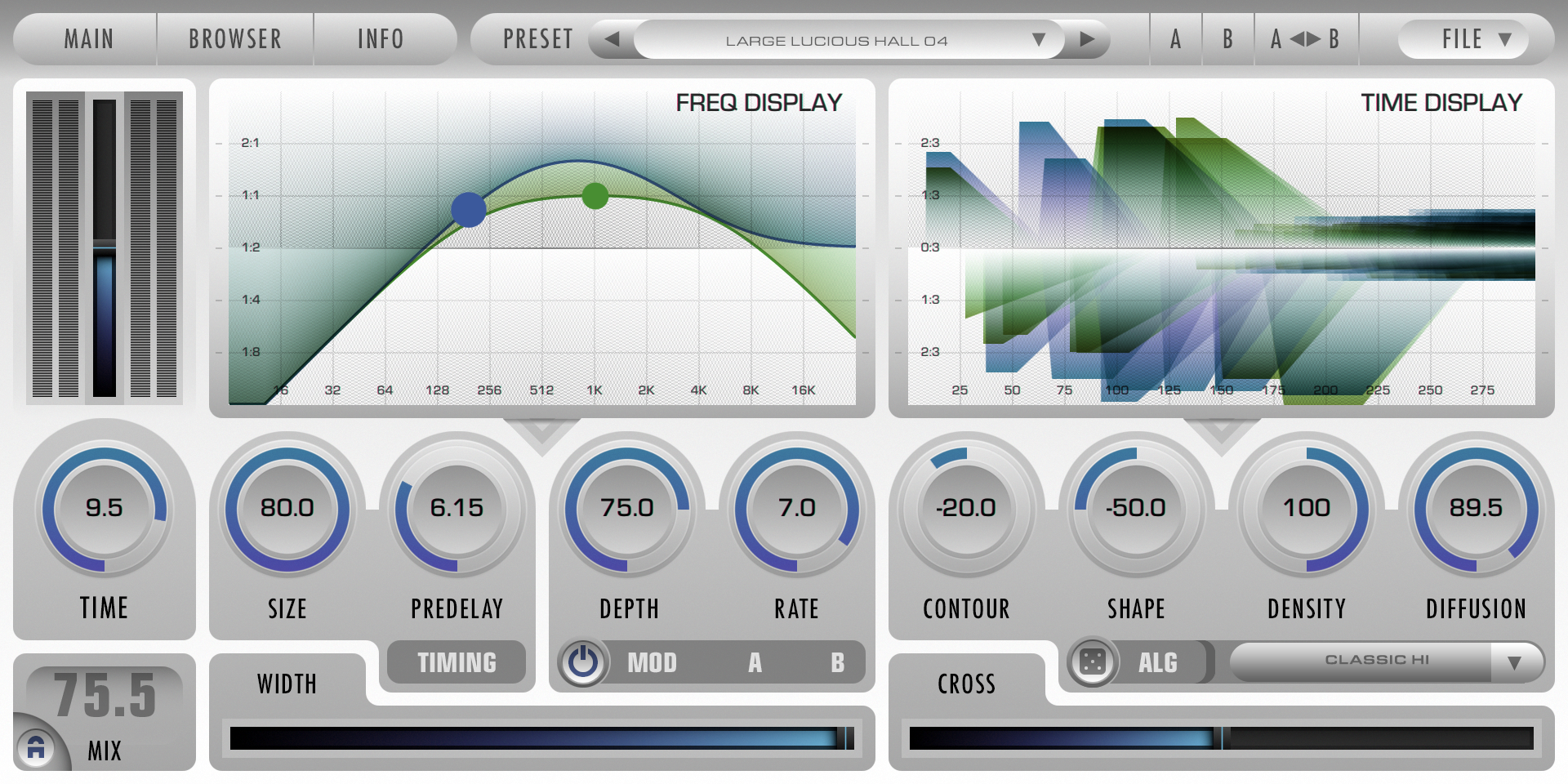
(of course the color can be customized by user pref, as well)
... still testing a few other things on this. It might be cool to have a light GUI with dark (time/freq) displays for example, as a higher contrast theme, like B2... still deciding some...
Happy New Year! We're excited to start the new year with this awesome new product to share with everyone...
I've spent the last week working on all the new presets, and have some really great stuff to share shortly.
Meanwhile, regarding the LightMode GUI theme, it will look something like this:
http://www.2caudio.com/sitecontent/prod ... MockUp.png
(of course the color can be customized by user pref, as well)
... still testing a few other things on this. It might be cool to have a light GUI with dark (time/freq) displays for example, as a higher contrast theme, like B2... still deciding some...
Happy New Year! We're excited to start the new year with this awesome new product to share with everyone...
-
- KVRAF
- 5641 posts since 15 Dec, 2011
Just switched to Win7 64-bit. Because 2C, Ableton, Exponential and Goodhertz.
And Breeze 2 demo appeared in my Renoise 3...
Happy New Year!!!
And Breeze 2 demo appeared in my Renoise 3...
Happy New Year!!!