Tablet-to-MIDI-converter

DSP, Plugin and Host development discussion.
RELATED
PRODUCTS

Post

Thanx whyterabbyt.I have no experience with a tablet...but i`m going to check into them!

How I hate writing and editing midi with the mouse!!! :cry:
(i`m sure keying them in is much better...but i`m a lazy fu_k.
....................Don`t blame me for 'The Roots', I just live here. :x
Image

Post

helge,

I suspect Ableton Live users, in particular, would be all over this.

Post

Seems like there's a bit of interest in this, so I'll get cracking. Between my day job and changing nappies on my newborn son it might take a few weeks to get it into a releasable state, but I'll keep you posted.

...and keep those feature requests coming!
helge

HELP! MY TYPEWRITER IS BROKEN!
E E CUMMINGS

Post

Helga,

One thing which will make an enormous difference to the number of uses for this:-

Can it output multiple points simultaneously?

e.g. If you drag two fingers down it can you control two virtual sliders?

Post

annode wrote:I would personally like to have a way to write and edit midi lines/notes on a piano roll grid using my fingers or pen.

Anything around like that?
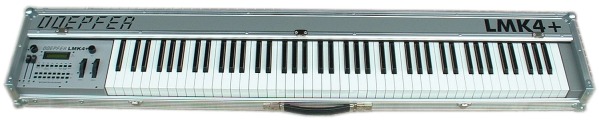
how about a keyboard? :hihi:

Image

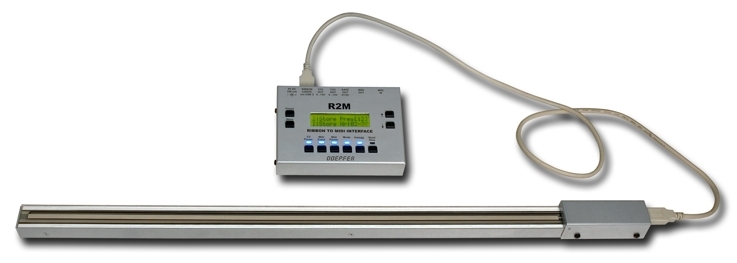
or the new doepfer ribbon...

Image

____
btw, great idea with the tablet!

Post

HelgeG wrote:
Emerald Tablet wrote:for a moment you had me worried when i read the title.
Initial support will be for wacom-compatible tablets, but once I get hold of the spec for the Emerald type, I'll see what I can do ;-)
simplified personal translation.

1) most true.
2) as below so above & as above so below
3) all things have been & arose from 1
4) Father sun - Mother moon
5) wind carried it , earth nourished it.
6) Father of perfection = your whole world.
7) 1 power is entire if it be converted into earth.
8 ) ascending from below to above and descending back receiving your force of 2 poles
9) By your means you shall have your glory of your whole world
10) 1 force is above all force, vanquishes every subtle thing / penetrates every solid thing.
11) So was your world created.
12) From this are & do come admirable adaptations

Post

nuffink quoth

One thing which will make an enormous difference to the number of uses for this:-

Can it output multiple points simultaneously?

e.g. If you drag two fingers down it can you control two virtual sliders?


None of the normal graphics tablets out there actually use fingers, they use a special pen or a mouse. One pen or mouse per tablet AFAIK.
An idiot on Set Theory:
"In some cases there is an object called red that contains everything that is red. In much the same way a pot is a plate."

Post

As luck would have it, I've already started into my own Tablet-to-MIDI project! :P

Wacom-only support really shouldn't be a problem, as most all tablets go through the "wintab" system driver interface. It should be a vendor-agnostic affair.

I have a Wacom Intuos2 and it supports lots of cool dimensions: X, Y, Pressure, Tilt, Azimuth. You can also add to that the two side pen buttons. Moreover, the cursor still tracks even if the pen isn't in contact with the surface, so there's another performance trick for you! If you want to get even more clever, it can track several stylus devices at once, so if you use two pens you can do odd things based upon their relative positions.

My goal is to have a standalone virtual MIDI output port that you can map for yourself in the sequencer. To that end, it will send either CC, Channel Pressure, or NPRN messages for the main 3D coordinate system, and MIDI Note messages for the "virtual buttons". Mapping different regions on the tablet to "virtual zones" could be done with different CCs or entirely different channels.

For the moment I have something cobbled together using the VBTablet library and MIDI-OX. I'd planned that once I had more of the design goals worked out and had a prototype in hand, I'd get it swapped over to a C++ COM component for app flexibility...

But then other projects started eating my time! :lol:

Anyway, glad to see that others are interested in this sort of thing. My first experiments have been a lot of fun. We should really get busy on this! :)

- m
Markleford's band, The James Rocket: http://www.TheJamesRocket.com/
Markleford's tracks: http://www.markleford.com/music/
Markleford's free MFX, DXi2, DR-008 modules: http://www.TenCrazy.com/

Post

nuffink wrote:Helga
Ouch! By changing the last letter of my name to an A, you just castrated me ;-)
nuffink wrote:Can it output multiple points simultaneously? e.g. If you drag two fingers down it can you control two virtual sliders?
With the Wacom tablet, the signal is generated electronically (when the pen is in close proximity to the tablet, an electrical signal is generated), so there is no way of using the finger on the tablet, is has to be the stylus or the Wacom mouse.

Now, only the high-end tablets (Intuos) can record the position of two input devices isimultaneously. The consumer models (Graphire, Volito) can only record input from one source.

Anyway, the first release of the app will be single source only regardless of tablet model.

This of course begs the question, will the app support two tablets connected simultaneously? Not in the first release, but I will look into it (as well as enabling dual tracking for the Intuos models).
helge

HELP! MY TYPEWRITER IS BROKEN!
E E CUMMINGS

Post

Markleford wrote:As luck would have it, I've already started into my own Tablet-to-MIDI project! :P[]
Cool! Seems like you have a bit of a head start on me though! Like you I am using MIDI Yoke for my initial work, I need to do a bit more research on how to create a virtual MIDI input port.
I have a Wacom Intuos2 and it supports lots of cool dimensions: X, Y, Pressure, Tilt, Azimuth. You can also add to that the two side pen buttons.
I was drooling over the Intuos2 in the shop, but then reality interfered, and I ended up with a small Graphire. However if the project takes off, an Intuos is high on the list. Playing with the extra dimensions would be exiting, as well as the possibility of dual tracking.
helge

HELP! MY TYPEWRITER IS BROKEN!
E E CUMMINGS

Post

HelgeG wrote:when the pen is in close proximity to the tablet, an electrical signal is generated
then would it be possible to rip a pen (maybe taken from damaged tablets) and stich the tip to a glove (in theory)? and how about the switch then? would it also be possible to rip and use it?

Post

A Tablet-to-MIDI converter already exists. Its MIDITab from http://www.tinygod.com

I use this all the time with my Reaktor patches. Its an awesome way to control a synth :D
Incomplete list of my gear: 1/8" audio input jack.

Post

whyterabbyt wrote:nuffink quoth

One thing which will make an enormous difference to the number of uses for this:-

Can it output multiple points simultaneously?

e.g. If you drag two fingers down it can you control two virtual sliders?


None of the normal graphics tablets out there actually use fingers, they use a special pen or a mouse. One pen or mouse per tablet AFAIK.
Yep. That was a dumb question. :oops:

Post

r_module wrote:then would it be possible to rip a pen (maybe taken from damaged tablets) and stich the tip to a glove (in theory)? and how about the switch then? would it also be possible to rip and use it?
Yep, I dont see why not. There's a bit of circuitry in the pen you'll need in addition to the tip, but nothing major.
helge

HELP! MY TYPEWRITER IS BROKEN!
E E CUMMINGS

Post

deastman wrote:A Tablet-to-MIDI converter already exists. Its MIDITab from http://www.tinygod.com
I'm using this as well. Russell from Tiny God made me even an hi-res NRPN version. However there were some flaws in the NRPN support, but Russell did not have the time to fix these. If there is enough interest, maybe he is willing to take up MIDITab again?

- Hans

Post Reply

Return to “DSP and Plugin Development”