They've tried to address it with Direct Inputs for Instruments in version 3.3. Basically it gives you the opportunity to send MIDI from one VST or External device directly to other (VST) Instruments without the need of an armed Instrument track in between. Direct Input alone is much more powerful than the Multi Instrument when it comes to MIDI because it can transmit data over all available MIDI output channels. But in the tradition of we-build-nice-ideas-but-forget-to-finish-or-thoroughly-test them, they forgot to make Direct Input available to Inserts that are able to send and receive MIDI and there's no PDC applied to MIDI data from plugin to plugin.Guenon wrote:MIDI functionality was one of those big ones, foremost the way you can't route one midi source to multiple destinations. That's one of those surprising limitations in a modern DAW that I would imagine 4.0 will address, along with a couple of other similar routing barriers.
[PreSonus Studio One] Music | Design | Film | VFX Production Resource
-
- KVRist
- 105 posts since 16 Nov, 2016
-
- KVRAF
- 6077 posts since 27 Jul, 2001 from Tarpon Springs, Florida, USA
I agree.daw.one wrote:They've tried to address it with Direct Inputs for Instruments in version 3.3. Basically it gives you the opportunity to send MIDI from one VST or External device directly to other (VST) Instruments without the need of an armed Instrument track in between. Direct Input alone is much more powerful than the Multi Instrument when it comes to MIDI because it can transmit data over all available MIDI output channels. But in the tradition of we-build-nice-ideas-but-forget-to-finish-or-thoroughly-test them, they forgot to make Direct Input available to Inserts that are able to send and receive MIDI and there's no PDC applied to MIDI data from plugin to plugin.Guenon wrote:MIDI functionality was one of those big ones, foremost the way you can't route one midi source to multiple destinations. That's one of those surprising limitations in a modern DAW that I would imagine 4.0 will address, along with a couple of other similar routing barriers.
There are many VST midi fx available so we need a better way to integrate them in S1 like you said without "an armed Instrument track in between".
As for Multi-Instruments I will like to see it to be more like Bidule or FL Studio Patcher. I currently use Bidule as an In which allows me to do all kinds of midi routing.
Biduel
https://www.plogue.com/products/bidule/
FL Studio Patcher
https://www.image-line.com/support/FLHe ... atcher.htm
My Studio: viewtopic.php?f=4&t=7760&p=7777146#p7777146
-
- KVRAF
- 6077 posts since 27 Jul, 2001 from Tarpon Springs, Florida, USA
Great list!!!Funkybot's Evil Twin wrote:For me, I hope 4.0 is just as much about catching up to Cubase on the MIDI side of the house as 3.0-3.5 was about catching up to Pro Tools on the audio side.
So specifically, MIDI features like:
1. Sending receiving multiple MIDI channels on 1 instrument track (Omni or All channel mode, basic MPE compatibility)
2. Drum Editor
3. Smart tool for MIDI
4. Coloring notes in the PRV by velocity
5. A basic Staff editor (even if it's a paid add-on or requires a Notion license, but no Rewire)
6. MIDI Input Transformer/Logical Editor
7. MIDI Event List
8. An Articulation Editor
9. Polyphonic aftertouch
My slightly modified list
1. Sending receiving multiple MIDI channels on 1 instrument track (Omni or All channel mode, basic MPE compatibility)
2. Drum Editor
3. Smart tool for MIDI
4. Coloring notes in the PRV by velocity
5. A basic Staff editor (even if it's a paid add-on or requires a Notion license, but no Rewire)
6. MIDI Input Transformer/Logical Editor and TRANSFORMER. BUT EASIER TO USE THAN IN CUBASE.
7. MIDI Event List WITH GRAPHS, EDITABLE
8. An Articulation Editor
9. Polyphonic aftertouch
10 CREATIVE MIDI FX
11 TO BE ABLE TO USE THIRD PARTY VST MIDI FX WITH OUT HAVING TO USE AN ADDITIONAL TRACK
My Studio: viewtopic.php?f=4&t=7760&p=7777146#p7777146
-
tapiodmitriyevich tapiodmitriyevich https://www.kvraudio.com/forum/memberlist.php?mode=viewprofile&u=391928
- KVRist
- 411 posts since 15 Jan, 2017 from 127.0.0.1
Studio One user. I want excellent modulation as in Bitwig. It is not existing in S1 at all. This opens up for unmatched possibilities in sound design. You can add LFOs etc. to any vsts setting, which is exposed to the DAW.
-
- KVRAF
- 2140 posts since 16 Jan, 2013 from USA
I'd be shocked if they went anywhere near something like that. As far as I know, only Bitwig and Mulab have the modular framework to support something like that. Perhaps Live. I'm sure someone will chime in if there are others.tapiodmitriyevich wrote:Studio One user. I want excellent modulation as in Bitwig. It is not existing in S1 at all. This opens up for unmatched possibilities in sound design. You can add LFOs etc. to any vsts setting, which is exposed to the DAW.
-
- KVRAF
- Topic Starter
- 3493 posts since 30 Dec, 2014
Interesting to see Bitwig approaches the modulation aspect, although modulation isn't really an aspect that Studio One has overlooked with their own instruments. Having a modulation device would probably follow on from the Instrument FX devices if it were to go that route.tapiodmitriyevich wrote:Studio One user. I want excellent modulation as in Bitwig. It is not existing in S1 at all. This opens up for unmatched possibilities in sound design. You can add LFOs etc. to any vsts setting, which is exposed to the DAW.
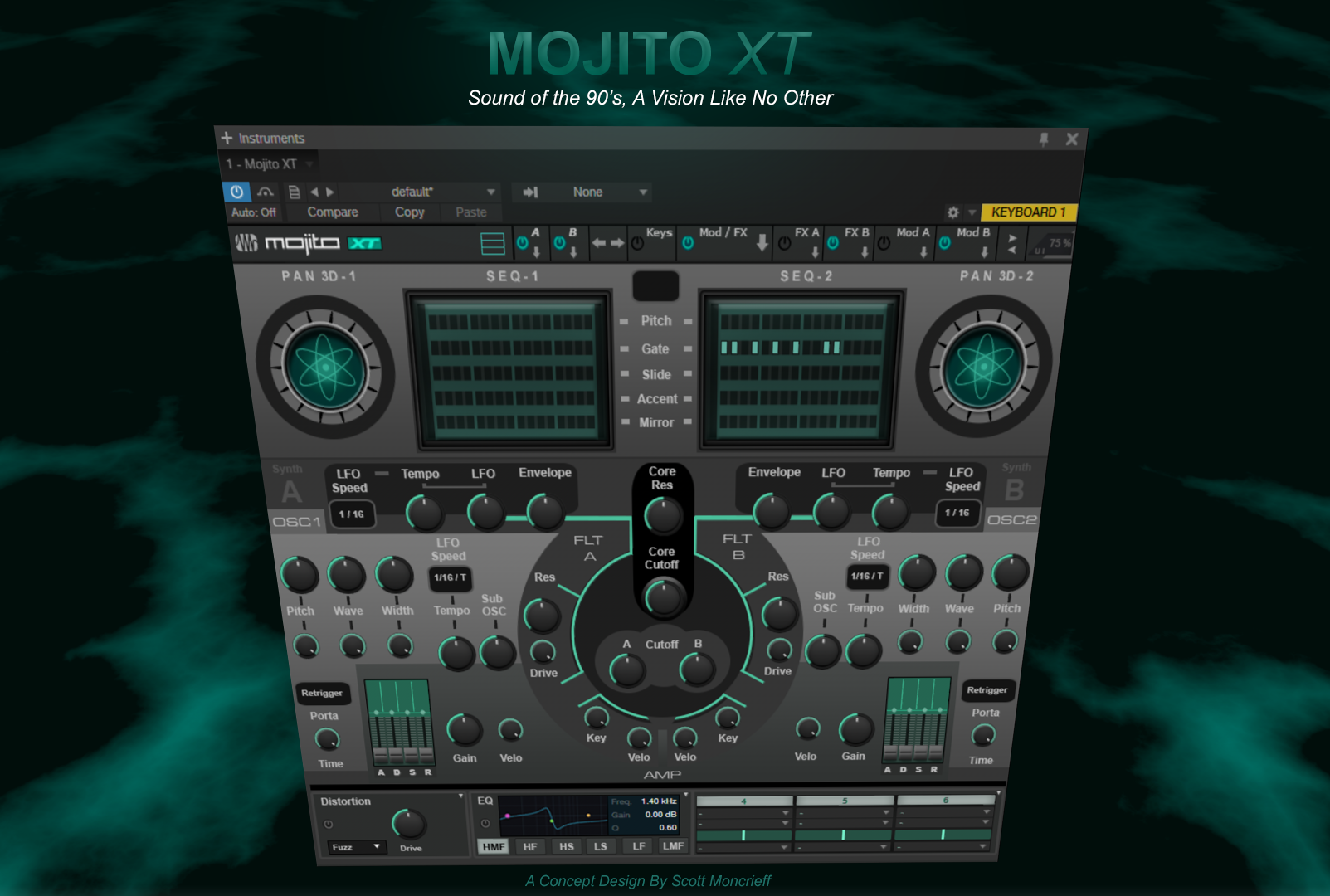
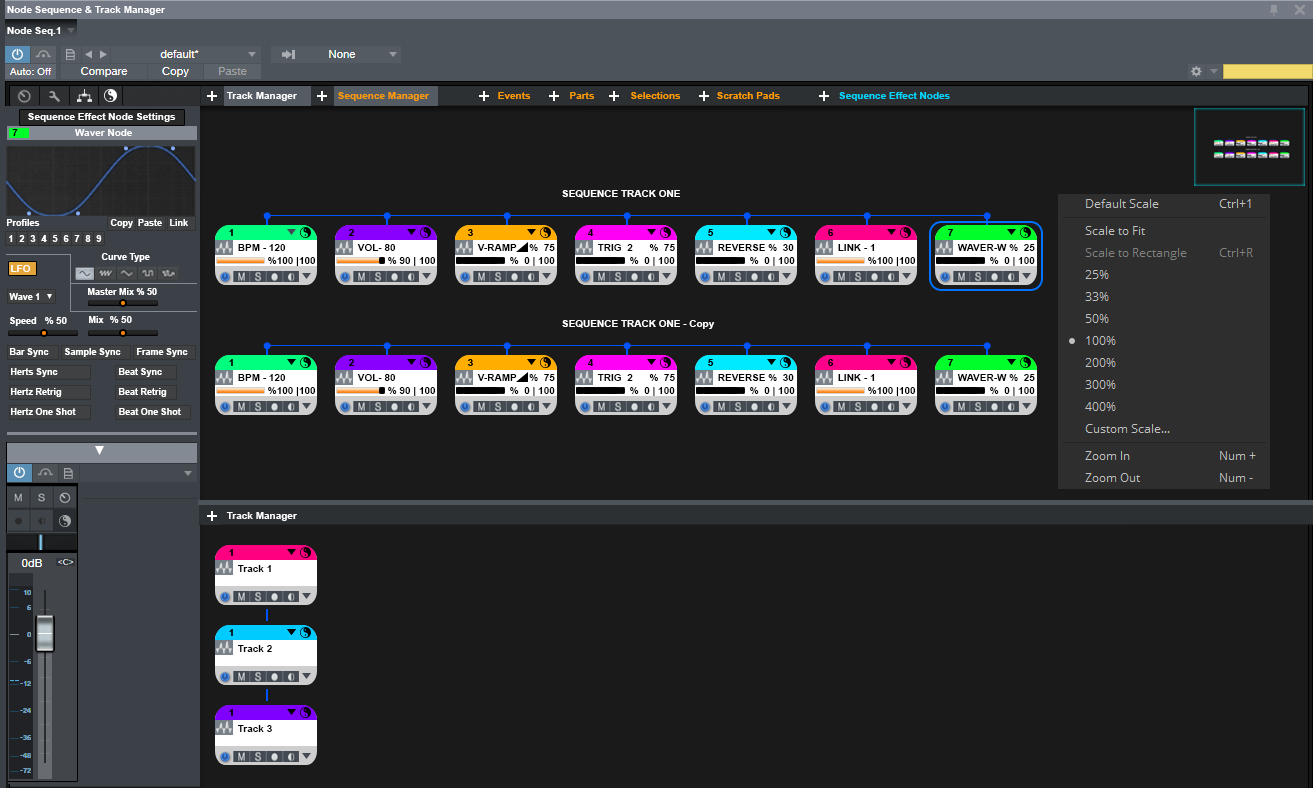
The modulation control aspect in Studio One is something I integrated with in my own idea I put together, it's from a different angle and based upon a Nodal System. There's details of it here where I originally posted it.

__
The Nodal System
The advantages of a node approach over the conventional workspace system we are use to in Studio One 3 / 3.5, is that tracks can be both controlled on a horizontal and vertical basis within a node environment system, independently or in conjunction with the normal sequencing arrangement.
On a vertical basis, it allows tracks within the main sequencer to be organised simply and quickly without having to dive into the sequencer, zooming in and out, and dragging up and down. With the node system, tracks can be re-configured and include an ID which is assigned to them.
The single or grouped tracks within a container node can be reorganised by colour, alphabetically or data-type - eg wave data, note data, automation data etc at track level. This organisation happens in a non destructive way inside the node environment and allows the user complete freedom in how they want to present the track at node level which you typically have with node based systems.
Nodes themselves can be re-configured themselves when selected, presented in different patterns and be save as a user preset. The track node organisation parts can then be then transferred to the main sequencer. The node environment is really split into two parts of which either one or both can be displayed..vie a click of a button. 'The Nodal Track Manager' or 'NTM' and the 'NSM' the Nodal Sequence Manager, the latter of which, I'll come to next.
__
The nodal sequence manager, or 'NSM', works on a horizontal plane but of course can be viewed in any way you wish to display it. When tracks are copied over to the node environment, the clips / events on those tracks are then represented as individual nodes connected by lines and I/O points.
The type of data a clip/event contains is identified on each and every node vie a pictorial image and represented colour.
As you can imagine, configuring and managing how these clip/events nodes can be organised to playback, provides more flexibility for the composer. You are also able to access the data contained within the node which you can then edit as you normally would but in the safety of the node framework environment.
The difference between the node system and that of the scratch pad system which follows the similar non-destructive editing process is that you have an overview and complete connectivity system in which to connect and playback parts or sections of track in any way which you desire. Split and set up different playback timings for each node to play back, and to trigger other nodes to stop or play, change the volume, speed up or down, apply volume curves and any other possible parameters which are difficult, time consuming or impossible to do conventionally.
The node system would contain a panel with sliders for controlling how these each of nodes would function as well as vector curve and line displays.
The play position mark of a node or connected nodes is indicated by a descending bar to indicate the time left, (or point in time it is currently) and optionally a numerical value and total time.
A Node Control Track would be transferred to the main sequencer track if nodes are copied from the node environment, with various options such as overriding any other similar sequence data.
The node system provides a different but familiar framework to manage and compose in for a user in essence and new ways to work if they so desire, in perhaps a quicker and more flexible way.
Last edited by THE INTRANCER on Thu May 31, 2018 7:08 pm, edited 1 time in total.
KVR S1-Thread | The Intrancersonic-Design Source > Program Resource | Studio One Resource | Music Gallery | 2D / 3D Sci-fi Art | GUI Projects | Animations | Photography | Film Docs | 80's Cartoons | Games | Music Hardware |
-
tapiodmitriyevich tapiodmitriyevich https://www.kvraudio.com/forum/memberlist.php?mode=viewprofile&u=391928
- KVRist
- 411 posts since 15 Jan, 2017 from 127.0.0.1
Intrancer, will read your ideas later.
Modulation for any instruments,
that is the benefit. Also, Bitwig has more modulation sources than the ones which instruments typically have.
I think, like traditional automation, modulation is something very natural. Something I am surprised not any DAW to have.
I always thought there are strong limitations on the MIDI side, but then saw what Bitwig is capable of.
Modulation for any instruments,
that is the benefit. Also, Bitwig has more modulation sources than the ones which instruments typically have.
Why? It opens for more possibilities in this rather traditional DAW. Options are good.jonljacobi wrote:I'd be shocked if they went anywhere near something like that.
I think, like traditional automation, modulation is something very natural. Something I am surprised not any DAW to have.
I always thought there are strong limitations on the MIDI side, but then saw what Bitwig is capable of.
Last edited by tapiodmitriyevich on Fri Jan 05, 2018 9:15 pm, edited 1 time in total.
- KVRAF
- 2302 posts since 21 Mar, 2012 from Nom..nom.. YOUR MOM
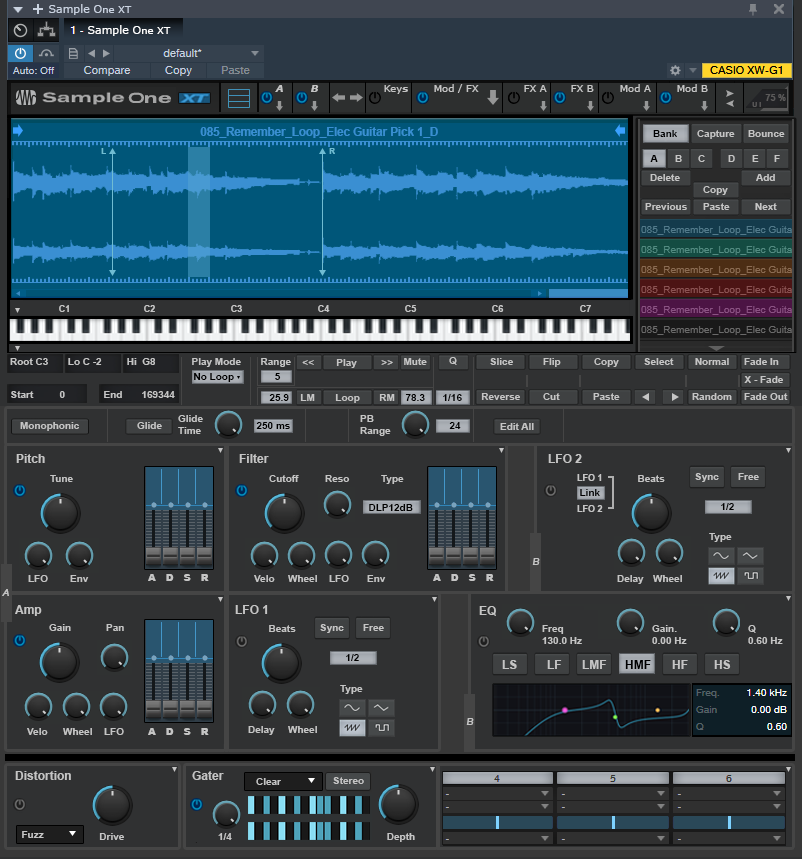
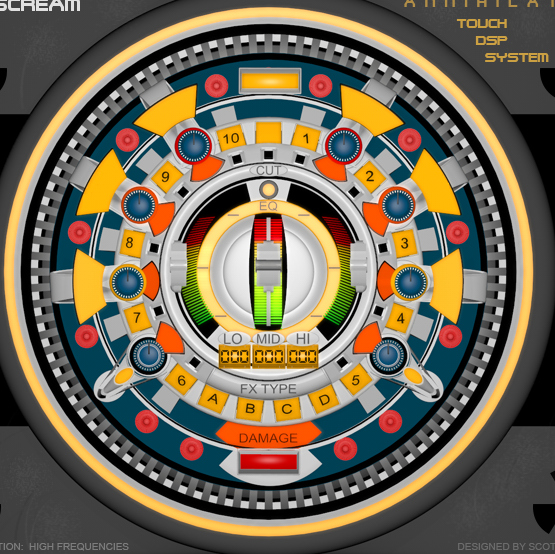
THE INTRANCER wrote: I have redesigned 3 of the instruments and presented them on their forum and their facebook pages over the past couple of years to give them idea's in how they could adapt similar idea's. They have included Impact XT, Sample One XT, & Mojito XT..
![]()
ScottyM!!! Holy crap, I had no idea that was you (The Intrancer). The ideas you had above look pretty good. A marked improvement over this gem, for sure:

Win 10 | Ableton Live 11 Suite | Reason 13 | i7 3770 @ 3.5 Ghz | 16 GB RAM | RME Babyface Pro| Akai MPC Live 3 & Akai Force | Roland System 8 | Roland TB-3 | Roland MX-1 | Dreadbox Typhon | Korg Minilogue XD
-
- KVRAF
- 35671 posts since 11 Apr, 2010 from Germany
On the other hand, a DAW should have a consequent concept, because that's what people buy it for (and what originally attracted them to it). I couldn't imagine Cubase being like Live or Bitwig, for example. And many people, professionals, and studios, would probably be like "Wut??" if they implemented Live- or Bitwig-esque stuff like the modulation system you posted. And vice versa.tapiodmitriyevich wrote:Why? It opens for more possibilities in this rather traditional DAW. Options are good.jonljacobi wrote:I'd be shocked if they went anywhere near something like that.
-
tapiodmitriyevich tapiodmitriyevich https://www.kvraudio.com/forum/memberlist.php?mode=viewprofile&u=391928
- KVRist
- 411 posts since 15 Jan, 2017 from 127.0.0.1
chk071 I see what you mean. But from my pov a modulation system offered from DAW side does do no harm to an existing concept. I do not see a concept change at all.
- Modulation is in their instruments, it already happens
- Automatic knob and slider movement vs manual one (automation lanes) - the automatic one is still operated by me.
- Modulation is in their instruments, it already happens
- Automatic knob and slider movement vs manual one (automation lanes) - the automatic one is still operated by me.
-
- KVRAF
- Topic Starter
- 3493 posts since 30 Dec, 2014
I'm never far away EnochLightEnochLight wrote: ScottyM!!! Holy crap, I had no idea that was you (The Intrancer). The ideas you had above look pretty good. A marked improvement over this gem, for sure:
KVR S1-Thread | The Intrancersonic-Design Source > Program Resource | Studio One Resource | Music Gallery | 2D / 3D Sci-fi Art | GUI Projects | Animations | Photography | Film Docs | 80's Cartoons | Games | Music Hardware |
-
- KVRian
- 506 posts since 9 Jun, 2005
ive had s13 for ages but only just got into it...very nice program
id really like the frequency analyser to be embedded in the pro-eq
yep make presence open to edit...although nobody asks the same for halion so really thats a bit cheeky
duplicate using selected area rather than intelligent duplicate...
pitch manipulation is a must...timestretch tape algorhythm....resizing...
and MAKE IT POSSIBLE TO HIDE THE TRANSPORT!!! takes up unnecessary space...
drum editor
draw on waveform
its quite amazing to see the development of s1 over the last 10 years though...come a long long way
id really like the frequency analyser to be embedded in the pro-eq
yep make presence open to edit...although nobody asks the same for halion so really thats a bit cheeky
duplicate using selected area rather than intelligent duplicate...
pitch manipulation is a must...timestretch tape algorhythm....resizing...
and MAKE IT POSSIBLE TO HIDE THE TRANSPORT!!! takes up unnecessary space...
drum editor
draw on waveform
its quite amazing to see the development of s1 over the last 10 years though...come a long long way
-
GrabtharsHammer GrabtharsHammer https://www.kvraudio.com/forum/memberlist.php?mode=viewprofile&u=377531
- KVRian
- 543 posts since 7 Apr, 2016 from Bünde, Germany
+1 for Drum Editor
Also I don‘t like that the freeze mode resets the faders to zero. Would be better to have the option to freeze pre-fader.
-
- KVRist
- 105 posts since 16 Nov, 2016
People asked for it continuously since the release of Halion 4. Steinberg stated it has to do with copyrights.bundoo wrote:yep make presence open to edit...although nobody asks the same for halion so really thats a bit cheeky
-
- KVRian
- 506 posts since 9 Jun, 2005
I mean that Halion CAN be edited in terms of sounds etc but Halion SE can't bedaw.one wrote:People asked for it continuously since the release of Halion 4. Steinberg stated it has to do with copyrights.bundoo wrote:yep make presence open to edit...although nobody asks the same for halion so really thats a bit cheeky
Presence is like Halion SE as far as I can see.