

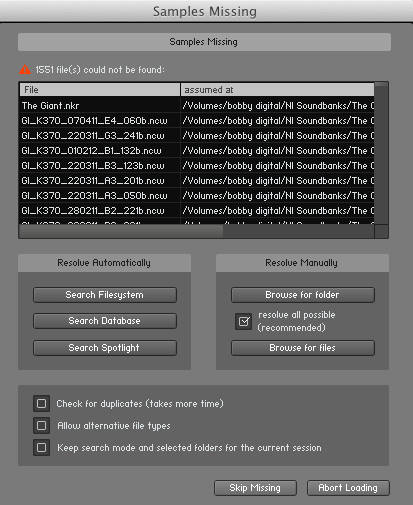
I purchased a loop/sample library that has a collection of patches for Kontakt, but there is no proper installer. All the install directions tell me is that I can put the patches anywhere on my hard drive. What I can't figure out is how to actually get the patches/library into Kontakt to actually use them. I've tried to simply navigate to the folder containing the patches on my desktop, but no matter what patch I pick, I get a "content missing" pop up in Kontakt.
How do I load third party libraries like this in Kontakt?
Thanks.
How To Load Third Party Patches Into Kontakt?
-

- Beware the Quoth
- 35506 posts since 4 Sep, 2001 from R'lyeh Oceanic Amusement Park and Funfair
Usually when Kontakt tells you there's missing wave files etc, it prompts you to tell it where they are.
An idiot on Set Theory:
"In some cases there is an object called red that contains everything that is red. In much the same way a pot is a plate."
"In some cases there is an object called red that contains everything that is red. In much the same way a pot is a plate."
-
- KVRist
- Topic Starter
- 168 posts since 19 Jun, 2011
So I have to go through this searching dialogue routine for every single patch in the library until each one is found? Isn't there a proper way of loading third party libraries where I no longer even get such a pop up message?
-
- Beware the Quoth
- 35506 posts since 4 Sep, 2001 from R'lyeh Oceanic Amusement Park and Funfair
https://support.native-instruments.com/ ... h-re-save-Carpenter wrote:So I have to go through this searching dialogue routine for every single patch in the library until each one is found? Isn't there a proper way of loading third party libraries where I no longer even get such a pop up message?
An idiot on Set Theory:
"In some cases there is an object called red that contains everything that is red. In much the same way a pot is a plate."
"In some cases there is an object called red that contains everything that is red. In much the same way a pot is a plate."
-

- KVRAF
- 37492 posts since 14 Sep, 2002 from In teh net
Shouldn't be being needed all the time though, makes me wonder if the sample libraries are being put in the wrong folder structure? Generally when I install a new third party library they are all saved with paths that stand up to being on a different system as long as folders in in the right position relative to each other still.
-
- KVRAF
- 6468 posts since 8 Jun, 2009
Most Kontakt sample libraries assume the samples are in a folder that's parallel to the instrument .nks files. If you're loading patches from a folder on the desktop, the instrument will expect them to be in something like /Desktop/[Whatever Library]/Samples if the patches are in /Desktop/[Whatever Library]/Instruments. Normally, even multiformat loop libraries like those from Zero-G have them placed together, so maybe you've separated them for some reason?
You can either place the folder with the instruments so that it sits alongside the actual sample folder; use Batch Resave to identify the sample folder once for that collection of instruments and then have Kontakt resave the individual instruments (I'd move to it wherever you really want it first or you'll have to do it all over again later); or use a symbolic link or junction point to make a virtual copy of the sample folder so that it has the right relationship to the instrument files.
You can either place the folder with the instruments so that it sits alongside the actual sample folder; use Batch Resave to identify the sample folder once for that collection of instruments and then have Kontakt resave the individual instruments (I'd move to it wherever you really want it first or you'll have to do it all over again later); or use a symbolic link or junction point to make a virtual copy of the sample folder so that it has the right relationship to the instrument files.
-
- KVRist
- 335 posts since 2 Aug, 2013 from USA
I think what you're asking is to use the "Quick Load" feature. 3rd Party developers have two choices with Kontakt. They can license it (which does the installer, encryption, and a serial number from NI) or create the same files, but you have to manually point to it.
-
- KVRAF
- 37492 posts since 14 Sep, 2002 from In teh net
No that wouldn't make a difference in this case