Any sampler with "automable" loop position - video example

VST, AU, AAX, CLAP, etc. Plugin Virtual Effects Discussion
RELATED
PRODUCTS

Post

frangellico wrote:Just to confirm to Etienne and the group, i can´t get Tal Sampler to do it as in the video, im on version 2.0

Probably im doing something wrong, but i did as in the video and START LOOP - end loop KNOBS are not linked. Neighter start sample wich keeps independent.

If anyone know the trick, please = )

tahnks!
The loop and position related knobs are not directly assignable or automatable... Take a look here for some hints -> viewtopic.php?p=7088973#p7088973.

Regards,
tl.

Post

Bliss can do that.


Post

I think iZotope Iris too?

Post

Iris have heard is pretty deep, but never tried it yet.

Thanks for the DISCO hint, seems very good on the Macros thing, but is not exactly what im looking for since you need to move end and start points at the same time and cordinally, looks more like the ableton sampler modulation capabilities.

What im looking for - as in the video at the 1st post - is a way to automate the whole bar loop scaning thorugh the whole sample. If at the same time can do this "scaning bar" longer and shorter would be also amazing.

I will look into Granite, i guess would be an easy talk for a Granular instrument. Honestrly the few times i saw into it, did not understand it very much, will check it better.

big thanks to everyone , will update if i do find a good option
PROGRESSIVE NEVER DIES

Post

jbuonacc wrote:this:
one of the main reasons that i bought it years back.
By the way, checked GRAIN and is very close on what i want. I just could not "automate" the upper loop bar to move it freely. I can do it with the mouse, but could not assign it to a parameter in ableton. = (
PROGRESSIVE NEVER DIES

Post

In Bliss, you can assign both loop start and loop end to the same macro. You cannot
keep them both equidistant from each other as the start and end points are expressed as
a range that changes as they move across the sample. Near as I can figure anyway.
So, unless your trying to do granular type playback, its probably not what your looking
for. I don't know of any VST sampler that you could set up like you describe beyond Kontakt.

Post

pekbro wrote:In Bliss, you can assign both loop start and loop end to the same macro. You cannot
keep them both equidistant from each other as the start and end points are expressed as
a range that changes as they move across the sample. Near as I can figure anyway.
So, unless your trying to do granular type playback, its probably not what your looking
for. I don't know of any VST sampler that you could set up like you describe beyond Kontakt.
Thanks for the tip, Yes, but i need to move them together.

About Kontakt, ive version 5 and have not find this funcion there. Im not an expert anyway, will re check.

thanks
PROGRESSIVE NEVER DIES

Post

What I have described in Bliss will move them together. The loop size
will change however. I suspect you could do it in Kontakt, because
keeping the loop size uniform while moving it, will likely require some math
functions. E.g. scripting in Kontakt, there is no pre-built function for it.

Post

frangellico wrote:
pekbro wrote:In Bliss, you can assign both loop start and loop end to the same macro. You cannot
keep them both equidistant from each other as the start and end points are expressed as
a range that changes as they move across the sample. Near as I can figure anyway.
So, unless your trying to do granular type playback, its probably not what your looking
for. I don't know of any VST sampler that you could set up like you describe beyond Kontakt.
Thanks for the tip, Yes, but i need to move them together.

About Kontakt, ive version 5 and have not find this funcion there. Im not an expert anyway, will re check.

thanks
You should be able to do it in TAL, by enabling the loop-link in the sample editor or by mapping both knobs to the same macro.

Post

Yeah you can do it in either Tal Sampler or Bliss. I thought he wanted to keep then loop size uniform,
which you cant do in either. Watching the video (finally), I see thats not the case.

Post

Moshimoshi, you are right, i saw the LINK function in TAL, but form some reason i dont know i dont get to move em together in the main windows, im sure im doin some wrong, will check again.

thanks for all the good tipos guys!
PROGRESSIVE NEVER DIES

Post

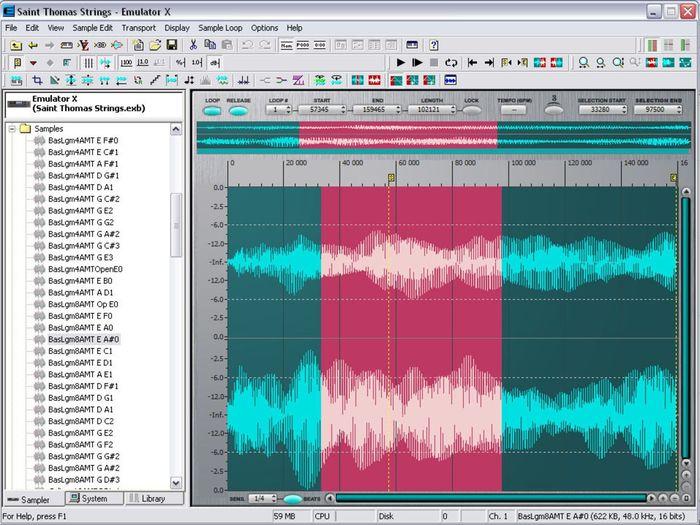
Old, but still available, Emulator X3 can do this.

https://www.creative.com/emu/products/p ... &pid=17681

Image

Post

Andywanders wrote:Old, but still available, Emulator X3 can do this.

https://www.creative.com/emu/products/p ... &pid=17681

Image

Will check it out for sure, thanks a lot!! Hope is still available for MAC
PROGRESSIVE NEVER DIES

Post

Andywanders wrote:Old, but still available, Emulator X3 can do this.

https://www.creative.com/emu/products/p ... &pid=17681

Image

Will check it out for sure, thanks a lot!! Hope is still available for MAC
PROGRESSIVE NEVER DIES

Post

frangellico wrote:
jbuonacc wrote:this:
one of the main reasons that i bought it years back.
By the way, checked GRAIN and is very close on what i want. I just could not "automate" the upper loop bar to move it freely. I can do it with the mouse, but could not assign it to a parameter in ableton. = (
did you mean to say that you tried 'Granite' and couldn't figure it out, or what? i think 'GRAIN' is something else altogether? i pulled up 'Granite' tonight just to check and it does exactly what you want.
What im looking for - as in the video at the 1st post - is a way to automate the whole bar loop scaning thorugh the whole sample. If at the same time can do this "scanning bar" longer and shorter would be also amazing.
i didn't try to "assign" them, but the parameters "Start" and "Length" come up in Ableton. these control the two blue loop bars in the display. "Start" scans through the sample, and "Length" can be controlled at the same time to do the "scanning bar longer and shorter" thing. the other parameters (Space, Speed, Density) need to be set correctly for it to sound right.

Post Reply

Return to “Effects”