

Yeah. It used to be 8 velocity layers and now it appears to be either 127 or unlimited. I suspect 127 but I stopped counting at 60 something. There are certainly enough velocity layers there now to pull off a really high quality sampled drum kit if anyone is ever inclined.chk071 wrote: Impact XT finally got layers per pad
[PreSonus Studio One] Music | Design | Film | VFX Production Resource
-
- KVRAF
- 6159 posts since 4 Dec, 2004
-
- KVRian
- 591 posts since 10 Nov, 2005 from New York City
UI is certainly subject to a matter of preference and taste, though in many respects an objective discipline. For whatever reason, Presonus has decided to provide a color palette rooted in either low contrast greys and pastels or in garish, over saturated primary colors. It honestly looks like the same design team for 1995 MS Paint sometimes. Judging by screenshots, it looks like they have indeed improved upon this somewhat in version 4, but to me still lag behind Pro Tools, Logic, and Ableton. Even something as simple as clips in the arrange window, which should be easy to fix, look flat compared to other DAWs.THE INTRANCER wrote:What aspect of the UI do you think needs looking at ? The colour control parameters were tweaked significantly, from 3.XX, and extended to even that of the new updates to Impact XT and Sample One XT.
As an example, Studio One 4:
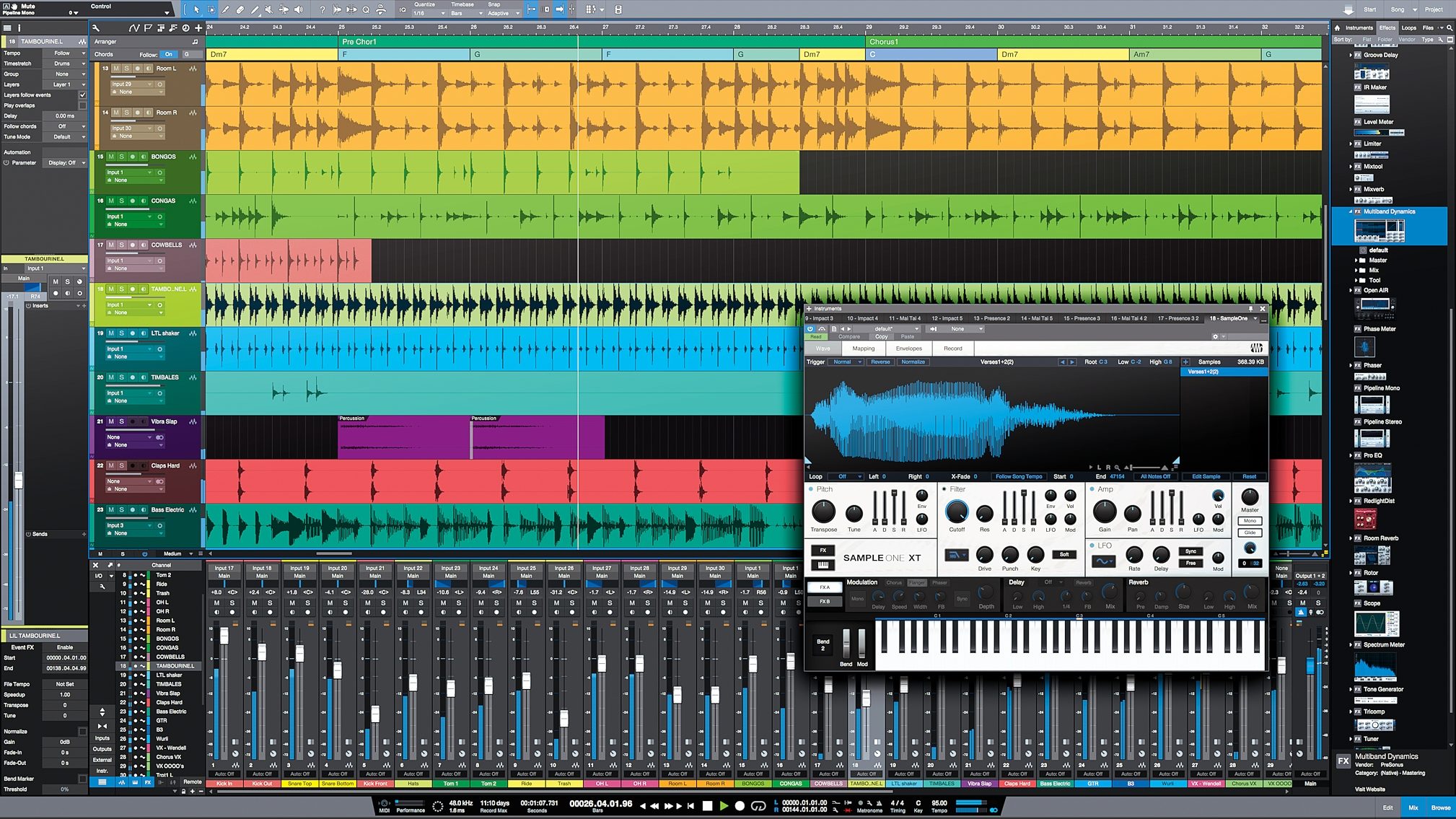
Logic X (notice the subtle gradients applied to clips, etc. - helps provide depth):

If you want to pursue a flat UI look and feel, go for it - but then at least execute it well.
-

- KVRian
- 711 posts since 19 Jan, 2008
I'm not a fan of those gradients and Logic has the worst interface, is sluggish, feels unresponsive, while in SO the interface reacts as expected. Try to enlarge the piano roll or the mixer in Logic and you'll see how it lags behind when you move the cursor. So I would say the interface it's just a matter of taste. I feel SO has the best interface and uses screen space without wasting it. The only complain I would have about v4 is how they placed the M/S buttons, it makes the tracks taller and screens are wider than taller.
-

- KVRAF
- 2960 posts since 9 Dec, 2011 from falling
I do prefer Logic's color palette.5Lives wrote:Like I said, somewhat subjective.
Must say though - never had an issue with sluggishness with Logic’s interface.
Studio One's design gets better every release, but many elements of Logic's UI look really good.
Bitwig Certified Trainer
-
- KVRAF
- 12084 posts since 2 Dec, 2004 from North Wales
They both look good to me (a lot better than Cubase) but when you are on a PC the choise is simpler!
X32 Desk, i9 PC, S88MK3, S1, BWS, Live + PUSH 3, Osmose, RedShift 6 Pro3, Tempera, Syntakt, Digitone II, OP1-F, OPXY, Eurorack, TD27 Drums, Guitars, Basses, Amps and of course lots of pedals!
-
- KVRian
- 721 posts since 23 Jun, 2004
Logic always had a good color palette, even when emagic. The color tones all belonged together. The interface was always clean.billcarroll wrote:
I do prefer Logic's color palette.
Studio One's design gets better every release, but many elements of Logic's UI look really good.
S1 v3 had a better color palette than 4. These new ones are all over the place—garishly bright, dull. They are not even laid out in proper order. From a designer standpoint, they're not even nice looking shades. It would be nice to have pastel-like, tastefully muted tones, and for those folk who like it, even bright.
Or just do Logic's. That whole thing is cohesive, the colors go together while giving multiple successive ranges from brighter, muted, soft...and they are nice looking.
-
- KVRAF
- 35671 posts since 11 Apr, 2010 from Germany
I agree that it's still not perfect, and that Logic does it vastly better. It's OK though. Nothing more, nothing less. There are worse, and there are better. For me, Cubase and Logic have the best looking, and feeling GUI's.5Lives wrote: If you want to pursue a flat UI look and feel, go for it - but then at least execute it well.
-
- KVRAF
- Topic Starter
- 3496 posts since 30 Dec, 2014
There are powerful and free third party tools that can deal with the colour aspects of Studio One, but that wouldn't be so much of an issue if users had proper control over what fonts they wanted to use to a greater degree like other apps. In fact you can pretty much do without all the unnecessary text on the transport bar. Isn't the tool tip information or information bar enough...? Studio One does look unnecessary cluttered GUI wise.. I fixed that issue in Studio One 3...I can't do nothing with 4.0 for the reason I've mentioned multiple times about in this thread, since it's release to fix that yet.
They keep adding stuff, but why can't we choose to have what we want displayed ourselves... not everyone wants a million icons on the task bar. Yes there are services...but that's faff and half...
I think the GUI actually being more configurable was one of the big omissions in 4.0.
They keep adding stuff, but why can't we choose to have what we want displayed ourselves... not everyone wants a million icons on the task bar. Yes there are services...but that's faff and half...
I think the GUI actually being more configurable was one of the big omissions in 4.0.
KVR S1-Thread | The Intrancersonic-Design Source > Program Resource | Studio One Resource | Music Gallery | 2D / 3D Sci-fi Art | GUI Projects | Animations | Photography | Film Docs | 80's Cartoons | Games | Music Hardware |
-
- KVRAF
- 5144 posts since 3 Oct, 2013
your picture was a bit misleading, generally and especially on laptop the scaled display is used5Lives wrote:UI is certainly subject to a matter of preference and taste, though in many respects an objective discipline. For whatever reason, Presonus has decided to provide a color palette rooted in either low contrast greys and pastels or in garish, over saturated primary colors. It honestly looks like the same design team for 1995 MS Paint sometimes. Judging by screenshots, it looks like they have indeed improved upon this somewhat in version 4, but to me still lag behind Pro Tools, Logic, and Ableton. Even something as simple as clips in the arrange window, which should be easy to fix, look flat compared to other DAWs.THE INTRANCER wrote:What aspect of the UI do you think needs looking at ? The colour control parameters were tweaked significantly, from 3.XX, and extended to even that of the new updates to Impact XT and Sample One XT.
As an example, Studio One 4:
Logic X (notice the subtle gradients applied to clips, etc. - helps provide depth):
If you want to pursue a flat UI look and feel, go for it - but then at least execute it well.

so it has more space, retina has 3840x2400 resolution ... Logic has the look of a winner
"Where we're workarounding, we don't NEED features." - powermat
-

- KVRAF
- 1593 posts since 2 Oct, 2016 from Planet X-19
I personally do not have a problem with the gui.
V1-2.6 was total class and I loved it, but since the big changes in v3, it's not a deal breaker.
Ultimately, I've never once not finished writing a song because I didn't like the colours or shading, or whatever.
Got too many other first world problems to sort out before I let hues and palettes destroy my creativity and passion.
V1-2.6 was total class and I loved it, but since the big changes in v3, it's not a deal breaker.
Ultimately, I've never once not finished writing a song because I didn't like the colours or shading, or whatever.
Got too many other first world problems to sort out before I let hues and palettes destroy my creativity and passion.
-
AdvancedFollower AdvancedFollower https://www.kvraudio.com/forum/memberlist.php?mode=viewprofile&u=418780
- KVRian
- 1342 posts since 8 May, 2018 from Sweden
Logic certainly looks cleaner and less cluttered in those screenshots, but some prefer to have everything accessible on one page, without having to open extra windows or unfold panels. More customization options would be the key I think.
Of course the whole thing falls apart anyway when you use a bunch of 3rd party plugins, each with its own unique design language, ranging from total skeuomorphism to abstract and flat.
Of course the whole thing falls apart anyway when you use a bunch of 3rd party plugins, each with its own unique design language, ranging from total skeuomorphism to abstract and flat.
Take a single oscillator, producing a drone. Send it to the wave shaper, altering the tone.
This can be a triangle, Sawtooth or a square. Modulate the pulse width, nobody will care
This can be a triangle, Sawtooth or a square. Modulate the pulse width, nobody will care
-
- KVRAF
- 5144 posts since 3 Oct, 2013
Logic has unified control interface (AL like macros>smart controls) so instead of thisAdvancedFollower wrote: Of course the whole thing falls apart anyway when you use a bunch of 3rd party plugins, each with its own unique design language, ranging from total skeuomorphism to abstract and flat.

gonna use this

its controls can be LFOed etc. with Logic own modulator devices, it works same as the Instrument rack in AL (and bit more comfy than in the similar solution of S1), quite sad that both DAWs need some MIDI loopback solution if u need MIDI CC based modulationSmart Controls allow you to efficiently take control of a large effects chain. Here I have created a vocal processing chain with an accompanying Smart Control layout that allows me to quickly clean up the low end of a vocal, de-ess it, try out different types of compression, apply basic equalisation and add plate reverb or ambience.
>> https://www.soundonsound.com/techniques ... ack-stacks
"Where we're workarounding, we don't NEED features." - powermat
-
- KVRAF
- Topic Starter
- 3496 posts since 30 Dec, 2014
Lets Talk About Bugs & Issues In Studio One 4.0
As a bit of a change in direction in this thread...it's probably a good idea to talk about actual bugs and problems in 4.0 that you have encountered or which are known as it's been a few weeks in. Many still might be on the fence about upgrading to it and some bugs might be show stoppers for them.
So I thought I'd dig in to the new Pattern Editor / Roll Editor..here's what I've found.
In regard to the new pattern roll editor, I've discovered an issue where that it doesn't know what to do with polyphonic notes. By that I mean that when programming vie an external midi keyboard which is able to apply multiple notes to one point. For example my external synth is able to use 4 layers per channel for every key so I can have C4 C4 C4 C4 of multiple velocity levels from pressing one key to generate thick sounding notes.
The problem arises when you actually try and delete the notes ( or brown blocks as they are shown ). It doesn't delete all of them when you try and delete them, what it does instead is toggle between the eraser tool and the freehand pencil tool, able to remove the first note layer but unable to remove the others below. It's like an on / off switch for one whilst the rest is ignored.
One other issue I'd hope for them to fix as a feature, was the ability to set predefined step record rest periods, something I've been requesting from Presonus for the past 3 years. The drum programmer section is kinda half way there with what I'm talking about but that's not the same thing in the pre-set recording interval setting that one can use in a real time sense. If I want to record in real time only on every 4th note skipping the notes between, you can't do that, it's every one step, atm you have to press a button to insert a friggen rest period...I mean why should that be the case ? The most primitive of Sound Trackers have been able to do what I'm talking about from the late 1980's.
As a bit of a change in direction in this thread...it's probably a good idea to talk about actual bugs and problems in 4.0 that you have encountered or which are known as it's been a few weeks in. Many still might be on the fence about upgrading to it and some bugs might be show stoppers for them.
So I thought I'd dig in to the new Pattern Editor / Roll Editor..here's what I've found.
In regard to the new pattern roll editor, I've discovered an issue where that it doesn't know what to do with polyphonic notes. By that I mean that when programming vie an external midi keyboard which is able to apply multiple notes to one point. For example my external synth is able to use 4 layers per channel for every key so I can have C4 C4 C4 C4 of multiple velocity levels from pressing one key to generate thick sounding notes.
The problem arises when you actually try and delete the notes ( or brown blocks as they are shown ). It doesn't delete all of them when you try and delete them, what it does instead is toggle between the eraser tool and the freehand pencil tool, able to remove the first note layer but unable to remove the others below. It's like an on / off switch for one whilst the rest is ignored.
One other issue I'd hope for them to fix as a feature, was the ability to set predefined step record rest periods, something I've been requesting from Presonus for the past 3 years. The drum programmer section is kinda half way there with what I'm talking about but that's not the same thing in the pre-set recording interval setting that one can use in a real time sense. If I want to record in real time only on every 4th note skipping the notes between, you can't do that, it's every one step, atm you have to press a button to insert a friggen rest period...I mean why should that be the case ? The most primitive of Sound Trackers have been able to do what I'm talking about from the late 1980's.
KVR S1-Thread | The Intrancersonic-Design Source > Program Resource | Studio One Resource | Music Gallery | 2D / 3D Sci-fi Art | GUI Projects | Animations | Photography | Film Docs | 80's Cartoons | Games | Music Hardware |
-
 Brother Charles Brother Charles https://www.kvraudio.com/forum/memberlist.php?mode=viewprofile&u=271995
 - KVRian
- 1112 posts since 3 Jan, 2012 from Alberta, Canada
Samplitude Pro X3 can indeed import AAF. I'm rather pleased about this since I use a few DAWs, but mostly S1 and SAM. To be honest, Samplitude just seems to have a warm, better-sounding audio engine, but of course, I have no scientific way to prove it. That said, I also really, really like PreSonus's (double) 64 bit audio engine too -- it's very precise and detailed.
LawrenceF wrote:Looks like AAF is for PT, Nuendo, FCP, Logic. It's mostly used by post applications. Sonar, Tracktion, Bitwig, Live and many of the others maybe don't handle that format. Not sure about Samp. Studio One was always compatible with Cubase using steingberg.xml
If you want load a song from another DAW and keep edits and some other things intact like fades, trims, that's really the only way other than buying AATranslator. The other format it already had, OpenTL, is not is use by many others either.