


v3 Beta Feedback And Discussion (Bugs, Features, Suggestions)
-
 musicdevelopments musicdevelopments https://www.kvraudio.com/forum/memberlist.php?mode=viewprofile&u=223336
 - KVRAF
- Topic Starter
- 6014 posts since 9 Jan, 2010
I'll do my best to include a strum pattern generator and editor for v3.6!
-
crossovercable crossovercable https://www.kvraudio.com/forum/memberlist.php?mode=viewprofile&u=329708
- KVRian
- 576 posts since 26 May, 2014
Thanks !!!
I will just recap a few things from other posts in the one place here.
http://indiginus.com/renegade_acoustic.html
And have the mute keyswitches that can be set to a note or velocity triggered mutes.
Also, maybe an option for each strum to just strum the bass note only.
And the strums work from the Chord Voicing > Acoustic Guitar
And strum speed like for an ending that has a slow strum:

So you get the keyswitches in the patterns:

This was an export from the Kontakt instrument strum pattern gen in http://indiginus.com/renegade_acoustic.html :
untitled MIDI item render 009.mid
To get it to sound realistic it has overlapping notes but RC Chops them on import and then it's just chop strums that sounds bad:
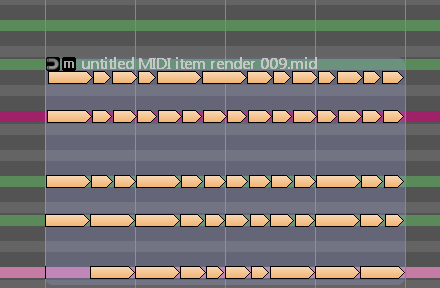
I will just recap a few things from other posts in the one place here.
http://indiginus.com/renegade_acoustic.html
And have the mute keyswitches that can be set to a note or velocity triggered mutes.
Also, maybe an option for each strum to just strum the bass note only.
And the strums work from the Chord Voicing > Acoustic Guitar
And strum speed like for an ending that has a slow strum:
So you get the keyswitches in the patterns:
This was an export from the Kontakt instrument strum pattern gen in http://indiginus.com/renegade_acoustic.html :
untitled MIDI item render 009.mid
To get it to sound realistic it has overlapping notes but RC Chops them on import and then it's just chop strums that sounds bad:
-
musicdevelopments musicdevelopments https://www.kvraudio.com/forum/memberlist.php?mode=viewprofile&u=223336
- KVRAF
- Topic Starter
- 6014 posts since 9 Jan, 2010
Thanks for the summary!
The biggest task will be to support overlapping notes, because note rendering was not designed with this in mind. This is strange because on the guitar a string cannot create 2 sounds simultaneously...
The biggest task will be to support overlapping notes, because note rendering was not designed with this in mind. This is strange because on the guitar a string cannot create 2 sounds simultaneously...
-
- KVRian
- 1405 posts since 11 Nov, 2013
Hi Attila
wy overlapping notes need ?. I think when a new note is trigger even if same notehigh note continue, the before note is switch off and new note is start. this do the VST synth. the strum maker with mute switch option is great. but what happen with the controllers in phrase support. is this lots work to finish ?
wy overlapping notes need ?. I think when a new note is trigger even if same notehigh note continue, the before note is switch off and new note is start. this do the VST synth. the strum maker with mute switch option is great. but what happen with the controllers in phrase support. is this lots work to finish ?
win 11 64 25H2 ryzen 8600G (6*4.3 GHZ) 48 GB Ram
-
crossovercable crossovercable https://www.kvraudio.com/forum/memberlist.php?mode=viewprofile&u=329708
- KVRian
- 576 posts since 26 May, 2014
If you play the sample midi you will hear before and after what it sounds like and then might be able to see where the problem is.
Right click Open in new Tab
https://www.dropbox.com/s/ptatqzstzholq ... m.mp4?dl=0
Right click Save Link/Target As
untitled MIDI item render 009.mid
Right click Open in new Tab
https://www.dropbox.com/s/ptatqzstzholq ... m.mp4?dl=0
Right click Save Link/Target As
untitled MIDI item render 009.mid
-
- KVRian
- 1405 posts since 11 Nov, 2013
ah yes i hear
I report such a problem with the the delay articulation. but attila was able to fix it very fast. with strumming seem same problem. a note is delay but the delay shift the end of note too. when always doo upstrum or downstrum this should be no problem
but when mix upstrum downstrum upstrum downstrum. it happen the 1. string note on and note off is delay because it is strum as last. but on next strum direction the note is trigger as first. so the delay of the note before bring note on before note off.
I think a workaround for now is when you use phrase variation Adjust note length V2 setting change by percent and choose 99% or less. i guess it is not hear because the guitar VST should play the string longer or until next note on come to be able too repeat notes better on keyboard play. because a keyboard player can not play immidiate same not again
I report such a problem with the the delay articulation. but attila was able to fix it very fast. with strumming seem same problem. a note is delay but the delay shift the end of note too. when always doo upstrum or downstrum this should be no problem
but when mix upstrum downstrum upstrum downstrum. it happen the 1. string note on and note off is delay because it is strum as last. but on next strum direction the note is trigger as first. so the delay of the note before bring note on before note off.
I think a workaround for now is when you use phrase variation Adjust note length V2 setting change by percent and choose 99% or less. i guess it is not hear because the guitar VST should play the string longer or until next note on come to be able too repeat notes better on keyboard play. because a keyboard player can not play immidiate same not again
win 11 64 25H2 ryzen 8600G (6*4.3 GHZ) 48 GB Ram
-
- KVRAF
- 2154 posts since 15 May, 2017
RC not behaving with a dual monitor setup.. when you double click the main window it jumps to the second monitor, completely leaving the first monitor. If you double click again it returns to monitor 1. If you double click again, it then stretches across both monitors, but, the transport controls don't work, you have to go to monitor 2 and double click the window.
It should only fill one monitor on double click..
I just upgraded my system for dual monitors.. I am using an AMD RX560 GPU with 4 gigs ram, if that matters. All my other software, browsers, etc., work fine..
It should only fill one monitor on double click..
I just upgraded my system for dual monitors.. I am using an AMD RX560 GPU with 4 gigs ram, if that matters. All my other software, browsers, etc., work fine..
-
- KVRAF
- 1753 posts since 30 Nov, 2013
Hello Attila!
My fantasies about "collect scales for selected chords" ..)
Maybe this
do in this place (in the picture)?
And so that you can see all the notes included in these scales.
Well, something like this ...)
Thank you .
My fantasies about "collect scales for selected chords" ..)
Maybe this
do in this place (in the picture)?
And so that you can see all the notes included in these scales.
Well, something like this ...)
Thank you .
You do not have the required permissions to view the files attached to this post.
-
crossovercable crossovercable https://www.kvraudio.com/forum/memberlist.php?mode=viewprofile&u=329708
- KVRian
- 576 posts since 26 May, 2014
I had that with other apps, this may work ?? try disable secondary monitor, start RC on one "primary" monitor, while RC still running enable secondary monitor and extend desktop to it.BluGenes wrote:RC not behaving with a dual monitor setup.. when you double click the main window it jumps to the second monitor,,,..
Not sure if RC works on more that 1920, somewhere back in posts was someone trying on 4K but would not increases, not sure if it was fixed ????
-
- KVRAF
- 2154 posts since 15 May, 2017
Hey, thanks for the tips, but, not an issue for me. I just point out that it is a bug.. I think it is probably a low priority bug since not everyone will be using multiple monitors (but I recommend it!).
-
crossovercable crossovercable https://www.kvraudio.com/forum/memberlist.php?mode=viewprofile&u=329708
- KVRian
- 576 posts since 26 May, 2014
Yes, you can then also set the browsers/inspectors to open in new windows and have them on another monitor.
I'm just using a 40" HD Led TV but would like to get a 50" UHD 4K, like having 4 HD monitors.
I'm just using a 40" HD Led TV but would like to get a 50" UHD 4K, like having 4 HD monitors.
-
musicdevelopments musicdevelopments https://www.kvraudio.com/forum/memberlist.php?mode=viewprofile&u=223336
- KVRAF
- Topic Starter
- 6014 posts since 9 Jan, 2010
RC should work well on dual-monitor setup, when I last tried (and fixed a few things).
I will check double-clicking, but manual resize and maximizing should work.
Recently I spent time on improving usage on a 4K monitor. Not everything is perfect, but it is usable. More and more vector icons are used, I am planning to replace all icons with resizable vector graphics for v4.0.
I will check double-clicking, but manual resize and maximizing should work.
Recently I spent time on improving usage on a 4K monitor. Not everything is perfect, but it is usable. More and more vector icons are used, I am planning to replace all icons with resizable vector graphics for v4.0.
-
- KVRAF
- 2154 posts since 15 May, 2017
Here is what I am seeing when using Dual Monitors.. (the thumbnail is auto generated by YouTube, that is why it is blurry)
-
crossovercable crossovercable https://www.kvraudio.com/forum/memberlist.php?mode=viewprofile&u=329708
- KVRian
- 576 posts since 26 May, 2014
Not sure what I'm doing wrong here but this midi is getting shorten notes in places yet show in note edit and editor.
It's a fiddle @ 200bpm
untitled MIDI item render 014.mid
Right click Save Link/Target As

It's a fiddle @ 200bpm
untitled MIDI item render 014.mid
Right click Save Link/Target As
You do not have the required permissions to view the files attached to this post.
-
musicdevelopments musicdevelopments https://www.kvraudio.com/forum/memberlist.php?mode=viewprofile&u=223336
- KVRAF
- Topic Starter
- 6014 posts since 9 Jan, 2010
This MIDI file has overlapping notes, multiple notes starting at the same position.
This could be handled better in RC, so I am checking if there is an easy fix.
This could be handled better in RC, so I am checking if there is an easy fix.