I happen to enjoy checking out the creative process behind a snapshot. A picture is worth more than a thousand words, so why not share a screenshot of a project with the DAW you're currently working with ?
Can be a picture of your actual project, or of your favourite plugin chain etc!
Here's mine for today. I was testing out the latest demo version of Bitwig, and as usual managed to throw a small groove together. It's fun even though I never got to save the project, it was still nice to dive in and find so much more to experiment with. I'm definitely buying this upgrade asap.
Note: It's a 5K image because I use a 5K monitor so it might be kind of huge. Not sure if there is a way to embed a smaller preview on here or not.
Share a DAW project snapshot!
-
AdvancedFollower AdvancedFollower https://www.kvraudio.com/forum/memberlist.php?mode=viewprofile&u=418780
- KVRian
- 1342 posts since 8 May, 2018 from Sweden
Here's one track that's nearing completion (a rare thing for me indeed)

Take a single oscillator, producing a drone. Send it to the wave shaper, altering the tone.
This can be a triangle, Sawtooth or a square. Modulate the pulse width, nobody will care
This can be a triangle, Sawtooth or a square. Modulate the pulse width, nobody will care
-
 Mister Natural Mister Natural https://www.kvraudio.com/forum/memberlist.php?mode=viewprofile&u=164174
 - KVRAF
- 2892 posts since 28 Oct, 2007 from michigan

expert only on what it feels like to be me
-

- KVRist
- 163 posts since 29 May, 2010 from Poland
I started this project today, but somehow can't really go forward with it. Might be something with my workflow.
You do not have the required permissions to view the files attached to this post.
Metal in my heart
Synths in my sound card
Synths in my sound card
-
AdvancedFollower AdvancedFollower https://www.kvraudio.com/forum/memberlist.php?mode=viewprofile&u=418780
- KVRian
- 1342 posts since 8 May, 2018 from Sweden
I think you might need to open more tabs. 15 tabs are the minimum for efficient workflow, 30 would be even better. Also you should always insert a Facebook and a Twitter every time you open a new project.htohgrom wrote:I started this project today, but somehow can't really go forward with it. Might be something with my workflow.
Take a single oscillator, producing a drone. Send it to the wave shaper, altering the tone.
This can be a triangle, Sawtooth or a square. Modulate the pulse width, nobody will care
This can be a triangle, Sawtooth or a square. Modulate the pulse width, nobody will care
-
- KVRAF
- 35675 posts since 11 Apr, 2010 from Germany
I see the issue: You need to activate the dark forum colours.htohgrom wrote:I started this project today, but somehow can't really go forward with it. Might be something with my workflow.

-
- KVRist
- 163 posts since 29 May, 2010 from Poland
AdvancedFollower wrote:I think you might need to open more tabs. 15 tabs are the minimum for efficient workflow, 30 would be even better. Also you should always insert a Facebook and a Twitter every time you open a new project.
Thanks guys, I also closed the Reason window, too distractingchk071 wrote:I see the issue: You need to activate the dark forum colours.

Metal in my heart
Synths in my sound card
Synths in my sound card
-
 thecontrolcentre thecontrolcentre https://www.kvraudio.com/forum/memberlist.php?mode=viewprofile&u=76240
 - KVRAF
- 37262 posts since 27 Jul, 2005 from Scottish Borders
-
- KVRAF
- 35675 posts since 11 Apr, 2010 from Germany
htohgrom wrote:AdvancedFollower wrote:I think you might need to open more tabs. 15 tabs are the minimum for efficient workflow, 30 would be even better. Also you should always insert a Facebook and a Twitter every time you open a new project.Thanks guys, I also closed the Reason window, too distractingchk071 wrote:I see the issue: You need to activate the dark forum colours.

-

- KVRAF
- 7412 posts since 8 Feb, 2003 from London, UK
OK, so this is simple. Two audio recordings, tiny little bit of effect processing. But I usually do no effect processing in Reaper, so this - for me - is pretty advanced.
After my first render, when I was listening in Audacity for final mastering adjustments, I decided the drums ("local_00") just didn't sit well in the mix. Too dry, not well balanced. It's probably the first time I've really though "What this needs is the elusive 'analogue warmth'"... I stuck a compressor and amp sim across it and it sounded much better after a bit of adjustment to the settings (much beefier bass, less brash high end). That only applied to the first two clips - on the third I played a different drum kit. The level for the amp sim output also needed adjusting between the first two clips. So one automation lane to enable/disable the warmer, second lane to control the level.
The recordings come from a NINJAM session. The ninbot server mixdown is here (use "open link in new tab", KVR parses this to a stream and it isn't). My final mix is here.
The recordings come from a NINJAM session. The ninbot server mixdown is here (use "open link in new tab", KVR parses this to a stream and it isn't). My final mix is here.
You do not have the required permissions to view the files attached to this post.
-

- KVRist
- 335 posts since 19 Aug, 2014
-
- KVRAF
- 3186 posts since 18 Mar, 2008
In progress... 
You do not have the required permissions to view the files attached to this post.
This entire forum is wading through predictions, opinions, barely formed thoughts, drama, and whining. If you don't enjoy that, why are you here? ShawnG
ShawnG-
- KVRAF
- 3496 posts since 30 Dec, 2014
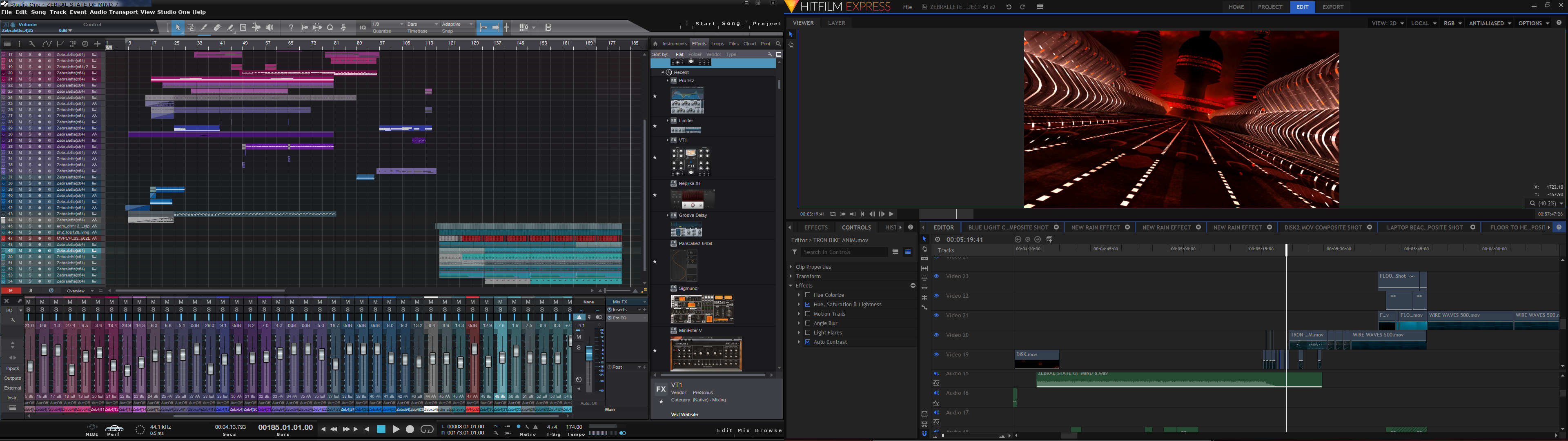
I like having more than one project open at a time....
KVR S1-Thread | The Intrancersonic-Design Source > Program Resource | Studio One Resource | Music Gallery | 2D / 3D Sci-fi Art | GUI Projects | Animations | Photography | Film Docs | 80's Cartoons | Games | Music Hardware |
-
- KVRAF
- Topic Starter
- 8413 posts since 4 Jul, 2012 from Alesia
Here's the actual track.
https://soundcloud.com/user-841453413/trak3
This is Mix V1 (basically not mixed) so it's pretty rough.
https://soundcloud.com/user-841453413/trak3
This is Mix V1 (basically not mixed) so it's pretty rough.
You do not have the required permissions to view the files attached to this post.